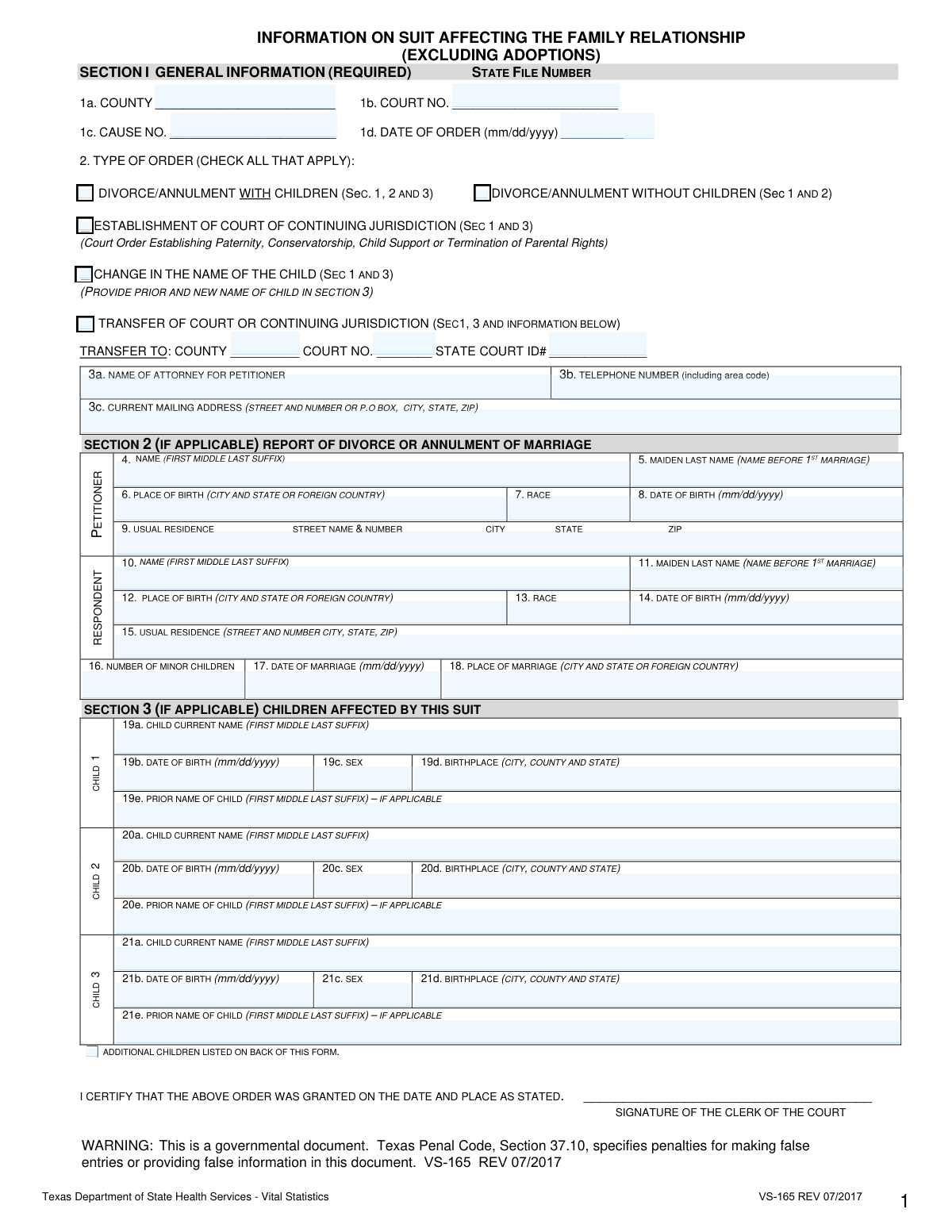
Yes! You can use AI to fill out Texas Form VS-165, Information on Suit Affecting the Family Relationship
Texas Form VS-165, Information on Suit Affecting the Family Relationship, is a mandatory document used in Texas to report legal actions such as divorces, annulments, and suits involving children to the state's Vital Statistics Unit. This form ensures that the state maintains accurate records on family law matters as required by the Texas Family Code and Health and Safety Code. Today, this form can be filled out quickly and accurately using AI-powered services like Instafill.ai, which can also convert non-fillable PDF versions into interactive fillable forms.
VS-165 is part of the
family law forms category on Instafill.
Our AI automatically handles information lookup, data retrieval, formatting, and form filling.
It takes less than a minute to fill out VS-165 using our AI form filling.
Securely upload your data. Information is encrypted in transit and deleted immediately after the form is filled out.
Form specifications
| Form name: | Texas Form VS-165, Information on Suit Affecting the Family Relationship |
| Number of fields: | 61 |
| Number of pages: | 1 |
| Language: | English |
Instafill Demo: How to fill out PDF forms in seconds with AI
How to Fill Out VS-165 Online for Free in 2026
Are you looking to fill out a VS-165 form online quickly and accurately? Instafill.ai offers the #1 AI-powered PDF filling software of 2026, allowing you to complete your VS-165 form in just 37 seconds or less.
Follow these steps to fill out your VS-165 form online using Instafill.ai:
- 1 Navigate to Instafill.ai and upload your Texas Form VS-165 or select it from the template library.
- 2 Allow the AI to scan and process the form, identifying all the required fields across the different sections.
- 3 Provide the general case information in Section 1, such as county, court number, cause number, and the type of order being filed.
- 4 If the suit involves a divorce or annulment, complete Section 2 with the required information for the petitioner and respondent.
- 5 For any suits affecting children, accurately fill out Section 3 with the details for each child, including their name, date of birth, and birthplace.
- 6 Carefully review all the information populated by the AI and entered by you to ensure accuracy and completeness.
- 7 Download the completed form, ready for the Clerk of the Court to sign and submit to the Texas Vital Statistics Unit.
Our AI-powered system ensures each field is filled out correctly, reducing errors and saving you time.
Why Choose Instafill.ai for Your Fillable VS-165 Form?
Speed
Complete your VS-165 in as little as 37 seconds.
Up-to-Date
Always use the latest 2026 VS-165 form version.
Cost-effective
No need to hire expensive lawyers.
Accuracy
Our AI performs 10 compliance checks to ensure your form is error-free.
Security
Your personal information is protected with bank-level encryption.
Frequently Asked Questions About Form VS-165
This form, VS-165, is used to officially report legal actions such as divorces, annulments, and other suits affecting a parent-child relationship to the Texas Vital Statistics Unit for state records.
This form must be completed for all divorces, annulments, and any suit affecting a parent-child relationship. It is typically filled out by the petitioner's attorney or the petitioner themselves and filed with the clerk of the court.
For a divorce or annulment without children, you are required to complete Section 1 (General Information) and Section 2 (Report of Divorce or Annulment of Marriage).
For a child's name change, you must complete Section 1 (General Information) and Section 3 (Children Affected by this Suit), making sure to provide both the prior and new name of the child.
The form has space for three children on the front and three more on the back. If more than six children are affected, you must complete Section 3 on a second form, label it 'continuation,' and attach it to the original.
If you are representing yourself, you should enter your own name, telephone number, and mailing address in the fields designated for the attorney for the petitioner.
Yes, the form must be printed double-sided on a single sheet of paper. It is then filed with the clerk of the court, who signs and submits it to the Vital Statistics Unit.
You must provide the full name, maiden name (name before first marriage), place and date of birth, race, and usual residence for both the Petitioner and the Respondent.
The Clerk of the Court signs the form to certify that the court order was granted on the date and at the location specified in Section 1.
Yes, services like Instafill.ai use AI to accurately auto-fill form fields from your saved profile, which can save you time and help reduce errors.
Simply upload the VS-165 form to the Instafill.ai platform. The AI will identify the fields and allow you to fill them out quickly online before printing for submission.
You can use a service like Instafill.ai, which can convert flat, non-fillable PDFs into interactive forms that you can complete easily on your computer.
This is an official government document, and providing false information is a punishable offense under Texas Penal Code, Section 37.10. It is critical to ensure all information is accurate before submission.
Compliance VS-165
Validation Checks by Instafill.ai
1
Conditional Requirement for Section 2
Checks if Section 2 (Report of Divorce or Annulment) is completed when the 'Type of Order' in Section 1 is marked as 'DIVORCE/ANNULMENT WITH CHILDREN' or 'DIVORCE/ANNULMENT WITHOUT CHILDREN'. This is crucial because the form instructions mandate that all divorces must be reported with the petitioner and respondent details. If this validation fails, the form is incomplete and cannot be processed for divorce reporting.
2
Conditional Requirement for Section 3
Verifies that Section 3 (Children Affected by this Suit) is completed if the 'Type of Order' is 'DIVORCE/ANNULMENT WITH CHILDREN', 'ESTABLISHMENT OF COURT OF CONTINUING JURISDICTION', 'CHANGE IN THE NAME OF THE CHILD', or 'TRANSFER OF COURT OR CONTINUING JURISDICTION'. These order types directly affect children, so their information is legally required. A failure indicates a critical data omission that prevents the state from tracking legal actions concerning minors.
3
Child Count Consistency
Ensures the number entered in field 16 'NUMBER OF MINOR CHILDREN' exactly matches the count of individual child records completed in Section 3. This cross-field validation prevents data entry errors and ensures the summary count aligns with the detailed records. If the numbers do not match, it suggests either a typo in the count or missing/extra child information.
4
Logical Date Check: Marriage vs. Order Date
Validates that the 'DATE OF ORDER' (field 1d) is on or after the 'DATE OF MARRIAGE' (field 17). A marriage cannot be legally dissolved before it has occurred. This check prevents logical impossibilities and ensures the chronological integrity of the legal events being reported. An error would indicate a significant data entry mistake.
5
Logical Date Check: Parent vs. Child Age
Verifies that the 'DATE OF BIRTH' for both the Petitioner (field 8) and Respondent (field 14) is at least 14 years prior to the 'DATE OF BIRTH' of any child listed in Section 3. This check ensures the biological and legal plausibility of the parent-child relationship. A failure would suggest a severe data entry error in one or more of the date fields.
6
Child's Minority Status Verification
Calculates the age of each child listed in Section 3 as of the 'DATE OF ORDER' (field 1d) to confirm they are a minor (under 18 years old). The form specifically pertains to suits affecting minor children, so this check ensures only relevant cases are processed. If a child is 18 or older, their inclusion may be an error or require a different legal filing.
7
Universal Date Format and Validity
Checks that all date fields (1d, 8, 14, 17, 19b, 20b, etc.) are entered in the specified 'mm/dd/yyyy' format and represent a valid calendar date (e.g., no '02/30/2023'). This is fundamental for data standardization and preventing processing errors in downstream systems. Invalid formats or dates will cause the submission to be rejected for correction.
8
Date of Order is Not in the Future
Ensures the 'DATE OF ORDER' (field 1d) is not a future date relative to the submission date. A court order cannot be dated for a time that has not yet occurred. This validation maintains the factual accuracy of the legal record. A future date would be rejected as a data entry error.
9
Conditional Requirement for Child's Prior Name
Verifies that if 'CHANGE IN THE NAME OF THE CHILD' is checked in Section 2, at least one child record in Section 3 has the 'PRIOR NAME OF CHILD' field (e.g., 19e) completed. This ensures the purpose of the filing is supported by the necessary data. If this validation fails, the form lacks the 'before' and 'after' information required to process the name change.
10
Completeness of Section 1 General Information
Confirms that all fields in Section 1 (1a-d, 2, 3a-c) are filled out, as the instructions explicitly state this section is 'REQUIRED' for all filings. This section contains the core identifying information for the case, such as county and cause number. Missing information in this section would make the entire form unidentifiable and unprocessable.
11
Attorney Telephone Number Format
Validates that the 'TELEPHONE NUMBER' in field 3b is a valid 10-digit number, including the area code. This ensures that court or state officials can contact the attorney or filer if there are questions about the submission. An invalid number would hinder communication and delay processing.
12
Completeness of Individual Child Records
Checks that for any child record that has been started (e.g., a name is entered in 19a), all associated mandatory fields (19b 'DATE OF BIRTH', 19c 'SEX', 19d 'BIRTHPLACE') are also completed. This prevents incomplete records for affected children. A partially filled record is unusable and must be completed or deleted.
13
Logic for Divorce Without Children
If 'DIVORCE/ANNULMENT WITHOUT CHILDREN' is checked, this validation ensures that the 'NUMBER OF MINOR CHILDREN' (field 16) is '0' and that Section 3 is entirely empty. This enforces consistency across the form based on the primary type of order. A mismatch indicates a contradiction in the filing's intent.
14
Conditional Requirement for Transfer Information
Verifies that if 'TRANSFER OF COURT OR CONTINUING JURISDICTION' is checked, the corresponding 'TRANSFER TO: COUNTY', 'COURT NO.', and 'STATE COURT ID#' fields are all filled in. This information is essential for tracking the case as it moves between jurisdictions. Failure to provide these details makes the transfer filing incomplete and ineffective.
Common Mistakes in Completing VS-165
This error occurs when the number entered in Field 16 ('Number of Minor Children') does not match the total number of children detailed in Section 3. This often happens due to a simple miscount or overlooking a child when filling out the sections separately. A discrepancy can lead to form rejection, requests for clarification, and significant delays in processing the legal order, as it creates ambiguity about which children are affected by the suit.
Filers often misunderstand Fields 5 and 11, 'Maiden Last Name (Name before 1st Marriage)'. They might enter a name from a previous marriage or leave it blank if they didn't change their name in the current marriage. The form specifically requires the surname held before the very first marriage, which is crucial for vital statistics records and can cause identity verification issues if entered incorrectly. Always provide the legal surname you had before you were ever married.
In Section 1, filers may check only one box in Field 2 ('Type of Order') when multiple actions apply, or they may check the wrong box entirely. For example, a divorce that also includes a child's name change requires checking both 'Divorce/Annulment with Children' and 'Change in the Name of the Child'. An incorrect selection can lead to an incomplete court record, failing to legally enact all parts of the order and requiring future amendments.
When a name change is part of the suit, filers often complete the child's new name (e.g., Field 19a) but forget to enter the child's previous name in the corresponding field (e.g., Field 19e). This omission creates an incomplete record, making it difficult to link the new name to the old one for legal and identification purposes. This can cause delays and require corrected filings; if the suit includes a name change for a child, you must fill out both the current and prior name fields.
Fields like 19d require the child's birthplace as 'CITY, COUNTY AND STATE'. Many people mistakenly enter only the city and state, omitting the county. This incomplete data can cause issues for the Vital Statistics Unit, which requires this specific level of detail for record-keeping. Failing to provide the county can lead to the form being returned for correction, delaying the finalization of the record.
Individuals representing themselves (pro se) often see Fields 3a-3c for 'Attorney for Petitioner' and leave them blank. However, the instructions state that if the case is pro se, the person completing the form must enter their own information. Omitting this contact data means the court clerk has no one to contact if there are questions, leading to significant processing delays or rejection. If you are representing yourself, you must enter your own name, phone number, and address in this section.
The form specifies the 'mm/dd/yyyy' format for all dates, but filers frequently use other formats like 'mm-dd-yy' or write out the month. This can lead to data entry errors and processing delays by automated systems or clerks, causing the form to be flagged for manual review or returned for correction. To prevent this, double-check that all dates are entered strictly in the 'mm/dd/yyyy' format. AI-powered form filling tools like Instafill.ai can automatically format dates correctly.
The 'Type of Order' checked in Field 2 dictates which other sections must be completed. A common mistake is checking 'Divorce/Annulment with Children' but then failing to fill out Section 3 with the children's information. This renders the submission incomplete and legally insufficient, guaranteeing its rejection until a fully completed form is submitted. Always follow the parenthetical instructions next to the order type you select to ensure all necessary sections are filled out.
The instructions explicitly state, 'The VSU-165 form must be printed double-sided (one sheet not two).' People often overlook this and print the document on separate sheets of paper. Courts and vital statistics offices have strict filing requirements, and submitting the form incorrectly can lead to immediate rejection, forcing the filer to reprint and resubmit. Always check printer settings to ensure the form is printed double-sided on a single sheet.
This form is often provided as a non-fillable PDF, forcing users to fill it out by hand. Illegible handwriting is a major source of errors, leading to incorrect data entry by the clerk, misidentification, and rejection of the form. To avoid this, print legibly in block letters or use a tool like Instafill.ai, which can convert a flat PDF into a fillable version, allowing you to type information clearly and accurately before printing.
Saved over 80 hours a year
“I was never sure if my IRS forms like W-9 were filled correctly. Now, I can complete the forms accurately without any external help.”
Kevin Martin Green
Your data stays secure with advanced protection from Instafill and our subprocessors

Robust compliance program
Transparent business model
You’re not the product. You always know where your data is and what it is processed for.
ISO 27001, HIPAA, and GDPR
Our subprocesses adhere to multiple compliance standards, including but not limited to ISO 27001, HIPAA, and GDPR.
Security & privacy by design
We consider security and privacy from the initial design phase of any new service or functionality. It’s not an afterthought, it’s built-in, including support for two-factor authentication (2FA) to further protect your account.
Fill out VS-165 with Instafill.ai
Worried about filling PDFs wrong? Instafill securely fills texas-form-vs-165-information-on-suit-affecting-the-family-relationship forms, ensuring each field is accurate.