
Yes! You can use AI to fill out Form 540, California Resident Income Tax Return (2024)
Don't type 172 fields by hand. Tell our AI about yourself, or upload your W-2 or last year's return, and it fills every field in seconds. You check it, then download, print or sign.
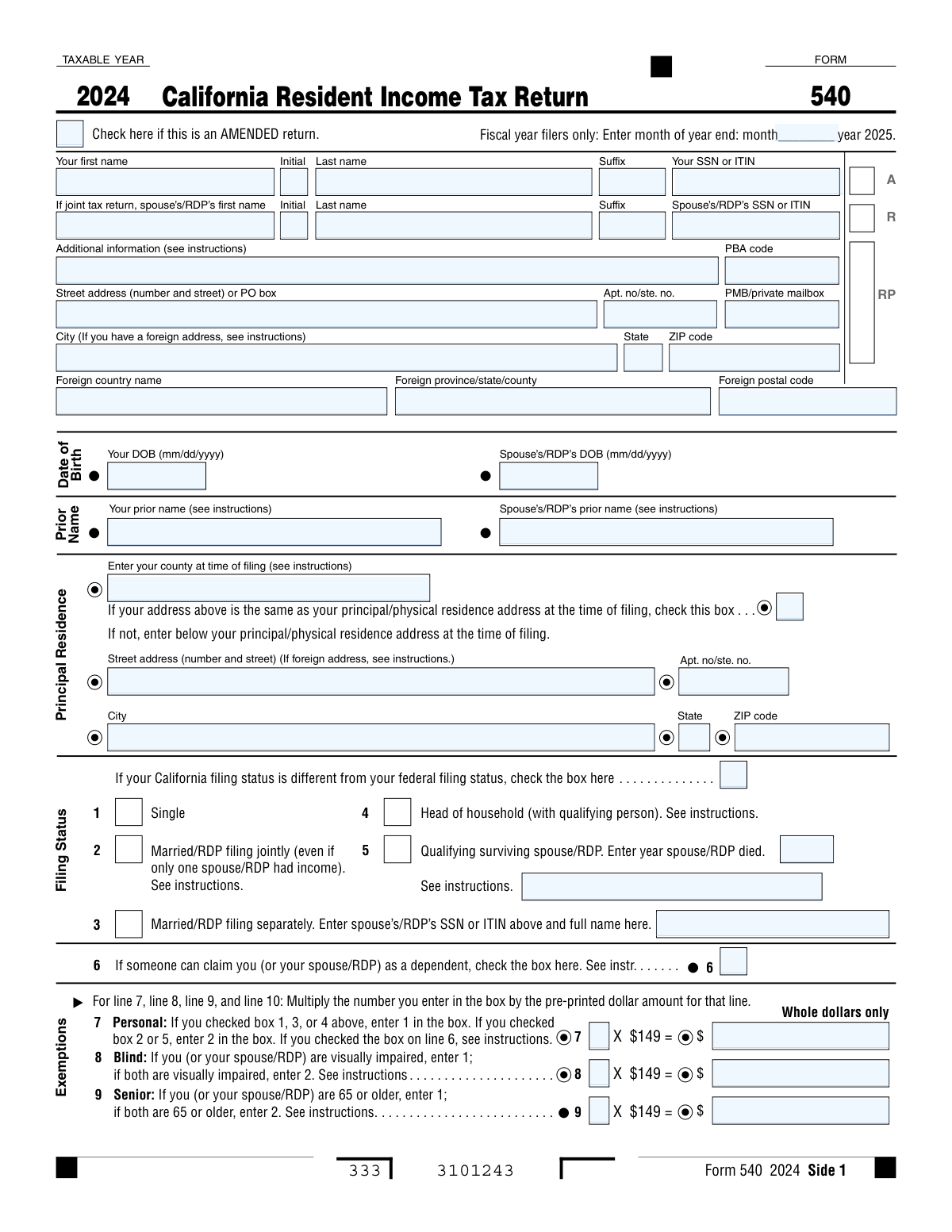
The AI does the filling. You just check it.
No typing into boxes, nothing to install.
What this form asks for
The AI fills all of it, from your answers or your documents.
The AI checks your answers before you download
14 checks built for this form, so a wrong date or a missing answer is caught before anyone else sees it.
This check ensures that the Social Security Number (SSN) or Individual Taxpayer Identification Number (ITIN) for both the primary filer and spouse/RDP consists of exactly nine digits. It also verifies that the primary filer's SSN/ITIN is not identical to the spouse's/RDP's SSN/ITIN. This is critical for accurate taxpayer identification and to prevent processing rejections. A failure would halt the submission and require the user to correct the number.
This validation verifies that only one filing status box is checked. If 'Married/RDP filing separately' (box 3) is selected, it confirms that the spouse's/RDP's SSN and full name are provided. If 'Qualifying surviving spouse/RDP' (box 5) is selected, it confirms the 'year spouse/RDP died' field is filled. This logic ensures the tax is calculated using the correct rules and rates, and failure results in a rejection due to incomplete or contradictory information.
This check cross-references the 'Senior Exemptions Claimed' on line 9 with the 'Date of Birth' fields. A filer or their spouse/RDP must be 65 or older by the end of the tax year to claim this exemption. This validation prevents incorrect claims for tax exemptions. If the age derived from the date of birth does not meet the requirement, the exemption claim will be disallowed and the tax liability will be recalculated.
This check verifies that the 'Total Personal Exemption Amount' on line 7 is the correct product of the 'Personal Exemption Quantity' and the pre-printed dollar amount ($149). It also validates that the quantity entered (1 or 2) is consistent with the selected filing status. Correctly calculating exemptions is fundamental to determining the final tax liability, and an error here will cause the entire return's calculations to be incorrect.
This validation confirms that the amount on line 11 ('Exemption amount') is the precise sum of the calculated exemption amounts from lines 7, 8, 9, and 10. This total is a key input for calculating the final tax, so its accuracy is paramount. A miscalculation here will directly impact the tax due or refund amount and will cause the return to be flagged for review or correction.
This check ensures the amount on line 19 ('Taxable Income') is correctly calculated by subtracting line 18 from line 17. It also enforces the rule that the result cannot be negative; if the calculation results in a negative number, the value must be entered as zero. Since this is the base amount for tax calculation, an error here invalidates the entire tax computation and will block the form from being processed.
And 8 more checks
- Validates Conditional Entry of Principal Residence Address
- Ensures Mutual Exclusivity of 'Amount You Owe' and 'Refund'
- Validates Direct Deposit Routing Number Format
- Ensures Complete Information for Each Claimed Dependent
- Validates Use Tax Field Completion on Line 91
- Verifies Total Payments Calculation on Line 78
- Validates Third Party Designee Conditional Logic
- Verifies Standard Deduction Logic for Dependents
Let AI fill out your Form 540
No typing. Every field filled in seconds, checked, ready to sign.
How to Fill Out Form 540 Online for Free in 2026
What the AI walks you through.
- Navigate to Instafill.ai and upload your Form 540 or select it from the template library.
- Provide your personal information, including your name, address, Social Security Number (SSN), and filing status, allowing the AI to populate the relevant fields.
- Enter your income details, such as state wages from your W-2 and your federal Adjusted Gross Income (AGI) from Form 1040.
- Detail any California-specific adjustments, deductions, and claim exemptions for yourself, your spouse, and any dependents.
- Calculate your tax liability and apply any applicable credits, such as the renter's credit or child and dependent care expenses credit.
- Report all payments made, including tax withheld and estimated tax payments, to determine your final tax due or the refund you will receive.
- Review the completed form for accuracy, provide your electronic signature, and follow the instructions for submission and payment or direct deposit.
Common Mistakes in Completing Form 540
The ones the AI is built to catch.
Selecting the Wrong Filing Status
Incorrectly Listing Dependent Information
Miscalculating Exemption Credit Amounts
Overlooking the 'Can be Claimed as a Dependent' Box
Entering the Wrong Federal Adjusted Gross Income (AGI)
Leaving the Use Tax Line Blank
Incorrect Bank Account or Routing Numbers for Direct Deposit
Missing or Incomplete Signatures
Mishandling Health Care Coverage Information
Failing to Choose the Optimal Deduction Method
Frequently Asked Questions About Form 540
Is it really free for 7 days?
Can I fill other forms too?
How do I cancel?
How does the AI fill out Form 540?
What happens to my information?
How complex is Form 540 to fill out?
What is Form 540 and who needs to file it?
What information do I need before I start filling out this form?
My California filing status is different from my federal one. What should I do?
What does it mean if 'someone can claim you as a dependent' on line 6?
Where do I find my Federal Adjusted Gross Income (AGI) for line 13?
How do I know whether to take the standard deduction or itemize on line 18?
What is the 'Use Tax' on line 91, and do I have to fill it out?
What is the Individual Shared Responsibility (ISR) Penalty on line 92?
Can I split my tax refund into two different bank accounts?
Where do I mail my completed Form 540?
I made a mistake on my return. How do I correct it?
Can I use AI to help me fill out Form 540?
How can I fill out Form 540 online using Instafill.ai?
The Form 540 PDF I downloaded isn't fillable. What can I do?
Get your Form 540 filled out by AI
$0 today. Cancel before Nov 2 and you pay nothing.
Other forms like this one
California tax forms: Form FTB 3514, California Earned Income Tax Credit, Form 540 2EZ, California Resident Tax Return, California Department of Tax and Fee Administration Form CDTFA-230, General Resale Certificate, Form 540NR, California Nonresident Tax Return (2022), Form 540NR, California Nonresident Tax Return (2023), Form DE 4, Employee’s Withholding Allowance Certificate (Rev. 56), Form 540, California Resident Income Tax Return (2023)
income tax forms: Form 1040-X, Amended U.S. Individual Income Tax Return, Form 1040-C, U.S. Departing Alien Income Tax Return, Form 4137, Social Security and Medicare Tax on Unreported Tip Income, Form 8960, Net Investment Income Tax, Form 990-T, Exempt Org Business Income Tax Return, Form 945, Annual Return of Withheld Federal Income Tax, Form FTB 3514, California Earned Income Tax Credit, Form 1120-S, U.S. Income Tax Return for an S Corporation, Form 1040, U.S. Individual Income Tax Return, Arizona Form 285-I, Individual Income Tax Disclosure/Representation Authorization Form, Form 1120-S (2025), U.S. Income Tax Return for an S Corporation, Form 1120 (2025), U.S. Corporation Income Tax Return, 2023 Schedule IL-E/EIC, Illinois Exemption and Earned Income Tax Credit (Illinois Department of Revenue), 2023 Form IL-1040-X, Amended Individual Income Tax Return (Illinois Department of Revenue), Form APL-505, Taxpayer’s Earned Income Tax Credit Protest, Form 1120-H, U.S. Income Tax Return for Homeowners Associations, Form 1040, U.S. Individual Income Tax Return (2025), T2 Corporation Income Tax Return, Form 1040-X, Amended U.S. Individual Income Tax Return, Form TC-40, Utah Individual Income Tax Return
Let AI fill out your Form 540
Your trial starts once a card is added. You pay nothing before Nov 2.
Our AI already knows this form, all 172 fields of it. Skip the typing: tell it about yourself, or upload what you have, and it fills the whole form in seconds.
- AI fills every field on all 6 pages, tables and checkboxes included
- No typing into boxes: answer a few questions, or upload your W-2 or last year's return, an old copy of this form, a photo of a document
- The AI checks the answers; you review and change anything before you download
- Download the finished PDF, print it, or sign it online
- Encrypted, and never used to train AI
Cancel before Nov 2 and you pay nothing.
A card is needed to start the trial. Cancel in two clicks from your account.
Terms · Privacy