
Instafill.ai
7 days free
AI form filling · 17 fields · 1 page · done in seconds

Yes! You can use AI to fill out Form MC 292, Disclosure of Employment or Contract in Michigan School System

Don't type 17 fields by hand. Tell our AI about yourself, or upload your resume, and it fills every field in seconds. You check it, then download, print or sign.
7 days free, then $19.99/month · Cancel anytime
AI fills it, no typingEncrypted, never used to train AICancel in two clicks
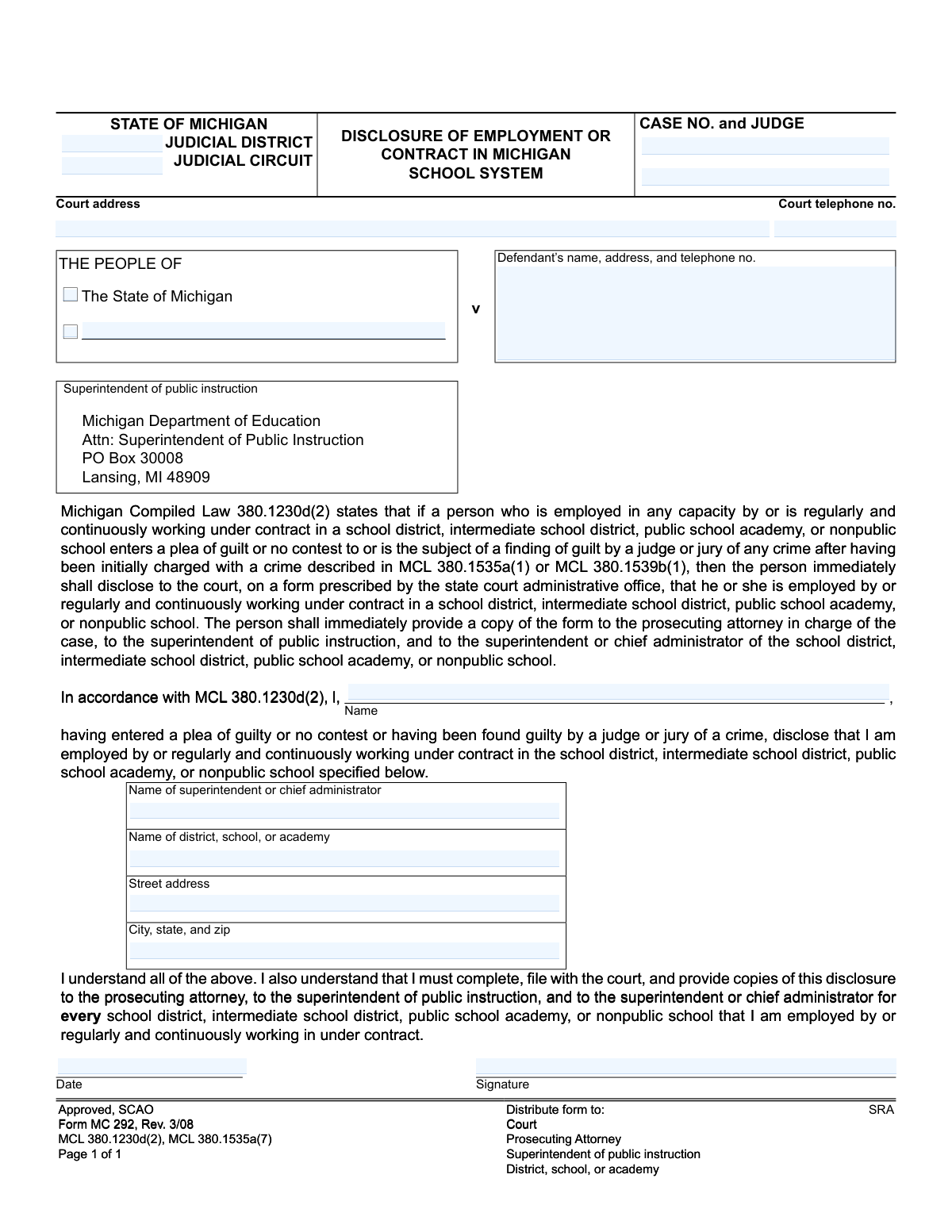
Form MC 292, Disclosure of Employment or Contract in Michigan School System, page 1
Simple · 28/100Form Complexity Index

The AI does the filling. You just check it.

No typing into boxes, nothing to install.

Tell the AI about youAnswer a few questions in plain words, or upload your resume. That is all the typing there is.
AI fills every field in secondsIt puts each answer in the right box on every page, checkboxes included.
Check it and downloadReview every field, change anything, then download, print or sign the PDF.

What this form asks for

The AI fills all of it, from your answers or your documents.

Form MC 292 is a legal document required by the State of Michigan for individuals employed by or under contract with a Michigan school system. It is used to formally disclose to the court when such a person enters a plea of guilt or no contest, or is found guilty of a crime, after being charged with certain offenses. This ensures that the court, prosecuting attorney, and school administration are officially notified as required by law. Today, this form can be filled out quickly and accurately using AI-powered services like Instafill.ai, which can also convert non-fillable PDF versions into interactive fillable forms.
Fillable fields17
Pages1
Form Complexity IndexSimple, 28/100

Let AI fill out your MC 292

No typing. Every field filled in seconds, checked, ready to sign.

7 days free, then $19.99/month · Cancel anytime

How to Fill Out MC 292 Online for Free in 2026

What the AI walks you through.

  1. Navigate to Instafill.ai and upload or select the Michigan Form MC 292.
  2. Provide the court and case information, including the judicial district/circuit, case number, judge, and court address.
  3. Enter your personal details as the defendant, including your full name, address, and telephone number.
  4. Specify the details of your school employment or contract, including the name of the superintendent, the name of the district/school/academy, and its address.
  5. Carefully review all the information auto-filled by the AI to ensure its accuracy and completeness.
  6. Electronically sign and date the form to certify the disclosure.
  7. Download the completed form and distribute copies to the court, prosecuting attorney, superintendent of public instruction, and the superintendent of your school district as required.

Common Mistakes in Completing MC 292

The ones the AI is built to catch.

Entering Incorrect or Incomplete Case Information
Individuals often incorrectly transcribe the 'CASE NO. and JUDGE' or 'Judicial Circuit' from other legal documents, or leave these fields blank altogether. This happens due to carelessness or not having the documents readily available. An incorrect case number can lead to the form being misfiled or rejected, causing significant delays and potential non-compliance with court orders. To avoid this, carefully double-check all court documents for the exact information and transcribe it precisely.
Confusing School Address with Personal Address
A frequent error is entering the defendant's personal home address in the fields designated for the school or district ('Street address', 'City, state, and zip'). This mistake occurs because people often fill out address fields automatically with their own information. Submitting the wrong address makes it impossible for the court to properly notify the correct school administration, defeating the purpose of the disclosure. Always read the field labels carefully to ensure you are providing the address of the school district or academy, not your own.
Providing an Incorrect or Vague Administrator Name
The form requires the 'Name of superintendent or chief administrator,' but individuals may list a school principal, a department head, or use a misspelled or outdated name. This can happen if the person is unsure of the district's current leadership structure. An incorrect administrator name can cause the disclosure to be sent to the wrong person, delaying or preventing the required notification to the employer. Before filling out the form, verify the current superintendent's full, correctly spelled name on the school district's official website.
Using Abbreviations for School or District Names
Instead of writing the full legal name of the institution, people often use common abbreviations or acronyms (e.g., 'WCS' instead of 'Warren Consolidated Schools'). While convenient, these abbreviations can be ambiguous and may not be officially recognized, potentially leading to confusion or rejection of the form. It is crucial to write out the complete and official name of the 'district, school, or academy' to ensure absolute clarity and legal compliance. AI-powered form filling tools like Instafill.ai can help by auto-completing official names and preventing the use of unofficial abbreviations.
Failing to File a Separate Form for Each Employer
The form's instructions state that a disclosure must be completed for 'every school district, intermediate school district, public school academy, or nonpublic school' where the person is employed. Individuals who work for multiple schools or districts (e.g., substitute teachers, coaches) often mistakenly file only one form for their primary employer. This failure to disclose all employment relationships is a serious compliance violation and can lead to further legal and professional consequences. A separate, fully completed form must be submitted for each and every school system employer.
Forgetting to Distribute Copies to All Required Parties
A critical error is filling out the form correctly but failing to provide copies to all mandated parties. The form explicitly requires distribution to the Court, Prosecuting Attorney, Superintendent of Public Instruction, and the specific school/district. Simply filing it with the court is insufficient and constitutes non-compliance with the statute. After signing, immediately make copies and ensure they are delivered to each of the four listed entities, keeping proof of delivery if possible.
Missing Signature or Incorrect Date
Forgetting to sign or date the form is a simple but common mistake that renders it invalid. Individuals may also enter the wrong date, such as their birthdate instead of the current date, out of habit. An unsigned or improperly dated form will be rejected by the court, leading to delays and failure to meet the legal disclosure requirement. Always review the form one last time before submission, specifically checking for a valid signature and the correct current date.
Submitting a Form with Illegible Handwriting
When a form is only available as a non-fillable PDF, it must be printed and filled out by hand, often leading to illegible entries. If court or school staff cannot read the case number, name, or school district, the form cannot be processed correctly, causing it to be rejected. To prevent this, print legibly in block letters using black ink. Better yet, use a tool like Instafill.ai, which can convert flat PDFs into fillable digital forms, allowing you to type your information clearly and ensure it is perfectly legible.
Mismatched Defendant Name
The defendant's name appears in two places: the case caption header and the main disclosure sentence ('I, [Name], ...'). Individuals sometimes use a nickname or an informal version of their name in the disclosure sentence, which does not match the official legal name in the case caption. This inconsistency can create legal ambiguity and may require the form to be resubmitted. Ensure the name used in the disclosure sentence is the full legal name as it appears on all other court documents for the case.
Leaving Court Header Information Blank
Defendants may assume that since they are filing the document with the court, the clerk will fill in the 'Court address,' 'Judicial District,' and other header information. This is an incorrect assumption; the filer is responsible for completing the form in its entirety. An incomplete header can lead to the document being misplaced or delayed in processing. You must fill out all fields, including court-specific details, to ensure the form is properly docketed and associated with your case file.

Frequently Asked Questions About MC 292


Is it really free for 7 days?
Yes. You pay $0 today. Cancel before Nov 11 and you are never charged. Keep it, and it is $19.99 a month for 5 fills of your MC 292.
Can I fill other forms too?
This plan is for your MC 292: your own AI agent fills it as often as 5 times a month. To fill other forms and upload your own, choose a Professional plan from your account.
How do I cancel?
From your account, in two clicks, any time. No email, no call.
How does the AI fill out MC 292?
You answer a few questions in plain words, or upload your resume. The AI reads what you give it and puts each answer into the right field of MC 292, on every page, in seconds. It checks the answers against the form's own rules, and you review and change anything before you download, print or sign.
What happens to my information?
It is encrypted in transit and at rest, and it is never used to train AI.
How complex is MC 292 to fill out?
MC 292 has a Form Complexity Index of 28 out of 100, in the simple tier: 17 fillable fields across 1 page. Instafill.ai's AI fills it in under a minute, with every field there for you to review before you download.
What is the purpose of Form MC 292?
This form is used to officially disclose to the court that you are employed by or work under contract for a Michigan school system, following a plea or finding of guilt for certain crimes as required by state law.
Who is required to fill out this form?
You must complete this form if you work for or have a continuous contract with a Michigan school, and you have entered a plea of guilt/no contest or been found guilty of a crime after being initially charged under specific statutes (MCL 380.1535a(1) or MCL 380.1539b(1)).
When do I need to submit this disclosure form?
The law requires you to complete, file, and distribute this form immediately after you enter a plea of guilt or no contest, or after a judge or jury finds you guilty.
What information do I need to provide on the form?
You will need your court case information, your personal contact details, and the name and address of the school or district you work for, including the name of the superintendent or chief administrator.
I'm a contractor, not a direct employee. Do I still need to file this form?
Yes, the requirement applies to anyone 'employed in any capacity by or is regularly and continuously working under contract' in a Michigan school system.
What if I work for more than one school district?
You must complete and submit a separate disclosure form for every school district, intermediate school district, public school academy, or nonpublic school that employs you or has you under contract.
Who do I give this form to after I fill it out?
You must file the original with the court and provide copies to the prosecuting attorney, the Michigan Superintendent of Public Instruction, and the superintendent or chief administrator of your school or district.
Where do I find the court and case information needed for the top section?
This information, including the case number, judicial circuit, and judge's name, can be found on other legal documents related to your case or obtained from the court clerk's office.
Does this form apply to any and all criminal convictions?
No, this disclosure is specifically required if you were initially charged with a crime described in Michigan Compiled Law (MCL) 380.1535a(1) or MCL 380.1539b(1), even if the final conviction is for a different crime.
Where do I send the copy for the Superintendent of Public Instruction?
The form provides the address: Michigan Department of Education, Attn: Superintendent of Public Instruction, PO Box 30008, Lansing, MI 48909.
Can an AI tool help me fill out this form?
Yes, services like Instafill.ai use AI to accurately auto-fill form fields from your saved information, which can save time and help prevent errors on important legal documents.
How can I fill out Form MC 292 online?
You can use a service like Instafill.ai to upload the form, fill it out on your computer or mobile device, and then print it for your signature and distribution to the required parties.
The PDF version of this form I found isn't fillable. What can I do?
Services like Instafill.ai can convert flat, non-fillable PDFs into interactive forms that you can easily type into online, ensuring your submission is neat and legible.
Encrypted in transit and at restNever used to train AIDelete your forms any time

Get your MC 292 filled out by AI

$0 today. Cancel before Nov 11 and you pay nothing.

7 days free, then $19.99/month · Cancel anytime