Yes! You can use AI to fill out Application for the Grant of Permanent Residence in the Cayman Islands
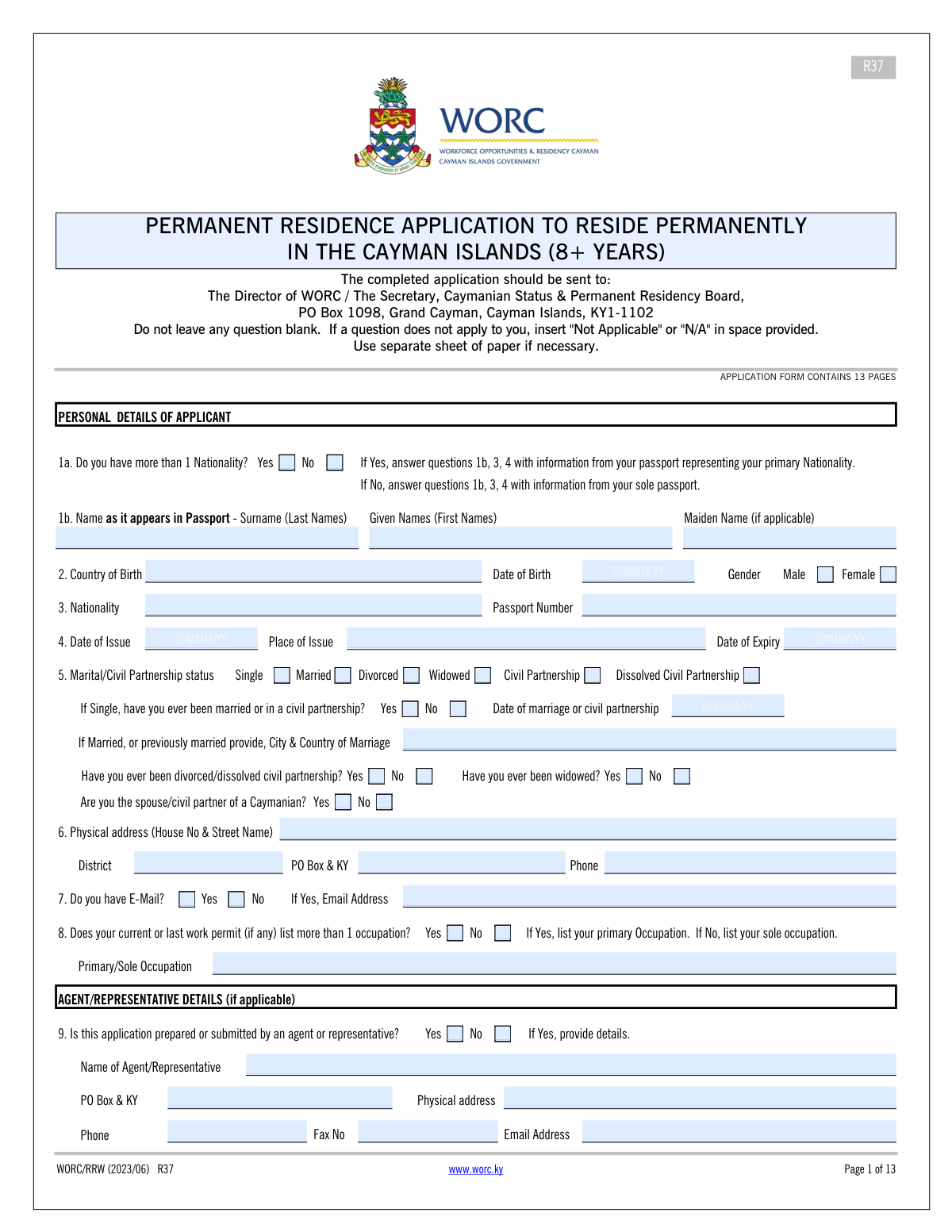
The Application for the Grant of Permanent Residence is the official form required by the Cayman Islands government for individuals seeking to obtain permanent residency. It gathers extensive information on the applicant's personal history, employment, education, and financial standing to assess their eligibility. Successfully completing this application is a crucial step for those wishing to establish long-term legal status in the Cayman Islands. Today, this form can be filled out quickly and accurately using AI-powered services like Instafill.ai, which can also convert non-fillable PDF versions into interactive fillable forms.
Cayman Islands PR Application is part of the
ERM forms and grant application forms categories on Instafill.
Our AI automatically handles information lookup, data retrieval, formatting, and form filling.
It takes less than a minute to fill out Cayman Islands PR Application using our AI form filling.
Securely upload your data. Information is encrypted in transit and deleted immediately after the form is filled out.
Form specifications
| Form name: | Application for the Grant of Permanent Residence in the Cayman Islands |
| Number of fields: | 465 |
| Number of pages: | 13 |
| Language: | English |
More forms in ERM forms
Instafill Demo: How to fill out PDF forms in seconds with AI
How to Fill Out Cayman Islands PR Application Online for Free in 2026
Are you looking to fill out a CAYMAN ISLANDS PR APPLICATION form online quickly and accurately? Instafill.ai offers the #1 AI-powered PDF filling software of 2026, allowing you to complete your CAYMAN ISLANDS PR APPLICATION form in just 37 seconds or less.
Follow these steps to fill out your CAYMAN ISLANDS PR APPLICATION form online using Instafill.ai:
- 1 Navigate to Instafill.ai and upload the Cayman Islands Permanent Residence application form or select it from our template library.
- 2 Use the AI assistant to accurately fill in your personal details, including your name, date of birth, passport information, and marital status.
- 3 Provide comprehensive information about your employment history, including details for both full-time and part-time work, as well as your spouse's employment.
- 4 Detail your educational background and vocational qualifications, allowing the AI to ensure the information is correctly formatted and placed.
- 5 If applicable, complete the sections for your agent or representative and provide all required contact information.
- 6 Carefully review all the auto-filled information for accuracy and completeness, making any necessary edits directly on the interactive form.
- 7 Electronically sign the application and download the completed document, ready for submission to the Cayman Islands immigration authorities.
Our AI-powered system ensures each field is filled out correctly, reducing errors and saving you time.
Why Choose Instafill.ai for Your Fillable Cayman Islands PR Application Form?
Speed
Complete your Cayman Islands PR Application in as little as 37 seconds.
Up-to-Date
Always use the latest 2026 Cayman Islands PR Application form version.
Cost-effective
No need to hire expensive lawyers.
Accuracy
Our AI performs 10 compliance checks to ensure your form is error-free.
Security
Your personal information is protected with bank-level encryption.
Frequently Asked Questions About Form Cayman Islands PR Application
This form is used to collect detailed personal, marital, and employment information for an application, likely related to residency, work permits, or immigration status in the Cayman Islands.
You must enter your surname (last name) and given names (first and middle) exactly as they appear on your passport. If you have a maiden name, enter it in the designated field; otherwise, you can leave it blank.
Check the 'Single' box for your current status. You will also need to answer the question 'Ever divorced/dissolved civil partnership' by checking 'Yes' and provide details of the previous marriage where required.
This section is for applicants who are using a third party, such as an immigration lawyer or consultant, to prepare or submit the application. If you are completing the form yourself, check 'No' and leave this section blank.
Yes, the form has separate sections for full-time (Question 10) and part-time (Question 11) employment. You must provide the requested details for each job you hold.
This information helps authorities get a complete picture of your household's circumstances, which is often a factor in residency and immigration decisions. You must provide details for your spouse's full-time and/or part-time employment if applicable.
This means you should select the highest qualification that directly relates to the primary job you list on the application. For example, if you are applying as an accountant, your accounting degree would be the relevant qualification.
In Question 1a, check 'Yes' to indicate you have more than one nationality. In the 'Nationality' field under Passport and Nationality Details, enter the country of the passport you are using for this application.
Your 'Physical Address' is the actual street address where you reside. The 'PO Box & KY' field is for your mailing address if you receive mail at a post office box in the Cayman Islands.
The form asks for both the physical street address and the PO Box for your employer. Please provide both if available to ensure the information is complete.
Yes, AI-powered services like Instafill.ai can help you complete this form accurately and efficiently. These tools can auto-fill your personal information from a secure profile, saving you time and reducing errors.
Simply upload the form to the Instafill.ai platform. The AI will identify all the fields, allowing you to click and fill them in or have your saved information auto-filled instantly.
You can use a service like Instafill.ai to convert the non-fillable PDF into an interactive form. Just upload the document, and the platform will make it possible for you to type your answers directly into the fields.
Compliance Cayman Islands PR Application
Validation Checks by Instafill.ai
1
Mutually Exclusive Marital Status
This validation ensures that an applicant selects only one current marital status from the available options (e.g., 'Single', 'Married', 'Divorced'). It is impossible for a person to have more than one of these statuses simultaneously, so this check prevents contradictory or invalid data. If more than one option is selected, the form submission should be blocked, and the user prompted to select only one status.
2
Passport Date Chronology
This check verifies that the 'Date of Expiry' for the passport is chronologically after the 'Date of Issue'. A passport's expiration date must always be later than its issue date for the document to be valid. If the issue date is on or after the expiry date, the system should flag an error, as this indicates a data entry mistake that would invalidate the passport information.
3
Conditional Agent Details Requirement
This validation enforces that if the applicant checks 'Yes' for 'Is application prepared/submitted by an agent/representative?', then all related agent detail fields become mandatory. This includes the agent's name, phone number, and physical address. This is crucial for ensuring that there is a valid point of contact if a third party is handling the application. Failure to provide these details after indicating an agent was used will prevent form submission.
4
Email Address Format and Conditionality
This check performs two functions: it first verifies if 'Do you have E-Mail? Yes' is selected, and if so, it ensures the 'Email Address' field is not empty. Secondly, it validates that the provided text in the 'Email Address' field conforms to a standard email format (e.g., '[email protected]'). This ensures a valid and usable email is collected for communication. An invalid format or an empty field when 'Yes' is checked will result in an error message.
5
Marital History Consistency Check
This validation cross-references the applicant's current marital status with their marital history. For example, if the applicant selects 'Divorced' as their current status, the form must also have 'Yes' selected for 'Ever divorced/dissolved civil partnership'. This maintains logical consistency across the form and prevents contradictory statements. A mismatch would trigger a validation error, prompting the user to correct their selections.
6
Single Status Follow-Up Question
This check ensures that if an applicant identifies their status as 'Single', they must then answer the follow-up question 'Ever married or in a civil partnership?'. This subsequent question is required to fully understand the applicant's marital history, which can be relevant for legal and administrative purposes. If 'Single' is checked but the follow-up question is left unanswered, the submission should be halted until a selection is made.
7
Logical Work Experience Verification
This validation compares the 'Years of Full‑time Experience' against the applicant's age derived from their 'Date of Birth'. The number of years of experience cannot be greater than the applicant's age minus a reasonable minimum working age (e.g., 16). This check prevents logical impossibilities, such as a 25-year-old claiming 20 years of experience. An illogical entry would trigger an error, asking the user to review their entered dates and experience.
8
Spouse Information Dependency
This validation ensures that sections related to a spouse's employment (Questions 12 and 13) are only enabled and can be filled out if the applicant's marital status is 'Married' or 'Civil Partnership'. This prevents irrelevant data from being entered for single, divorced, or widowed applicants. If a user attempts to fill spouse details without the appropriate marital status, the fields should be disabled or a validation error should appear.
9
Conditional Employment Details Requirement
This check validates that if an applicant indicates they are employed (either full-time or part-time), the corresponding employer details fields are mandatory. For instance, if 'Yes (currently employed full-time)' is checked, the 'Employer / Business Name' and 'Employer Physical Address' fields must be filled. This ensures that claims of employment are substantiated with required details for verification. The form cannot be submitted until this information is provided.
10
Applicant Name Completeness
This validation ensures that the 'Surname (as in passport)' and 'Given Names (as in passport)' fields are not left empty. These fields are fundamental for identifying the applicant and must match official documentation. This is a critical data point for any official application. If either field is blank, the form submission will fail with a message indicating that the name fields are required.
11
Conditional Education Qualification Title
This check ensures that if any checkbox is selected under 'Highest Level of Education' or 'Highest Level of Technical/Vocational Qualification', the 'Degree & Professional Qualification Titles' text field must be filled out. Claiming a qualification requires providing specific details about that qualification for it to be considered valid. If a degree level is checked but the title field is empty, an error should prompt the user to provide the name of their degree or qualification.
12
Phone Number Format Validation
This validation checks that the 'Phone Number' field contains a valid sequence of numbers and accepted special characters (like '+', '-', '()'). It prevents users from entering purely alphabetical or nonsensical text. This ensures that the collected phone number is potentially functional and correctly formatted for future contact. An entry that does not match a valid phone number pattern will be rejected.
Common Mistakes in Completing Cayman Islands PR Application
Applicants often get confused by the separate questions for current marital status (e.g., 'Single', 'Divorced') and historical status (e.g., 'Ever divorced?', 'Ever married?'). For instance, a divorced person might check 'Divorced' but then fail to also check 'Yes' for 'Ever divorced/dissolved civil partnership', creating ambiguity. This inconsistency can lead to processing delays as officials seek clarification. To avoid this, first select your single current status, then carefully answer the 'Ever...' questions as separate, historical facts about your life.
The form requires names 'as in passport', but applicants frequently enter nicknames, omit middle names, or use a married name not yet updated on their passport. Any discrepancy between the name on the form and the passport is a major red flag for identity verification. This mistake can cause significant processing delays or even rejection. Always have your passport in hand and transcribe your surname and all given names exactly as they appear on the document.
Many sections, such as spouse's employment or agent details, contain fields that are only required if a preceding 'Yes' box is checked. Applicants either miss filling out these dependent fields after checking 'Yes', resulting in an incomplete application, or they fill them out unnecessarily after checking 'No', creating confusion. To prevent this, answer the main yes/no question first and then carefully complete the subsequent fields only if directed. AI-powered tools like Instafill.ai can help by automatically showing or hiding these dependent fields based on your answers.
The form has four distinct employment sections: Applicant Full-Time (Q10), Applicant Part-Time (Q11), Spouse Full-Time (Q12), and Spouse Part-Time (Q13). It is common for applicants to enter their information in the wrong section, for example, putting their part-time job details in the full-time section. This misrepresents the employment situation and will require correction, delaying the application. Carefully read the heading for each question to ensure you are entering information for the correct person (applicant/spouse) and employment type (full-time/part-time).
When asked for 'Degree & Professional Qualification Titles' (Question 16), applicants often use abbreviations (e.g., 'MBA') or generic descriptions ('business degree') instead of the full, official title. This lack of specificity prevents proper verification and may devalue the qualification in the eyes of the reviewer. To avoid this, refer to your actual certificates and transcribe the titles exactly as they are written, such as 'Master of Business Administration in Finance'.
The form separates 'Highest Level of Education' (Q14) from 'Highest Level of Technical/Vocational Qualification' (Q15), which can be confusing. An applicant might not know whether to list their computer science degree under 'Education' or a 'Technical' qualification, or may list it in both places incorrectly. This can lead to an improper assessment of their credentials. As a rule, use Question 14 for academic degrees (Bachelor's, Master's) and Question 15 for job-specific training, licenses, and trade certificates.
A frequent error is checking 'Yes' for being employed but then failing to provide the complete employer address details, such as 'Employer Physical Address' and 'Employer District'. This is considered an incomplete application because the information cannot be verified. This will halt the process until the missing data is supplied. When you answer 'Yes' to a question that opens up a new section, you must treat all fields in that new section as mandatory unless explicitly marked 'optional'.
With a complex form, it's easy to provide contradictory information. For example, an applicant might check 'Single' but then provide spouse employment details, or list an occupation that does not align with the educational qualifications provided elsewhere. These inconsistencies are red flags that almost always lead to follow-up questions and significant delays. Review the entire form before submitting to ensure your answers create a consistent and logical narrative. AI form-filling tools can help by cross-referencing entries to flag potential contradictions.
Applicants often make typos when entering their 'Passport Number', 'Place of Issue', or expiry dates. They might transpose numbers, mix up the letter 'O' and the number '0', or misinterpret the issuing authority as a city. An error in passport details is a critical failure that prevents identity verification and will stop the application from being processed. To avoid this, do not work from memory; physically hold your passport and double-check every character and date you enter.
Fields like 'City & Country of Marriage' provide a clear format example ('London, United Kingdom'), yet users often enter just the city or use non-standard country abbreviations. Similarly, for Cayman Islands addresses, failing to include the correct 'District' or 'KY' postal code can cause issues. This ambiguity can slow down verification processes. Always follow the format examples provided and be as specific as possible with all address and location components. If the form is a non-fillable PDF, a tool like Instafill.ai can convert it into a smart, fillable version that can help validate formatting.
Saved over 80 hours a year
“I was never sure if my IRS forms like W-9 were filled correctly. Now, I can complete the forms accurately without any external help.”
Kevin Martin Green
Your data stays secure with advanced protection from Instafill and our subprocessors

Robust compliance program
Transparent business model
You’re not the product. You always know where your data is and what it is processed for.
ISO 27001, HIPAA, and GDPR
Our subprocesses adhere to multiple compliance standards, including but not limited to ISO 27001, HIPAA, and GDPR.
Security & privacy by design
We consider security and privacy from the initial design phase of any new service or functionality. It’s not an afterthought, it’s built-in, including support for two-factor authentication (2FA) to further protect your account.
Fill out Cayman Islands PR Application with Instafill.ai
Worried about filling PDFs wrong? Instafill securely fills application-for-the-grant-of-permanent-residence-in-the-cayman-islands forms, ensuring each field is accurate.