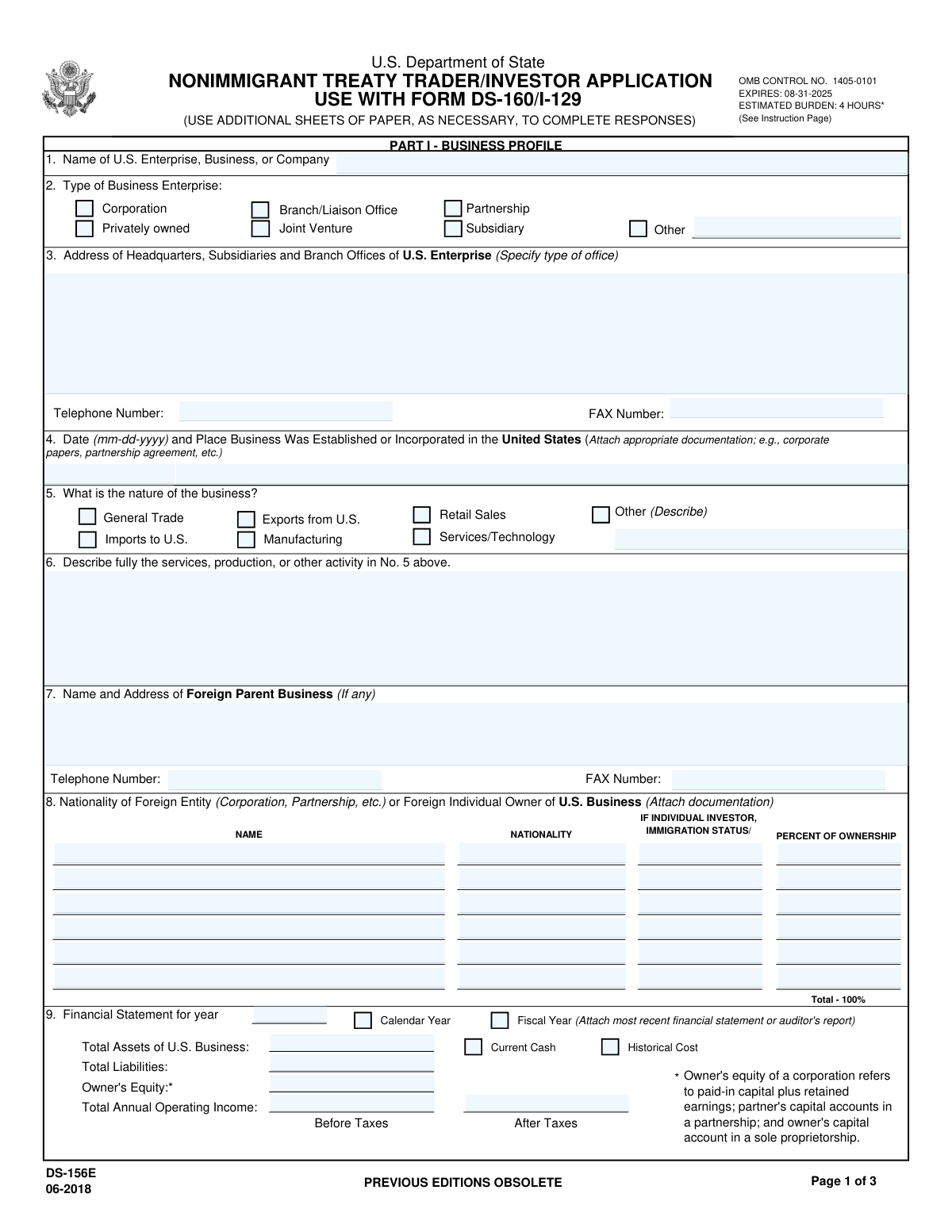
Yes! You can use AI to fill out Form DS-156E, Nonimmigrant Treaty Trader / Investor Application

Form DS-156E, the Nonimmigrant Treaty Trader/Investor Application, is a supplemental form required by the U.S. Department of State for individuals applying for an E-1 Treaty Trader or E-2 Treaty Investor visa. It collects comprehensive details about the U.S. enterprise, including its ownership, financial status, trade activities, and staffing, to determine if the business and the applicant meet the strict requirements of the Immigration and Nationality Act. Completing this detailed application is a critical step in demonstrating eligibility for these specialized visa categories, and today this form can be filled out quickly and accurately using AI-powered services like Instafill.ai, which can also convert non-fillable PDF versions into interactive fillable forms.
DS-156E is part of the grant application forms and investor application forms categories on Instafill.
Our AI automatically handles information lookup, data retrieval, formatting, and form filling.
It takes less than a minute to fill out DS-156E using our AI form filling.
Securely upload your data. Information is encrypted in transit and deleted immediately after the form is filled out.

Form specifications

Form name: Form DS-156E, Nonimmigrant Treaty Trader / Investor Application
Number of fields: 209
Number of pages: 4
Language: English
main-image

Instafill Demo: How to fill out PDF forms in seconds with AI

How to Fill Out DS-156E Online for Free in 2026

Are you looking to fill out a DS-156E form online quickly and accurately? Instafill.ai offers the #1 AI-powered PDF filling software of 2026, allowing you to complete your DS-156E form in just 37 seconds or less.
Follow these steps to fill out your DS-156E form online using Instafill.ai:
  1. 1 Navigate to Instafill.ai and upload your DS-156E form or select it from the template library.
  2. 2 Use the AI assistant to automatically fill in your personal details in Part III, such as your name, position, and employment history.
  3. 3 Provide information for Part I - Business Profile, detailing the U.S. enterprise's name, structure, and establishment details, letting the AI guide you through the required fields.
  4. 4 Complete the financial and trade data sections by inputting figures for assets, liabilities, and international trade volume as prompted by the smart form.
  5. 5 Fill out Part II - Staff, providing a breakdown of employees by nationality and role, including current and projected numbers.
  6. 6 Review all the information pre-filled and entered by the AI for accuracy and completeness, making any necessary corrections directly on the interactive form.
  7. 7 Securely download, print, and sign the completed DS-156E, ready to be submitted with your DS-160 and supporting documents.

Our AI-powered system ensures each field is filled out correctly, reducing errors and saving you time.

Why Choose Instafill.ai for Your Fillable DS-156E Form?

Speed

Complete your DS-156E in as little as 37 seconds.

Up-to-Date

Always use the latest 2026 DS-156E form version.

Cost-effective

No need to hire expensive lawyers.

Accuracy

Our AI performs 10 compliance checks to ensure your form is error-free.

Security

Your personal information is protected with bank-level encryption.

Frequently Asked Questions About Form DS-156E

Form DS-156E is used in conjunction with Form DS-160 to apply for a nonimmigrant E-1 Treaty Trader or E-2 Treaty Investor visa. It gathers detailed information about the U.S. business enterprise to determine if it meets the visa requirements.

This form must be completed by nationals of a treaty country applying for an E-1 or E-2 visa. This includes both the principal investor or trader and qualifying employees seeking to work in a supervisory, executive, or specialized skill capacity.

An E-1 visa is for individuals or companies engaged in substantial trade principally between the U.S. and the treaty country. An E-2 visa is for those who have made a substantial capital investment in a real, operating U.S. commercial enterprise.

You should provide evidence of your investment, business establishment, nationality, and trade activity. Examples include bank statements, articles of incorporation, contracts, invoices, and tax returns, organized in a binder with a table of contents.

A substantial investment must be sufficient to ensure the successful operation of the enterprise. The required investment percentage is generally higher for a low-cost business than for a high-cost one.

Yes, but your investment cannot be 'marginal,' meaning it must have the capacity to generate significantly more income than just a living for you and your family. You can use projections for potential income and job creation if the enterprise is not yet fully operational.

Yes, all applicants must also complete Form DS-160, the Online Nonimmigrant Visa Application. The DS-156E is a supplement to the DS-160 for E-visa applicants.

The instructions clearly state that incomplete or undocumented applications will be returned. It is crucial to answer all relevant questions and provide all required supporting documents to avoid delays.

As an employee, you must complete Part III of the form, which covers your personal and professional details. The company information is detailed in Parts I and II, which must also be completed for the application.

The form estimates an average of 4 hours to gather the necessary documents and fill out the application. However, the actual government processing time for the visa itself will vary depending on the specific U.S. embassy or consulate.

Yes, services like Instafill.ai use AI to auto-fill form fields accurately and save time. This can be particularly helpful for a detailed form like this, reducing the chance of errors and speeding up the preparation process.

Simply upload the DS-156E PDF to the Instafill.ai platform. The AI will make the form interactive, allowing you to easily type in your information, review it for accuracy, and then download the completed document.

If you have a non-fillable or 'flat' PDF, you can use a tool like Instafill.ai. It is designed to convert such documents into interactive, fillable forms that you can complete directly on your computer.

Part I, the 'Business Profile,' collects information about the U.S. enterprise, its structure, and its finances. Part III, 'Applicant,' is where the individual visa applicant provides their personal, educational, and professional background information.

Speculative or idle investments, such as uncommitted funds in a bank account or undeveloped land, do not qualify. The investment must be in a real, operating commercial enterprise and must be at risk in a commercial sense.

Compliance DS-156E
Validation Checks by Instafill.ai

1
Verifies Total Ownership Percentage
This check ensures that the sum of all values entered in the 'PERCENT OF OWNERSHIP' column in Part I, Section 8 equals exactly 100%. This is critical for confirming the complete and accurate ownership structure of the U.S. enterprise. If the total is not 100%, the application is considered incomplete as the full ownership is not accounted for, which will lead to rejection or a request for information.
2
Validates Principal Trade Requirement for E-1 Visa
This validation confirms that the trade is principally between the U.S. and the treaty country for E-1 visa applicants. It calculates the sum of the percentages for 'Imports from treaty country to U.S. business' and 'Exports from U.S. business to treaty country' in Section 10. This sum must be greater than 50%. Failure to meet this threshold means the applicant does not satisfy a core requirement of the E-1 visa, and the application will be denied.
3
Ensures Conditional Investment Value is Provided
This check verifies that when a specific 'Type of Investment' is selected in Section 11 (e.g., 'Creation of a new business'), the corresponding monetary value field ('Total Start-up Costs') is filled. This ensures that the application provides the required financial data based on the investment type. An application with a selected investment type but a missing value will be returned as incomplete.
4
Standardizes Date Format Across All Fields
This validation enforces the 'mm-dd-yyyy' format for all date fields on the form, such as 'Date Business Was Established' (Section 4) and visa issuance dates (Section 15). It also checks that the date is a valid calendar date. This prevents data entry errors and ensures consistency for processing, and failure to comply will result in form rejection.
5
Verifies Financial Statement Integrity (Balance Sheet Equation)
This check validates the logical consistency of the financial data provided in Section 9. It ensures that the 'Total Assets' value equals the sum of 'Total Liabilities' and 'Owner's Equity'. Discrepancies indicate potential errors in the financial statements, which undermines the credibility of the business's financial health and may lead to further scrutiny or rejection.
6
Requires Description for 'Other' Selections
This validation ensures that if an 'Other' checkbox is selected in sections like 'Type of Business Enterprise' (Section 2) or 'Nature of the business' (Section 5), the adjacent text field for description is not left blank. This is important for capturing specific details not covered by standard options. An empty description field will render the application incomplete and require correction.
7
Validates Cumulative vs. Initial Investment Logic
This check ensures that for each investment category in Section 12, the 'TOTAL CUMULATIVE INVESTMENT' is greater than or equal to the 'INITIAL INVESTMENT'. This is a logical check to ensure the investment figures are reported correctly and chronologically. An initial investment larger than the cumulative total is a logical impossibility and will flag the application for review and correction.
8
Confirms Personnel Count Summation Accuracy
This validation verifies that the totals in the personnel chart (Section 14) are correct. For each column ('This Year' and 'Next Year'), the value in the 'TOTAL' row must equal the sum of the three employee categories above it (Treaty Country Nationals, U.S. Citizens/LPRs, and Other Nationals). Incorrect totals suggest carelessness or misrepresentation of staffing data and will require correction.
9
Ensures Applicant Role is Specified
This check confirms that at least one checkbox is selected in Section 17, 'Type of Applicant'. This field defines the applicant's qualifying capacity as a principal investor, executive, supervisor, or specialist. Failing to select a role leaves the basis for the application unclear and will result in the form being considered incomplete.
10
Verifies Majority Ownership by Treaty Country Nationals
This validation checks that the nationality of the owner(s) holding more than 50% of the business (as listed in Section 8) is from a qualifying treaty country. This is a fundamental eligibility requirement for both E-1 and E-2 visas. If the majority ownership does not belong to nationals of a treaty country, the enterprise is not eligible, and the visa application will be denied.
11
Validates Total Trade Percentage Sum
This check ensures that the sum of all percentages in the 'PERCENT OF TOTAL TRADE' column in Section 10 adds up to 100%. This confirms that the breakdown of international and domestic trade is complete and mathematically sound. A total other than 100% indicates an error in the trade data, which must be corrected before the application can be processed.
12
Requires Fiscal Year End Date When Applicable
This validation rule applies to the trade information in Section 10. If the 'Fiscal Year' checkbox is selected as the reporting period, the 'Fiscal Year Ending' date field must be populated. This is necessary to clearly define the 12-month period being reported. An empty date field will cause the application to be flagged as incomplete.
13
Verifies Applicant's Total Compensation Calculation
This check ensures the arithmetic accuracy of the applicant's compensation in Section 24. It validates that the 'TOTAL' field is the correct sum of the 'Salary' and 'Allowances/Benefits' fields. An incorrect total can cause confusion and may require clarification, delaying the application process.
14
Ensures Completeness of Alien Staff Visa Information
This validation checks that for every non-U.S. citizen listed in the personnel table in Section 15, all corresponding visa details ('U.S. VISA TYPE', 'DATE', 'PLACE OF ISSUANCE') are fully completed. Missing information for existing alien employees can hinder the assessment of the company's staffing structure and reliance on foreign workers. Incomplete entries will require the applicant to provide the missing data.

Common Mistakes in Completing DS-156E

Incomplete or Incorrect Ownership Information

Applicants often fail to list all owners of the U.S. enterprise in Part I, Field 8, or provide ownership percentages that do not sum to 100%. This mistake occurs due to oversight or misunderstanding the requirement to prove at least 50% ownership by nationals of a treaty country. An incomplete or inaccurate ownership table is a primary reason for rejection, as it fails to establish the fundamental eligibility of the enterprise.

Failing to Prove the Lawful Source of Investment Funds

In Part I, Field 13, applicants must document the path of their investment capital but often provide insufficient evidence. A common error is failing to show a clear paper trail from the investor's personal account to the U.S. business account, or using loans secured by the enterprise's assets, which are not considered 'at risk'. This leads to denial, as consular officers must verify the funds are legitimate and irrevocably committed to the business.

Submitting a Vague or Unqualified Job Description

In Part III, Field 23, applicants use generic titles like 'Manager' without detailing the specific executive, supervisory, or essential skills duties. The regulations are strict that the applicant cannot be an 'ordinarily skilled or unskilled worker'. A weak description can lead the officer to conclude the position does not qualify for an E-visa, resulting in a refusal. The description must clearly outline high-level responsibilities and, if applicable, subordinate staff.

Miscalculating 'Principal Trade' Percentages

For E-1 trader visas, applicants must demonstrate in Part I, Field 10 that more than 50% of the U.S. company's international trade is with the treaty country. Common mistakes include confusing imports and exports, incorrectly categorizing trade with third countries, or simple mathematical errors in the percentage calculation. An incorrect calculation can make a qualifying business appear non-compliant, leading to an immediate denial.

Providing Evidence of a 'Marginal' Investment

An investment is considered 'marginal' if it only generates enough income to support the investor and their family. Applicants make this mistake by submitting financial projections or a business plan that shows minimal profit and no plans for hiring U.S. workers. To avoid this, the application must demonstrate the enterprise's capacity to generate significantly more income or make a substantial economic contribution, such as through job creation detailed in Part II, Field 14.

Leaving Fields Blank Instead of Using 'Not Applicable'

Applicants frequently leave fields blank if they believe they don't apply, such as 'Foreign Parent Business' for a new company. The form instructions explicitly state to enter 'Not applicable' or 'N/A' in such cases. Leaving fields blank can cause the application to be deemed incomplete and returned, creating unnecessary delays and ambiguity for the reviewing officer.

Disorganized or Incomplete Supporting Documentation

The form requires extensive supporting evidence, from bank records to articles of incorporation, and the instructions recommend submitting it in an organized binder. A common failure is submitting a disorganized stack of papers with missing key documents. This makes it impossible for the officer to verify claims and reflects poorly on the applicant, often resulting in denial. A table of contents and tabbed sections are critical for a successful application.

Inconsistent Information Between Form DS-156E and DS-160

This application must be submitted along with Form DS-160, and information must be identical across both. Applicants often make mistakes by having discrepancies in job titles, company names, salaries, or dates between the two forms. Such inconsistencies raise red flags for misrepresentation and can lead to a denial and future immigration difficulties.

Incorrectly Completing the Staffing Chart

The personnel table in Part II, Field 14, is complex, requiring a breakdown of employees by role and nationality for both the current and next year. Applicants often confuse rows and columns, miscalculate totals, or provide future projections that are not supported by the business plan. An illogical or inaccurate staffing chart undermines the credibility of the entire application and the business's future plans.

Failing to Differentiate Initial vs. Cumulative Investment

In Part I, Field 12, applicants must specify both 'Initial' and 'Total Cumulative' investment amounts but often enter the same figures in both columns or only complete one. For an ongoing enterprise, this fails to capture the full scope and history of the financial commitment to the business. This can understate the 'substantiality' of the investment, which is a key factor in the adjudication.

Using an Obsolete Version of the Form

Applicants may download the form from an unofficial source, failing to notice the 'PREVIOUS EDITIONS OBSOLETE' warning. Government forms are updated periodically, and submitting an outdated version like a pre-2018 DS-156E will lead to automatic rejection. This forces the applicant to restart the entire process, causing significant delays. Always download forms from the official U.S. Department of State website.

Submitting a Non-Fillable or Poorly Scanned PDF

Often, applicants find this form as a flat, non-fillable PDF, leading them to print it and fill it out by hand. This can result in illegible handwriting, smudges, and calculation errors, which can cause the application to be rejected. To avoid this, it is crucial to use a fillable version. AI-powered tools like Instafill.ai can convert non-fillable PDFs into fillable ones, ensuring clarity and allowing for data validation to prevent entry errors.
Saved over 80 hours a year

“I was never sure if my IRS forms like W-9 were filled correctly. Now, I can complete the forms accurately without any external help.”

Kevin Martin Green

Your data stays secure with advanced protection from Instafill and our subprocessors

Robust compliance program

Transparent business model

You’re not the product. You always know where your data is and what it is processed for.

ISO 27001, HIPAA, and GDPR

Our subprocesses adhere to multiple compliance standards, including but not limited to ISO 27001, HIPAA, and GDPR.

Security & privacy by design

We consider security and privacy from the initial design phase of any new service or functionality. It’s not an afterthought, it’s built-in, including support for two-factor authentication (2FA) to further protect your account.

Fill out DS-156E with Instafill.ai

Worried about filling PDFs wrong? Instafill securely fills form-ds-156e-nonimmigrant-treaty-trader-investor-application forms, ensuring each field is accurate.

Related forms by category

grant application forms EDAWN Investor Application, Form I-539, Application to Extend/Change Nonimmigrant Status, Form I-102, Application for Replacement/Initial Nonimmigrant Arrival-Departure Document, Form I-192, Application for Advance Permission to Enter as a Nonimmigrant, Form I-539, Application to Extend/Change Nonimmigrant Status, Application for the Grant of Permanent Residence in the Cayman Islands
investor application forms Application Form: Individual Investor | Qualified Investor Hedge Fund, Transamerica Premier Funds Direct Rollover IRA Application (704-TRS Investor Class), Merrill Edge® Self‑Directed Business Investor Account (BIA Account) Account Application Booklet and Agreements, Merrill Business Investor Account (BIA) and Working Capital Management Account (WCMA) Account Application Booklet and Agreements, Merrill AwardChoice® Individual Investor Account Application Form for U.S. Persons, Investor Application and Subscription Agreement for The Wyoming Reserve Opportunity Zone Fund Corporation, Pomona Investment Fund Investor Initial Application (Class A & Class I Shares), Application Form: Legal Entities | Qualified Investor Hedge Fund, EDAWN Investor Application, Investor Application and Subscription Agreement for Shares of Common Stock in Oxford Park Income Fund, Inc., Triple Point Venture VCT plc | Investor Application Form, Pomona Investment Fund Investor Subsequent Application (Class A & Class I Shares), Application Form: Individual Investor | Monthly Liquidity – Retail Hedge Fund, Corporate Investor Application and Agreement - SEI, Fundrock Qualified Investor Hedge Fund - Application Form for Individual Investor, Fundrock Application Form: Individual Investor | Qualified Investor Hedge Fund, Huntington Beach Chamber of Commerce New Investor Packet and Application, Fundrock Application Form: Individual Investor | Monthly Liquidity – Qualified Investor Hedge Fund, Fundrock Application Form: Legal Entities | Monthly Liquidity – Qualified Investor Hedge Fund, Fundrock Qualified Investor Hedge Fund Application Form for Individual Investors · + 7 more →