Yes! You can use AI to fill out Corporate Investor Application and Agreement - SEI
The SEI Corporate Investor Application and Agreement is a crucial document for corporate entities seeking to invest in SEI's range of sub-funds. It serves as both an application to open an investment account and a binding agreement that outlines the terms, conditions, fees, and regulatory disclosures for the investment relationship. Completing this multi-page form accurately is essential for initiating trades and ensuring compliance. Today, this form can be filled out quickly and accurately using AI-powered services like Instafill.ai, which can also convert non-fillable PDF versions into interactive fillable forms.
Our AI automatically handles information lookup, data retrieval, formatting, and form filling.
It takes less than a minute to fill out 173819-AMD-UK using our AI form filling.
Securely upload your data. Information is encrypted in transit and deleted immediately after the form is filled out.
Form specifications
| Form name: | Corporate Investor Application and Agreement - SEI |
| Number of pages: | 1 |
| Language: | English |
| Categories: | corporate forms |
Instafill Demo: How to fill out PDF forms in seconds with AI
How to Fill Out 173819-AMD-UK Online for Free in 2026
Are you looking to fill out a 173819-AMD-UK form online quickly and accurately? Instafill.ai offers the #1 AI-powered PDF filling software of 2026, allowing you to complete your 173819-AMD-UK form in just 37 seconds or less.
Follow these steps to fill out your 173819-AMD-UK form online using Instafill.ai:
- 1 Navigate to Instafill.ai and upload or select the SEI Corporate Investor Application and Agreement form.
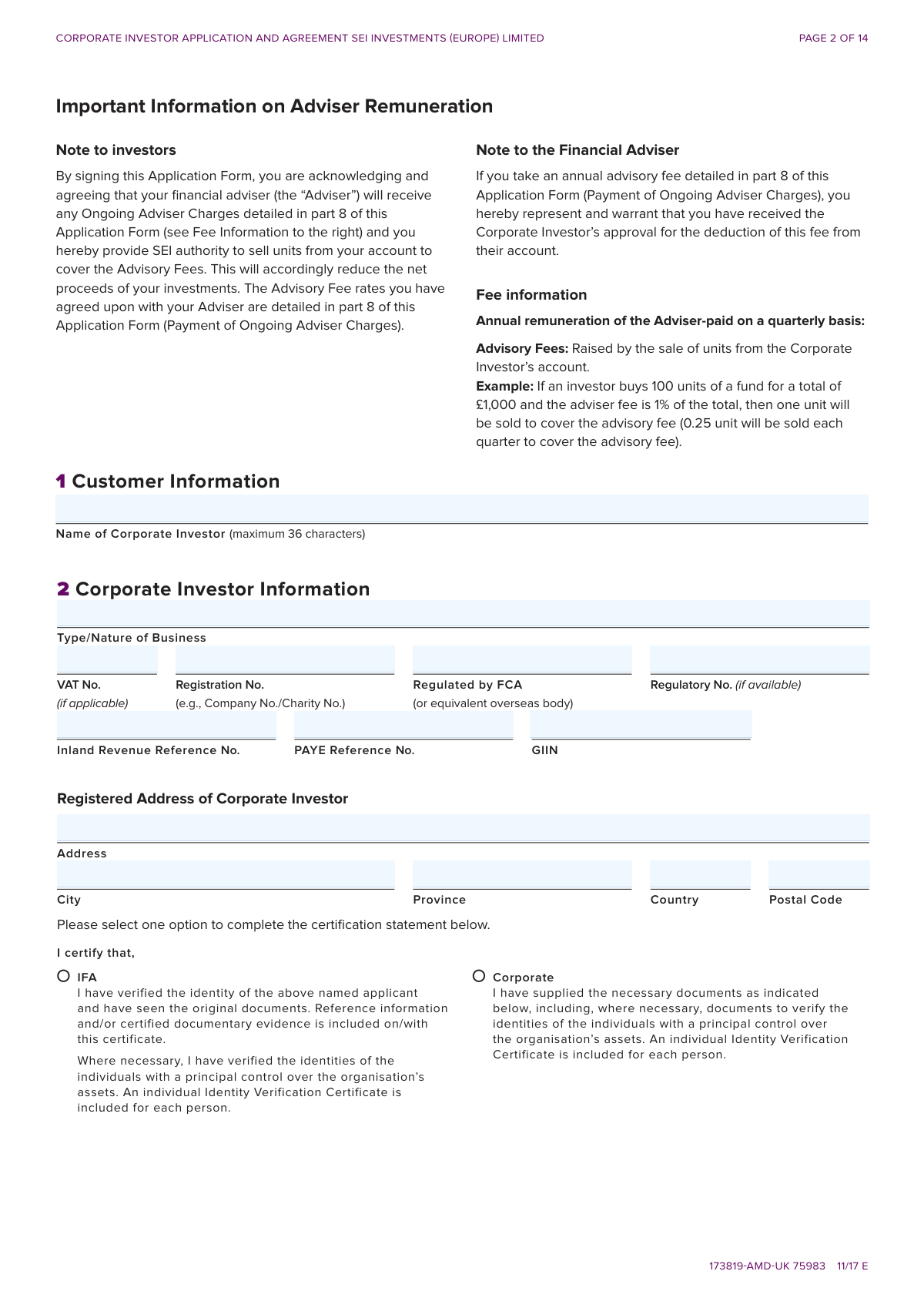
- 2 Use the AI assistant to fill in the Corporate Investor Information (Section 1 & 2), including business name, registration numbers, and tax details.
- 3 Provide evidence of your business name and trading address by completing Sections 3 & 4, attaching certified documents as prompted by the platform.
- 4 Complete the Tax Compliance section (Section 6) and have your adviser fill in their information and the agreed-upon charges in Sections 7 and 8.
- 5 Specify your method of account funding (Section 9) and make your investment selections in the Strategic and/or Global Mutual Funds (Section 10).
- 6 Indicate your preferences for dividend payments, regular withdrawals, and contract note delivery in Sections 11, 12, and 13.
- 7 Carefully review all entered information, then have an authorized signatory and the financial adviser digitally or physically sign the form in Section 14 to finalize the application.
Our AI-powered system ensures each field is filled out correctly, reducing errors and saving you time.
Why Choose Instafill.ai for Your Fillable 173819-AMD-UK Form?
Speed
Complete your 173819-AMD-UK in as little as 37 seconds.
Up-to-Date
Always use the latest 2026 173819-AMD-UK form version.
Cost-effective
No need to hire expensive lawyers.
Accuracy
Our AI performs 10 compliance checks to ensure your form is error-free.
Security
Your personal information is protected with bank-level encryption.
Frequently Asked Questions About Form 173819-AMD-UK
This form is used by corporate entities, such as companies and charities, to apply for an investment account with SEI Investments (Europe) Limited. It allows businesses to invest in the SEI Global Master Fund and/or the SEI Strategic Funds.
This application is specifically for corporate investors. It is not intended for individual or personal investors.
You must provide certified copies of documents to verify your business name and trading address, as detailed in Sections 3 and 4. Examples include a Certificate of Incorporation, a recent utility bill, or a bank statement.
The original, signed form must be posted to the SEI T3K Operations Team in London. If paying by bank transfer, you can send a faxed or scanned copy first for faster processing, but the original must still be sent by post.
For same-day trading, SEI must receive your cleared funds and completed form by 11:00 a.m. London time for Strategic Funds, or 12:30 p.m. London time for Global Mutual Funds.
You can fund your account via a cheque made payable to SEI Investments (Europe) Ltd., or through a bank transfer using CHAPS, BACS, or Faster Payments. Bank details are provided on the first page of the application.
The Tax Compliance section (Section 6) is required for SEI to comply with the US Foreign Account Tax Compliance Act (FATCA). You must provide your company's country of incorporation and tax residency to determine its US status.
By signing the form, you authorize SEI to sell units from your account to cover the Ongoing Adviser Charges agreed upon with your adviser. These fees are detailed in Section 8 and are typically deducted quarterly.
An authorized signatory for the corporate investor must sign on page 9. Your financial adviser must also sign their acknowledgement on the same page.
Contract notes are issued the next business day and can be delivered by post, fax, or email as selected in Section 13. You will receive quarterly statements by post to your registered address.
Yes, services like Instafill.ai use AI to help you complete forms like this one accurately and quickly. These tools can auto-fill your information, saving time and reducing the chance of errors.
You can upload the PDF of the SEI Corporate Investor Application to the Instafill.ai platform. The service will make the form interactive, allowing you to type in your information, save your progress, and download the completed document for printing and signing.
If your PDF is a flat, non-fillable file, you can use a service like Instafill.ai to convert it into an interactive form. This allows you to easily type your information into the correct fields before printing.
Compliance 173819-AMD-UK
Validation Checks by Instafill.ai
1
Verifies Total Investment Amount Matches Sum of Fund Allocations
This validation ensures that the value entered in the 'TOTAL INVESTMENT' field in Section 10 is equal to the sum of all individual investment amounts allocated to the Strategic Funds and Global Mutual Funds. This check prevents funding discrepancies and ensures the investor's instructions are arithmetically correct before processing. If the amounts do not match, the submission will be blocked, and the user must correct the allocation amounts or the total investment figure.
2
Detects US Tax Residency and Flags W-9 Requirement
This check scans the fields in Section 6 (Tax Compliance) for any mention of 'US' or 'United States' in the tax residency, incorporation, citizenship, or birth country fields. Identifying US persons is a critical requirement under the Foreign Account Tax Compliance Act (FATCA). If a US indicator is found, the system must flag the submission as incomplete pending the receipt of a completed W-9 form.
3
Ensures Regulatory Number is Provided when Regulated by FCA
This validation verifies that if the 'Regulated by FCA' checkbox in Section 2 is marked as 'Yes', the 'Regulatory No.' field is not empty. This is crucial for compliance and verification purposes, as the regulatory number is required to confirm the entity's status with the Financial Conduct Authority. A failure will result in an error message requiring the user to either provide the regulatory number or change the selection.
4
Validates Bank Details are Provided for Bank Transfer Funding
This check is triggered in Section 9, 'Method of Account Funding.' If the user selects the 'Bank Transfer' option, the system verifies that the fields for 'Bank Name,' 'Account Name,' 'Sort Code,' and 'Account Number' are all completed. This information is essential for matching the incoming funds to the correct application. Failure to provide these details will prevent form submission until the required bank information is entered.
5
Confirms Mandatory Signatures and Dates are Completed
This check verifies that the signature and date fields for both the 'Authorised Investor' and the 'Adviser/Manager' in Section 14 are completed. These signatures are legally binding and signify agreement to all terms, making their presence essential for the application to be valid. An incomplete signature section will render the application invalid and require completion before it can be processed.
6
Prevents Duplicate Use of Local Authority Tax Bill for Evidence
This rule enforces the note on page 4 stating that the 'Current Local Authority Tax Bill' cannot be used as evidence for both Business Name (Section 3) and Business Address (Section 4). The system will check if this evidence type has been entered in both sections. This is important for maintaining the integrity of the identity verification process by requiring two distinct pieces of evidence. If duplication is detected, an error will be shown, forcing the user to provide an alternative form of evidence for one of the sections.
7
Validates Shareholder Percentages Sum to 100%
In Section 5, this validation calculates the sum of all values entered in the 'Percent (%)' column for the list of shareholders and controllers. This is a logical check to ensure that the ownership structure is fully and accurately accounted for, totaling 100%. If the sum is not equal to 100%, the application will be flagged for review or rejected, as it indicates an incomplete or erroneous declaration of the company's control structure.
8
Requires Bank Details if Dividends are Paid as Cash
In Section 11, if the user selects the option 'Dividend income to be paid out as cash,' this validation ensures that the associated bank details (Bank Name, Account Name, Sort Code, Account Number) are filled out. This is necessary to ensure dividend payments can be processed correctly and sent to the investor's desired account. If the option is selected but the details are missing, the form will be considered incomplete.
9
Ensures Regular Withdrawal Start Date is in the Future
This validation checks the 'Payment Start Date (DD/MM/YYYY)' in Section 12. The rule ensures that the entered date is not in the past and is a valid future date. This is important for scheduling automated payments correctly and preventing immediate, unintended withdrawals from the account. A past or invalid date will trigger an error, requiring the user to select a valid future start date for the withdrawal plan.
10
Validates Corporate Investor Name Character Limit
This check ensures that the 'Name of Corporate Investor' in Section 1 does not exceed the specified maximum of 36 characters. This is important for ensuring the name fits within system fields, on reports, and on legal documents without truncation. If the name is too long, the form submission will be rejected, and the user will be prompted to use a compliant abbreviation or correct the entry.
11
Verifies Investor Name and Date Match Across Sections
This check ensures consistency between the main application and the Client Investment Agreement. It verifies that the 'Print Name of Investing Corporate Investor' on page 12 matches the 'Name of Corporate Investor' from Section 1. This cross-referencing is vital for ensuring the legal agreement is correctly associated with the right entity, preventing legal and administrative discrepancies.
12
Ensures At Least One Form of Business Name Evidence is Provided
This validation rule checks that at least one of the subsections within Section 3, 'Evidence of Business Name,' has been completed. The form requires 'One or more to be completed' to satisfy anti-money laundering (AML) and Know Your Customer (KYC) requirements. If all subsections in Section 3 are left blank, the application is incomplete and cannot be processed.
13
Validates Conditional Requirement for Investment Selection
This rule enforces a conditional requirement for Section 10, 'Investment Selection.' If the investor selects 'Stock Transfer from another account' as the funding method in Section 9, the system allows Section 10 to be left blank. Conversely, if 'Cheque' or 'Bank Transfer' is chosen, Section 10 becomes mandatory, ensuring investment instructions are provided when new funds are being sent.
Common Mistakes in Completing 173819-AMD-UK
Applicants often miss one of the required signatures or enter the date in an incorrect format. The form requires signatures from both the Authorised Investor and the Financial Adviser on page 9, and a printed name on page 12. Failure to provide all signatures and dates in the specified DD/MM/YY format will render the application invalid, immediately halting the investment process until a correctly completed original form is received.
A frequent error is a discrepancy between the 'TOTAL INVESTMENT' amount listed in Section 10 and the actual amount on the cheque or bank transfer. This often happens due to miscalculations when adding up individual fund investments. This mismatch prevents the trade from being placed, causing delays and potentially missing a desired investment window while SEI contacts the adviser to resolve the discrepancy.
The form requires certified copies for nearly all evidence submitted in Section 3 (Evidence of Business Name) and Section 4 (Evidence of Business Address). Applicants frequently forget to include these documents or submit non-certified photocopies. An application without the necessary certified copies is considered incomplete and will be put on hold, significantly delaying the account opening and investment process.
The payment instructions on page 1 provide different bank details for CHAPS versus BACS/Faster Payments, a detail that is easily overlooked. Furthermore, applicants often forget to include the mandatory payment reference with the corporate investor's name. These errors can cause payments to be delayed, misallocated, or even returned, leading to missed trading deadlines and administrative complications.
Section 4 explicitly states that a 'Current Local Authority Tax Bill' can be used as evidence for either the business name (Section 3) or the trading address (Section 4), but not for both. Applicants often attempt to use this single document to satisfy both requirements. This will result in one of the verification sections failing, making the application incomplete and requiring the applicant to submit additional documentation.
Section 6 requires detailed tax residency information for the corporation and its owners to comply with FATCA and CRS regulations. Applicants may provide incomplete information or fail to attach a W-9 form if a US connection is indicated. This is a critical compliance failure that will halt the application until all tax information and necessary forms are correctly provided, preventing the account from being opened.
The instructions on page 1 clearly state to complete the form in 'BLOCK CAPITALS using black ink'. Many applicants fill out the form using lowercase letters or blue ink, which can cause issues with automated scanning and legibility. This can lead to data entry errors or the form being returned for proper completion. AI-powered tools like Instafill.ai can convert this non-fillable PDF into a fillable version, ensuring text is legible and correctly formatted.
Applicants often miss Sections 11 (Dividend Payments) and 13 (Contract Notes), assuming their preferences will be set later. The form defaults to reinvesting all dividends and sending contract notes by post. If an applicant wants cash dividends or email delivery, they must explicitly select these options and provide the necessary bank or email details, otherwise their account will be set up with the default, undesired options.
While the main signature page is page 9, a separate 'Print Name of Investing Corporate Investor' field is located on page 12 within the Client Investment Agreement text. This is highlighted in the initial instructions but is very easy to miss when completing the form. Omitting this printed name makes the agreement technically incomplete and will cause the application to be rejected pending correction.
In Section 5, applicants must list all relevant shareholders, directors, or partners, including their name, status, ownership percentage, and whether an identity verification check has been completed. It is common for this table to be filled out partially, with missing percentages or unclear verification statuses. Incomplete information about the controlling parties of the corporation will prevent the compliance team from approving the application.
Saved over 80 hours a year
“I was never sure if my IRS forms like W-9 were filled correctly. Now, I can complete the forms accurately without any external help.”
Kevin Martin Green
Your data stays secure with advanced protection from Instafill and our subprocessors

Robust compliance program
Transparent business model
You’re not the product. You always know where your data is and what it is processed for.
ISO 27001, HIPAA, and GDPR
Our subprocesses adhere to multiple compliance standards, including but not limited to ISO 27001, HIPAA, and GDPR.
Security & privacy by design
We consider security and privacy from the initial design phase of any new service or functionality. It’s not an afterthought, it’s built-in, including support for two-factor authentication (2FA) to further protect your account.
Fill out 173819-AMD-UK with Instafill.ai
Worried about filling PDFs wrong? Instafill securely fills corporate-investor-application-and-agreement-sei forms, ensuring each field is accurate.