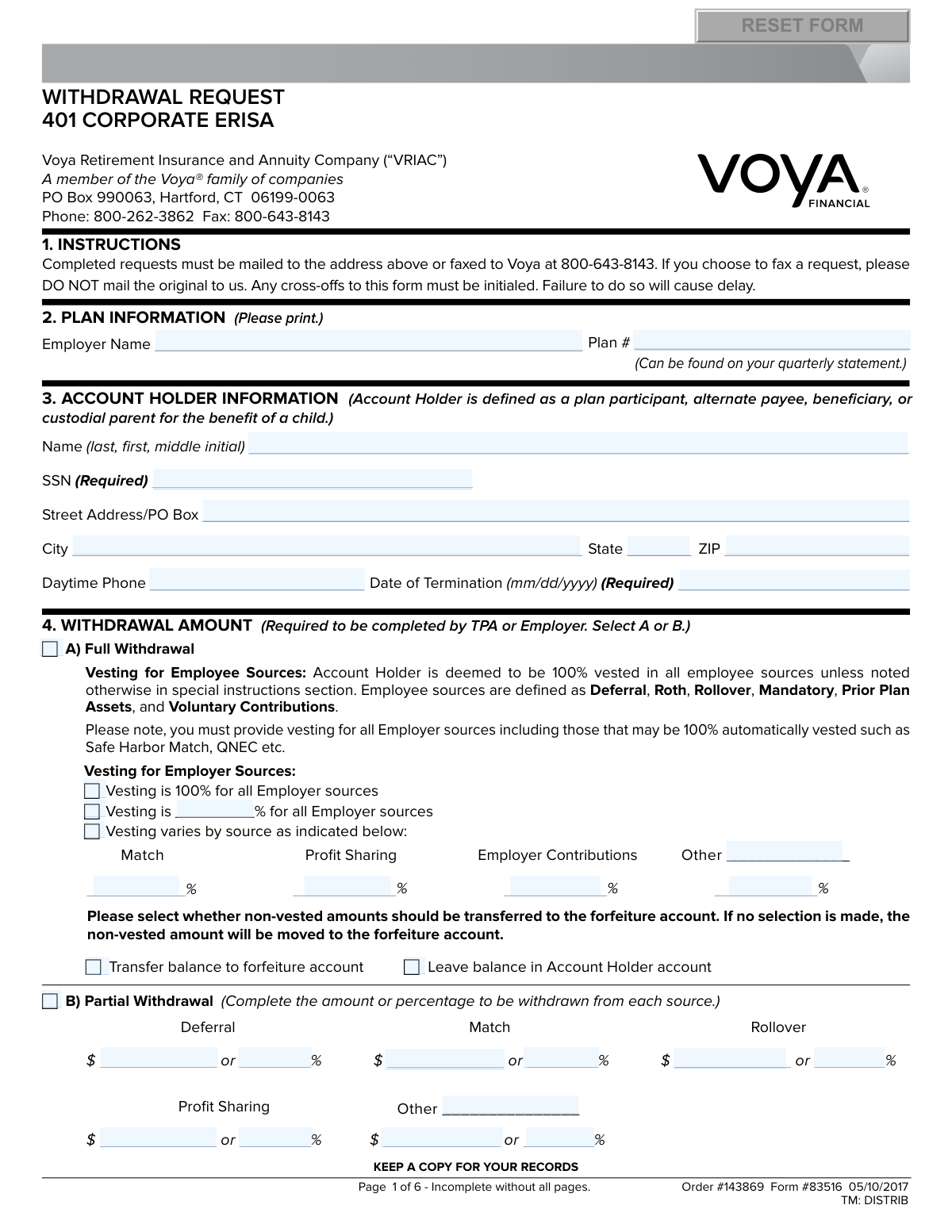
Yes! You can use AI to fill out Voya Form 83516, Withdrawal Request 401 Corporate ERISA

Voya Form 83516, the Withdrawal Request for 401 Corporate ERISA plans, is used by plan participants to request a distribution of their retirement savings. It allows for full or partial withdrawals due to reasons such as termination of employment, retirement, hardship, or rollovers to other accounts. Today, this form can be filled out quickly and accurately using AI-powered services like Instafill.ai, which can also convert non-fillable PDF versions into interactive fillable forms.
Our AI automatically handles information lookup, data retrieval, formatting, and form filling.
It takes less than a minute to fill out Form 83516 using our AI form filling.
Securely upload your data. Information is encrypted in transit and deleted immediately after the form is filled out.

Form specifications

Form name: Voya Form 83516, Withdrawal Request 401 Corporate ERISA
Number of pages: 1
Language: English
Categories: corporate forms
main-image

Instafill Demo: How to fill out PDF forms in seconds with AI

How to Fill Out Form 83516 Online for Free in 2026

Are you looking to fill out a FORM 83516 form online quickly and accurately? Instafill.ai offers the #1 AI-powered PDF filling software of 2026, allowing you to complete your FORM 83516 form in just 37 seconds or less.
Follow these steps to fill out your FORM 83516 form online using Instafill.ai:
  1. 1 Navigate to Instafill.ai and upload or select the Voya 401k Withdrawal Request form.
  2. 2 Provide your personal account holder information in Section 3, including your name, SSN, and address, as well as the plan information in Section 2.
  3. 3 In Section 4, specify whether you are requesting a full or partial withdrawal and provide the necessary vesting information for employer sources.
  4. 4 Select the reason for your withdrawal in Section 5, such as Termination of Employment, Hardship, or In-Service Withdrawal.
  5. 5 Complete Sections 6 and 7 to make your withdrawal elections for non-Roth and Roth accounts, detailing whether you want a cash distribution or a rollover to another plan or IRA.
  6. 6 Indicate your federal and state tax withholding preferences in Section 11 and choose your delivery option (direct deposit or mail) in Section 12.
  7. 7 Carefully review all sections, provide your authorized signature and date in Section 15, and submit the completed form to Voya via mail or fax as instructed.

Our AI-powered system ensures each field is filled out correctly, reducing errors and saving you time.

Why Choose Instafill.ai for Your Fillable Form 83516 Form?

Speed

Complete your Form 83516 in as little as 37 seconds.

Up-to-Date

Always use the latest 2026 Form 83516 form version.

Cost-effective

No need to hire expensive lawyers.

Accuracy

Our AI performs 10 compliance checks to ensure your form is error-free.

Security

Your personal information is protected with bank-level encryption.

Frequently Asked Questions About Form Form 83516

This form is used by participants in a Voya-administered 401k corporate ERISA plan to request a withdrawal of funds from their retirement account. You would use it for events like termination of employment, retirement, hardship, or rolling over your funds.

The account holder must complete their sections and sign in Section 15. Additionally, your Employer or Third Party Administrator (TPA) must complete the vesting information and provide an authorized signature in Section 16 or 17 for the request to be processed.

You will need your Social Security Number, your Plan Number (which can be found on your quarterly statement), and your date of termination if you are leaving your employer. If you plan to roll over funds or use direct deposit, you will also need the relevant account information.

You can either mail the completed form to the Voya address listed in Section 1 or fax it to 800-643-8143. The form explicitly states that if you fax the request, you should not mail the original copy.

A full withdrawal will distribute your entire vested account balance, while a partial withdrawal allows you to take out a specific dollar amount or percentage from your available funds. Your employer or TPA must help complete this section.

A cash distribution is paid directly to you and is subject to a mandatory 20% federal tax withholding. A direct rollover moves your money tax-free to another eligible retirement account, such as an IRA or a new employer's 401k, avoiding immediate taxes and penalties.

If you are terminating employment with an outstanding loan, you must complete Section 9 and/or 10. The loan balance may be treated as a taxable distribution unless you can pay it back or roll over the offset amount to another retirement plan.

In Section 12, you can choose to receive your funds via a mailed check or through a direct deposit (EFT) to your bank account. Direct deposit is typically faster, taking 3-4 business days once the request is processed.

For an eligible rollover distribution paid to you in cash, a 20% federal withholding is mandatory and cannot be waived. For other types of non-rollover eligible payments, you may be able to elect no federal withholding, but state tax rules vary and may require withholding.

Roth and non-Roth funds have different tax treatments, so they must be handled and tracked separately. Section 6 is for pre-tax and employer contributions, while Section 7 is for any after-tax Roth 401k contributions you have made.

You should list a reliable contact person, phone number, and email address in Section 13. This ensures that if there are any issues with your request, Voya can reach out to resolve them quickly and avoid delays.

Yes, services like Instafill.ai use AI to accurately auto-fill form fields, which can save you time and help prevent common errors. The AI can populate your personal information and guide you through the required sections.

Simply upload the form to the Instafill.ai platform. The AI will identify the fields, and you can then provide your information once to have it automatically and accurately filled across the document.

If you have a flat, non-fillable PDF, you can use a service like Instafill.ai. It can convert the static form into an interactive, fillable one, allowing you to easily type your information directly into the fields online.

Compliance Form 83516
Validation Checks by Instafill.ai

1
Ensures SSN is Present and Validly Formatted
This check verifies that the Social Security Number (SSN) field in Section 3 is completed and follows the standard 9-digit format. The SSN is critical for identity verification and mandatory for IRS tax reporting on the distribution. Failure to provide a valid SSN will result in the form being rejected as it cannot be processed for tax or identification purposes.
2
Validates Withdrawal Amount Selection
This check ensures that in Section 4, the user has selected either 'Full Withdrawal' or 'Partial Withdrawal'. A selection is required to determine the basis of the distribution calculation. If no selection is made, the system cannot determine how much of the account balance to distribute, causing the request to be delayed until clarified.
3
Verifies Partial Withdrawal Details are Provided
If 'Partial Withdrawal' is selected in Section 4, this validation confirms that at least one dollar amount or percentage is specified for a withdrawal source (e.g., Deferral, Match). Without this detail, the specific amount to be partially withdrawn is unknown. A failure here means the request is incomplete and cannot be executed.
4
Confirms a Single Reason for Withdrawal is Selected
This check validates that exactly one reason for withdrawal is checked in Section 5. The reason for withdrawal dictates eligibility, tax implications, and potential penalties. Selecting multiple or no reasons creates ambiguity and non-compliance with plan rules, leading to processing rejection.
5
Cross-Validates Termination Reason and Date
This check ensures that if 'Termination of Employment/Retirement' is selected in Section 5, the 'Date of Termination' field in Section 3 is filled with a valid date. This date is legally required to confirm eligibility for a termination-based distribution. If the date is missing or invalid, the request cannot be processed as eligibility cannot be confirmed.
6
Validates RMD Reason Against Participant Age
If 'Required Minimum Distribution (RMD)' is selected in Section 5, this check verifies against system data that the participant is at least age 70½. This is an IRS requirement for RMDs. Requesting an RMD before reaching the eligible age is not permissible and will result in the request being denied.
7
Ensures Rollover Destination Information is Complete
This validation confirms that if a rollover option is chosen in Section 6 or 7, all required destination fields (e.g., 'Check is to be made payable to', 'Account #', address) are completed. This information is essential to correctly issue and direct the rollover funds to the new custodian. Missing information will prevent the rollover check from being created and sent.
8
Validates Completeness of EFT Information
If the direct deposit delivery option is selected in Section 12, this check ensures the ABA Routing #, Bank Account #, and Account Type are all provided. It also verifies the ABA number is exactly 9 digits. Incomplete or invalid bank details will cause the electronic transfer to fail, forcing a delay as a physical check must be issued and mailed instead.
9
Verifies Account Holder Signature and Date
This check confirms that the 'Account Holder Signature' and 'Date' fields in Section 15 are completed. The signature is a legal authorization for Voya to execute the withdrawal and certifies the information provided. A missing signature or date renders the form invalid and legally non-binding, halting all processing.
10
Confirms Consistency of SSN Across Form
This validation compares the SSN entered in Section 3 with the SSN entered in the signature block of Section 15. The numbers must be identical to ensure the person signing the form is the same individual identified at the beginning. A mismatch indicates a potential error or fraud and will cause the request to be rejected pending verification.
11
Checks for Required Employer/Fiduciary Signature
This check verifies that the signature in Section 17 ('Employer, Plan Sponsor or Named Fiduciary') is present if required by the specific plan's rules. The form explicitly states the distribution will not be processed without this signature if it is required. Failure to obtain a necessary signature will stop the withdrawal process completely.
12
Validates Non-Resident Alien Status Declaration
If the 'Non-Resident Alien' checkbox is marked in Section 15, this check ensures the 'country of residence' field is also completed. This information is mandatory for applying the correct tax withholding rules, which differ significantly for non-resident aliens. An incomplete declaration will delay processing until the proper tax status and country can be confirmed.

Common Mistakes in Completing Form 83516

Missing or Incomplete Signatures

The form requires signatures from the Account Holder (Section 15) and potentially a Third Party Administrator (TPA) or Employer (Sections 16 & 17). Participants often submit the form without their own signature or fail to get the necessary TPA/Employer authorizations. An unsigned or improperly authorized form is considered 'not in good order' and will be rejected, causing significant processing delays. To avoid this, carefully review all signature blocks before submission.

Participant Completing Employer/TPA Sections

Section 4, which details the withdrawal amount and vesting percentages, is explicitly marked 'Required to be completed by TPA or Employer.' Participants often misunderstand this and attempt to fill it out themselves, providing incorrect vesting percentages or withdrawal calculations. This leads to rejection as the financial institution cannot process a withdrawal based on unverified data. To avoid this, participants must coordinate with their TPA or HR department to have this section completed correctly.

Incomplete or Inaccurate Rollover Information

When electing a rollover in Section 6 or 7, applicants must provide precise details for the receiving institution, including the full custodian name, address, and account number. People frequently provide partial names, leave the account number blank, or transpose digits. This error prevents the funds from being transferred correctly, leading to processing holds, returned funds, and the risk of an unintended taxable distribution if the 60-day rollover window is missed. AI-powered form fillers like Instafill.ai can help prevent this by saving and accurately auto-filling validated custodian information.

Incorrect Tax Withholding Election

Section 11 is complex and often misunderstood, especially the rules around mandatory withholding. A common error is attempting to elect 'Do not withhold' for an eligible rollover distribution, which is not allowed as 20% federal withholding is mandatory by law. An incorrect election can lead to form rejection or unexpected tax bills and penalties at the end of the year. It is crucial to read the tax notices attached to the form before making a selection.

Missing Key Identifiers and Dates

The form requires several critical data points that are easily missed, such as the Social Security Number (in both Section 3 and 15) and the Plan Number (Section 2). Furthermore, if selecting 'Termination of Employment' in Section 5, the 'Date of Termination' in Section 3 becomes mandatory. Forgetting to fill in these required fields will halt the process, as the request cannot be identified or validated without them. Using a tool like Instafill.ai can help by validating that all required fields are filled in before the user considers the form complete.

Invalid Direct Deposit (EFT) Details

In Section 12, many users opt for a direct deposit but enter an incorrect ABA routing number or bank account number. They may copy the number from a deposit slip instead of a check or simply make a typo. As the form states, if the EFT information is invalid, the payment will default to a mailed check, delaying access to funds by several business days. Always verify routing numbers directly with your bank.

Confusion Between Roth and Non-Roth Elections

The form has separate, nearly identical sections for non-Roth (Section 6) and Roth (Section 7) withdrawal elections. Participants with both account types may fill out only one section, assuming it covers the entire balance, or provide conflicting instructions across the two sections. This ambiguity forces the processing agent to seek clarification, delaying the entire withdrawal until the applicant's intent for each money type is clearly established.

Making Uninitialed Corrections

When filling out a paper form, it's common to make a mistake and cross it out. However, the instructions in Section 1 specify that 'Any cross-offs to this form must be initialed.' Many people forget this step, and an uninitialed correction can be interpreted as a potential alteration, forcing the form to be returned for verification. The best way to avoid this is to fill out the form digitally first to minimize errors. Since this is a non-fillable PDF, a tool like Instafill.ai can convert it into an interactive form, allowing you to enter information cleanly before printing.

Submitting an Incomplete Form Packet

The form states 'Page 1 of 6 - Incomplete without all pages.' Participants sometimes only send the pages they filled out, not the entire packet, which can lead to rejection. Additionally, certain withdrawal reasons, like a Qualified Domestic Relations Order (QDRO), require additional forms to be attached. Failing to include all pages and necessary attachments will result in an incomplete submission and processing delays.

Incorrect 'Reason for Withdrawal' Selection

In Section 5, the reason selected for the withdrawal has major legal and tax consequences. A person might select 'Hardship' when they actually qualify for an 'In-Service Withdrawal,' leading to different tax treatments and potential penalties. Selecting a reason like 'Termination of Employment' without providing the required termination date in Section 3 will also cause the form to be rejected. It is crucial to understand the eligibility criteria for each option before making a selection.
Saved over 80 hours a year

“I was never sure if my IRS forms like W-9 were filled correctly. Now, I can complete the forms accurately without any external help.”

Kevin Martin Green

Your data stays secure with advanced protection from Instafill and our subprocessors

Robust compliance program

Transparent business model

You’re not the product. You always know where your data is and what it is processed for.

ISO 27001, HIPAA, and GDPR

Our subprocesses adhere to multiple compliance standards, including but not limited to ISO 27001, HIPAA, and GDPR.

Security & privacy by design

We consider security and privacy from the initial design phase of any new service or functionality. It’s not an afterthought, it’s built-in, including support for two-factor authentication (2FA) to further protect your account.

Fill out Form 83516 with Instafill.ai

Worried about filling PDFs wrong? Instafill securely fills voya-form-83516-withdrawal-request-401-corporate-erisa forms, ensuring each field is accurate.