Yes! You can use AI to fill out Schwab One® Account Application for Incorporated Organizations
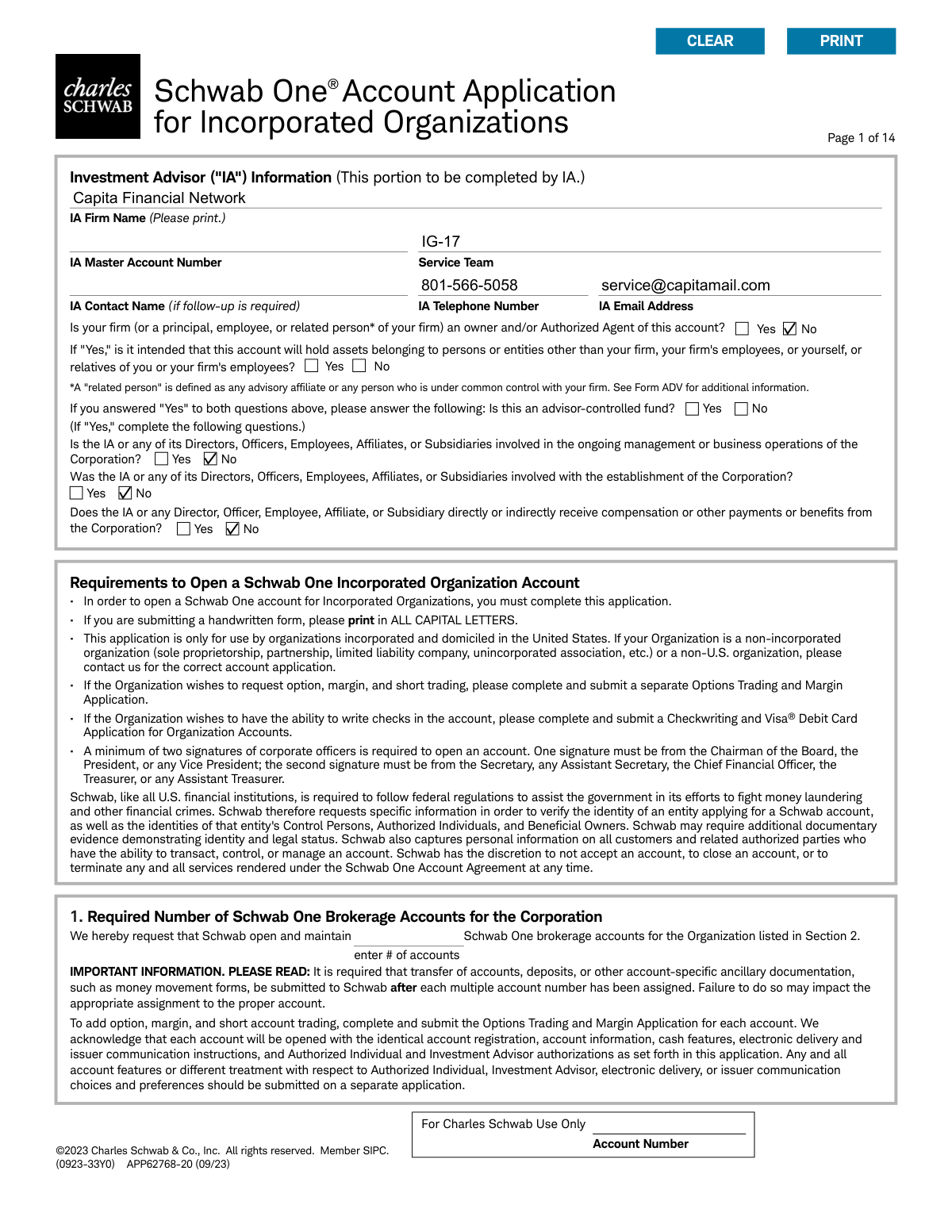
This form is an application for U.S.-based incorporated organizations, such as C Corporations, S Corporations, and non-profits, to open a Schwab One® brokerage account. It gathers essential information about the corporation, its business activities, and key individuals like authorized persons, control persons, and beneficial owners to comply with federal financial regulations. Today, this form can be filled out quickly and accurately using AI-powered services like Instafill.ai, which can also convert non-fillable PDF versions into interactive fillable forms.
APP62768-20 is part of the
corporate forms, Schwab forms, investment account forms, corporate account forms, business account forms, brokerage account forms and account application forms categories on Instafill.
Rather not fill this in by hand? Instafill is an online form filler that completes PDF forms automatically — upload the blank form, answer a few questions, and the AI fills every field.
Form specifications
| Form name: | Schwab One® Account Application for Incorporated Organizations |
| Number of pages: | 1 |
| Language: | English |
Our AI automatically handles information lookup, data retrieval, formatting, and form filling.
It takes less than a minute to fill out APP62768-20 using our AI form filling.
Securely upload your data. Information is encrypted in transit and deleted immediately after the form is filled out.
Instafill Demo: How to fill out PDF forms in seconds with AI
How to Fill Out APP62768-20 Online for Free in 2026
Are you looking to fill out a APP62768-20 form online quickly and accurately? Instafill.ai offers the #1 AI-powered PDF filling software of 2026, allowing you to complete your APP62768-20 form in just 37 seconds or less.
Follow these steps to fill out your APP62768-20 form online using Instafill.ai:
- 1 Navigate to Instafill.ai and upload the Schwab One® Account Application for Incorporated Organizations PDF.
- 2 Use the AI chat to provide information about your corporation, including its legal name, tax ID, address, and business type (NAICS code).
- 3 Enter the required personal details for all Authorized Individuals, Control Persons, and Beneficial Owners, such as names, addresses, Social Security Numbers, and identification information.
- 4 Review and confirm your choices for account features, including the Cash Features Program, paperless document enrollment, and any authorizations for your Investment Advisor (IA).
- 5 Specify how you want to handle issuer communications like proxy voting and corporate actions by designating either the account holder or the IA.
- 6 After the AI populates the form, carefully review all entered information for accuracy, then have all required corporate officers and authorized individuals e-sign the document.
- 7 Download the final, signed application, ready to be submitted to Charles Schwab.
Our AI-powered system ensures each field is filled out correctly, reducing errors and saving you time.
Why Choose Instafill.ai for Your Fillable APP62768-20 Form?
Speed
Complete your APP62768-20 in as little as 37 seconds.
Up-to-Date
Always use the latest 2026 APP62768-20 form version.
Cost-effective
No need to hire expensive lawyers.
Accuracy
Our AI performs 10 compliance checks to ensure your form is error-free.
Security
Your personal information is protected with bank-level encryption.
Frequently Asked Questions About APP62768-20
This application is used by organizations incorporated and domiciled in the United States to open a Schwab One brokerage account. It is intended for C Corporations, S Corporations, and nonprofit or charitable organizations.
No, this application is exclusively for incorporated organizations. If your organization is a non-incorporated entity like an LLC, partnership, or sole proprietorship, you must contact Schwab to obtain the correct application.
You must provide detailed personal information for all Authorized Individuals who can transact on the account, at least one Control Person with significant management responsibility (e.g., CEO, President), and all Beneficial Owners who own 10% or more of the organization.
A minimum of two signatures from corporate officers are required in Section 8. One signature must be from a Category 1 officer (e.g., President, CEO) and the second from a Category 2 officer (e.g., Secretary, Treasurer).
If you are the sole corporate officer, you must sign in both Category 1 and Category 2 in Section 8. You will need to indicate your respective corporate titles under each signature.
These features require separate forms. You must complete and submit a 'Checkwriting and Visa® Debit Card Application' for checkwriting and an 'Options Trading and Margin Application' for margin and options trading.
The Schwab MoneyLink® form is used to set up electronic fund transfers (ACH) between your Schwab account and an account at another U.S. bank. This allows for one-time, recurring, or automated income transfers.
To verify your external bank account information, Schwab may request supplemental documents. This can include a voided check, a recent bank statement, or a preprinted direct deposit form from the other financial institution.
While the form does not specify a processing time, you should allow several business days for the account to be opened if the application is complete. For ACH setup, allow up to two weeks before requesting your first transfer.
Yes, by providing an email address for the Primary Authorized Individual in Section 3a, the account is set to be enrolled in paperless delivery for statements and other documents. You can opt out by checking the box in Section 5 to receive documents via postal mail.
Yes, services like Instafill.ai use AI to accurately auto-fill form fields, which can save you a significant amount of time and help prevent errors on complex applications like this one.
You can upload the PDF to the Instafill.ai platform, which will make the document interactive. After you provide your information once, the AI will automatically and accurately populate it across all relevant fields in the application packet.
If you have a non-fillable or 'flat' PDF, you can use a service like Instafill.ai to convert it into an interactive, fillable form. This allows you to easily type your information into the fields online instead of printing and filling it out by hand.
Compliance APP62768-20
Validation Checks by Instafill.ai
1
Ensures Number of Accounts is Specified
This check verifies that Section 1, which asks for the number of Schwab One brokerage accounts to be opened, is filled with a positive integer. This information is fundamental for account setup and determines how many account numbers need to be generated. If this field is left blank, the application cannot be processed as the core request is undefined.
2
Validates Consistency of Beneficial Ownership Declaration
This check ensures logical consistency in the beneficial ownership section (Section 3). If the checkbox for 'no single individual...owns >=10%' is left unchecked, it implies there are beneficial owners to declare. The system must then verify that at least one individual is marked as a '>=10% Beneficial Owner' and their 'percentage of ownership' is provided. A failure indicates a contradiction that must be resolved for regulatory compliance under the Financial Crimes Enforcement Network (FinCEN) rules.
3
Verifies Corporate Officer Signature Requirements
This validation confirms that the signature requirements in Section 8 are met, specifically that at least two officers have signed, with one from Category 1 (e.g., President, CEO) and one from Category 2 (e.g., Secretary, Treasurer). This is crucial as it confirms the action is authorized by the corporation's leadership structure as required by Schwab's policy. An application with missing or improperly categorized signatures will be rejected for being incomplete and unauthorized.
4
Validates Social Security Number Format
This check confirms that the Social Security Number (SSN) for each individual in Section 3a follows the standard NNN-NN-NNNN format. This is a basic data integrity check required for customer identification and tax reporting to the IRS. An incorrectly formatted SSN will cause failures in identity verification and regulatory reporting, leading to application rejection.
5
Verifies Individual's Date of Birth and Legal Age
This validation ensures that the Date of Birth for each individual in Section 3a is a valid date and that the individual is of legal age (typically 18 or older) to be an authorized person on a financial account. This is a standard compliance measure to prevent minors from being designated with control over corporate assets. If an individual is underage, their authorization is invalid and the application cannot proceed.
6
Confirms Government ID is Not Expired
This check verifies that the expiration date listed for the government-issued ID (e.g., Driver's License, Passport) in Section 3a is in the future. A valid, unexpired ID is required by federal law under the USA PATRIOT Act to verify an individual's identity. An expired ID is not a valid form of identification and will result in the application being flagged for insufficient documentation.
7
Validates Physical Street Address Requirement
This check ensures that the Corporation Street Address (Section 2) and the Home Street Address for all individuals (Section 3a) are not P.O. Boxes. Federal regulations require financial institutions to obtain a physical address for identity verification and anti-money laundering purposes. An application using a P.O. Box for a required physical address will be considered incomplete and rejected.
8
Cross-Verifies Corporation's Legal Name
This check compares the 'Name of Corporation' provided in Section 2 ('UNIVERSITY IMPACT FBO') against the name on the legal formation documents, such as the Articles of Incorporation ('University Impact'). Discrepancies must be flagged to ensure the account is opened under the correct legal entity name for legal and tax purposes. Any additions like 'FBO' may require further documentation or clarification to prevent titling errors.
9
Verifies U.S. Domicile and Incorporation
This validation confirms that the 'Country of Incorporation' listed in Section 2 is the United States, as per the form's explicit instructions. This is a fundamental eligibility requirement for this specific application type. If the country is not the U.S., the applicant has used the wrong form and the application must be rejected with instructions to obtain the correct form for non-U.S. organizations.
10
Validates ACH Bank Account Number Against Bank Statement
This check cross-references the bank account number provided on the ACH MoneyLink form (e.g., '62758726') with the account number on the supporting bank document (e.g., '862758726'). Mismatches, such as a missing leading digit, are critical errors that will cause all electronic fund transfers to fail. This validation prevents setup of a faulty link, which would lead to transaction rejections and operational issues.
11
Validates ACH Bank Name Spelling and Accuracy
This check analyzes the bank name on the ACH form ('JP MOGRAN CHASE BANK') for potential misspellings by comparing it to a database of official bank names or supporting documents ('JPMorgan Chase'). Incorrect bank names can cause delays or failures in the ACH setup and verification process. Flagging likely errors for correction ensures a smoother and more reliable funds transfer setup.
12
Validates ABA Transit Routing Number
This check confirms the 9-digit ABA Transit Routing Number on the ACH form is a valid, active number corresponding to the specified bank. The validation involves a checksum calculation and a lookup against a federal database. An invalid routing number is a fatal error that makes electronic transfers impossible, so the form must be rejected until a correct number is provided.
13
Ensures Conditional IA Questions are Answered
This validation enforces the conditional logic in the Investment Advisor (IA) Information section. If the answer to 'Is your firm...an owner and/or Authorized Agent?' is 'Yes,' the subsequent related questions must also be answered. This is important for regulatory transparency, especially regarding potential conflicts of interest in advisor-controlled funds. Incomplete answers in this section will halt the application pending clarification.
14
Verifies Signer's Authority for Corporate Resolution
This check confirms that the individual signing the Certificate of Authority and Corporate Resolution in Section 9 holds an appropriate title (President or Secretary). This signature legally certifies the authority of all individuals listed on the application to act on behalf of the corporation. If the signer does not hold the required title, the certification is invalid, and the entire application lacks proper corporate authorization.
Common Mistakes in Completing APP62768-20
The application requires a minimum of two officer signatures from two different categories (e.g., one from the President/VP and one from the Secretary/Treasurer). Applicants often fail to provide signatures from the correct categories, or they forget to print their name, select their title, and enter the date. Any missing element in this section will halt the application process, as Schwab cannot complete these fields on the applicant's behalf. To avoid this, carefully review the specific signature requirements for each category and ensure all four fields (signature, printed name, title, and date) are completed by the appropriate officers.
In Section 3a, applicants must specify each individual's role (Authorized Person, Control Person, ≥10% Beneficial Owner) and their title (CEO, President, etc.) by checking the appropriate boxes. It is common for these checkboxes to be overlooked, leaving the individual's authority on the account undefined. This omission leads to processing delays as Schwab must contact the applicant for clarification. Before submitting, verify that every individual listed in Section 3a has both their role and title clearly selected.
The form explicitly states that a P.O. Box is not acceptable for the Corporation's Street Address (Section 2) or an individual's Home Street Address (Section 3a). People often enter a P.O. Box out of habit, which is a compliance violation for identity verification purposes under federal law. This will result in the application being returned for correction. Always provide a valid physical street address where required and use the separate 'Mailing Address' field for P.O. Boxes.
When setting up electronic fund transfers (Schwab MoneyLink®), if the external bank account is not identically owned, the signature of the other financial institution's account holder must be notarized (Section 7B). This is a critical step that is very frequently missed, causing the entire ACH setup to be rejected. To prevent this significant delay, ensure you locate a notary public and have the required signature properly notarized before submitting the form.
Several sections, such as the Investment Advisor Authorization on the ACH form (Section 6) and the Delegation of Advisor Authorities on the LPOA (Section 5), specifically require initials from all account holders, not signatures or checkmarks. Applicants often sign these sections by mistake, which invalidates the authorization. This requires the form to be corrected and re-submitted. Carefully read the instructions for each authorization box; if it says 'Initial', use only your initials.
On the ACH (Schwab MoneyLink®) form, applicants must provide the ABA Transit Routing Number and the Account Number for the external bank. Transposing digits or entering incorrect numbers is a frequent data entry error that will cause all fund transfer attempts to fail. To avoid this, cross-reference the numbers with a voided check or a bank statement as suggested on the form. AI-powered tools like Instafill.ai can help prevent these errors by validating number formats and reducing manual data entry.
Federal regulations require the identification of at least one 'Control Person'—an individual with significant managerial responsibility (e.g., CEO, President, CFO). Applicants sometimes misunderstand this requirement and only list authorized signers or owners, omitting a designated Control Person. This is a compliance failure that will prevent the account from being opened. Ensure you identify and provide complete information for at least one individual who fits the definition of a Control Person in Section 3.
Section 2a requires the organization's six-digit North American Industry Classification System (NAICS) code, and Section 2b requires a clear description of the business activity. Many applicants are unfamiliar with their NAICS code and either leave it blank or provide a vague, one-word business description. This information is mandatory for regulatory categorization, and its absence will delay the application. You can look up the code on the census.gov website as indicated on the form and provide a clear, descriptive sentence about your organization's primary activities.
The application may require additional documents that are easily forgotten, such as an approval letter if an authorized individual is affiliated with a FINRA member firm (Section 3a). Similarly, Schwab may request a voided check or bank statement to verify ACH information. Forgetting to include these attachments will put the application on hold until they are received. Create a checklist of all required items before submission to ensure the application package is complete.
The form instructions state to print in ALL CAPITAL LETTERS if submitting a handwritten form. Poor handwriting can lead to data entry errors by Schwab personnel, resulting in misspelled names, incorrect addresses, or wrong account numbers, all of which cause significant delays and potential security issues. To avoid this, it is best to fill out the form electronically. If the form is a non-fillable PDF, a service like Instafill.ai can convert it into a fillable version, ensuring all entries are clear, legible, and correctly formatted.
Saved over 80 hours a year
“I was never sure if my IRS forms like W-9 were filled correctly. Now, I can complete the forms accurately without any external help.”
Kevin Martin Green
Your data stays secure with advanced protection from Instafill and our subprocessors




Robust compliance program
Transparent business model
You’re not the product. You always know where your data is and what it is processed for.
ISO 27001, HIPAA, and GDPR
Our subprocesses adhere to multiple compliance standards, including but not limited to ISO 27001, HIPAA, and GDPR.
Security & privacy by design
We consider security and privacy from the initial design phase of any new service or functionality. It’s not an afterthought, it’s built-in, including support for two-factor authentication (2FA) to further protect your account.
Fill out APP62768-20 with Instafill.ai
Worried about filling PDFs wrong? Instafill securely fills schwab-one-account-application-for-incorporated-organizations forms, ensuring each field is accurate.
