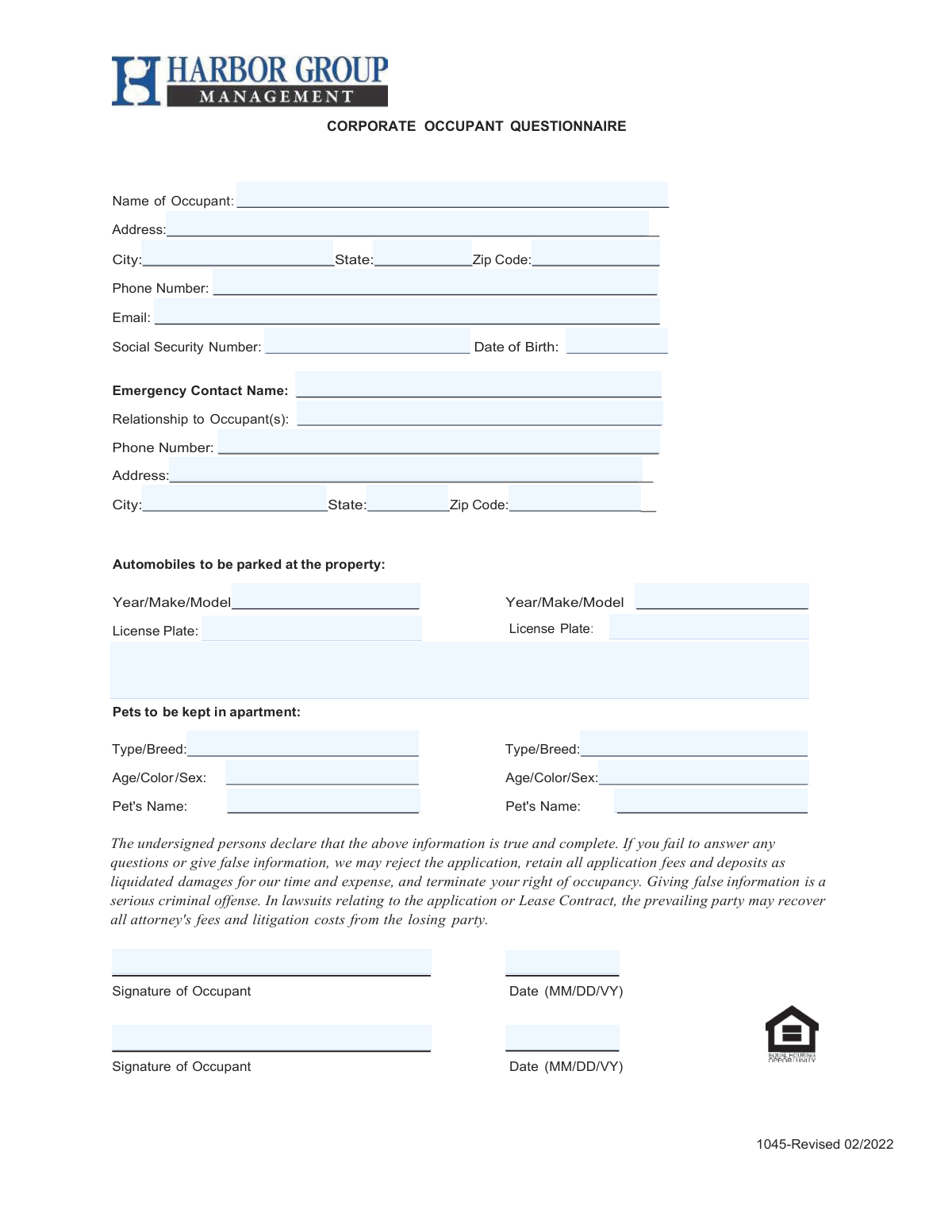
Yes! You can use AI to fill out Form 1045, Corporate Occupant Questionnaire
The Corporate Occupant Questionnaire is a document used to gather detailed information about the person who will be living in a property under a corporate lease. It collects personal details, emergency contacts, vehicle information, and pet details to ensure property management has a complete record for safety, security, and administrative purposes. Today, this form can be filled out quickly and accurately using AI-powered services like Instafill.ai, which can also convert non-fillable PDF versions into interactive fillable forms.
Our AI automatically handles information lookup, data retrieval, formatting, and form filling.
It takes less than a minute to fill out Form 1045 using our AI form filling.
Securely upload your data. Information is encrypted in transit and deleted immediately after the form is filled out.
Form specifications
| Form name: | Form 1045, Corporate Occupant Questionnaire |
| Number of pages: | 1 |
| Filled form examples: | Form Form 1045 Examples |
| Language: | English |
Instafill Demo: How to fill out PDF forms in seconds with AI
How to Fill Out Form 1045 Online for Free in 2026
Are you looking to fill out a FORM 1045 form online quickly and accurately? Instafill.ai offers the #1 AI-powered PDF filling software of 2026, allowing you to complete your FORM 1045 form in just 37 seconds or less.
Follow these steps to fill out your FORM 1045 form online using Instafill.ai:
- 1 Navigate to Instafill.ai and upload or select the Corporate Occupant Questionnaire.
- 2 Allow the AI to scan the document and identify all the required fields for occupant, emergency contact, vehicle, and pet information.
- 3 Provide your personal details in the designated sections, including your full name, address, date of birth, and Social Security Number.
- 4 Enter the information for your emergency contact, including their name, relationship, and contact details.
- 5 List the details for any vehicles you will park at the property and any pets that will be living in the apartment.
- 6 Carefully review all the information you've entered for accuracy, then e-sign the document in the signature fields.
- 7 Download, print, or directly submit your completed and signed questionnaire as required by the property management.
Our AI-powered system ensures each field is filled out correctly, reducing errors and saving you time.
Why Choose Instafill.ai for Your Fillable Form 1045 Form?
Speed
Complete your Form 1045 in as little as 37 seconds.
Up-to-Date
Always use the latest 2026 Form 1045 form version.
Cost-effective
No need to hire expensive lawyers.
Accuracy
Our AI performs 10 compliance checks to ensure your form is error-free.
Security
Your personal information is protected with bank-level encryption.
Frequently Asked Questions About Form Form 1045
This form collects essential personal, contact, vehicle, and pet information from individuals residing in a property under a corporate lease. It helps property management maintain accurate records for all occupants.
Any adult individual who will be living in the residence needs to complete this form. This applies even if the primary lease is held by a company or corporation.
Your Social Security Number is typically required for identity verification and may be used for a background check as part of the occupancy approval process. This is a standard procedure for many rental agreements.
If you do not have any vehicles to park on the property or pets living in the apartment, you can simply leave those sections blank. Only fill out the parts of the form that apply to you.
The form includes signature lines for two occupants, suggesting one form can cover both of you. However, you should confirm with property management if they prefer a separate questionnaire for each adult occupant.
You need to provide the full name, relationship to you, phone number, and full address for your emergency contact. This ensures management can reach someone on your behalf in an emergency.
The form has dedicated space for two vehicles. You can use the 'Additional Vehicle / Notes' field to list information for a third vehicle or contact property management for instructions.
By signing, you declare that all information provided is true and complete. Providing false information can result in the rejection of your application, forfeiture of fees, and termination of your occupancy rights.
Submission instructions are not provided on the form itself. You should deliver the completed questionnaire to your property manager or leasing office as directed in your application packet.
Yes, you can use AI-powered services like Instafill.ai to help fill out this form. These tools can auto-fill your information accurately, saving you time and reducing the chance of errors.
Simply upload the Corporate Occupant Questionnaire PDF to the Instafill.ai platform. Their service will make the document fillable online, allowing you to type in your information and download the completed form.
If you have a non-fillable or 'flat' PDF, you can use a tool like Instafill.ai to convert it into an interactive, fillable form. This allows you to easily type your answers directly into the fields on your computer.
For each pet, you must list its type and breed, its age, color, and sex, and its name. The form provides space to register up to two pets.
Compliance Form 1045
Validation Checks by Instafill.ai
1
Validates Social Security Number Format
This check ensures the Social Security Number is entered in the correct 9-digit format, either as XXXXXXXXX or XXX-XX-XXXX. Proper formatting is critical for identity verification and background checks required for occupancy. If the format is incorrect, the application processing will be halted until a valid SSN is provided.
2
Verifies Occupant is of Legal Age
This validation calculates the occupant's age based on the provided Date of Birth to confirm they are 18 years or older. This is a legal requirement for entering into a lease agreement, which is a binding contract. Applications from individuals under 18 will be rejected or require a qualified guarantor.
3
Ensures Valid Email Address Format
This check verifies that the email address contains an '@' symbol and a domain, conforming to the standard email format. A valid email is essential for all official communication, including application status updates, lease documents, and notices. An invalid email will prevent the applicant from receiving important information and may delay the application process.
4
Confirms All Mandatory Occupant Fields are Complete
This validation ensures that all required fields in the 'Occupant Personal Information' section, such as Name, full Address, Phone Number, SSN, and Date of Birth, are not left blank. Incomplete applications cannot be processed for background and credit checks, which are necessary for approval. The form submission will be blocked until all mandatory fields are filled.
5
Enforces Completeness of Emergency Contact Information
This rule checks that if an 'Emergency Contact Name' is provided, all associated fields (Relationship, Phone Number, and full Address) are also completed. This ensures that a complete and usable contact record is available in case of an emergency situation involving the occupant. If the dependent fields are empty, the user will be prompted to either complete the information or clear the emergency contact name.
6
Validates Vehicle License Plate Presence
This check ensures that if a vehicle's 'Year/Make/Model' is specified, its corresponding 'License Plate' number is also entered. This information is required for property management to maintain an accurate registry of all vehicles parked on the premises for security and parking enforcement. An entry with a missing license plate will be flagged as incomplete.
7
Ensures All Pet Details are Provided
This validation confirms that if a pet's 'Type/Breed' is listed, the 'Age/Color/Sex' and 'Pet's Name' fields are also filled out. Complete pet information is necessary for compliance with property pet policies, including breed restrictions and registration requirements. Incomplete pet entries will require correction before the application can be fully approved.
8
Validates Phone Number Structure
This check verifies that the occupant's and emergency contact's phone numbers consist of 10 digits, allowing for common formats like (XXX) XXX-XXXX or XXXXXXXXXX. A valid phone number is crucial for direct and timely communication regarding the application or emergencies. An invalid number will trigger an error, requiring the user to correct the entry before submission.
9
Verifies ZIP Code Format
This validation ensures that the ZIP Code for both the occupant and emergency contact addresses is a valid 5-digit or 9-digit (ZIP+4) numeric format. Accurate ZIP codes are essential for mail delivery and for verifying address information during background checks. An incorrectly formatted ZIP code will result in a validation error.
10
Validates State Field Entry
This check confirms that the 'State' field for both the occupant and emergency contact contains a valid U.S. state name or a standard two-letter abbreviation. This ensures data consistency and accuracy for address verification and record-keeping. An invalid entry would be flagged, requiring the user to select from a valid list or correct the text.
11
Validates Signature Date is Logical and Current
This check ensures the signature date is a valid calendar date, is not set in the future, and is not prior to the form's revision date of February 2022. This confirms the applicant is signing a current version of the form and attesting to the information on the day of signing. An invalid date would render the signature and the application legally questionable.
12
Conditional Validation for Second Occupant's Signature Date
This rule verifies that if a signature or name is entered in the 'Occupant 2 Signature' field, the corresponding 'Occupant 2 Signature Date' field is also filled. A signature without a date is legally incomplete and can invalidate the second occupant's attestation. The form will prompt for the date if the signature is present but the date is missing.
13
Validates Vehicle Model Year
This check ensures the 'Year' provided in the 'Year/Make/Model' field is a 4-digit number within a logical range, such as from 1950 to the current year plus one. This prevents data entry errors like typos or nonsensical years, ensuring the vehicle registry is accurate. An invalid year would trigger an error message requesting a correction.
14
Ensures Emergency Contact is Not the Occupant
This validation compares the 'Emergency Contact Name' against the 'Occupant Name' to ensure they are not the same person. The purpose of an emergency contact is to have an alternate person to reach out to, so listing oneself is redundant and defeats the purpose. If the names match, the system will prompt the user to provide a different contact.
Common Mistakes in Completing Form 1045
Applicants often transpose digits or enter an incomplete Social Security Number due to carelessness or rushing. An incorrect SSN will cause background and credit checks to fail, leading to immediate application rejection and processing delays. To avoid this, double-check each digit carefully before submission. Using an AI form-filler like Instafill.ai can help by validating the number's format and length, reducing the chance of a simple typo.
When filling out the address, it's common for occupants to forget to include their specific apartment or unit number. This omission can cause significant issues with mail delivery and emergency services locating the correct residence. Always ensure your full address, including any unit designator, is entered in the 'Address' field to prevent confusion and ensure you receive important communications.
People frequently enter their emergency contact's name but then neglect to fill in the corresponding phone number and address. This renders the information useless in an actual emergency, defeating the purpose of the section. To prevent this, complete all fields for the emergency contact once you have entered their name; this includes their full address and a reliable phone number.
The form specifies a date format of '(MM/DD/VY)' next to the signature line, which is unusual and likely a typo for YYYY. This ambiguity leads applicants to enter dates in various incorrect formats, which can cause document processing errors or questions about the document's validity. Always follow the specified format as closely as possible (e.g., MM/DD/YYYY) and be consistent. AI-powered tools like Instafill.ai can automatically format dates correctly based on the form's requirements.
In situations with multiple occupants, one person often fills out the form and forgets to have the second person sign and date it. A missing signature from any listed occupant can invalidate the entire agreement, leading to application rejection or the termination of occupancy rights. Ensure all individuals listed as occupants provide their signature and the date in the designated spaces.
The form asks for specific pet details like 'Age/Color/Sex', but the examples provided are slightly different for the first and second pet, causing confusion. Applicants may provide vague information or leave fields blank, which can violate pet policy agreements. To avoid issues, provide all requested information in a clear format (e.g., '3 yrs / Black / F') for every pet that will be on the property.
When listing automobiles, applicants often enter the license plate number but forget to include the state of issuance. Without the state, the license plate number is ambiguous and difficult for property management to track for parking enforcement. Always include the two-letter state abbreviation with your license plate number (e.g., 'ABC-1234, CA') to ensure your vehicle is correctly registered with the property.
Applicants sometimes enter a preferred nickname or a shortened version of their name instead of their full legal name as it appears on government-issued ID. This can cause a mismatch during the identity verification and background check process, leading to delays or rejection of the application. Always use your complete and official legal name in the 'Name of Occupant' field.
The form requires a signature to declare the information is true, but applicants using a computer may just type their name in the signature field. This may not be considered a legally binding signature, potentially invalidating the questionnaire and exposing the applicant to penalties for submitting an unsigned document. If filling out a digital version, use the provided e-signature tool; if it's a flat PDF, you may need to print, sign, and scan it. Tools like Instafill.ai can convert non-fillable PDFs into fillable forms with proper signature fields.
The form has separate lines for 'Year/Make/Model' and 'License Plate'. A common mistake is to write all vehicle information on one line or to enter the license plate in the 'Year/Make/Model' field. This disorganization makes it difficult for management to log vehicle data correctly for parking permits and security. Be sure to enter the vehicle's year, make, and model on the first line and its corresponding license plate number on the line directly below it.
Saved over 80 hours a year
“I was never sure if my IRS forms like W-9 were filled correctly. Now, I can complete the forms accurately without any external help.”
Kevin Martin Green
Your data stays secure with advanced protection from Instafill and our subprocessors
Robust compliance program
Transparent business model
You’re not the product. You always know where your data is and what it is processed for.
ISO 27001, HIPAA, and GDPR
Our subprocesses adhere to multiple compliance standards, including but not limited to ISO 27001, HIPAA, and GDPR.
Security & privacy by design
We consider security and privacy from the initial design phase of any new service or functionality. It’s not an afterthought, it’s built-in, including support for two-factor authentication (2FA) to further protect your account.
Fill out Form 1045 with Instafill.ai
Worried about filling PDFs wrong? Instafill securely fills form-1045-corporate-occupant-questionnaire forms, ensuring each field is accurate.