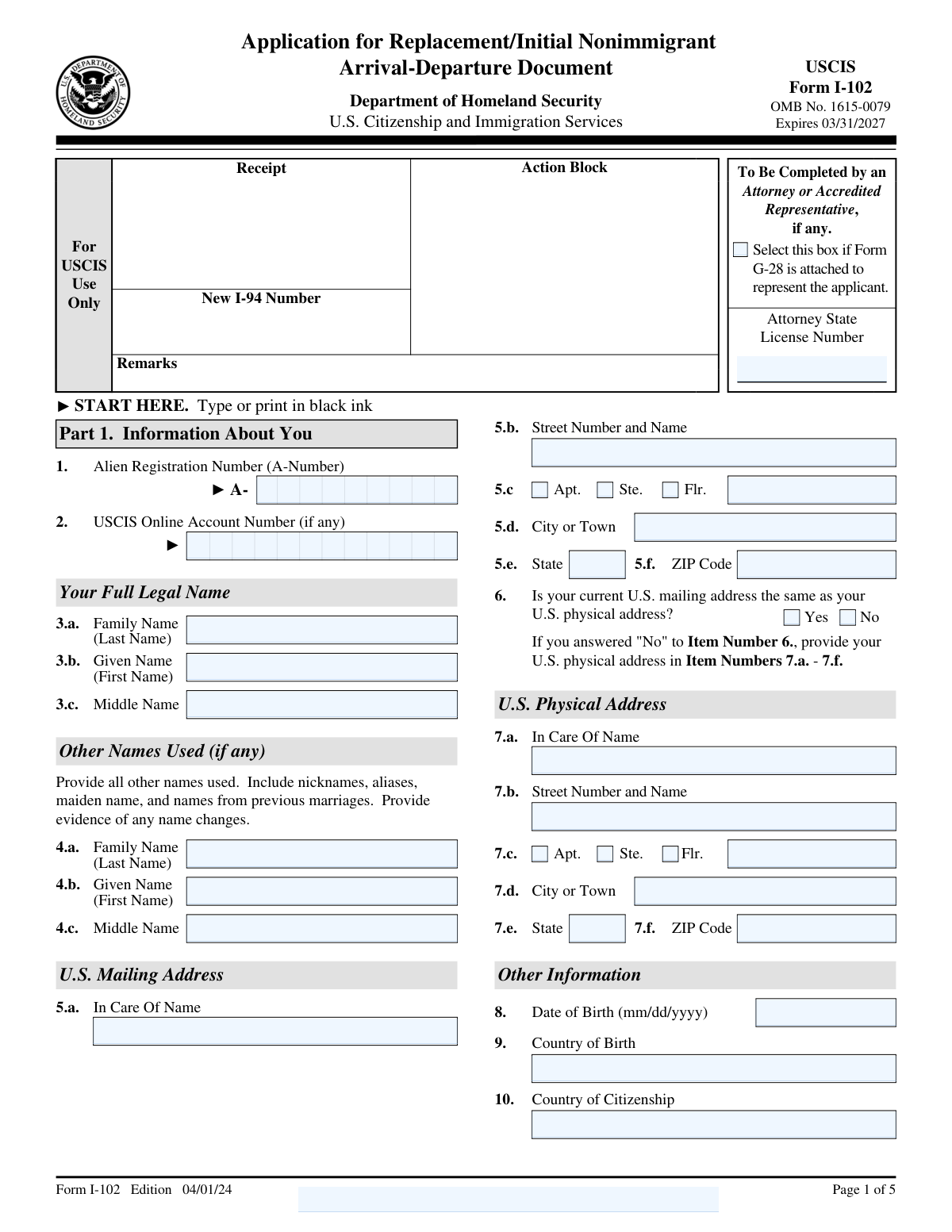
Fill out Form I-102, Application for Replacement/Initial Nonimmigrant Arrival-Departure Document with Instafill.ai
Worried about filling PDFs wrong? Instafill securely fills I-102 forms, ensuring each field is accurate.
#1 AI PDF Filling Software of 2025
3 out of 4 customers say they prepare their Form I-102 forms in 37 seconds or less
Secure platform for your PDF forms and personal information
| Form name: | Form I-102, Application for Replacement/Initial Nonimmigrant Arrival-Departure Document |
| Number of pages: | 5 |
| Download form: | https://www.uscis.gov/sites/default/files/document/forms/i-102.pdf |
Instafill Demo: filling out a legal form in seconds
Compliance Form I-102
Validation Checks by Instafill.ai
1
Verifies that the form is completed using black ink
This validation check ensures that the form is filled out using black ink, which is a requirement for clarity and compliance with submission standards. It confirms that all entries are legible and can be easily read by processing personnel. By enforcing this standard, the software helps to prevent any potential delays in processing due to illegible handwriting. This check is crucial for maintaining the integrity of the submitted information.
2
Confirms that the full legal name is provided
This validation check verifies that the applicant's full legal name is entered as it appears on their immigration documents. It ensures that all components of the name, including the family name, given name, and middle name, are accurately captured. This is essential for matching the application with existing records in the immigration system. By confirming the accuracy of the name, the software helps to avoid any discrepancies that could lead to processing issues.
3
Ensures that the USCIS Online Account Number and Alien Registration Number (A-Number) are accurately filled in
This validation check ensures that the USCIS Online Account Number and Alien Registration Number (A-Number) are correctly entered, if applicable. It verifies that these identifiers are accurate and correspond to the applicant's records, which is vital for tracking and processing the application. By confirming the presence and correctness of these numbers, the software helps to streamline the application process. This check is particularly important for applicants who have previously interacted with USCIS.
4
Checks that the U.S. physical address is complete
This validation check verifies that the U.S. physical address provided is complete and includes all necessary components such as street number, street name, city, state, and ZIP code. It ensures that the address is formatted correctly to facilitate accurate delivery of correspondence. By validating the completeness of the address, the software helps to prevent any issues related to mail delivery or communication from USCIS. This check is essential for ensuring that applicants receive timely updates regarding their application status.
5
Validates that a different mailing address is provided if applicable
This validation check ensures that if a different mailing address is provided, it is accurately filled in the designated section. It confirms that the applicant has indicated an alternative address for correspondence, which is important for maintaining effective communication. By validating this information, the software helps to ensure that all correspondence reaches the applicant without delay. This check is particularly useful for applicants who may not receive mail at their physical address.
6
Ensures that the date of birth, country of citizenship, and country of birth are accurately entered.
This validation check ensures that the applicant's date of birth is correctly formatted and falls within a reasonable range. It confirms that the country of citizenship is accurately specified, aligning with the applicant's legal documents. Additionally, it verifies that the country of birth is entered correctly, which is crucial for identity verification. By cross-referencing these details, the software helps prevent potential discrepancies that could delay the application process.
7
Verifies that any other names used are listed, along with evidence of name changes if applicable.
This check verifies that the applicant has provided all other names they have used, ensuring a comprehensive identity record. It confirms that any evidence of name changes, such as marriage certificates or court orders, is included if applicable. This validation is essential for maintaining accurate records and preventing identity fraud. By ensuring these details are complete, the software aids in a smoother review process by immigration authorities.
8
Confirms that only one reason for application is selected in Part 2, and that the original document is attached if replacing due to an error.
This validation check confirms that the applicant has selected only one reason for their application in Part 2, which is critical for processing efficiency. It ensures that if the application is for a replacement due to an error, the original document is attached as required. This helps to streamline the review process and reduces the likelihood of requests for additional information. By enforcing these requirements, the software enhances the accuracy and completeness of the application.
9
Checks that the applicant indicates whether they are filing this application with any other petition or application, including the USCIS form number and name if applicable.
This validation check ensures that the applicant has indicated if they are submitting this application alongside any other petitions or applications. It confirms that the USCIS form number and name of any related applications are provided, which is vital for processing multiple requests simultaneously. By capturing this information, the software helps to maintain a clear and organized record of the applicant's submissions. This check ultimately aids in expediting the review process by immigration officials.
10
Ensures that the applicant answers whether they are currently in removal proceedings and provides details if applicable.
This validation check ensures that the applicant has accurately indicated their current status regarding removal proceedings. It verifies that any necessary details are provided if the applicant is indeed in such proceedings, which is crucial for the assessment of their application. By capturing this information, the software helps to identify any potential legal implications that may affect the application process. This check is essential for ensuring that all relevant circumstances are considered during the review.
11
Validates that the applicant's mobile and daytime telephone numbers, and email address are provided if available.
This validation check ensures that the applicant has provided their mobile and daytime telephone numbers, as well as an email address if available. It confirms that these contact details are essential for communication regarding the application. By verifying the presence of this information, the software helps to facilitate any necessary follow-up or clarification. This step is crucial for maintaining an open line of communication between the applicant and the processing agency.
12
Confirms that the application is signed and dated by the applicant, certifying that all information is true and correct.
This validation check verifies that the application has been duly signed and dated by the applicant. It ensures that the applicant certifies the truthfulness and accuracy of all information provided in the application. By confirming the presence of a signature and date, the software helps to uphold the integrity of the application process. This step is vital for legal compliance and accountability.
13
Checks that the interpreter's contact information and signature are provided if an interpreter assisted in completing the application.
This validation check ensures that if an interpreter was involved in completing the application, their contact information and signature are included. It verifies that the application accurately reflects the assistance provided, which is important for transparency. By confirming this information, the software helps to maintain the integrity of the application process. This step is essential for ensuring that all parties involved are properly documented.
14
Ensures that the preparer's contact information and signature are included if someone else prepared the application, certifying the accuracy of the information.
This validation check verifies that if the application was prepared by someone other than the applicant, the preparer's contact information and signature are included. It ensures that the preparer certifies the accuracy of the information provided in the application. By confirming this detail, the software helps to uphold the accountability of the preparer. This step is crucial for maintaining the integrity of the application process.
15
Validates that any additional information is provided in Part 7, and that any attached sheets include the applicant's name and A-Number at the top.
This validation check ensures that any additional information required in Part 7 of the application is provided. It verifies that any attached sheets also include the applicant's name and A-Number at the top for proper identification. By confirming these details, the software helps to ensure that all relevant information is organized and easily accessible. This step is important for the efficient processing of the application.
Common Mistakes in Completing Form I-102
Submitting the form in ink colors other than black can lead to processing delays or rejections. It is essential to use black ink to ensure that the information is clearly legible and meets the requirements set by USCIS. To avoid this mistake, always check your writing instrument before filling out the form and keep a black pen handy. Additionally, reviewing the form after completion can help ensure compliance with this requirement.
Not providing your full legal name as it appears on official documents can result in discrepancies that may complicate your application process. It is crucial to ensure that your name matches exactly with the name on your passport or other legal identification. To prevent this error, double-check your documents and write your name as it appears, including any middle names or suffixes. If you have changed your name, be sure to include all previous names used.
Leaving out your USCIS Online Account Number or A-Number can hinder the processing of your application, especially if you have previously interacted with USCIS. These numbers are vital for tracking your application and linking it to your immigration history. To avoid this mistake, locate your A-Number on any previous USCIS correspondence or documents and ensure it is included in your application. If you do not have an account number, make sure to indicate that clearly on the form.
Providing incorrect or incomplete U.S. physical address details can lead to miscommunication and delays in receiving important documents. It is important to ensure that your address is accurate, including street number, street name, city, state, and zip code. To avoid this mistake, verify your address using a reliable source, such as a utility bill or official correspondence, before entering it on the form. Additionally, consider using a standardized address format to enhance clarity.
Failing to list all other names you have used or any name changes can create confusion and may result in your application being denied. USCIS requires a complete history of names to ensure accurate identification and processing. To prevent this issue, take the time to compile a list of all names you have used, including maiden names or aliases, and include them in the appropriate section of the form. This thoroughness will help avoid potential complications in your application.
Selecting multiple reasons for the application can lead to confusion and delays in processing. It is essential to choose only one reason that accurately reflects your situation. To avoid this mistake, carefully review the options provided and select the one that best applies to your circumstances. If you have questions about which reason to select, consider seeking guidance from an immigration professional.
Not attaching the original document when correcting errors can result in the rejection of your application. It is crucial to include the original document that contains the errors you are addressing. To prevent this issue, double-check the requirements for your application and ensure that all necessary documents are included before submission. Keeping a copy of all submitted documents for your records is also advisable.
Omitting information about filing with other petitions can lead to complications in processing your application. It is important to disclose if you are submitting this application alongside other petitions, as this information can affect your case. To avoid this mistake, carefully read the instructions and provide all relevant details regarding any concurrent filings. Transparency in your application helps immigration officials understand your situation better.
Failing to provide details about being in removal proceedings can significantly impact your application. It is vital to disclose your current status accurately, as this information is crucial for the processing of your application. To avoid this mistake, ensure that you include all relevant details regarding your removal proceedings in the appropriate section of the form. Consulting with an immigration attorney can also help clarify what information needs to be included.
Neglecting to provide a mobile or daytime telephone number can hinder communication regarding your application. Immigration authorities may need to contact you for additional information or clarification, and without a valid phone number, this may delay the process. To prevent this issue, always include your current contact information, ensuring it is accurate and up-to-date. Consider providing multiple contact methods if possible to facilitate communication.
Submitting the application without a signature and date can lead to delays or rejection. It is crucial to ensure that you sign and date the application in the designated areas before submission. To avoid this mistake, double-check the application to confirm that all required signatures are present. Additionally, consider setting a reminder to review the application for completeness before sending it.
Omitting or incorrectly filling out the interpreter's information can result in processing issues. It is essential to provide accurate details about the interpreter, including their name, contact information, and signature if applicable. To prevent this error, verify that the interpreter's information is complete and accurate before submitting the application. If an interpreter is not used, ensure that this section is appropriately marked.
Neglecting to include the preparer's contact information can hinder communication regarding the application. It is important to provide complete contact details for the preparer, including their phone number and email address. To avoid this mistake, review the application to ensure that all preparer's information is filled out correctly. If the application is prepared by someone else, confirm that they are aware of the need to provide their contact information.
Failing to use additional sheets when necessary can lead to incomplete applications. If there is not enough space on the form to provide all required information, it is important to attach additional sheets clearly labeled with the applicant's name and the relevant section. To avoid this issue, assess the form thoroughly and determine if additional sheets are needed before submission. Always ensure that any extra information is organized and easy to follow.
Submitting an incomplete application can result in delays or denials. It is vital to review the entire application to ensure that all sections are filled out and that all required documents are included. To prevent this mistake, create a checklist of all required information and documents before submission. Taking the time to review the application thoroughly can save time and prevent unnecessary complications.
Failing to retain a copy of the completed Form I-102 can lead to difficulties in tracking the status of your application or providing necessary documentation in the future. It is essential to keep a personal record of all submitted forms for your own reference and to ensure you have proof of your application. To avoid this mistake, make a photocopy or digital scan of the completed form before submission. Additionally, consider organizing your immigration documents in a dedicated folder to easily access them when needed.
Saved over 80 hours a year
“I was never sure if my IRS forms like W-9 were filled correctly. Now, I can complete the forms accurately without any external help.”
Kevin Martin Green
Your data stays secure with advanced protection from Instafill and our subprocessors
Robust compliance program
Transparent business model
You’re not the product. You always know where your data is and what it is processed for.
ISO 27001, HIPAA, and GDPR
Our subprocesses adhere to multiple compliance standards, including but not limited to ISO 27001, HIPAA, and GDPR.
Security & privacy by design
We consider security and privacy from the initial design phase of any new service or functionality. It’s not an afterthought, it’s built-in, including support for two-factor authentication (2FA) to further protect your account.
Fill out Form I-102 with Instafill.ai
Worried about filling PDFs wrong? Instafill securely fills i-102 forms, ensuring each field is accurate.