Yes! You can use AI to fill out Form I-539, Application to Extend/Change Nonimmigrant Status

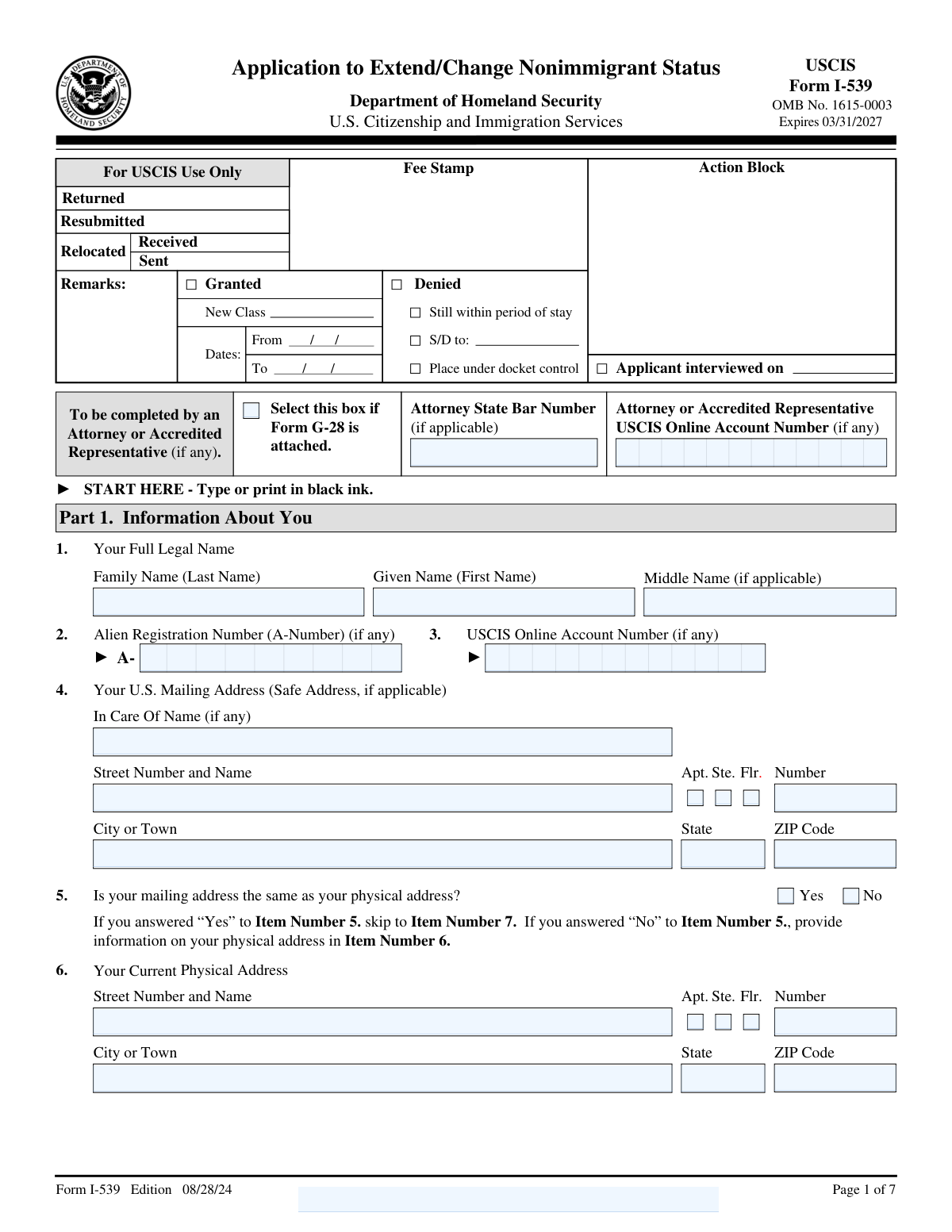
Form I-539 (Application to Extend/Change Nonimmigrant Status) is a USCIS application used by certain nonimmigrants to request an extension of stay, a change to another nonimmigrant classification, or related requests such as reinstatement to student status, and it may include eligible family co-applicants. It collects identity details (A-Number/USCIS account number, passport and I-94 information), addresses, current status and expiration, requested action, and background/eligibility questions, plus signatures and preparer/interpreter information when applicable. Filing it accurately is important because USCIS uses it to determine whether you may lawfully remain in the U.S. under the requested terms and whether you are admissible/eligible for the benefit. Today, this form can be filled out quickly and accurately using AI-powered services like Instafill.ai, which can also convert non-fillable PDF versions into interactive fillable forms.
Our AI automatically handles information lookup, data retrieval, formatting, and form filling.
It takes less than a minute to fill out I-539 using our AI form filling.
Securely upload your data. Information is encrypted in transit and deleted immediately after the form is filled out.

Form specifications

Form name: Form I-539, Application to Extend/Change Nonimmigrant Status
Number of pages: 7
Filled form examples: Form I-539 Examples
Language: English
Categories: passport forms
main-image

Instafill Demo: filling out a legal form in seconds

How to Fill Out I-539 Online for Free in 2026

Are you looking to fill out a I-539 form online quickly and accurately? Instafill.ai offers the #1 AI-powered PDF filling software of 2026, allowing you to complete your I-539 form in just 37 seconds or less.
Follow these steps to fill out your I-539 form online using Instafill.ai:
  1. 1 Go to Instafill.ai and upload the Form I-539 PDF (or select Form I-539 from the form library).
  2. 2 Let the AI detect and map the form fields, then provide your basic identity details (full legal name, date of birth, country of birth/citizenship, SSN if any, A-Number/USCIS online account number).
  3. 3 Enter your mailing address and indicate whether it is the same as your current physical address; if different, complete the physical address section.
  4. 4 Provide your most recent entry and document details (I-94 number, last arrival date, passport/travel document number, country of issuance, and expiration date).
  5. 5 Complete your current nonimmigrant status information (classification, expiration date or D/S) and select the application type (extension, change of status, or reinstatement), including any requested effective dates and school/SEVIS details if applicable.
  6. 6 Answer the processing and eligibility/background questions (including any prior filings, petitions, employment, removal proceedings, and other yes/no disclosures) and add explanations in the Additional Information section when required.
  7. 7 Review the AI validation checks, generate the final completed PDF, then print for required wet signatures (applicant/interpreter/preparer as applicable) and prepare for submission to USCIS with supporting documents.

Our AI-powered system ensures each field is filled out correctly, reducing errors and saving you time.

Why Choose Instafill.ai for Your Fillable I-539 Form?

Speed

Complete your I-539 in as little as 37 seconds.

Up-to-Date

Always use the latest 2026 I-539 form version.

Cost-effective

No need to hire expensive lawyers.

Accuracy

Our AI performs 10 compliance checks to ensure your form is error-free.

Security

Your personal information is protected with bank-level encryption.

Frequently Asked Questions About Form I-539

Form I-539 is used to request an extension of stay, a change of nonimmigrant status, or (in some cases) reinstatement to student status. The form collects your identity, entry, status, and eligibility information so USCIS can decide your request.

You should file if you are a nonimmigrant in the U.S. seeking to extend your current stay, change to a different nonimmigrant status, or request reinstatement to student status (as applicable). You can file for yourself only or include eligible family members as co-applicants.

Select “extension of stay” if you want more time in the same status, “change of status” if you want to switch to a different nonimmigrant category, and “reinstatement to student status” if you are requesting your student status be reinstated. Your selection controls which additional fields you must complete (like requested effective date or school/SEVIS information).

Yes—check the option indicating you are filing for yourself and family members, then enter the total number of people included. If you are the only applicant, select “I am the only applicant” and do not complete the total-people field.

Provide your A-Number and USCIS Online Account Number only if you have them, and enter your Social Security Number only if you have one. If you do not have a number, leave that field blank rather than entering zeros.

Use the I-94 Arrival/Departure Record number and the date of your most recent arrival as shown on your I-94 record and entry documents. Enter the I-94 number exactly as listed (including any letters and numbers).

If your mailing address is the same as your physical address, check “Yes” and skip the physical address fields. If it is different, check “No” and complete the current physical address fields (note that the physical address should not be a P.O. Box).

Check the box that matches the type of unit number you are providing (apartment, suite, or floor). Then enter the actual unit identifier in the unit number field (including letters or hyphens if applicable).

If you were admitted for “D/S,” check the D/S box and do not enter a specific status expiration date. If you were not admitted for D/S, leave that box unchecked and enter the date your current status expires.

The requested effective date is when you want the new status to begin, and the requested new status/employer field describes what you are changing to (such as a new nonimmigrant category or employer, if applicable). These fields are completed only if you selected “A change of status.”

Attach Form G-28 if an attorney or accredited representative is representing you, and check the “G-28 Attached” box. If you check it, you must also provide the attorney/representative’s state bar number (if an attorney) and their USCIS Online Account Number as requested.

If you answer “Yes” to any of those questions, you must provide an explanation in Part 8 (Additional Information). Include the page number, part number, and item number you are explaining, and provide clear details.

If you answer “No” to having been employed, you must describe how you are supporting yourself in Part 8 and include documentary evidence of the source, amount, and basis for any income. If you answer “Yes,” list all employment periods and whether the work was authorized by USCIS.

This form’s signature fields indicate they cannot be signed electronically, so you must print the form and sign in ink (and date it). The same applies to interpreter and preparer signatures, if those sections are used.

Yes—AI tools can help reduce errors and save time by auto-filling fields from your information; services like Instafill.ai can map your data to the correct form fields. If your PDF is flat/non-fillable, Instafill.ai can convert it into an interactive fillable form and then guide you to complete it online before you print and sign in ink.

Compliance I-539
Validation Checks by Instafill.ai

1
Footer/Page Identifier Fields Must Match Expected Template Values
Validates that 'Page 1 Footer Text' and 'Footer Field 1 — Page Identifier' are present (if required by the form package) and match the expected format/allowed character set (typically short alphanumeric codes). This helps ensure the submission is tied to the correct edition/page set and prevents misrouting or rejection during scanning/indexing. If the value is missing or contains disallowed characters/length, flag the submission for correction or regeneration of the form package.
2
A-Number Format Validation (If Provided)
Checks that the Alien Registration Number, if entered, is 7–9 digits (often presented as 'A' followed by digits, but stored as digits only) and contains no invalid characters. This is critical for matching the applicant to USCIS records and avoiding identity mismatches. If the A-Number fails format rules, reject the field and require re-entry or leave blank if the applicant truly does not have one.
3
USCIS Online Account Number Format Validation (Applicant and Representative)
Validates that the applicant’s and (if applicable) the attorney/representative’s USCIS Online Account Number follow the expected numeric length and character constraints (commonly a 12-digit number; allow leading zeros). Correct formatting is important for linking the filing to the correct USCIS online profile and preventing account association errors. If invalid, the system should block submission or prompt correction depending on whether the field is optional/conditional.
4
G-28 Attachment Conditional Completeness (Attorney/Representative Section)
If 'G-28 Attached' is checked, require attorney/representative identifiers such as 'Attorney State Bar Number' and 'Attorney or Accredited Representative USCIS Online Account Number' (as applicable to the representative type) to be completed and non-placeholder. This ensures representation is properly documented and USCIS can communicate with the authorized party. If 'G-28 Attached' is not checked, these fields must be blank to avoid conflicting representation signals.
5
Applicant Legal Name Completeness and Character Validation
Ensures 'Family Name (Last Name)' and 'Given Name (First Name)' are present and contain only valid name characters (letters plus limited punctuation like hyphen/apostrophe), and are not obviously invalid (e.g., 'N/A', 'Unknown', single character). Accurate legal names are essential for identity verification and record matching. If validation fails, prevent submission and request corrected legal name entry.
6
Mailing Address Required Fields and ZIP Code Format
Validates that the mailing address includes 'Street Number and Name', 'City or Town', 'State', and 'ZIP Code', and that ZIP is either 5 digits or ZIP+4 (##### or #####-####). This is necessary for deliverability of USCIS notices and to avoid returned mail. If any required component is missing or ZIP format is invalid, the submission should be blocked until corrected.
7
Apt/Ste/Flr Checkbox and Unit Number Consistency (Mailing and Physical)
Checks that at most one of Apt/Ste/Flr is selected for a given address and that if any is selected, the corresponding unit number field is populated; conversely, if a unit number is provided, one of Apt/Ste/Flr should be selected (unless the form allows 'Unit' without a checkbox). This prevents ambiguous address parsing and improves mail deliverability. If inconsistent, prompt the user to either select the correct unit type or clear the unit number.
8
Mailing vs Physical Address Branching Logic
Validates that exactly one of 'Yes' or 'No' is selected for whether mailing address equals physical address. If 'No' is selected, all current physical address fields become required and must not contain a P.O. Box; if 'Yes' is selected, the physical address fields must be blank/ignored. If branching rules are violated, the system should block submission and highlight the missing/extra address fields.
9
Date Fields Must Be Valid Calendar Dates and Use Required Format
Validates all date inputs (e.g., Date of Birth, Date of Last Arrival, Passport Expiration, Status Expiration, Requested Effective Date, Requested Extension Date, signature dates, 'Date Filed') are real calendar dates and conform to mm/dd/yyyy with leading zeros where required. This prevents downstream parsing errors and ensures USCIS receives interpretable dates. If invalid, reject the date field and require correction before submission.
10
Chronological Consistency: DOB, Arrival Date, Signature Dates, and Expiration Dates
Checks logical ordering across key dates: Date of Birth must be in the past; Date of Last Arrival must be after DOB; passport/travel document expiration should be on/after the arrival date; applicant/interpreter/preparer signature dates should not precede DOB and should not be unreasonably far in the future. These checks catch common data-entry mistakes (transposed month/day/year) that can cause adjudication delays. If inconsistencies are found, flag for review and require confirmation/correction.
11
SSN Format Validation (If Provided)
Validates that the U.S. Social Security Number, if entered, is exactly 9 digits (optionally allowing hyphens in the pattern ###-##-####) and is not an obvious invalid placeholder (e.g., 000000000). Correct SSN formatting supports identity verification and reduces mismatches. If invalid, require correction or allow blank if the applicant indicates they do not have an SSN.
12
I-94 Number Format Validation (Most Recent Entry)
Checks that the I-94 Arrival-Departure Record Number is present (if required for the filing) and matches expected length/character rules (commonly 11 digits, though some formats may include letters). This is critical for verifying lawful admission and linking to CBP/USCIS entry records. If the I-94 number fails validation, block submission or require the applicant to confirm the number from their I-94 record.
13
Passport/Travel Document Data Completeness and Expiration Logic
If a passport/travel document number is provided, require the associated country of issuance and expiration date (where those fields exist for the same row/section), and validate that expiration is not before the date of last arrival. This ensures the travel document information is usable and internally consistent. If incomplete or illogical, prompt the user to complete the missing fields or correct the dates.
14
Nonimmigrant Status Expiration vs D/S Selection
Validates that if 'Select if granted Duration of Status (D/S)' is checked, 'Date Status Expires' must be blank; if D/S is not checked, 'Date Status Expires' must be provided and be a valid date. This prevents contradictory status information and aligns with how USCIS records status validity. If the rule is violated, block submission and require the user to correct the D/S selection or expiration date.
15
Application Type Selection Requires Exactly One Primary Choice and Related Fields
Ensures exactly one of the application type options is selected (extension of stay, change of status, reinstatement to student status) unless the form explicitly allows multiple (typically it does not). If 'change of status' is selected, require 'Requested effective date' and 'Requested new status/employer or information medium'; if 'reinstatement' is selected, require 'Name of School' and 'SEVIS ID Number'. If selection is missing/multiple or required dependent fields are blank, prevent submission and request correction.
16
Number of People Included Logic and Total Count Validation
Validates that exactly one of 'I am the only applicant' or 'I am filing for myself and members of my family' is selected. If filing with family, 'Total number of people included' must be an integer greater than 1; if only applicant, the total count field must be blank or implicitly 1. If the count is non-numeric, zero/negative, or inconsistent with the selection, block submission and prompt for correction.
17
Processing Information Dependency: Prior/Pending Petition Answers and Receipt Number/Date Filed
Validates that the 'Yes/No' processing information questions are mutually exclusive (only one option selected) and that if any 'Yes' option is selected indicating a related petition/application, the USCIS Receipt Number and 'Date Filed' are required and properly formatted. This is important for USCIS to locate the related case and adjudicate the request correctly. If 'Yes' is selected without the receipt/date (or with invalid formats), the submission should be blocked or routed to exception handling.
18
Part 4 Yes/No Question Exclusivity and Part 8 Explanation Requirement
For each Part 4 question presented as separate 'Yes' and 'No' checkboxes, validate that exactly one is selected (not both, not neither). Additionally, if any question that instructs an explanation upon 'Yes' is answered 'Yes' (e.g., items 3–15, including criminal history, removal proceedings, status violations, weapons training), require at least one Part 8 entry referencing the correct Page/Part/Item and containing non-empty explanatory text. If exclusivity or explanation requirements fail, block submission and direct the applicant to correct the answers or provide the required explanation.
19
Contact Information Format Validation (Phones and Emails) and Minimum Contact Requirement
Validates that telephone numbers (daytime/mobile for applicant, interpreter, preparer) contain valid digits and optional punctuation, and conform to expected U.S. length (typically 10 digits, optionally with country code). Validates email addresses (if provided) using standard email syntax rules and rejects obvious invalid placeholders. If the form requires at least one reliable contact method (commonly a daytime phone), enforce presence; if formats are invalid, prompt correction before submission.
20
Signature Presence and Signature Date Requirements (Applicant/Interpreter/Preparer)
Ensures the applicant signature field is not blank and that a signature date is provided and valid; similarly, if interpreter or preparer sections are completed, require their signatures and dates as well. The form notes signatures cannot be electronic, so the system should validate that the submission method includes an ink-signed scanned page or otherwise meets the channel’s signature policy. If signatures/dates are missing or inconsistent with completion of those sections, reject the submission as incomplete.

Common Mistakes in Completing I-539

Mixing up A-Number and USCIS Online Account Number

Applicants often enter their USCIS Online Account Number in the A-Number field (or vice versa) because both are “identification numbers” and may appear on different USCIS notices. This can cause USCIS to mis-associate your filing with the wrong record or delay intake while they verify identity. Avoid this by copying each number from the correct source document (A-Number is typically 7–9 digits; the USCIS Online Account Number is a separate identifier tied to your online profile). AI-powered tools like Instafill.ai can help by validating number patterns and placing each ID in the correct field.

Checking G-28 Attached but leaving attorney fields blank (or filling them when G-28 is not attached)

People frequently mark “G-28 Attached” and forget to complete the attorney’s bar number and the representative’s USCIS online account number, or they fill those fields even though no G-28 is included. This creates inconsistencies that can lead to rejection, requests for evidence, or USCIS sending notices to the wrong party. Only check the box if Form G-28 is actually included in the packet, and then complete all related attorney/representative fields exactly as issued (including letters, punctuation, and leading zeros). Instafill.ai can enforce conditional logic so the attorney fields appear only when G-28 is selected and can flag missing dependent fields.

Name not entered exactly as on official documents

Applicants commonly use nicknames, omit a second family name, swap given/family name order, or put “N/A” in the middle name field instead of leaving it blank. Name mismatches can trigger identity verification issues, delays, or problems matching the application to prior immigration records. Enter your full legal name exactly as shown on your passport and immigration documents, and leave the middle name field blank if you have none. Instafill.ai can help standardize name formatting and reduce accidental swaps between first/last name fields.

Incorrect use of C/O (In Care Of) in the mailing address

Many applicants put their own name in the C/O field, or they enter a landlord/roommate name without actually needing mail delivered “in care of” that person. This can confuse delivery and increase the risk of missed USCIS notices if the address label is interpreted incorrectly. Use C/O only when you must receive mail through another person or organization, and otherwise leave it blank. Instafill.ai can prompt you to use C/O only when it’s truly required and keep the mailing label consistent.

Putting apartment/unit information in the street line or failing to check Apt/Ste/Flr

A very common error is entering “Apt 4B” in the Street Number and Name field, or entering a unit number but not checking whether it’s an apartment, suite, or floor. This can lead to address standardization problems, returned mail, or delivery delays for time-sensitive USCIS correspondence. Keep the street address line to street number and street name only, put the unit identifier in the Apt./Ste./Flr./Unit Number field, and check the correct box (Apt/Ste/Flr). Instafill.ai can automatically split and format addresses to USPS-style conventions and flag missing unit-type selections.

Mailing address vs. physical address mismatch (Yes/No box checked incorrectly)

Applicants often check “Yes, same as physical address” out of habit, even when they use a safe mailing address (friend, attorney, or P.O. Box) that differs from where they live. If the wrong box is checked, the form’s conditional physical address section may be skipped, leaving required fields blank or creating contradictory addresses. Carefully decide whether the mailing address is the same as where you physically reside; if “No,” complete every physical address field and do not use a P.O. Box for the physical address. Instafill.ai can help by detecting when a mailing address looks like a P.O. Box or third-party address and prompting you to complete the physical address section.

Date format errors and inconsistent dates across sections

This form repeatedly requires dates in a strict 2-digit month/2-digit day/4-digit year format, and applicants frequently use international formats (DD/MM/YYYY), write text months, or enter inconsistent timelines (e.g., last arrival after status start, passport expiration before last entry). Incorrect or conflicting dates can cause delays, rejections, or credibility concerns that lead to follow-up requests. Always use MM/DD/YYYY and cross-check that your last arrival date, I-94 information, passport validity, and status expiration/D/S selection align. Instafill.ai can validate date formats and run consistency checks across related fields.

I-94 number and travel document details entered incorrectly

People often transpose digits, omit letters, use an old I-94 instead of the most recent one, or confuse “passport number” with “travel document number” fields. Errors here can prevent USCIS from verifying lawful admission and may trigger requests for evidence or delays while records are matched. Use the I-94 from your most recent entry (from CBP’s I-94 website or your admission record) and copy the number exactly, including any letters; ensure the passport/travel document country of issuance and expiration date match the document used for that entry. Instafill.ai can reduce transcription errors by formatting and validating alphanumeric IDs and ensuring the “most recent entry” fields are internally consistent.

Incorrect selection between D/S and a specific status expiration date

Applicants in F-1/J-1 and similar categories sometimes enter a specific expiration date even though their I-94 shows “D/S,” or they check D/S but still fill the “Date Status Expires” field. This can create contradictions about your authorized stay and may lead to confusion or additional review. If your I-94 indicates Duration of Status (D/S), check the D/S box and do not provide a fixed expiration date; if not D/S, provide the exact expiration date from your I-94/status document. Instafill.ai can guide the correct conditional path and prevent entering a date when D/S is selected.

Wrong application type selection (extension vs change of status vs reinstatement)

Applicants sometimes check multiple boxes or choose the wrong category because the terms sound similar (e.g., “extension” vs “change,” or selecting “reinstatement” when they are actually extending). Selecting the wrong type can result in an incorrect filing basis, missing required supporting evidence, or even a rejected or denied request. Choose exactly the option that matches your intent and eligibility, and complete the dependent fields (e.g., requested effective date and requested new status details for a change of status; school name and SEVIS ID for reinstatement). Instafill.ai can help by asking clarifying questions and ensuring only the correct downstream fields are completed.

Failing to provide required explanations in Part 8 for “Yes” answers or employment/support details

Many applicants answer “Yes” to sensitive questions (immigrant petition, arrests, status violations, removal proceedings, J-1 history, weapons/military-related questions) but forget to add the required explanation in Part 8, or they answer “No” to U.S. employment and fail to describe how they are supporting themselves with documentary evidence. Missing explanations commonly lead to Requests for Evidence (RFEs) or delays because USCIS cannot assess eligibility or admissibility without details. When any item instructs you to explain in Part 8, include the page/part/item reference and a clear, complete narrative (dates, locations, agencies, outcomes) and attach supporting documents as needed. Instafill.ai can flag when a “Yes” answer requires a Part 8 entry and can auto-populate the correct page/part/item references to reduce omissions.
Saved over 80 hours a year

“I was never sure if my IRS forms like W-9 were filled correctly. Now, I can complete the forms accurately without any external help.”

Kevin Martin Green

Your data stays secure with advanced protection from Instafill and our subprocessors

Robust compliance program

Transparent business model

You’re not the product. You always know where your data is and what it is processed for.

ISO 27001, HIPAA, and GDPR

Our subprocesses adhere to multiple compliance standards, including but not limited to ISO 27001, HIPAA, and GDPR.

Security & privacy by design

We consider security and privacy from the initial design phase of any new service or functionality. It’s not an afterthought, it’s built-in, including support for two-factor authentication (2FA) to further protect your account.

Fill out I-539 with Instafill.ai

Worried about filling PDFs wrong? Instafill securely fills form-i-539-application-to-extendchange-nonimmigrant-status forms, ensuring each field is accurate.



