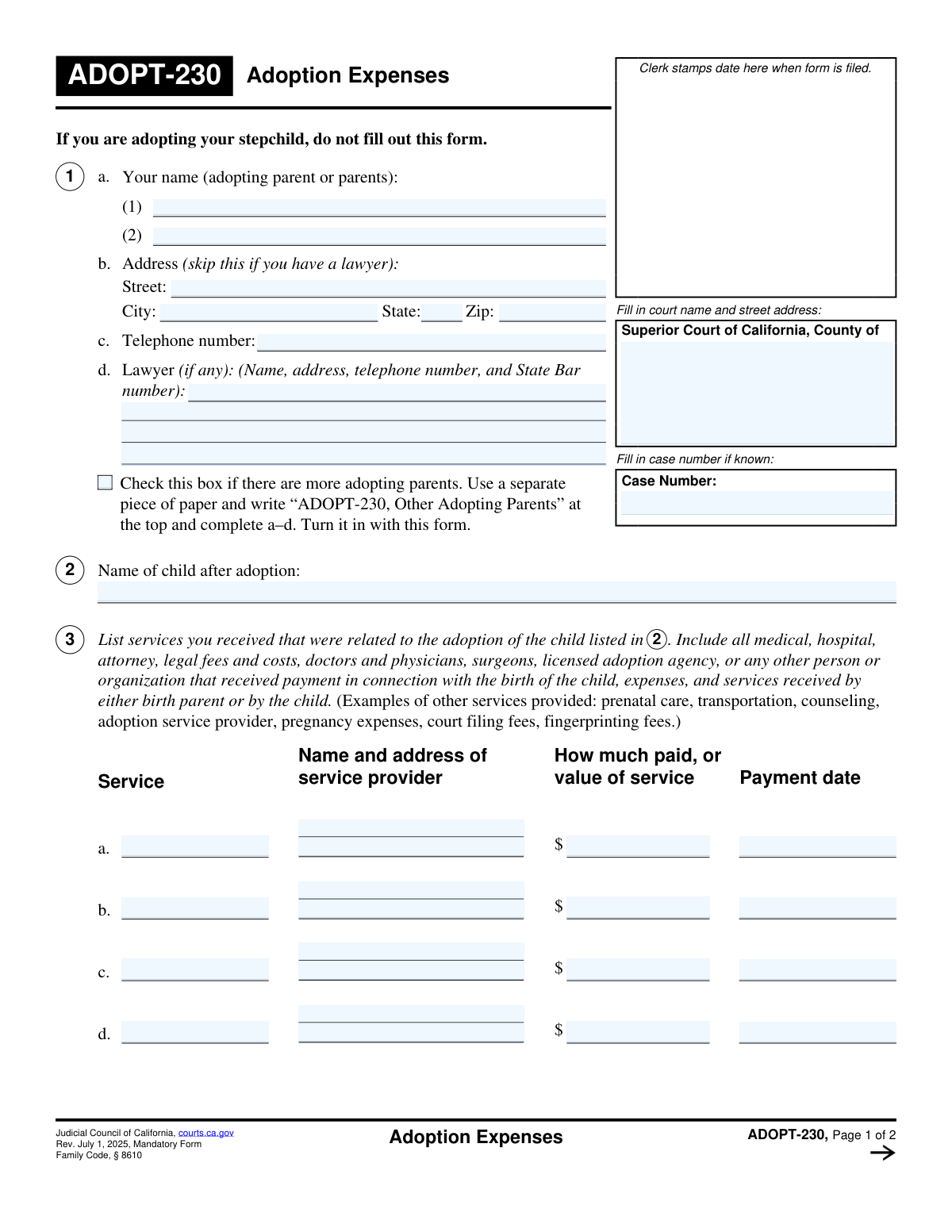
Yes! You can use AI to fill out Form ADOPT-230, Adoption Expenses
Form ADOPT-230 is a legal document filed with the California Superior Court to provide a detailed accounting of all expenses incurred during the adoption process. It ensures transparency by requiring prospective parents to list all payments made to agencies, attorneys, or other parties for services related to the adoption. Today, this form can be filled out quickly and accurately using AI-powered services like Instafill.ai, which can also convert non-fillable PDF versions into interactive fillable forms.
Our AI automatically handles information lookup, data retrieval, formatting, and form filling.
It takes less than a minute to fill out ADOPT-230 using our AI form filling.
Securely upload your data. Information is encrypted in transit and deleted immediately after the form is filled out.
Form specifications
| Form name: | Form ADOPT-230, Adoption Expenses |
| Number of fields: | 74 |
| Number of pages: | 2 |
| Language: | English |
| Categories: | adoption forms |
Instafill Demo: How to fill out PDF forms in seconds with AI
How to Fill Out ADOPT-230 Online for Free in 2026
Are you looking to fill out a ADOPT-230 form online quickly and accurately? Instafill.ai offers the #1 AI-powered PDF filling software of 2026, allowing you to complete your ADOPT-230 form in just 37 seconds or less.
Follow these steps to fill out your ADOPT-230 form online using Instafill.ai:
- 1 Navigate to Instafill.ai and upload your ADOPT-230 form, or select it from their library of official documents.
- 2 Enter the court and case information at the top of the form. The AI can assist in formatting the court's address correctly.
- 3 Provide the personal details for the adopting parent(s) and their legal representative, if applicable. Instafill.ai can pre-fill this information from your profile.
- 4 Systematically list each expense related to the adoption, including the service description, provider details, amount paid, and payment date for each item.
- 5 Indicate if additional pages are attached for listing more expenses, and specify the total number of attached pages.
- 6 Carefully review all the entered information for accuracy, then print the form for the adopting parent(s) to sign and date in the designated sections.
Our AI-powered system ensures each field is filled out correctly, reducing errors and saving you time.
Why Choose Instafill.ai for Your Fillable ADOPT-230 Form?
Speed
Complete your ADOPT-230 in as little as 37 seconds.
Up-to-Date
Always use the latest 2026 ADOPT-230 form version.
Cost-effective
No need to hire expensive lawyers.
Accuracy
Our AI performs 10 compliance checks to ensure your form is error-free.
Security
Your personal information is protected with bank-level encryption.
Frequently Asked Questions About Form ADOPT-230
This form is used to report all services, payments, and items of value you have received or paid in connection with an adoption. It provides the court with a complete accounting of all financial transactions related to the adoption process.
The adopting parent or parents must complete and sign this form. If you are represented by a lawyer, they may assist you in preparing it and can be listed in the 'Lawyer Information' section.
You should list any service related to the adoption, such as legal fees, agency fees, medical expenses, or counseling services. For each service, you must provide the provider's name, the amount paid or its value, and the payment date.
If a case number has not yet been assigned to your adoption proceedings, you can leave that field blank. The court clerk will typically add the number when the case is officially filed.
The form indicates you should only fill in your personal address if your lawyer's name and address are not provided. If you have legal representation, enter your lawyer's information in the designated section instead.
Service Value refers to the estimated monetary worth of a service or item you received, even if you did not pay for it with cash. For example, if you were provided with free housing, you would estimate its fair market rental value.
If you have more services to list than the form allows, check the box for 'Need More Space for Services.' List the additional items on a separate sheet of paper and attach it to the form, indicating the total number of attached pages.
Check the 'More Adopting Parents' box and provide the additional parents' information on a separate, attached paper. The form includes a signature line for a third adopting parent.
This form should be filed with the court handling your adoption case, which is the court you list at the top of the form. Contact the court clerk for specific submission instructions.
In this field, you should enter the full legal name you intend for the child to have after the adoption is legally finalized. This is the name that will appear on the new birth certificate.
Yes, services like Instafill.ai use AI to help you accurately auto-fill forms like this one. This can save you time and help reduce errors by pulling information from your saved records.
To fill this form using Instafill.ai, you can upload the PDF to their platform. The AI will identify all the fields, allowing you to fill them in quickly or have the tool auto-fill them with your saved information.
You can use a service like Instafill.ai, which is designed to convert flat, non-fillable PDFs into interactive forms. Simply upload your document, and the platform will make the fields fillable online.
Compliance ADOPT-230
Validation Checks by Instafill.ai
1
Conditional Address Requirement for Adopting Parents
This check ensures that contact information is complete. It verifies that either the full 'Adopting Parent(s) Address' (Street, City, State, Zip) is provided, or the 'Lawyer Name and Address' is provided. If the lawyer's information is filled, the parent's address is not required, and vice-versa. A failure indicates that neither a direct address for the parents nor a lawyer's address was provided, making it impossible to contact the filers.
2
Validates All Date Formats and Plausibility
This validation inspects all date fields, including all 'Payment Date' and 'Signature Date' entries. It ensures each date is in a valid format (e.g., MM/DD/YYYY) and represents a real, plausible date. The check also confirms that no dates are set in the future, as all actions reported on the form should have already occurred. An error would be flagged for invalid formats or future dates.
3
Ensures Completeness of Core Required Fields
This check verifies that essential information for identifying the case and parties is present. It confirms that 'Court Name and Street Address', 'Adopting Parent 1 Name', and 'Child's Name After Adoption' are all filled out. These fields are critical for the form to be processed correctly, and their absence would render the document incomplete and un-fileable.
4
Service Block Integrity Check
For each service block (First through Eighth), this validation ensures that if any single piece of information is entered (e.g., 'Service Value'), then all other fields within that same block (Description, Provider Name/Address, and Payment Date) are also completed. This prevents partial, ambiguous entries about expenses. A failure means a service entry is incomplete, making it impossible to verify the expense.
5
Validates Format of All Monetary Values
This check examines all fields representing a monetary value, such as 'Service Value Paid' and 'Amount Paid'. It ensures the entry is a valid positive number, formatted as currency (e.g., 123.45 or $123.45). This is crucial for accurate financial accounting and reimbursement calculations. An invalid format would prevent the system from correctly summing totals or processing the financial data.
6
Validates Telephone Number Format
This validation applies to the 'Adopting Parent(s) Telephone Number' and 'Lawyer Phone' fields. It checks that the entered value conforms to a standard North American phone number format, such as (XXX) XXX-XXXX or XXXXXXXXXX. This ensures the contact information is usable and correctly formatted for communication purposes. A failure would indicate a typo or an invalid number.
7
Signature Name and Date Consistency for First Adopting Parent
This check verifies that the 'First Adopting Parent Printed Name' in the signature section matches the 'Adopting Parent 1 Name' entered at the top of the form. It also ensures the 'First Adopting Parent Signature Date' is present. This confirms the identity of the person signing the form and that the signature is properly attested and dated.
8
Conditional Requirement for Second Parent's Signature
This validation is triggered if 'Adopting Parent 2 Name' is filled out. It then checks to ensure that the 'Second Adopting Parent Printed Name' and 'Second Adopting Parent Signature Date' fields are also completed. This maintains consistency and ensures that if a second parent is party to the adoption, their legal signature and attestation are properly recorded on the form.
9
Logical Check on Signature Date vs. Payment Dates
This validation compares the signature dates against all service payment dates listed on the form. It ensures that the signature date is on or after the latest payment date. It is logically inconsistent for a parent to sign and attest to a list of payments before all of those payments have been made. A failure suggests a data entry error in either the payment or signature date.
10
Conditional Requirement for Attached Pages Count
This check is linked to the 'Need More Space for Services' checkbox. If this box is checked, the validation ensures that the 'Number of Pages Attached' field contains a positive integer (e.g., 1 or greater). If the box is not checked, it ensures the number of pages is zero or empty. This prevents discrepancies where filers indicate attachments but fail to specify how many.
11
Validates Zip Code Format
This check applies to the 'Zip Code' field within the 'Adopting Parent(s) Address'. It verifies that the entry is a valid 5-digit or 9-digit (ZIP+4) US postal code. Correctly formatted zip codes are essential for mail delivery and for geolocating the address for jurisdictional purposes. An error would be flagged for non-numeric characters or an incorrect number of digits.
12
Conditional Requirement for Third Parent's Signature
This validation is triggered if the 'More Adopting Parents' checkbox is checked. It then verifies that the 'Third Adopting Parent Printed Name' and 'Third Adopting Parent Signature Date' fields are filled out. This rule ensures that when additional parents are declared, their information is properly captured in the signature section as required.
Common Mistakes in Completing ADOPT-230
The form requires the adopting parent's address ONLY if the lawyer's information is not provided. A common error is filling out both address sections, which can cause confusion and lead to mail being sent to the wrong location. To avoid this, carefully read the instructions for each section and only provide one primary contact address. AI-powered tools like Instafill.ai can automatically handle this conditional logic, ensuring only the correct fields are filled based on your inputs.
Users often list a service provider's name (e.g., 'Dr. Smith' or 'Adoption Agency') without including the complete street address, city, state, and zip code. This omission makes it difficult or impossible for the court to verify the services and expenses claimed, potentially leading to the disallowance of those costs. Before starting the form, gather the full business name and address for every service provider you need to list.
Applicants frequently use nicknames, initials, or omit middle names for themselves or the child (e.g., 'Jen' instead of 'Jennifer Anne'). Legal documents require full legal names as they appear on official identification like birth certificates or passports. Using incorrect names can cause mismatches with other court records and require amendments, delaying the adoption process.
People often enter dates in various formats (e.g., 01-15-2024, 15/01/24, Jan 15, 2024) across the multiple 'Payment Date' fields. This inconsistency can lead to data entry errors and ambiguity for the court clerk. To prevent this, use the standard MM/DD/YYYY format consistently for all date entries throughout the document. Form-filling tools can automatically enforce a single, correct format.
The lawyer's State Bar number is a unique identifier required for verification, but it is often forgotten or entered incorrectly. Without this number, the court cannot confirm the attorney's standing and authority to represent the adopting parents, causing significant processing delays. Always confirm the correct State Bar number with your attorney's office before completing this section.
A frequent mistake is checking a box like 'More Adopting Parents' or 'Need More Space for Services' but forgetting to attach the corresponding documents. Conversely, users may attach extra pages but fail to check the box or specify the 'Number of Pages Attached'. This leads to an incomplete submission, as the court may disregard information that isn't properly referenced on the main form.
In the service payment sections, users may enter vague descriptions like 'fees' or 'consultation' instead of providing specific details. The court needs to understand the exact nature of the expense, such as 'Post-placement supervision visit' or 'Preparation of adoption finalization paperwork'. Vague entries can trigger a request for more information, halting the case's progress.
When entering monetary values, people may include currency symbols ($), commas, or non-numeric text, which can cause data rejection. Another error is leaving the field blank for services that were bartered or free, instead of estimating and entering their fair monetary value as instructed. To avoid this, enter only numbers and decimal points, and research a fair market value for any non-cash services received.
In the signature section, the 'Printed Name' must exactly match the full legal name provided at the top of the form. People sometimes rush and print a shorter or informal version of their name out of habit. This discrepancy can raise questions about the identity of the signatory and the validity of the document, potentially requiring re-submission.
The case number is a critical identifier that often has a specific format of letters, numbers, and dashes, which is easy to mistype. Entering this number incorrectly can lead to the document being misfiled or rejected entirely, as it cannot be linked to the correct court case. Always copy the case number exactly as it appears on other official court documents. If the form is a non-fillable PDF, a tool like Instafill.ai can convert it to a fillable version, reducing the chance of manual entry errors.
Saved over 80 hours a year
“I was never sure if my IRS forms like W-9 were filled correctly. Now, I can complete the forms accurately without any external help.”
Kevin Martin Green
Your data stays secure with advanced protection from Instafill and our subprocessors

Robust compliance program
Transparent business model
You’re not the product. You always know where your data is and what it is processed for.
ISO 27001, HIPAA, and GDPR
Our subprocesses adhere to multiple compliance standards, including but not limited to ISO 27001, HIPAA, and GDPR.
Security & privacy by design
We consider security and privacy from the initial design phase of any new service or functionality. It’s not an afterthought, it’s built-in, including support for two-factor authentication (2FA) to further protect your account.
Fill out ADOPT-230 with Instafill.ai
Worried about filling PDFs wrong? Instafill securely fills form-adopt-230-adoption-expenses forms, ensuring each field is accurate.