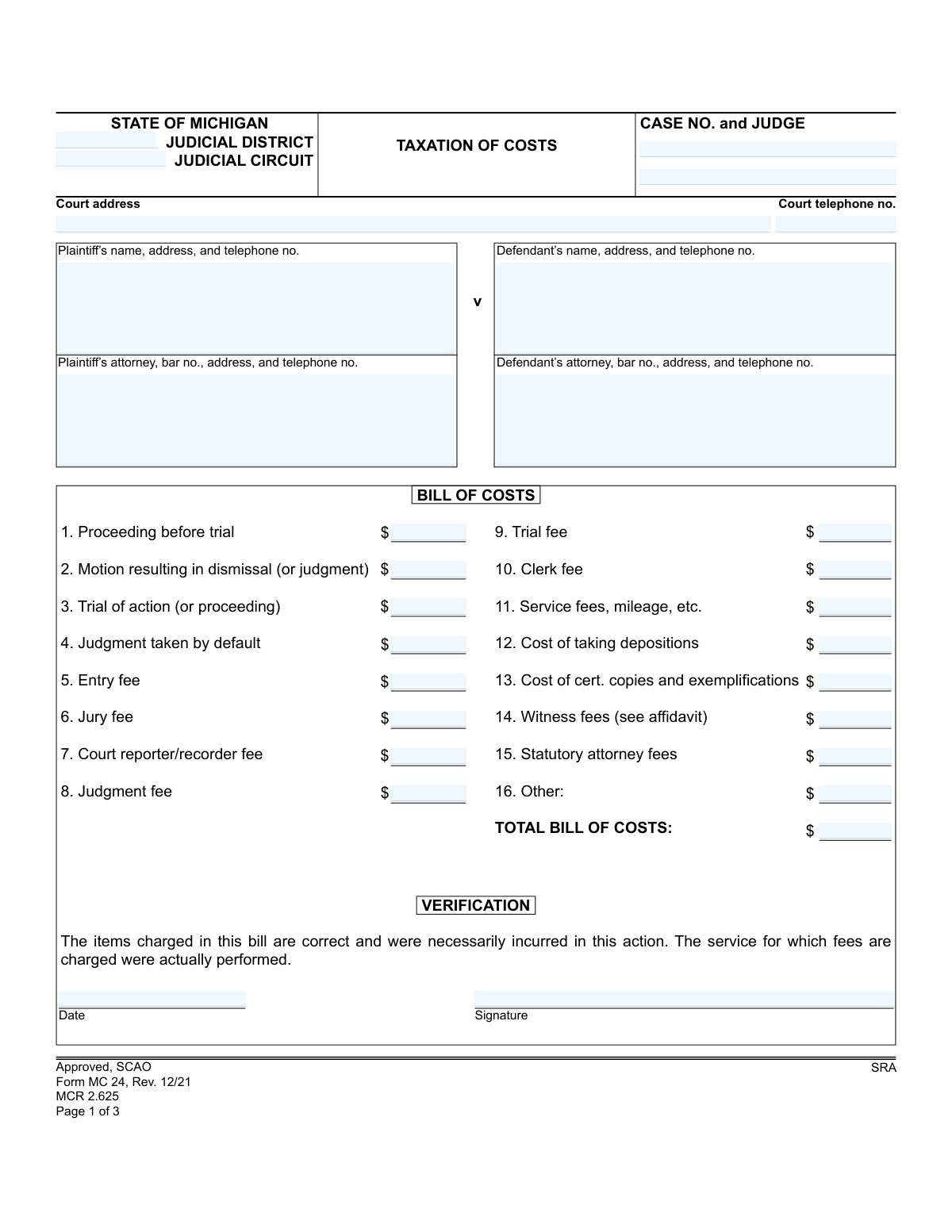
Yes! You can use AI to fill out Form MC 24, Taxation of Costs

Form MC 24, Taxation of Costs, is a legal document used in the State of Michigan for the prevailing party in a lawsuit to claim and itemize the costs they are entitled to recover from the losing party. It includes sections for listing various fees (court, service, witness), a verification statement, and an affidavit for witness expenses. Today, this form can be filled out quickly and accurately using AI-powered services like Instafill.ai, which can also convert non-fillable PDF versions into interactive fillable forms.
MC 24 is part of the Michigan court forms and Michigan tax forms categories on Instafill.
Our AI automatically handles information lookup, data retrieval, formatting, and form filling.
It takes less than a minute to fill out MC 24 using our AI form filling.
Securely upload your data. Information is encrypted in transit and deleted immediately after the form is filled out.

Form specifications

Form name: Form MC 24, Taxation of Costs
Number of fields: 69
Number of pages: 1
Language: English
main-image

Instafill Demo: How to fill out PDF forms in seconds with AI

How to Fill Out MC 24 Online for Free in 2026

Are you looking to fill out a MC 24 form online quickly and accurately? Instafill.ai offers the #1 AI-powered PDF filling software of 2026, allowing you to complete your MC 24 form in just 37 seconds or less.
Follow these steps to fill out your MC 24 form online using Instafill.ai:
  1. 1 Navigate to Instafill.ai and upload or select the MC 24, Taxation of Costs form.
  2. 2 Provide the case details, including the court, case number, judge, and information for the plaintiff and defendant.
  3. 3 Enter the itemized costs in the 'Bill of Costs' section, detailing expenses like entry fees, service fees, and deposition costs.
  4. 4 If claiming witness fees, complete the 'Affidavit' section with the name, residence, days attended, and miles traveled for each witness.
  5. 5 Complete the 'Verification' section by signing and dating to certify that the costs listed are correct and were necessarily incurred.
  6. 6 Review all the information populated by the AI for accuracy, then download, print, or e-file the completed Form MC 24.

Our AI-powered system ensures each field is filled out correctly, reducing errors and saving you time.

Why Choose Instafill.ai for Your Fillable MC 24 Form?

Speed

Complete your MC 24 in as little as 37 seconds.

Up-to-Date

Always use the latest 2026 MC 24 form version.

Cost-effective

No need to hire expensive lawyers.

Accuracy

Our AI performs 10 compliance checks to ensure your form is error-free.

Security

Your personal information is protected with bank-level encryption.

Frequently Asked Questions About Form MC 24

This form is used by the winning party in a Michigan court case to request reimbursement for specific legal costs they incurred during the lawsuit. It provides an itemized list for the court to review and assess against the losing party.

The prevailing party (the winner) of a lawsuit, or their attorney, fills out this form to claim allowable costs from the non-prevailing party (the loser).

You can claim statutory fees and other necessary costs, such as court filing fees, jury fees, service fees, deposition costs, and witness fees as detailed in the 'Bill of Costs' section. All claimed expenses must have been necessarily incurred in the action.

You will need your case number, court information, names and addresses of all parties and attorneys, and a detailed, itemized list of all costs you are claiming. If claiming witness fees, you'll also need the witness's details for the affidavit.

The Affidavit section must be completed if you are claiming costs for witness fees. You must list each witness, the days they attended court, and the miles they traveled, and then sign the affidavit before a notary public.

Yes, the Affidavit section on page 2 requires your signature to be witnessed and certified by a notary public or a deputy court clerk.

These are specific, limited attorney fees that a prevailing party may be entitled to recover by law or court rule. They are typically a set amount and are not the same as the total attorney fees paid for the entire case.

By signing the Verification section, you are legally affirming that the costs listed are correct, were necessary for the case, and that the services for which fees are charged were actually performed.

Yes, you must serve a copy of the completed Bill of Costs and any affidavits on the other party or their attorney. You must then complete and sign the 'Certificate of Mailing' on page 3 to prove that you have done so.

After you file the form and serve it on the other parties, the court clerk will review it, along with any objections, and 'tax' the costs. The clerk will then issue a final taxed bill of costs, which becomes part of the judgment.

The other party has the right to file objections to your Bill of Costs within a specific time frame. The court clerk will consider these objections when deciding which costs to allow.

Yes, services like Instafill.ai use AI to accurately auto-fill form fields with your case and personal information, which can save time and reduce errors.

You can use a service like Instafill.ai to fill out the form online. Simply upload the MC 24 form, and the platform will make it interactive, allowing you to type in your information and save or print the completed document.

If you have a non-fillable or 'flat' PDF, you can upload it to a platform like Instafill.ai. It can convert the static PDF into an interactive, fillable form that you can easily complete on your computer.

Compliance MC 24
Validation Checks by Instafill.ai

1
Bill of Costs Total Calculation
Validates that the sum of all individual cost items (lines 1-16) equals the value entered in the 'TOTAL BILL OF COSTS' field. This is a critical arithmetic check to ensure the financial accuracy of the document before it is submitted for approval. A mismatch would indicate a calculation error and would require the user to correct the individual line items or the total.
2
Case Number Consistency Across Pages
Ensures the 'Case No.' field contains the exact same value on page 1, page 2, and page 3. This is crucial for document integrity and proper filing within the court system. If the case numbers do not match, the document could be misfiled or rejected, causing significant delays.
3
Notary Commission Expiration Date Validity
Checks that the notary's 'commission expires on' date is on or after the 'Subscribed and sworn to before me on' date. A notarization is legally invalid if the notary's commission was expired at the time of signing. This validation prevents the submission of a legally deficient document.
4
Monetary Field Format Validation
Verifies that all fields in the 'BILL OF COSTS' section (items 1-16 and the total) contain valid, non-negative numerical currency values. This check prevents data entry errors, such as entering text or negative numbers into financial fields. Failure would require the user to format the entry as a proper dollar amount (e.g., 123.45).
5
Required Signature Presence
Confirms that essential signature fields, specifically 'Verification Signature', 'Affidavit Signature', and 'Notary public signature', are not empty. These signatures are legally required to attest to the document's authenticity and the truthfulness of its contents. An unsigned form is incomplete and cannot be processed.
6
Attorney Bar Number Format
Validates that the 'Plaintiff’s attorney, bar no.' and 'Defendant’s attorney, bar no.' fields, if filled, conform to the expected format for a Michigan State Bar number (e.g., a 'P' followed by numbers). This helps ensure the attorney is correctly identified and is a member in good standing. An invalid format could indicate a typo or an incorrect entry.
7
Affidavit Witness Data Integrity
Checks that for each witness row in the affidavit, if any data (like days or miles) is entered, the corresponding 'NAME' field for that witness is also filled. It is illogical and incomplete to have cost details without identifying the witness to whom they apply. This ensures each cost claim is associated with a specific individual.
8
Date Field Format and Plausibility
Ensures all date fields ('Verification Date', 'Affidavit Date', 'Subscribed and sworn to before me on', etc.) are entered in a valid date format (e.g., MM/DD/YYYY) and are not set to a future date. This maintains data consistency and prevents the entry of impossible dates, which would invalidate the timeline of events documented in the form.
9
Affidavit Numeric Field Validation
Verifies that the 'DAYS' and 'MILES' columns in the witness affidavit section contain only non-negative whole numbers. These fields are used to calculate witness fees and must be numeric. This check prevents errors from text or special characters being entered where quantitative data is required.
10
Party Information Completeness
Ensures that either the 'Plaintiff’s name, address, and telephone no.' or the 'Defendant’s name, address, and telephone no.' field group is fully completed. The form is meaningless without identifying at least one of the primary parties involved in the case. This check guarantees the document can be associated with the correct legal entities.
11
Court Telephone Number Format
Validates that the 'Court telephone no.' field is in a recognizable US phone number format (e.g., (XXX) XXX-XXXX or XXXXXXXXXX). Correct formatting ensures the contact information is usable and can be processed by automated systems. An invalid format would be flagged for user correction.
12
Notary County Information Presence
Checks that if a notary signature is present, the 'Notary public, State of Michigan, County of' field is also filled. A notary's jurisdiction is a required element for a valid notarial act. This validation ensures that all necessary components for the notarization are present on the form.

Common Mistakes in Completing MC 24

Incorrect or Incomplete Case Number

Filers often enter the case number incorrectly, omitting parts of it or transposing digits. The case number is the primary identifier for the entire legal action, and an error can cause the document to be misfiled, delayed, or rejected outright by the court clerk. Always double-check the complete case number, including the year and case type codes, against official court documents before submitting.

Mathematical Errors in the Total Bill of Costs

Manually adding the 16 separate cost items often leads to calculation errors in the 'TOTAL BILL OF COSTS' field. An incorrect total can lead to disputes with the opposing party or require the form to be amended and refiled, causing delays. To avoid this, use a calculator and double-check your addition before writing the final number. AI-powered form fillers like Instafill.ai can prevent this by performing the calculations automatically.

Missing Verification Signature or Date

The verification section on page 1 is a sworn statement confirming the accuracy of the costs. Forgetting to sign or date this section is a critical error that renders the entire Bill of Costs invalid. The court clerk will reject an unverified bill, forcing the filer to start the process over. Always perform a final check for all required signatures before filing.

Failure to Properly Notarize the Affidavit

The affidavit on page 2, which supports the claim for witness fees, is legally invalid without proper notarization. Common mistakes include forgetting to get it notarized at all, or the notary omitting their signature, commission expiration date, or official stamp. A defective affidavit will result in the denial of reimbursement for all witness fees claimed. Ensure you sign in the presence of a notary and verify that their section is completed correctly.

Incomplete Witness Information in the Affidavit

When claiming witness fees, filers often fail to completely fill out the table in the Affidavit section on page 2. Each witness requires a name, residence, the number of days they attended, and the miles they traveled. Leaving any of this information blank gives the opposing party or the court a reason to object to and deny reimbursement for that specific witness's costs.

Forgetting to Sign the Certificate of Mailing

The Certificate of Mailing on page 3 is the filer's official declaration that they have sent a copy of the Bill of Costs to all other parties in the case. Forgetting to sign and date this certificate means there is no proof of service. This failure can nullify the filing and halt the cost taxation process until proper service is proven.

Omitting Parties or Attorneys from Service Lists

The form requires a list of attorneys and unrepresented parties for service purposes on page 2. A common mistake is forgetting to include all opposing counsel or any parties who are representing themselves (pro se). This failure results in improper service, which can lead to legal challenges, sanctions, and significant delays in getting the costs taxed.

Miscategorizing Costs or Using Vague Descriptions

Filers may incorrectly place a cost in the wrong category (e.g., putting a motion fee under 'Trial fee') or provide a vague entry for 'Other' costs without attaching supporting documentation. This confusion can lead the court clerk or judge to strike the cost item as improper or unsubstantiated. It is crucial to categorize each expense correctly and provide detailed explanations and receipts for any costs listed under 'Other'.

Missing Attorney Bar Number

The form explicitly asks for the bar number for both the plaintiff's and defendant's attorneys. This number is a unique identifier essential for the court to verify the attorney's standing and for proper record-keeping. Omitting the bar number can lead to the document being flagged as incomplete and may delay processing. This type of data validation can be handled automatically by tools like Instafill.ai, which can store and populate this information correctly every time.

Filing a Scanned, Non-Fillable Document

Often, parties receive this form as a flat, non-fillable PDF, leading them to print it, fill it out by hand, and then scan it. This can result in illegible handwriting, misaligned text, and calculation errors that cause rejection. To ensure clarity and professionalism, it's better to use a tool like Instafill.ai, which can convert any non-fillable PDF into an interactive, fillable form that can be completed digitally, ensuring all entries are legible and properly formatted.
Saved over 80 hours a year

“I was never sure if my IRS forms like W-9 were filled correctly. Now, I can complete the forms accurately without any external help.”

Kevin Martin Green

Your data stays secure with advanced protection from Instafill and our subprocessors

Robust compliance program

Transparent business model

You’re not the product. You always know where your data is and what it is processed for.

ISO 27001, HIPAA, and GDPR

Our subprocesses adhere to multiple compliance standards, including but not limited to ISO 27001, HIPAA, and GDPR.

Security & privacy by design

We consider security and privacy from the initial design phase of any new service or functionality. It’s not an afterthought, it’s built-in, including support for two-factor authentication (2FA) to further protect your account.

Fill out MC 24 with Instafill.ai

Worried about filling PDFs wrong? Instafill securely fills form-mc-24-taxation-of-costs forms, ensuring each field is accurate.