
Yes! You can use AI to fill out National Youth in Transition Database (NYTD) Survey
Don't type 78 fields by hand. Tell our AI about yourself, or upload a document you already have, and it fills every field in seconds. You check it, then download, print or sign.
The AI does the filling. You just check it.
No typing into boxes, nothing to install.
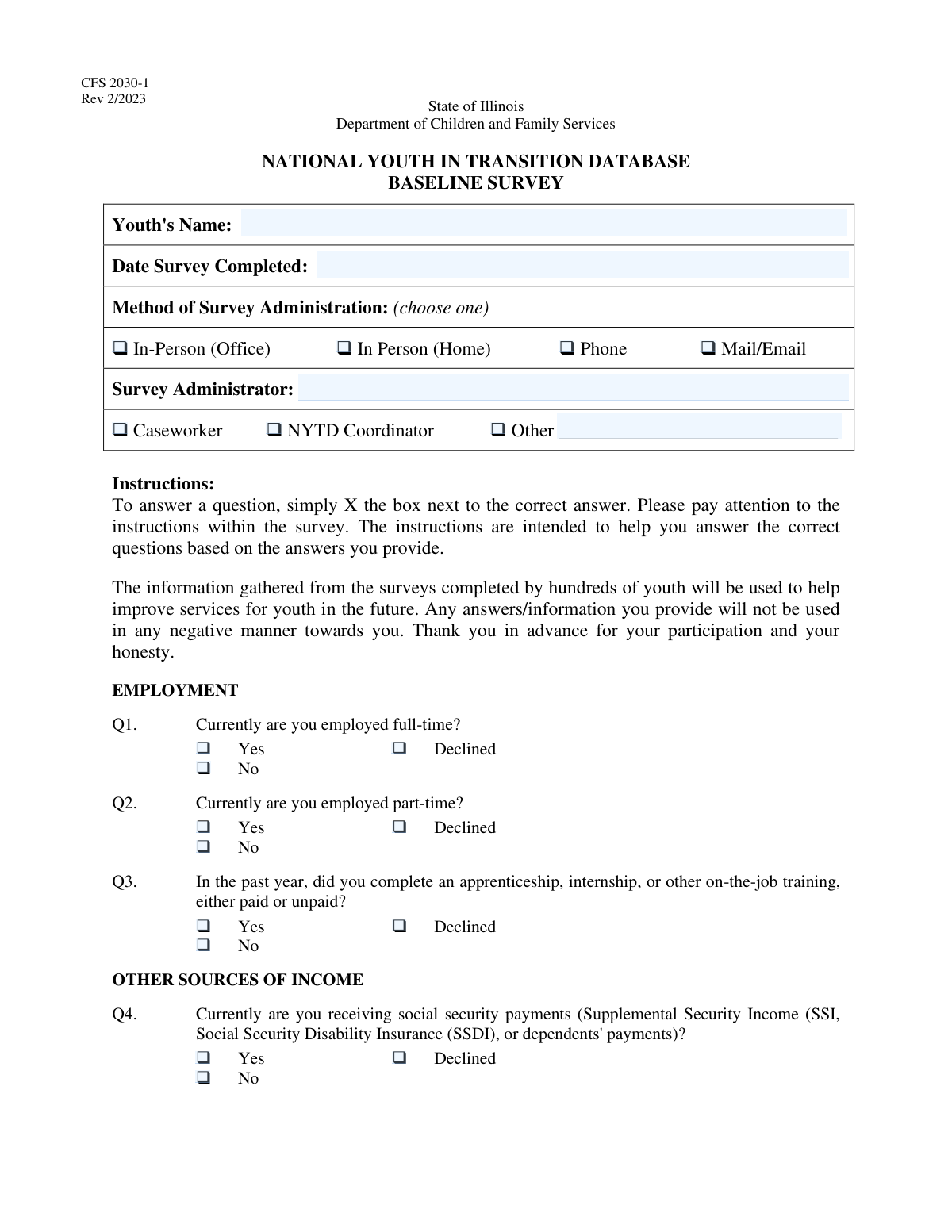
What this form asks for
The AI fills all of it, from your answers or your documents.
The AI checks your answers before you download
14 checks built for this form, so a wrong date or a missing answer is caught before anyone else sees it.
This validation checks that the 'Survey Completion Date' field contains a valid date in a recognized format (e.g., MM/DD/YYYY). It also ensures the date is not set in the future, as a survey cannot be completed on a day that has not yet occurred. If the date is invalid or in the future, the form submission will be rejected and the user will be prompted to enter a correct, past or present date.
This check validates that only one option is selected from the 'Method of Survey Administration' group (In-Person Office, In-Person Home, Phone, Mail/Email). Selecting multiple methods is logically inconsistent for a single survey event. A failed validation will trigger an error message asking the user to select only one administration method to ensure data accuracy.
This validation ensures that only one role (Caseworker, NYTD Coordinator, or Other) is selected for the survey administrator. An individual can only have one primary role in the context of administering this specific survey. If more than one role is checked, the system will display an error and require the user to specify a single role.
This check enforces a conditional logic rule: the 'Other Survey Administrator Role' text field must be filled out if and only if the 'Other' checkbox is selected for the administrator's role. This ensures that when a non-standard role is indicated, it is properly described. If 'Other' is checked and the text field is empty, or if the text field is filled when 'Other' is not checked, the submission will fail until the inconsistency is resolved.
This validation ensures that for the 'Full-Time Employment Status' question, exactly one of the three options ('Yes', 'No', or 'Declined to answer') is selected. This prevents contradictory or incomplete data, such as selecting both 'Yes' and 'No'. If zero or more than one option is selected, the form will prompt the user to make a single, definitive choice.
This check verifies that a youth cannot be reported as both employed full-time and employed part-time. If a user selects 'Yes, employed full-time', they cannot also select 'Yes' for 'Part-Time Employment Status'. This cross-field validation prevents logically impossible employment scenarios, ensuring higher data quality. A validation failure would require the user to correct the employment status entries.
And 8 more checks
- Conditional Validation for Marital Status Question
- Conditional Validation for Medical Services Coverage
- Chained Conditional Logic for Mental Health Coverage
- Requires a Single Selection for Highest Educational Degree
- Ensures Youth's Name is Provided
- Ensures Survey Administrator's Name is Provided
- Mutually Exclusive Selection for Housing Status
- Mutually Exclusive Selection for Social Security Payments
Let AI fill out your NYTD Survey
No typing. Every field filled in seconds, checked, ready to sign.
How to Fill Out NYTD Survey Online for Free in 2026
What the AI walks you through.
- Navigate to Instafill.ai and upload your NYTD Survey form or select it from a list of available templates.
- Instafill's AI will process the document, making all fields interactive, including checkboxes for survey responses.
- Enter the basic information at the top of the form, such as the youth's name, survey completion date, and the administrator's details.
- Proceed through the survey questions, checking the appropriate 'Yes,' 'No,' or 'Declined' boxes for topics like employment, education, financial resources, and housing.
- The platform will intelligently handle conditional questions, such as those about health insurance coverage, appearing only when relevant.
- Review all your answers. The AI will flag any missed questions to ensure the survey is complete and accurate.
- Securely download, print, or share the completed NYTD Survey directly from the platform.
Frequently Asked Questions About NYTD Survey
Is it really free for 7 days?
Can I fill other forms too?
How do I cancel?
How does the AI fill out NYTD Survey?
What happens to my information?
How complex is NYTD Survey to fill out?
What is the purpose of this survey?
Who is supposed to complete this survey?
What if I don't want to answer a sensitive question?
Who can be a 'Survey Administrator'?
For the 'Other Financial Resources' question, what should I include?
I have a part-time job. How do I answer the employment questions?
What counts as an 'on-the-job training'?
For the 'PERMANENT RELATIONSHIPS WITH ADULTS' question, who can I list?
I'm not sure if I have health insurance or what it covers. What should I do?
What happens to the information I provide?
Can I use an AI tool to help me fill out this form?
How can I fill out this survey online if I only have a paper copy?
The PDF version of this survey I received is not fillable. What can I do?
If I answer 'Yes' to having children, do I have to answer the follow-up question about marriage?
Get your NYTD Survey filled out by AI
$0 today. Cancel before Nov 10 and you pay nothing.
Other forms like this one
ABA forms: Form BHVH, Outpatient Behavioral Health – ABA Treatment Request, ABA Authorization Request (Medi-Cal) – Initial and Concurrent Requests, MetroPlusHealth Applied Behavior Analysis (ABA) Universal ABA Request Form, Alabama Medicaid Agency ABA Therapy Assessment Form (6/20/19) — Behavior Assessment and Treatment Request (CPT 97151) for Applied Behavioral Analysis for Autism Spectrum Disorder, Applied Behavioral Analysis (ABA) Prior Authorization Request Form (Health Net Behavioral Health Autism Center), Applied Behavior Analysis (ABA) Initial Assessment Request, Applied Behavioral Analysis (ABA) Prior Authorization Request Form (Coordinated Care), Applied Behavioral Analysis (ABA) Prior Authorization Form (New Hampshire), Health Net Applied Behavioral Analysis (ABA) Recommendation and Referral Form (24-989), Applied Behavioral Analysis (ABA) Authorization Form, Louisiana Health Connect (BRO-DP-ABA FORM-0822), Applied Behavior Analysis (ABA) Therapy Request Form, Blue Shield of California Prior Authorization Request Form for Applied Behavioral Analysis (ABA) – Commercial Products, Form 5385BSP, Behavioral Health Utilization Management Applied Behavioral Analysis (ABA) Initial Request Form, Evernorth Applied Behavior Analysis (ABA) Prior Authorization Form, Outpatient Behavioral Health (BH) – ABA Treatment Request: Required Information for Precertification (GR-69017-4), Arkansas Medicaid Applied Behavioral Analysis (ABA) Authorization Request, Highmark Health Options Applied Behavioral Analysis (ABA) Prior Authorization Request Form, CareSource PASSE Applied Behavior Analysis (ABA) Prior Authorization Request Form, Applied Behavior Analysis (ABA) Initial Assessment Request and Clinical Service Request Form – Blue Cross and Blue Shield of Illinois (BCBSIL), 1199SEIU Benefit Funds Applied Behavior Analysis (ABA) Prior Authorization Form
Let AI fill out your NYTD Survey
Your trial starts once a card is added. You pay nothing before Nov 10.
Our AI already knows this form, all 78 fields of it. Skip the typing: tell it about yourself, or upload what you have, and it fills the whole form in seconds.
- AI fills every field on all 3 pages, checkboxes included
- No typing into boxes: answer a few questions, or upload a document you already have, an old copy of this form, a photo of a document
- The AI checks the answers; you review and change anything before you download
- Download the finished PDF, print it, or sign it online
- Encrypted, and never used to train AI
Cancel before Nov 10 and you pay nothing.
A card is needed to start the trial. Cancel in two clicks from your account.
Terms · Privacy