
Yes! You can use AI to fill out National Youth in Transition Database (NYTD) Youth Outcome Survey
Don't type 87 fields by hand. Tell our AI about yourself, or upload a document you already have, and it fills every field in seconds. You check it, then download, print or sign.
The AI does the filling. You just check it.
No typing into boxes, nothing to install.
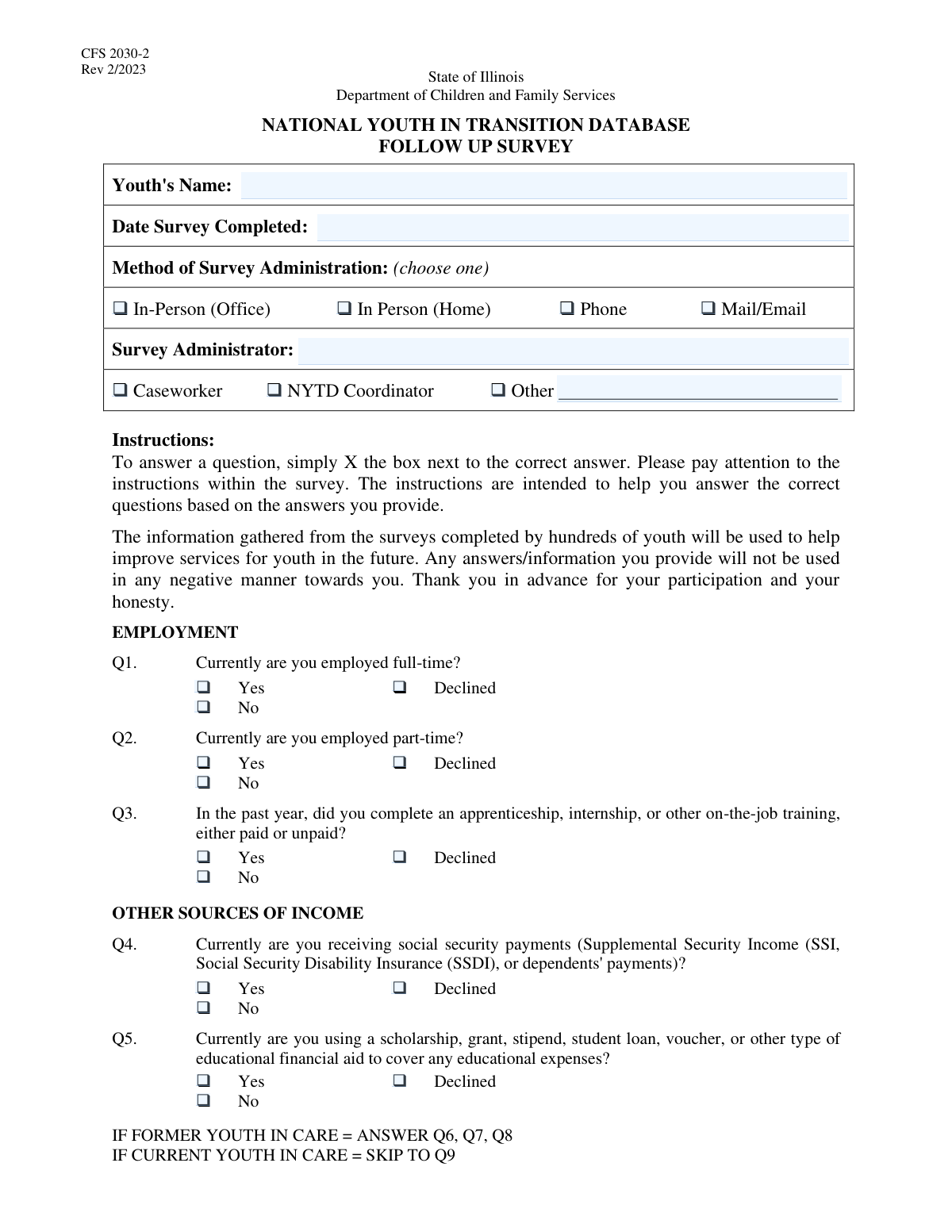
What this form asks for
The AI fills all of it, from your answers or your documents.
The AI checks your answers before you download
12 checks built for this form, so a wrong date or a missing answer is caught before anyone else sees it.
This check ensures the 'Youth's Name' field is not empty. The youth's name is a fundamental identifier for the survey record, and without it, the data is anonymous and cannot be linked to a specific individual. A submission will be rejected if this field is blank to maintain data traceability.
This validation ensures the 'Survey Completion Date' is a valid date in a recognized format (e.g., MM/DD/YYYY) and is not a date in the future. This is crucial for data integrity, tracking when the survey was taken, and analyzing trends over time. An invalid or future date would cause the form submission to fail, preventing inaccurate temporal data.
This check validates that exactly one option is selected from the 'Method of Survey Administration' group (In-Person Office, In-Person Home, Phone, Mail/Email). Selecting multiple methods is logically inconsistent and would make it unclear how the survey was actually administered. The form should prompt the user to select only one method if more than one is chosen to ensure data clarity.
This validation verifies that only one role (Caseworker, NYTD Coordinator, or Other) is selected for the 'Survey Administrator'. A survey can only have one primary administrator, so selecting multiple roles creates a data conflict. The system should enforce a single selection, similar to a radio button group, to ensure data accuracy.
This check ensures that if the 'Other' checkbox is selected under 'Survey Administrator,' the corresponding 'Other Administrator Role' text field is filled out. This is important for capturing complete information about who is administering the survey when the standard roles do not apply. If 'Other' is selected and the text field is empty, the user will be prompted to specify the role before submission.
This validation applies to all questions with a 'Yes,' 'No,' and 'Declined' response format, such as those regarding employment, housing, and permanent relationships. It ensures that for each such question, exactly one of the three options is chosen. This prevents logically impossible answers, like selecting both 'Yes' and 'No', and maintains data integrity across the form.
And 6 more checks
- Enforces 'Former Youth in Care' Status for Dependent Questions
- Single Highest Educational Degree Selection
- Conditional Marital Status Inquiry
- Conditional Health Insurance Coverage Details
- Administrator Name Presence
- Conditional Medicaid and Other Insurance Inquiry
Let AI fill out your NYTD Survey
No typing. Every field filled in seconds, checked, ready to sign.
How to Fill Out NYTD Survey Online for Free in 2026
What the AI walks you through.
- Navigate to Instafill.ai and upload or select the NYTD Youth Outcome Survey form.
- Allow the AI to process the document, identifying all survey questions and response fields.
- Provide initial administrative details, such as the youth's name, survey date, and the administrator's information.
- Answer the guided questions about the youth's status regarding employment, education, financial resources, and housing.
- Respond to questions about health, personal relationships, and life experiences, with the AI helping to navigate conditional sections based on your answers.
- Review all the provided answers for completeness and accuracy before finalizing the survey.
- Download, print, or securely share the completed NYTD survey as required by the administering agency.
Common Mistakes in Completing NYTD Survey
The ones the AI is built to catch.
Ignoring Conditional Question Logic
Forgetting to Specify 'Other' Administrator Role
Inconsistent Employment Status Answers
Incorrectly Selecting Highest Educational Level
Misusing the 'Declined' Option
Failing to Complete Administrator and Method Sections
Entering an Incorrect Survey Completion Date
Using Nicknames or Incomplete Names
Navigating Complex Non-Fillable PDF Forms
Frequently Asked Questions About NYTD Survey
Is it really free for 7 days?
Can I fill other forms too?
How do I cancel?
How does the AI fill out NYTD Survey?
What happens to my information?
How complex is NYTD Survey to fill out?
What is the purpose of this survey?
Who is supposed to complete this survey?
What if I don't want to answer a personal question?
Why are some questions only asked if I am a 'Former Youth in Care'?
What counts as 'on-the-job training'?
What does a 'permanent relationship with an adult' mean?
I receive SNAP benefits. Does this count as 'Public Food Assistance'?
How is 'homeless' defined for the housing question?
If I have a child, why does the form ask if I was married at the time of birth?
What is the difference between Medicaid and 'Other Health Insurance'?
Can I use an AI tool to help me fill out this form?
The PDF version of this form I have isn't fillable. What can I do?
How can I use Instafill.ai to complete this survey online?
Get your NYTD Survey filled out by AI
$0 today. Cancel before Nov 10 and you pay nothing.
Other forms like this one
ABA forms: Form BHVH, Outpatient Behavioral Health – ABA Treatment Request, ABA Authorization Request (Medi-Cal) – Initial and Concurrent Requests, MetroPlusHealth Applied Behavior Analysis (ABA) Universal ABA Request Form, Alabama Medicaid Agency ABA Therapy Assessment Form (6/20/19) — Behavior Assessment and Treatment Request (CPT 97151) for Applied Behavioral Analysis for Autism Spectrum Disorder, Applied Behavioral Analysis (ABA) Prior Authorization Request Form (Health Net Behavioral Health Autism Center), Applied Behavior Analysis (ABA) Initial Assessment Request, Applied Behavioral Analysis (ABA) Prior Authorization Request Form (Coordinated Care), Applied Behavioral Analysis (ABA) Prior Authorization Form (New Hampshire), Health Net Applied Behavioral Analysis (ABA) Recommendation and Referral Form (24-989), Applied Behavioral Analysis (ABA) Authorization Form, Louisiana Health Connect (BRO-DP-ABA FORM-0822), Applied Behavior Analysis (ABA) Therapy Request Form, Blue Shield of California Prior Authorization Request Form for Applied Behavioral Analysis (ABA) – Commercial Products, Form 5385BSP, Behavioral Health Utilization Management Applied Behavioral Analysis (ABA) Initial Request Form, Evernorth Applied Behavior Analysis (ABA) Prior Authorization Form, Outpatient Behavioral Health (BH) – ABA Treatment Request: Required Information for Precertification (GR-69017-4), Arkansas Medicaid Applied Behavioral Analysis (ABA) Authorization Request, Highmark Health Options Applied Behavioral Analysis (ABA) Prior Authorization Request Form, CareSource PASSE Applied Behavior Analysis (ABA) Prior Authorization Request Form, Applied Behavior Analysis (ABA) Initial Assessment Request and Clinical Service Request Form – Blue Cross and Blue Shield of Illinois (BCBSIL), 1199SEIU Benefit Funds Applied Behavior Analysis (ABA) Prior Authorization Form
Let AI fill out your NYTD Survey
Your trial starts once a card is added. You pay nothing before Nov 10.
Our AI already knows this form, all 87 fields of it. Skip the typing: tell it about yourself, or upload what you have, and it fills the whole form in seconds.
- AI fills every field on all 3 pages, checkboxes included
- No typing into boxes: answer a few questions, or upload a document you already have, an old copy of this form, a photo of a document
- The AI checks the answers; you review and change anything before you download
- Download the finished PDF, print it, or sign it online
- Encrypted, and never used to train AI
Cancel before Nov 10 and you pay nothing.
A card is needed to start the trial. Cancel in two clicks from your account.
Terms · Privacy