
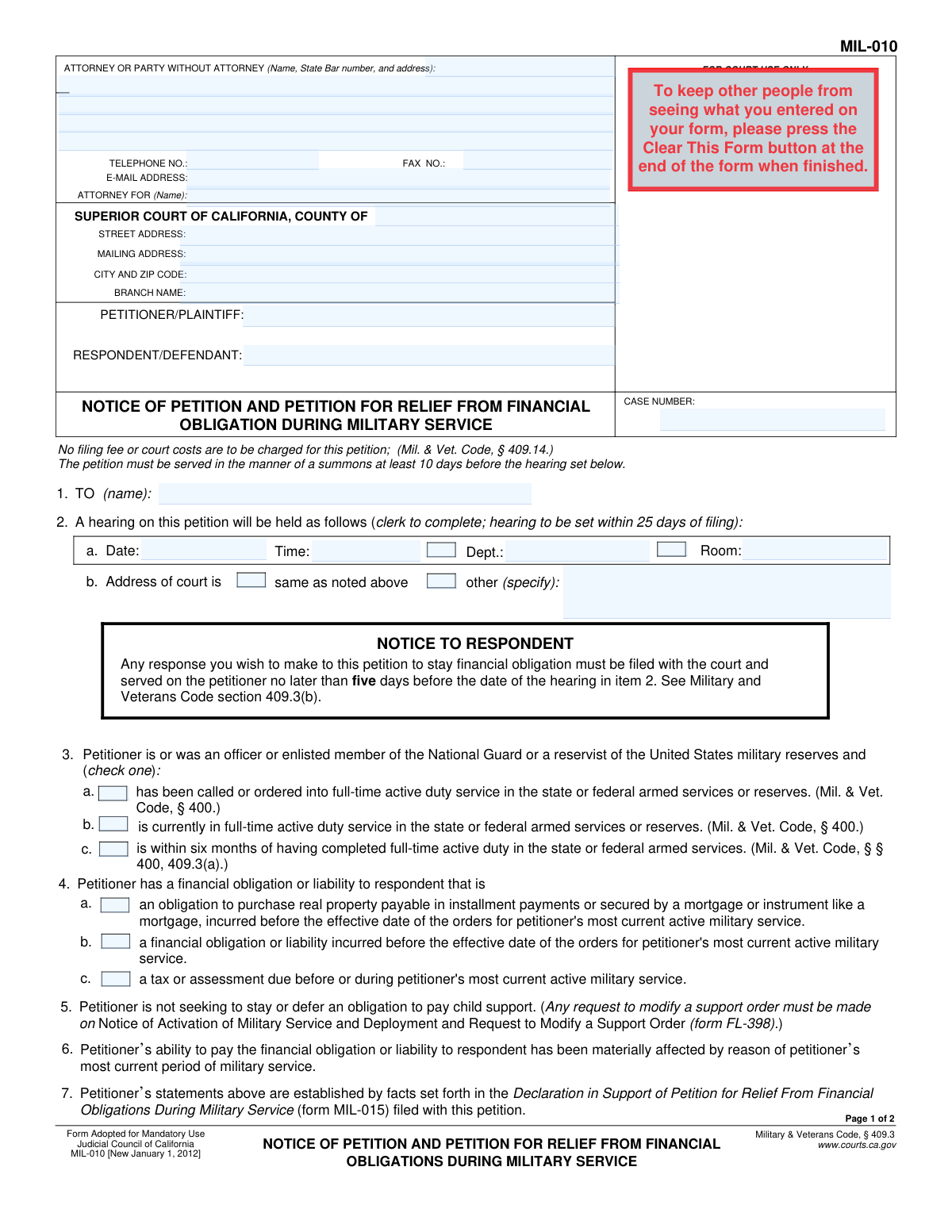
Yes! You can use AI to fill out Form MIL-010, Notice of Petition and Petition for Relief From Financial Obligation During Military Service
Don't type 48 fields by hand. Tell our AI about yourself, or upload a document you already have, and it fills every field in seconds. You check it, then download, print or sign.
The AI does the filling. You just check it.
No typing into boxes, nothing to install.
What this form asks for
The AI fills all of it, from your answers or your documents.
The AI checks your answers before you download
12 checks built for this form, so a wrong date or a missing answer is caught before anyone else sees it.
Ensures the 'PETITIONER/PLAINTIFF' and 'RESPONDENT/DEFENDANT' fields are not empty. These fields are critical for identifying the primary parties involved in the legal action. A failure to provide these names would make the petition legally insufficient and prevent the court from processing it.
Validates that the 'CASE NUMBER' field is populated. While a case number may not exist for an initial filing, for any subsequent documents filed in an existing case, it is mandatory for correct docketing. This check prevents misfiling and ensures the document is associated with the correct legal matter.
Checks that the hearing date entered in item 2a is within 25 days of the petition's filing date, as specified on the form. This is a procedural requirement under Military & Veterans Code section 409.3. If the date is outside this window, the filing may be rejected or require rescheduling, delaying the petitioner's request for relief.
Verifies that if the 'other' checkbox is selected for the court address in item 2b, the corresponding text field specifying the address is filled out. This prevents ambiguity about the hearing location. If the box is checked but the address is missing, the parties may not know where to appear, leading to a missed hearing.
Ensures that exactly one of the three checkboxes in item 3 is selected to define the petitioner's military service status. This status is the basis for eligibility for relief under the law. Failure to select a status makes it impossible for the court to determine if the petitioner qualifies for the requested stay.
Validates that at least one checkbox in item 4 (a, b, or c) is selected to specify the nature of the financial obligation. This information is essential for the court to understand the context of the request and apply the correct legal standards. An omission here would leave the petition incomplete and unclear.
And 6 more checks
- Logical Consistency Between Obligation and Relief
- Conditional 'Other Relief' Description
- Signature Date Validity
- Mandatory Signer Name
- Email Address Format Validation
- Telephone Number Format
Let AI fill out your MIL-010
No typing. Every field filled in seconds, checked, ready to sign.
How to Fill Out MIL-010 Online for Free in 2026
What the AI walks you through.
- Navigate to Instafill.ai and upload or select Form MIL-010.
- Provide your personal, attorney (if any), and court case information in the header section. The AI can help pre-fill recurring details.
- Indicate your military service status by checking the box that describes whether you have been called to, are currently in, or recently completed active duty.
- Specify the type of financial obligation for which you are seeking relief, such as a real property purchase, other liability, or tax assessment.
- State the relief you are requesting, such as a stay of enforcement or an extension of time to pay the obligation.
- Confirm that your ability to pay has been materially affected by your service and that a supporting declaration (Form MIL-015) is attached.
- Review all the information populated by the AI for accuracy, then date, sign, and download the completed form for filing with the court and service to the respondent.
Common Mistakes in Completing MIL-010
The ones the AI is built to catch.
Incorrectly Identifying the Respondent
Filling Out Court-Use-Only Sections
Failing to Select or Misidentifying Military Status
Forgetting to File the Supporting Declaration (MIL-015)
Not Specifying the Relief Requested in Item 8
Missing Signature or Date
Entering Incorrect Superior Court Information
Improperly Using the Form for Child Support
Incomplete Party Information in Header
Failing to Properly Serve the Petition
Frequently Asked Questions About MIL-010
Is it really free for 7 days?
Can I fill other forms too?
How do I cancel?
How does the AI fill out MIL-010?
What happens to my information?
How complex is MIL-010 to fill out?
What is the purpose of Form MIL-010?
Who should file the Notice of Petition MIL-010?
What kind of financial obligations does this form cover?
Can I use this form to delay my child support payments?
What do I need to prove to get relief using this form?
Do I need to submit any other documents with this petition?
Is there a fee to file this petition with the court?
What happens after I file Form MIL-010?
How much time does the person I owe money to have to respond?
How do I serve this petition on the respondent?
What if I have a disability and need an accommodation for my court hearing?
Can AI tools help me fill out Form MIL-010?
How can I use a service like Instafill.ai to complete this form online?
What should I do if the PDF version of Form MIL-010 I found is not fillable?
Get your MIL-010 filled out by AI
$0 today. Cancel before Nov 4 and you pay nothing.
Other forms like this one
California court forms: Judicial Council of California Form SC-105, Request for Court Order and Answer (Small Claims), Judicial Council of California Form SC-120, Defendant’s Claim and ORDER to Go to Small Claims Court (Small Claims), Judicial Council of California Form SER-001, Request for Sheriff to Serve Court Papers, Judicial Council of California Form SER-001, Request for Sheriff to Serve Court Papers, Affidavit for Collection of Personal Property California Probate Code Section 13100, Form POS-040, Proof of Service—Civil, Declaration of Facts of Death (California Superior Court), declaration-of-marriage-for-court-proceeding-california-family-law, ADOPT-200, Adoption Request, ADOPT-200, Stepparent Adoption Request, ADOPT-210, Adoption Agreement, ADOPT-310, Contact After Adoption Agreement, Judicial Council of California Form ADOPT-200, Adoption Request, Form ADR-107, Mediation Attendance Sheet, Form ADR-110, Order Appointing Referee, Form ADR-109, Stipulation or Motion for Order Appointing Referee, Form ADR-102, Request for Trial De Novo After Judicial Arbitration, Form ADR-108, Referee's Report (Code Civ. Proc., §§ 638, 639), Form ADR-106, Petition to Confirm, Correct, or Vacate Contractual Arbitration Award, Form ADR-104, Rejection of Award and Request for Trial After Attorney-Client Fee Arbitration
financial service forms: Funds Transfer Service Enrollment Form, Empower Financial Services, Inc. (EFSI) and Empower Advisory Group, LLC (EAG) Form CRS Customer Relationship Summary, Form MIL-015, Declaration in Support of Petition for Relief From Financial Obligations During Military Service, Form MIL-020, Order on Petition for Relief From Financial Obligations During Military Service, Certification in Support of Request to be Excused from Jury Service Due to Severe Financial Hardship
Let AI fill out your MIL-010
Your trial starts once a card is added. You pay nothing before Nov 4.
Our AI already knows this form, all 48 fields of it. Skip the typing: tell it about yourself, or upload what you have, and it fills the whole form in seconds.
- AI fills every field on both pages, checkboxes included
- No typing into boxes: answer a few questions, or upload a document you already have, an old copy of this form, a photo of a document
- The AI checks the answers; you review and change anything before you download
- Download the finished PDF, print it, or sign it online
- Encrypted, and never used to train AI
Cancel before Nov 4 and you pay nothing.
A card is needed to start the trial. Cancel in two clicks from your account.
Terms · Privacy