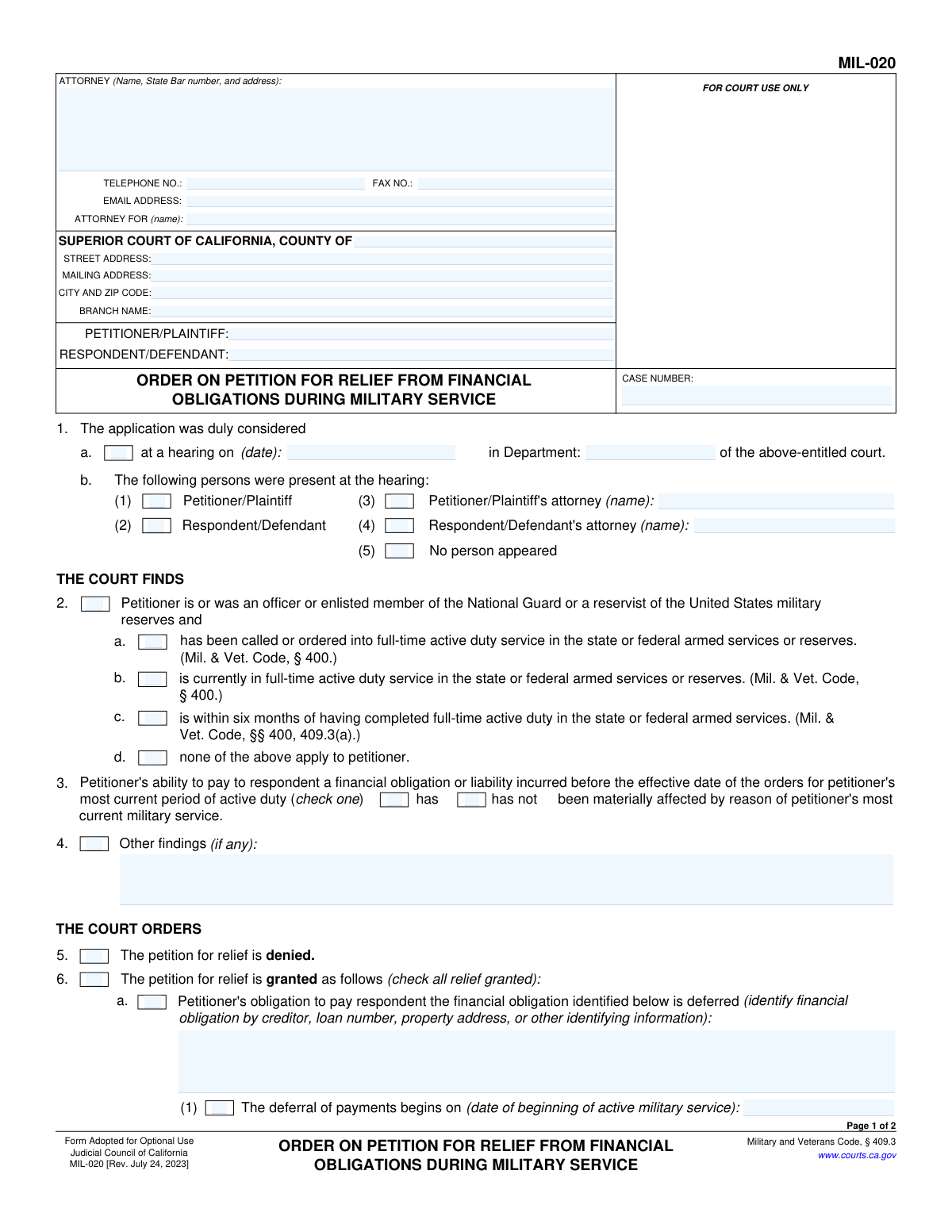
Yes! You can use AI to fill out Form MIL-020, Order on Petition for Relief From Financial Obligations During Military Service

Form MIL-020, Order on Petition for Relief From Financial Obligations During Military Service, is a legal document used by the Superior Court of California to grant or deny a service member's request for financial relief. This order is crucial as it legally documents the court's decision on deferring payments for loans, taxes, or other liabilities when military service materially affects the petitioner's ability to pay. Today, this form can be filled out quickly and accurately using AI-powered services like Instafill.ai, which can also convert non-fillable PDF versions into interactive fillable forms.
MIL-020 is part of the California court forms and financial service forms categories on Instafill.
Our AI automatically handles information lookup, data retrieval, formatting, and form filling.
It takes less than a minute to fill out MIL-020 using our AI form filling.
Securely upload your data. Information is encrypted in transit and deleted immediately after the form is filled out.

Form specifications

Form name: Form MIL-020, Order on Petition for Relief From Financial Obligations During Military Service
Number of fields: 63
Number of pages: 1
Language: English
main-image

Instafill Demo: How to fill out PDF forms in seconds with AI

How to Fill Out MIL-020 Online for Free in 2026

Are you looking to fill out a MIL-020 form online quickly and accurately? Instafill.ai offers the #1 AI-powered PDF filling software of 2026, allowing you to complete your MIL-020 form in just 37 seconds or less.
Follow these steps to fill out your MIL-020 form online using Instafill.ai:
  1. 1 Navigate to Instafill.ai and upload or select the MIL-020 form to begin.
  2. 2 Enter the court and case information, including the county, case number, and names of the petitioner and respondent.
  3. 3 Use the guided interface to specify the hearing details, such as the date, department, and attendees.
  4. 4 Indicate the court's findings regarding the petitioner's military service status and whether their ability to pay has been materially affected.
  5. 5 Clearly mark the court's final decision by checking the box to either deny or grant the petition for relief.
  6. 6 If relief is granted, follow the prompts to detail the specific terms of the deferral, including the financial obligation, start/end dates, and payment conditions.
  7. 7 Review the entire completed order for accuracy, then have the judicial officer date and sign the document before saving or printing it for court records.

Our AI-powered system ensures each field is filled out correctly, reducing errors and saving you time.

Why Choose Instafill.ai for Your Fillable MIL-020 Form?

Speed

Complete your MIL-020 in as little as 37 seconds.

Up-to-Date

Always use the latest 2026 MIL-020 form version.

Cost-effective

No need to hire expensive lawyers.

Accuracy

Our AI performs 10 compliance checks to ensure your form is error-free.

Security

Your personal information is protected with bank-level encryption.

Frequently Asked Questions About Form MIL-020

The MIL-020, 'Order on Petition for Relief From Financial Obligations During Military Service,' is a California court form used by a judge to officially grant or deny a service member's request for temporary relief from financial obligations due to active duty.

No, this form is an 'Order' that is completed and signed by a judicial officer. You would initiate the process by filing a 'Petition' form, and this MIL-020 form is the court's final decision on your petition.

Eligibility is for National Guard members or U.S. military reservists who have been called to active duty and can demonstrate to the court that their service has 'materially affected' their ability to pay their debts.

The court can order a deferral of payments for loans and other debts, extend a loan's maturity date, or defer income tax payments. The specific relief granted is detailed in section 6 of the form.

This is a legal standard meaning you must prove to the court that your active duty service has significantly impacted your income or financial situation, making it difficult to pay obligations you had before your service began.

If your petition is granted, the judge will check box 6 and outline the specific terms of your financial relief, such as the start and end dates for deferred payments. Both you and your creditor must comply with this order.

If your petition is denied, the judge will check box 5 on the form. This means you are not granted relief, and you remain responsible for your financial obligations under their original terms.

The form states that you must immediately notify your creditor of your new release date. You are then required to resume payments, typically starting the first month after your release.

The court considers the information from your petition and the hearing, including proof of your military service and evidence showing how that service has materially impacted your ability to pay a specific financial obligation.

Yes. While the court fills out this MIL-020 Order, AI services like Instafill.ai can help you accurately complete the initial petition form required to start the process, saving you time and reducing errors.

You can upload the petition form (the one you file with the court) to Instafill.ai. The service uses AI to help you accurately auto-fill your personal information, case details, and other required fields before you submit it.

Services like Instafill.ai can convert flat, non-fillable PDFs into interactive forms. This allows you to easily type your information into the correct fields online, ensuring a clean and professional submission.

No, section 6.e of the order prohibits the creditor from imposing fines, penalties, or late charges during the deferral period. They also cannot take action to foreclose on or attach property securing the debt.

Yes, if the court grants it, the order can defer your obligation to pay income tax until six months after your release from active military service. No interest or penalties will accrue on the tax amount during this deferral period.

Compliance MIL-020
Validation Checks by Instafill.ai

1
Case and Party Header Consistency
This check ensures that the Case Number, Petitioner/Plaintiff name, and Respondent/Defendant name are identical on both page 1 and page 2. This is crucial for document integrity and to ensure that all pages of the order clearly belong to the same legal case. A mismatch could lead to clerical errors and confusion in court records.
2
Conditional Hearing Details Requirement
Validates that if the checkbox in section 1.a 'at a hearing on' is checked, then the corresponding date field ('AppConsideredDate_dt') and department field ('AppConsidereDept_ft') must be populated. This ensures that when a hearing is indicated as the basis for the order, the essential details of that hearing are recorded. Failure to provide these details would result in an incomplete and potentially invalid order.
3
Hearing Date Logical Constraint
Ensures the date entered in section 1.a ('AppConsideredDate_dt') is a valid, non-future date. The hearing must have already occurred for an order to be issued based on it. This prevents data entry errors, such as typos or entering a future date, which would make the court record nonsensical.
4
Hearing Attendance Mutual Exclusivity
This check verifies that if the 'No person appeared' checkbox (1.b.(5)) is selected, then none of the other attendance checkboxes (for petitioner, respondent, or attorneys) are selected. It is logically impossible for specific individuals to be present if no one appeared. This prevents contradictory information on the official record of the hearing.
5
Conditional Attorney Name Entry
If the checkbox indicating an attorney was present (1.b.(3) or 1.b.(4)) is checked, this validation ensures the corresponding attorney name field is filled. Simply checking the box without identifying the attorney is insufficient for a complete court record. This rule enforces the capture of necessary participant information.
6
Exclusive Military Status Finding
Validates that only one checkbox from the list in section 2 (options a, b, c, or d) is selected. These options describe the petitioner's military service status and are mutually exclusive. Selecting more than one would create an ambiguous and contradictory finding by the court, undermining the basis for the order.
7
Exclusive Material Affect Finding
Ensures that in section 3, only one of the two options ('has' or 'has not') is selected to indicate if the petitioner's ability to pay has been materially affected. This is a critical finding of fact upon which the entire order rests. The form must clearly state one or the other, not both or neither.
8
Mutually Exclusive Order Outcome
This validation confirms that the court cannot both deny the petition (section 5) and grant it (section 6). The checkboxes 'Petition denied' and 'Petition granted' are mutually exclusive. An order must have a single, unambiguous outcome, and selecting both would render the document legally void.
9
Conditional Grant Relief Specification
If the 'Petition for relief is granted' checkbox (section 6) is selected, this check ensures that the financial obligation is described ('ObligationDesc_ft') and at least one of the specific relief checkboxes (6.a, 6.b, 6.c, or 6.d) is also selected. A granted petition is meaningless without specifying what relief is being granted and to which obligation it applies.
10
Deferral Period Chronology
Verifies that in section 6.a, the 'deferral of payments ends' date is on or after the 'deferral of payments begins' date. A deferral period cannot end before it starts. This check prevents logical errors in date entry that would create an impossible timeline for the financial relief.
11
Conditional Interest Rate Entry
In section 6.c.(2), if the checkbox for repayment 'over a period of time... with interest' is selected, this validation ensures the interest rate field ('DeferralSvcPeriodInterest_ft') is populated with a valid numerical value. The order would be incomplete and unenforceable if it specifies interest will be charged but fails to state the rate.
12
Income Tax Deferral Date Logic
This check validates the relationship between dates in section 6.d. The 'Deferral of payments ends' date should be approximately six months after the 'Current expected release date', as stipulated by the form text (Mil & Vet. Code, § 409.6). This ensures the order complies with the relevant statute and prevents inconsistent date entries.
13
Final Order Date Validation
Ensures the final 'Date' of the order at the bottom of page 2 is a valid, non-future date. Furthermore, it should be on or after the hearing date specified in section 1.a. This maintains a logical chronological sequence for the legal proceedings and the resulting order.

Common Mistakes in Completing MIL-020

Forgetting to Complete Header on Page 2

Users often complete the case number and party names on the first page but forget to repeat this crucial information at the top of page two. This happens because it's a repetitive task and easily overlooked when focusing on the substantive orders. An incomplete second page can lead to confusion and administrative delays, as it may be separated from the first page and become difficult to associate with the correct case file. To avoid this, always perform a final review of all pages before submission, ensuring all required fields, including repeating headers, are filled.

Vague Description of Financial Obligation

In section 6.a, preparers sometimes enter a generic description like 'car loan' or 'credit card debt' instead of the required specific identifiers. This ambiguity makes the court order difficult to enforce, as the creditor (respondent) may have multiple accounts for the petitioner. The order is not legally precise and can lead to future disputes. To prevent this, always include the creditor's name, the full account or loan number, and any other unique identifying information, such as a property address for a mortgage.

Contradictory Order Selections

A critical error is checking the box for 'The petition for relief is denied' (Section 5) while also selecting options under 'The petition for relief is granted' (Section 6). This usually happens due to a simple clerical error or misunderstanding. Such a contradiction renders the order ambiguous and legally invalid, requiring correction and causing significant delays. Always double-check that only one of these primary outcomes (denied or granted) is selected, and that all subsequent selections are consistent with that outcome.

Incorrectly Identifying Petitioner's Military Status

In Section 2, selecting the wrong checkbox regarding the petitioner's military service status (e.g., choosing 'currently in full-time active duty' when they are 'within six months of having completed' it) is a common mistake. This error undermines the legal basis for the court's findings and the entire order, as relief eligibility is tied to a specific status under the Military and Veterans Code. To avoid this, carefully verify the petitioner's service dates against the options provided and select the one that accurately reflects their situation at the time of the ruling.

Omitting Specific Deferral Dates

In sections 6.a(1) and 6.a(2), users may neglect to enter the precise start and end dates for the payment deferral. This often occurs when the exact dates of military service are not readily available when the form is being prepared. An order without these dates is unenforceable as it doesn't specify the period of relief. Always ensure the 'date of beginning of active military service' and the 'date of release from active military service' are accurately entered to create a clear and binding order.

Failing to Specify Interest Rate

When selecting the repayment option in section 6.c(2) for a deferred obligation, it is common to check the box indicating interest will accrue but forget to fill in the actual interest rate percentage. This omission creates ambiguity and potential for future disputes over the amount owed. The order becomes incomplete and may require a hearing to clarify the missing term. To prevent this, ensure that if box 6.c(2) is checked, a specific numerical interest rate is always entered in the corresponding blank field.

Miscalculating the Income Tax Deferral Period

Section 6.d provides for income tax deferral, but users often mistakenly enter the petitioner's release date as the end of the deferral. The law (Mil & Vet. Code, § 409.6) specifically allows deferral until six months *after* release from service. This error can cause the petitioner to believe taxes are due much earlier than they are, leading to unnecessary financial stress. Always calculate and enter the date that is six months following the release date in field 6.d(2).

Leaving 'Other Orders' Fields Blank

The form includes several 'Other' fields (e.g., 4, 6.c(3), 7) for specifying unique terms or findings made by the judge. Preparers sometimes overlook these fields, failing to document specific verbal instructions from the hearing. This results in an incomplete order that does not fully reflect the court's ruling, potentially leading to non-compliance or future litigation. It is crucial to listen carefully during the hearing and transcribe any additional orders or findings into the appropriate 'Other' text box.

Incomplete 'Persons Present' Section

In section 1.b, preparers may fail to check all the boxes corresponding to the individuals who were present at the hearing. This can happen in the rush to complete the form after a hearing concludes. An inaccurate record of attendance can be problematic if there are later questions about who was notified or had the opportunity to be heard. To ensure an accurate court record, methodically check the box for each person who appeared, including spelling their names correctly if they are an attorney.

Incorrectly Checking the 'Materially Affected' Finding

Section 3 requires a finding on whether the petitioner's ability to pay 'has' or 'has not' been materially affected by military service. Accidentally checking the wrong box is a simple but devastating error. If 'has not' is checked, it removes the legal justification for granting any relief, contradicting any orders made in Section 6. This mistake invalidates the order and requires formal correction. Carefully review this critical finding to ensure it aligns with the court's decision before finalizing the form. AI-powered tools like Instafill.ai can help by highlighting such logical inconsistencies in the form before submission.

Using Incorrect Date Formats

Throughout the form, multiple fields require dates (e.g., hearing date, deferral start/end dates). Users often enter dates in inconsistent or ambiguous formats like 'Mar 4' or '3/4/23' instead of a full 'MM/DD/YYYY' format. This can lead to confusion and potential data entry errors when the information is entered into the court's system. To ensure clarity and prevent misinterpretation, always use a consistent and unambiguous date format, such as MM/DD/YYYY. Smart form-filling tools like Instafill.ai can automatically format dates correctly, preventing these errors.
Saved over 80 hours a year

“I was never sure if my IRS forms like W-9 were filled correctly. Now, I can complete the forms accurately without any external help.”

Kevin Martin Green

Your data stays secure with advanced protection from Instafill and our subprocessors

Robust compliance program

Transparent business model

You’re not the product. You always know where your data is and what it is processed for.

ISO 27001, HIPAA, and GDPR

Our subprocesses adhere to multiple compliance standards, including but not limited to ISO 27001, HIPAA, and GDPR.

Security & privacy by design

We consider security and privacy from the initial design phase of any new service or functionality. It’s not an afterthought, it’s built-in, including support for two-factor authentication (2FA) to further protect your account.

Fill out MIL-020 with Instafill.ai

Worried about filling PDFs wrong? Instafill securely fills form-mil-020-order-on-petition-for-relief-from-financial-obligations-during-military-service forms, ensuring each field is accurate.

Related forms by category

California court forms Judicial Council of California Form SC-105, Request for Court Order and Answer (Small Claims), Judicial Council of California Form SC-120, Defendant’s Claim and ORDER to Go to Small Claims Court (Small Claims), Judicial Council of California Form SER-001, Request for Sheriff to Serve Court Papers, Judicial Council of California Form SER-001, Request for Sheriff to Serve Court Papers, Affidavit for Collection of Personal Property California Probate Code Section 13100, Form POS-040, Proof of Service—Civil, Declaration of Facts of Death (California Superior Court), declaration-of-marriage-for-court-proceeding-california-family-law, ADOPT-200, Adoption Request, ADOPT-200, Stepparent Adoption Request, ADOPT-210, Adoption Agreement, ADOPT-310, Contact After Adoption Agreement, Judicial Council of California Form ADOPT-200, Adoption Request, Form ADR-107, Mediation Attendance Sheet, Form ADR-110, Order Appointing Referee, Form ADR-109, Stipulation or Motion for Order Appointing Referee, Form ADR-102, Request for Trial De Novo After Judicial Arbitration, Form ADR-108, Referee's Report (Code Civ. Proc., §§ 638, 639), Form ADR-106, Petition to Confirm, Correct, or Vacate Contractual Arbitration Award, Form ADR-104, Rejection of Award and Request for Trial After Attorney-Client Fee Arbitration · + 557 more →
financial service forms Funds Transfer Service Enrollment Form, Empower Financial Services, Inc. (EFSI) and Empower Advisory Group, LLC (EAG) Form CRS Customer Relationship Summary, Form MIL-015, Declaration in Support of Petition for Relief From Financial Obligations During Military Service, Form MIL-010, Notice of Petition and Petition for Relief From Financial Obligation During Military Service