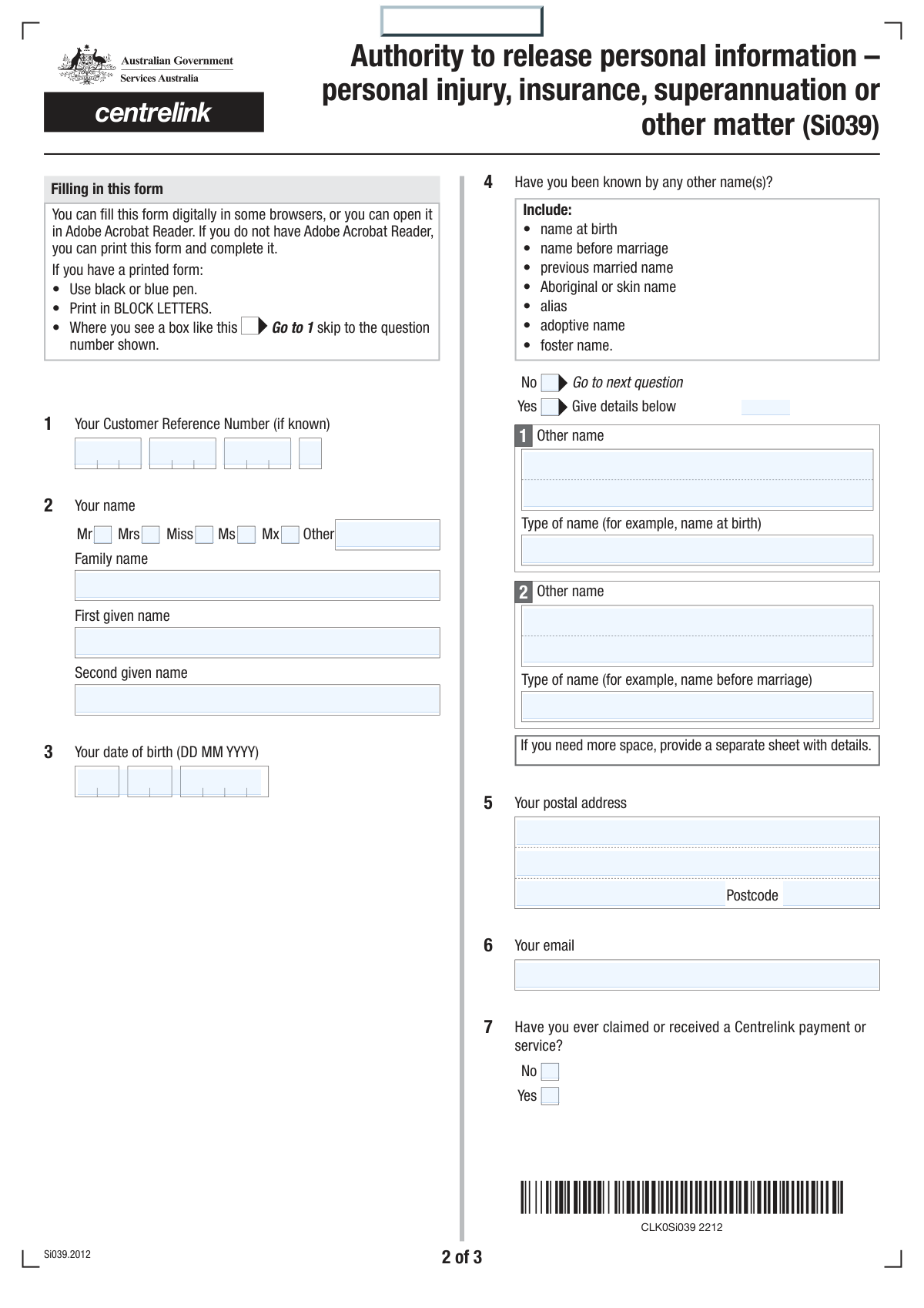
Yes! You can use AI to fill out Form Si039, Authority to release personal information – personal injury, insurance, superannuation or other matter

Form Si039, 'Authority to release personal information', is a document used to provide consent for Services Australia (Centrelink) to disclose your personal data to a third-party organization such as a law firm, insurance company, or superannuation fund. This is crucial for processing claims related to personal injury, insurance, or other legal matters where your Centrelink history is relevant. Today, this form can be filled out quickly and accurately using AI-powered services like Instafill.ai, which can also convert non-fillable PDF versions into interactive fillable forms.
Si039 is part of the insurance forms and superannuation forms categories on Instafill.
Our AI automatically handles information lookup, data retrieval, formatting, and form filling.
It takes less than a minute to fill out Si039 using our AI form filling.
Securely upload your data. Information is encrypted in transit and deleted immediately after the form is filled out.

Form specifications

Form name: Form Si039, Authority to release personal information – personal injury, insurance, superannuation or other matter
Number of fields: 61
Number of pages: 3
Language: English
main-image

Instafill Demo: How to fill out PDF forms in seconds with AI

How to Fill Out Si039 Online for Free in 2026

Are you looking to fill out a SI039 form online quickly and accurately? Instafill.ai offers the #1 AI-powered PDF filling software of 2026, allowing you to complete your SI039 form in just 37 seconds or less.
Follow these steps to fill out your SI039 form online using Instafill.ai:
  1. 1 Navigate to Instafill.ai and upload or select the 'Authority to release personal information' (Form Si039).
  2. 2 Provide your personal details, including your name, date of birth, address, and Centrelink Customer Reference Number (CRN).
  3. 3 Enter the complete details of the third-party organization that is requesting your information, including their name, address, and reference number.
  4. 4 Clearly select the specific types of information you consent to release (e.g., payment summaries, medical reports) and specify the exact time periods for each.
  5. 5 Complete the declaration section by providing your digital signature and the date, or fill in the details for an authorized representative if applicable.
  6. 6 Review the entire form populated by the AI to ensure all your personal details, third-party information, and consent specifications are correct.
  7. 7 Download the completed form, print it, sign it by hand, and return it to the third party as instructed on the form.

Our AI-powered system ensures each field is filled out correctly, reducing errors and saving you time.

Why Choose Instafill.ai for Your Fillable Si039 Form?

Speed

Complete your Si039 in as little as 37 seconds.

Up-to-Date

Always use the latest 2026 Si039 form version.

Cost-effective

No need to hire expensive lawyers.

Accuracy

Our AI performs 10 compliance checks to ensure your form is error-free.

Security

Your personal information is protected with bank-level encryption.

Frequently Asked Questions About Form Si039

This form allows you to give Services Australia (Centrelink) permission to release your personal information, such as payment summaries or medical reports, to a third-party organisation like a law firm or insurance company.

You need to fill out this form if a third party has requested your Centrelink information for a personal injury, insurance, superannuation, or other similar matter. It must be completed by the individual whose information is being requested or their legally authorized representative.

You can consent to release your Centrelink payment tax summary information, employment details, medical certificates, and various assessment reports. You must specify on the form exactly which information and time periods you are authorizing for release.

You should return the completed and signed form to the third-party organisation that requested your information (e.g., your lawyer or insurance company). They are responsible for submitting it to Services Australia.

A third-party organisation is the company or agency requesting your information. This commonly includes law firms, insurance companies, superannuation funds, or other government agencies, whose details you must provide in question 8.

Your consent is valid for 12 months from the date you sign the form, unless you decide to revoke it sooner.

You should ensure all relevant questions are answered, as the form states that incomplete forms may not be processed. This could cause delays in your case.

Yes, but only in specific circumstances, such as for a child, a deceased person, or if a Power of Attorney is in place. The person signing must complete the 'Authorisation by another person' section and may need to provide proof of their authority.

No, this form is not for compensation recovery advice. For that purpose, you should visit the Services Australia website for specific instructions.

You can still fill out the form. Simply answer 'No' to question 7, which asks if you have ever claimed or received a Centrelink payment or service.

Yes, services like Instafill.ai use AI to help you accurately auto-fill form fields, which can save you time and reduce errors.

You can upload the Si039 form to the Instafill.ai platform. The service will convert it into an interactive, fillable format that you can complete easily on your computer before printing to sign.

If you have a non-fillable or 'flat' PDF, you can use a service like Instafill.ai. It can convert the static PDF into an interactive form that you can type into directly from your browser.

Compliance Si039
Validation Checks by Instafill.ai

1
Mandatory Applicant Name
Verifies that the 'Family name' and 'First given name' fields in Question 2 are both completed. These fields are essential for uniquely identifying the individual whose information is to be released. A submission without a complete name cannot be processed as the subject of the authorization is unknown.
2
Valid and Plausible Date of Birth
Validates that the 'Date of birth' in Question 3 is a complete and logical date in DD MM YYYY format. The check ensures the date is not in the future and represents a plausible age (e.g., not more than 120 years ago). This is a critical data point for identity verification and prevents significant data entry errors.
3
Conditional 'Other Names' Requirement
Ensures that if 'Yes' is selected for 'Have you been known by any other name(s)?' (Question 4), then at least one of the 'Other name' detail fields is filled out. Conversely, if 'No' is selected, these detail fields should be empty. This maintains data integrity and ensures all relevant identifying information is captured when indicated.
4
Mandatory Third Party Organisation Name
Checks that the 'Name' of the third-party organisation in Question 8 is provided. It is impossible to fulfill the information release request without knowing the identity of the recipient organisation. Forms lacking this information must be rejected as they are fundamentally unactionable.
5
Valid Third Party Contact Method
Verifies that at least one valid method for sending the information to the third party is provided in Question 8, which means either a complete postal address or a validly formatted email address. Without a valid destination, the authorized information cannot be sent. The validation ensures the request is deliverable.
6
Standard Email Address Format
Verifies that any value entered in an email field (Question 6 and Question 8) conforms to the standard '[email protected]' format. This check prevents errors in communication and ensures that information or correspondence sent via email reaches the intended recipient. An invalid format would cause the delivery to fail.
7
Minimum Consent Selection
Confirms that at least one checkbox is selected in the consent section (Question 9) to specify what information is to be released. The entire purpose of the form is to authorize the release of specific information. A submission with no information selected for release is incomplete and has no action to perform.
8
Conditional Consent Period Entry
Validates that if a consent checkbox in Question 9 is ticked (e.g., for 'Details of employment income'), the corresponding 'from' and 'to' date fields are also filled. This ensures that every authorization has a clearly defined and non-ambiguous scope. A consent without a specified time period cannot be processed accurately.
9
Logical Date Range Sequence
For all date ranges provided in Question 9, this check ensures the 'from' date is on or before the 'to' date. An end date that precedes a start date is a logical impossibility and indicates a data entry error. Correcting this is crucial for accurately defining the scope of the information release.
10
Mandatory Declaration Signature and Date
Ensures the 'Your signature' and 'Date' fields in the declaration section (Question 10) are completed. The signature and date provide the legal basis for the authorization, and their absence invalidates the entire consent. The form cannot be processed without a signed and dated declaration from the applicant or their representative.
11
Valid and Current Signature Date
Checks that the signature date in Question 10 is a valid date and is not set in the future. This date establishes the start of the 12-month validity period for the authorization. A future date would make the consent invalid until that date, causing processing confusion and delays.
12
Conditional 'Authorisation by Another Person' Fields
Validates that if the 'Authorisation by another person' section (Question 11) is filled out, the 'Reason for authorisation' field is also completed. This section should only be used in specific circumstances (e.g., Power of Attorney, deceased person's executor). Requiring a reason ensures the authority is legitimate and properly documented.
13
Centrelink History Consistency Check
Compares the answer in Question 7 ('Have you ever claimed or received a Centrelink payment or service?') with the consent given in Question 9. If the user answers 'No' to Question 7 but then consents to release 'Type and amount of Centrelink payments', the form should be flagged for review. This logical check helps catch potential misunderstandings or errors by the applicant.
14
Australian Postcode Format
Validates that the postcode fields for the applicant's address (Question 5) and the third party's address (Question 8) contain a 4-digit number. This is the standard format for Australian postcodes. Enforcing this format improves address data quality and reduces the risk of failed mail delivery.

Common Mistakes in Completing Si039

Providing Incomplete Third Party Information

Applicants often leave fields in Question 8 (Details of the third party organisation) blank, such as the reference number, full address, or specific email address. This happens because the applicant may not have the information readily available from the organisation requesting it. Incomplete or incorrect details can lead to significant delays, the information being sent to the wrong recipient, or the request being rejected, compromising the entire process. To avoid this, confirm all details directly with the third party organisation before filling out the form.

Incomplete Consent Specification

A very common error is ticking a box in Question 9 to authorize the release of information (e.g., 'Details of employment income') but failing to fill in the mandatory corresponding date ranges. This renders the consent for that specific item invalid, and that piece of information will not be released. It is crucial to not only select the type of information but also to provide the complete 'from' and 'to' dates for each selected item to ensure the request can be fully processed.

Missing Signature or Date

A frequent and critical error is submitting the form without a handwritten signature and date in the declaration section. This often occurs due to oversight, especially when filling the form digitally and forgetting to print it for a physical signature. An unsigned or undated form is invalid and will be rejected immediately, requiring the entire process to be restarted from scratch. Always perform a final check to ensure the form is printed, signed by hand, and dated before submission.

Incorrect Date Formatting

The form explicitly requires the DD MM YYYY format for all dates (e.g., 03 10 2023). Many applicants default to other common formats like MM/DD/YYYY or use slashes instead of spaces, which can cause data entry errors and processing delays by the agency. To prevent this, carefully enter all dates exactly as specified in the format guide. AI-powered form filling tools like Instafill.ai can help by automatically validating and formatting dates correctly to prevent such errors.

Incorrect Form Submission Path

The instructions state to 'Return this form to the third party indicated at question 8,' who then submits it to Services Australia. Applicants often misunderstand this and send the completed form directly to Services Australia themselves. This disrupts the intended workflow, causing significant processing delays as the form must be rerouted or rejected. Always return the completed and signed form to the law firm, insurer, or other organisation that requested it from you.

Omitting Previous or Alternative Names

In Question 4, applicants may forget or neglect to list all previous names, such as a name at birth, a maiden name, or a legal alias. This omission can make it difficult for Services Australia to locate all relevant records, especially if they are filed under different names. This can lead to an incomplete release of information, meaning the third party may not receive the full history they require for their assessment. Ensure you list all names you have ever used to receive services or payments.

Omitting the Customer Reference Number (CRN)

The form states the CRN is '(if known),' which can lead applicants to believe it's optional and not worth looking up. However, providing the CRN is the fastest and most accurate way for Services Australia to identify the correct record. Submitting the form without a CRN forces a manual search based on name and date of birth, increasing the risk of errors and significant processing delays. Always include your CRN if you have one.

Illegible Handwriting on Printed Forms

When printing and filling the form by hand, applicants sometimes use cursive, non-block letters, or ink colors other than the required black or blue. This can make critical information like names, addresses, and numbers difficult or impossible for the processing officer to read accurately. Illegible forms may be delayed or rejected entirely. To avoid this, print clearly in BLOCK LETTERS as instructed. If the form is a non-fillable PDF, a tool like Instafill.ai can convert it into a fillable version, allowing you to type for maximum clarity.

Vague 'Other' Information Request

When using the 'Other' category in Question 9, applicants may provide a vague or unclear description of the information they are consenting to release. For example, writing just 'all files' or 'my information' is too broad and will likely be rejected for not being specific enough. This leads to follow-up communication and delays. The description must be specific enough for an officer to identify the exact documents or data being requested (e.g., 'Copy of Job Plan dated between X and Y').

Misuse of the Third-Party Authorisation Section

Section 11 is only for specific legal situations where another person is authorising the release, such as for a minor, a deceased person, or someone with a Power of Attorney. Applicants sometimes mistakenly fill it out themselves, or the authorised person fills it out without providing the required proof of their authority. This will halt the processing of the request until the correct documentation and authorisation are established. Only complete this section if you are not the subject of the information release and have the legal authority to act on their behalf.
Saved over 80 hours a year

“I was never sure if my IRS forms like W-9 were filled correctly. Now, I can complete the forms accurately without any external help.”

Kevin Martin Green

Your data stays secure with advanced protection from Instafill and our subprocessors

Robust compliance program

Transparent business model

You’re not the product. You always know where your data is and what it is processed for.

ISO 27001, HIPAA, and GDPR

Our subprocesses adhere to multiple compliance standards, including but not limited to ISO 27001, HIPAA, and GDPR.

Security & privacy by design

We consider security and privacy from the initial design phase of any new service or functionality. It’s not an afterthought, it’s built-in, including support for two-factor authentication (2FA) to further protect your account.

Fill out Si039 with Instafill.ai

Worried about filling PDFs wrong? Instafill securely fills form-si039-authority-to-release-personal-information-personal-injury-insurance-superannuation-or-other-matter forms, ensuring each field is accurate.