Yes! You can use AI to fill out Australian Expatriate Superannuation Fund (AESF) Membership Application
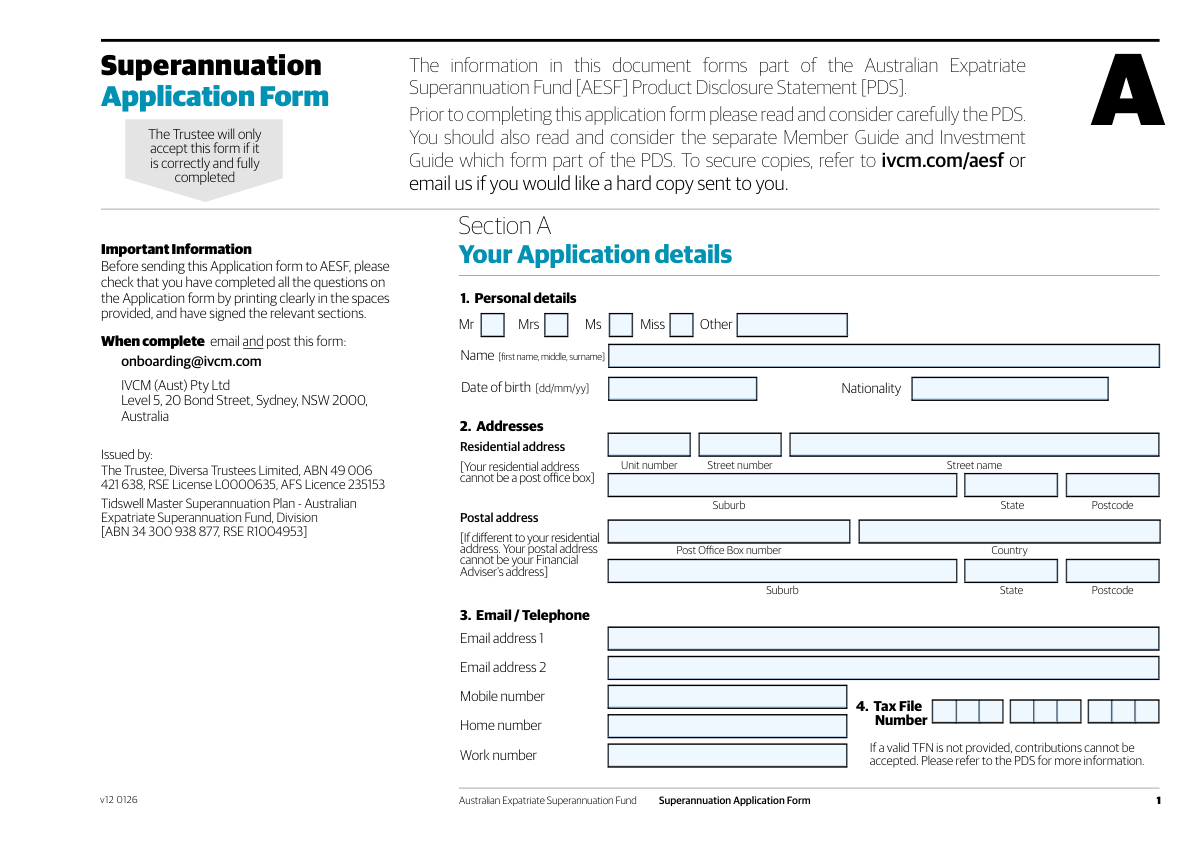
The Australian Expatriate Superannuation Fund (AESF) Membership Application is the primary document for individuals seeking to join the AESF and transfer their overseas pension or superannuation funds into an Australian account. It's crucial for consolidating retirement savings, especially for expatriates returning to Australia, as it captures all necessary personal, tax, and foreign fund details for a compliant transfer. Today, this form can be filled out quickly and accurately using AI-powered services like Instafill.ai, which can also convert non-fillable PDF versions into interactive fillable forms.
Our AI automatically handles information lookup, data retrieval, formatting, and form filling.
It takes less than a minute to fill out AESF Membership Application using our AI form filling.
Securely upload your data. Information is encrypted in transit and deleted immediately after the form is filled out.
Form specifications
| Form name: | Australian Expatriate Superannuation Fund (AESF) Membership Application |
| Number of fields: | 175 |
| Number of pages: | 10 |
| Language: | English |
Instafill Demo: How to fill out PDF forms in seconds with AI
How to Fill Out AESF Membership Application Online for Free in 2026
Are you looking to fill out a AESF MEMBERSHIP APPLICATION form online quickly and accurately? Instafill.ai offers the #1 AI-powered PDF filling software of 2026, allowing you to complete your AESF MEMBERSHIP APPLICATION form in just 37 seconds or less.
Follow these steps to fill out your AESF MEMBERSHIP APPLICATION form online using Instafill.ai:
- 1 Navigate to Instafill.ai and upload or select the AESF Membership Application form.
- 2 Use the AI assistant to fill in your personal details, including your full name, date of birth, contact information, and residential address.
- 3 Provide details of the foreign pension or superannuation schemes you wish to transfer, including scheme names, policy numbers, and estimated values.
- 4 Complete the tax details section, providing your Australian Tax File Number (TFN) and information regarding your tax residency status.
- 5 Specify your investment instructions, including your choice of currency (AUD or GBP) and any contributions you plan to make.
- 6 Appoint a financial adviser if desired and complete the beneficiary nomination section to designate who will receive your benefits.
- 7 Carefully review all the information pre-filled by the AI, sign the declaration electronically, and submit your completed application.
Our AI-powered system ensures each field is filled out correctly, reducing errors and saving you time.
Why Choose Instafill.ai for Your Fillable AESF Membership Application Form?
Speed
Complete your AESF Membership Application in as little as 37 seconds.
Up-to-Date
Always use the latest 2026 AESF Membership Application form version.
Cost-effective
No need to hire expensive lawyers.
Accuracy
Our AI performs 10 compliance checks to ensure your form is error-free.
Security
Your personal information is protected with bank-level encryption.
Frequently Asked Questions About Form AESF Membership Application
This form is for individuals who want to transfer their foreign pension or superannuation funds into the Australian Expatriate Superannuation Fund (AESF). You should fill it out if you are setting up an AESF account to consolidate your overseas retirement savings, particularly from the UK.
You only need to complete the postal address fields if your mailing address is different from your residential address. If they are the same, you can leave the postal address section blank.
You will need the scheme name, policy number, estimated value, and currency for each foreign pension you wish to transfer. You also need to specify if the funds are from the UK and whether it's a partial or full transfer.
If you have more than five funds to transfer, complete the details for the first five on the form. For any additional funds, attach a separate sheet with all the same required information and label it clearly.
This date is crucial for the Australian Taxation Office (ATO) to determine the tax implications of your transfer. Any growth in your fund's value since you became an Australian tax resident may be assessable for tax.
If you don't have this information, you should request it from your UK pension provider immediately. The form has a checkbox to confirm you will obtain and provide these missing documents within 2-3 weeks.
A non-lapsing binding nomination is a legally binding direction on who receives your super benefit and requires a separate, witnessed form. A non-binding nomination acts as a guide for the fund trustee, who retains the final discretion.
This choice determines the currency your investments are held in within your AESF account. Consider consulting a financial adviser, as your choice can affect returns due to currency exchange rate fluctuations.
Your TFN is required for Australian tax purposes to ensure you don't pay extra tax on your super. Your UK NI Number is used by the UK scheme for identification and to process the transfer correctly.
No, making additional contributions is optional. If you do not plan to make any personal, spouse, or employer contributions at this time, you can select 'No' in that section and move on.
No, appointing a financial adviser is optional. If you have an adviser you wish to appoint, you must provide their details in the designated section; otherwise, you can select 'NO' and skip those fields.
Yes, services like Instafill.ai use AI to help you accurately auto-fill form fields, saving you time and reducing the risk of errors. You can upload the form and let the technology assist you.
You can easily fill this form out online by uploading it to a platform like Instafill.ai. The service makes the document interactive, allowing you to type your answers directly into the fields before saving or printing.
If you have a flat, non-fillable PDF, you can use a service like Instafill.ai to convert it into an interactive, fillable form. Simply upload the document, and the AI will automatically detect the fields for you to complete online.
Compliance AESF Membership Application
Validation Checks by Instafill.ai
1
Exclusive Title Selection
This check ensures that a user selects only one title option. A user cannot select both a predefined checkbox (e.g., 'Mr.', 'Mrs.') and also provide a value in the 'Title (Other)' text field. This validation is important for maintaining data consistency and preventing ambiguity in the user's personal details. If validation fails, the user should be prompted to select only one title option before proceeding.
2
Valid and Reasonable Date of Birth
This validation verifies that the 'Date of birth' is a real date in a valid format and falls within a logical age range for a superannuation fund member (e.g., over 18 and under 110 years old). This is crucial for preventing data entry errors and confirming the applicant's legal eligibility to enter into a financial contract. A failed validation would require the user to correct the date to a plausible value.
3
Australian Tax File Number (TFN) Format
This check validates that the provided 'Tax File Number (TFN)' is a 9-digit number, and can optionally check it against the ATO's checksum algorithm to detect common transcription errors. A valid TFN is mandatory for tax reporting and compliance within the Australian superannuation system. An invalid format will prevent form submission and prompt the user for correction to ensure regulatory compliance.
4
At Least One Contact Method Provided
This validation ensures that the user has provided at least one primary method of contact, such as 'Email address 1' or 'Mobile number'. This is critical for the fund to communicate with the member regarding their account, transfers, and other important notices. If no contact information is provided, the form submission should be blocked with a message asking for at least one contact detail to be filled.
5
Transfer Item Completeness
For each of the five transfer rows, this check ensures that if a 'Scheme name' is entered, then the corresponding 'Estimated value', 'Policy number', and 'Fund currency' fields are also completed. This prevents incomplete transfer requests, which would require manual follow-up and significantly delay the process. A failure would highlight the incomplete row and specify which fields are missing.
6
Valid Fund Currency Code
This check validates that the 'Fund currency' entered for each transfer item is a standard 3-letter ISO 4217 currency code (e.g., GBP, AUD, USD). Using standardized codes is essential for accurate financial processing, currency conversion, and avoiding ambiguity in fund values. If an invalid code is entered, the system should reject it and suggest valid examples to the user.
7
Conditional Contribution Details
This check is triggered if the user selects 'Yes – making contributions to your account'. It then verifies that at least one contribution amount field (e.g., 'Personal Contribution – Initial Amount') is filled with a numeric value greater than zero. This ensures the user's stated intent to contribute is matched with actual contribution details, preventing an incomplete application section. If no amounts are entered, a message should prompt the user to provide details or select 'No'.
8
Conditional Financial Adviser Details
This validation verifies that if the user checks 'YES' to appointing a financial adviser, all required adviser fields ('Adviser Full Name', 'Adviser Business Name', 'AFSL Holder Name', 'Adviser Email Address') are completed. This is crucial for legal and communication purposes, ensuring the adviser can be correctly identified, authorized, and contacted. Failure to provide these details would block submission until the information is entered or the user selects 'NO'.
9
Beneficiary Allocation Total Must Equal 100%
If a 'Non-binding nomination' is chosen and beneficiaries are listed, this validation checks that the sum of all entered beneficiary percentages equals exactly 100%. This is critical to ensure the member's entire benefit is allocated according to their wishes and avoids ambiguity or legal disputes later. If the total is not 100%, an error message should be displayed, requiring the user to adjust the percentages.
10
Logical Date Sequencing
This check ensures that key dates are chronologically logical, for example, the 'Date of Australian Tax Residency' must occur before the 'Declaration Date'. This maintains the integrity of the timeline of events declared by the applicant and prevents nonsensical data. A validation failure would indicate a data entry error and require the user to review and correct the dates.
11
UK National Insurance Number (NINO) Format
This check validates that the 'National Insurance Number' follows the standard UK format, which is typically two prefix letters, six digits, and a suffix letter. A correctly formatted NINO is essential for identification and tax administration with UK authorities (HMRC) related to the pension transfer. The system should flag incorrectly formatted entries and provide an example of the correct format.
12
Exclusive ATO Form Choice
This validation ensures that the user selects one, and only one, of the two mutually exclusive options: 'Yes – I will complete the ATO Foreign Super Form' or 'No – I will not require AESF to deduct the assessable amount'. This choice has significant tax implications, and selecting both or neither creates ambiguity. The form should enforce this choice, preventing submission until a single, clear option is selected.
13
Single Beneficiary Relationship Type
For each nominated beneficiary, this check confirms that only one relationship checkbox ('Spouse', 'Child', 'Financial dependant', 'Interdependency relationship') is ticked. The relationship type is important for determining the tax treatment of a death benefit payment. If multiple relationships are selected for a single beneficiary, the user must be prompted to choose only the single most appropriate one.
14
Signature Date Consistency
This validation ensures that all signature date fields ('Member Signature Date', 'Adviser Signature Date', 'Signature Date (Page 8)', 'Declaration Date') are not in the future. The signature date must be on or before the current date of submission. This prevents post-dating of legal declarations and ensures the document reflects the state of affairs at the time of signing. If a future date is entered, the user must correct it.
Common Mistakes in Completing AESF Membership Application
Users often mistakenly fill out the postal address section even when it is the same as their residential address, or they forget to complete it when it is different (e.g., a PO Box). This happens due to overlooking the conditional instruction to only fill the postal section if it differs. This can lead to processing delays and mail being sent to the wrong location. To avoid this, carefully read the instructions for the postal address section and only provide information if it is genuinely different from your residential address.
The form contains confusingly similar, repetitive sections for detailing pension transfers (e.g., 'Transfer 1' and 'Row 1'). Applicants often enter the same information in both sections, or fill one and leave the other blank, creating ambiguity for the processing team. This error can halt the transfer process until clarification is received. To prevent this, carefully determine which section is primary and complete it fully and accurately, leaving the redundant section empty or marking it as not applicable if possible.
A frequent and critical error is allocating benefit portions to beneficiaries that do not sum to exactly 100%. People may make simple math errors or forget to adjust percentages when adding or removing a beneficiary. An incorrect total will invalidate the entire beneficiary nomination, meaning the benefit may not be distributed according to the applicant's wishes upon their death. Always double-check your calculations to ensure the percentages add up to 100%.
Applicants often select 'Non-lapsing binding nomination' without understanding the additional requirements mentioned in the form's fine print. This type of nomination is only valid if a separate, specific form is completed and signed in the presence of two witnesses. Simply ticking the box on this application is insufficient and results in an invalid nomination, defaulting it to a non-binding status, which may not be the applicant's intent.
Users frequently enter their date of arrival in Australia for the 'Date of Australian Tax Residency' field, but these dates are not always the same. Tax residency is a legal status determined by specific criteria, and using an incorrect date can have significant, adverse tax consequences on the foreign fund transfer. It is crucial to consult with a tax professional to determine the correct date before filling out the form. This mistake can lead to incorrect tax calculations and potential penalties from the ATO.
For questions requiring a 'Y' or 'N' response, such as 'Funds originate from UK?', people often write out 'Yes', 'No', or even tick the field. This deviation from the specified format can cause automated data capture to fail, requiring manual review and correction. This slows down processing and introduces the risk of misinterpretation. Always adhere strictly to the format requested, entering only 'Y' or 'N' as instructed.
This form has many sections that are conditional. For example, users might fill in detailed contribution amounts but forget to check the main 'Yes – making contributions to your account' box. This creates a contradiction that requires a follow-up to clarify the user's intent, delaying the application. To avoid this, ensure that for any section you fill out, you have also selected the corresponding 'Yes' or trigger option that activates it.
In fields like 'Estimated value' and 'Fund currency', applicants often include currency symbols ($, £) and commas in numerical values, or write out the full currency name ('British Pounds') instead of the requested code ('GBP'). These formatting errors can cause data entry failures in backend systems. Always enter plain numbers for values and use the specified currency codes (e.g., AUD, GBP) as shown in the examples. AI-powered tools like Instafill.ai can automatically format this data correctly.
When asked for a 'Full name', many individuals only provide their first and last names, omitting middle names or initials. For legal and financial documents like this, the full legal name as it appears on official identification (like a passport) is required for identity verification. This omission can lead to matching issues with other financial institutions or government bodies, causing delays. Always provide your complete name, including all middle names.
Applicants, especially those familiar with US conventions, often enter dates in MM/DD/YYYY format instead of the DD/MM/YYYY format standard in Australia and the UK. Entering '04/08/1985' could be interpreted as either April 8th or August 4th, depending on the system, leading to significant errors in personal data and eligibility calculations. Always use the DD/MM/YYYY format to avoid ambiguity. If the form is a non-fillable PDF, a tool like Instafill.ai can convert it to a fillable version with date pickers that enforce the correct format.
Saved over 80 hours a year
“I was never sure if my IRS forms like W-9 were filled correctly. Now, I can complete the forms accurately without any external help.”
Kevin Martin Green
Your data stays secure with advanced protection from Instafill and our subprocessors

Robust compliance program
Transparent business model
You’re not the product. You always know where your data is and what it is processed for.
ISO 27001, HIPAA, and GDPR
Our subprocesses adhere to multiple compliance standards, including but not limited to ISO 27001, HIPAA, and GDPR.
Security & privacy by design
We consider security and privacy from the initial design phase of any new service or functionality. It’s not an afterthought, it’s built-in, including support for two-factor authentication (2FA) to further protect your account.
Fill out AESF Membership Application with Instafill.ai
Worried about filling PDFs wrong? Instafill securely fills australian-expatriate-superannuation-fund-aesf-membership-application forms, ensuring each field is accurate.