Yes! You can use AI to fill out Vanguard Super Nominate or cancel a beneficiary
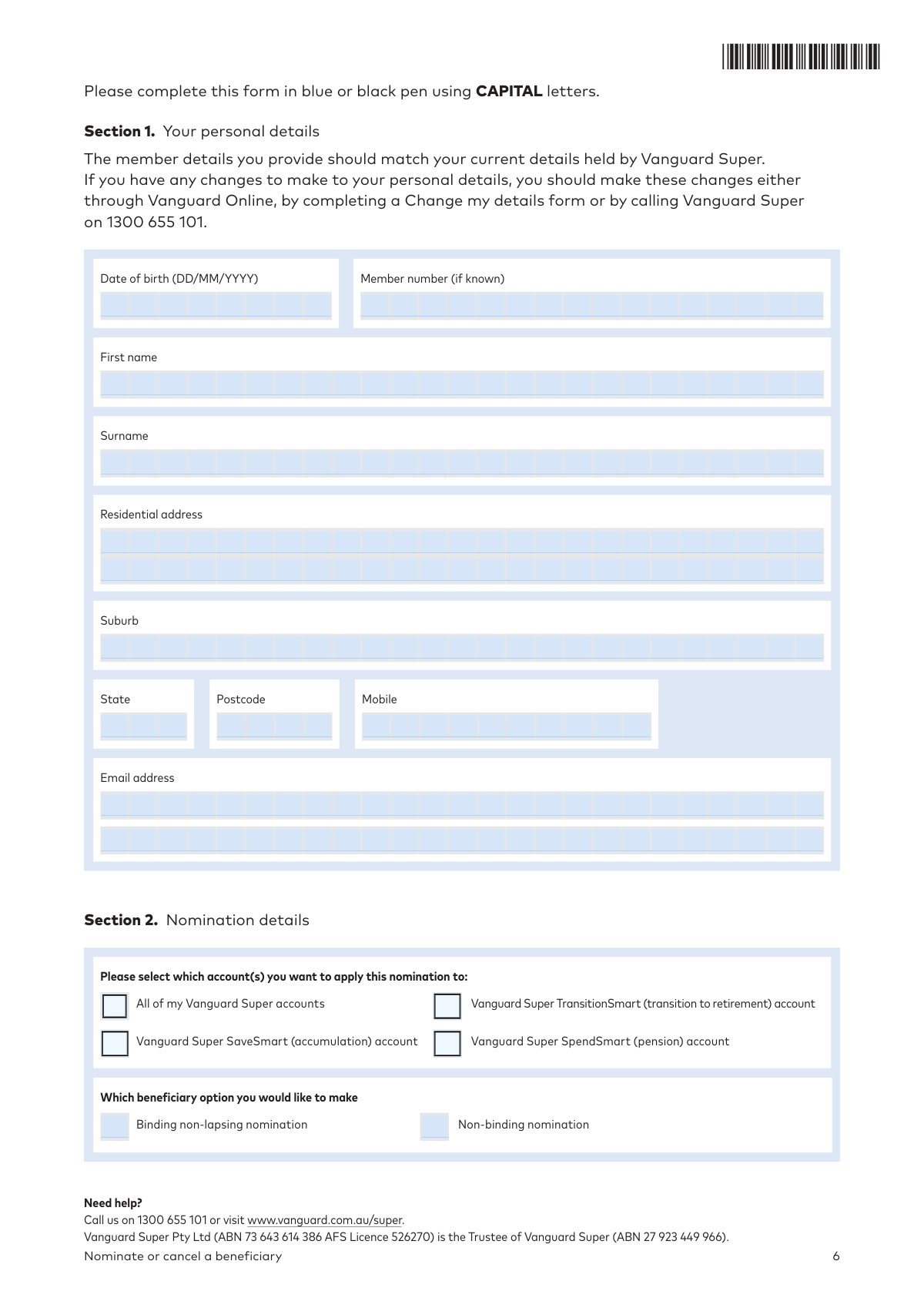
The Vanguard Super Nominate or cancel a beneficiary form allows members to formally instruct the Trustee on how their superannuation death benefits should be distributed. Members can make a non-binding nomination (a preference) or a non-lapsing binding nomination (a legally binding direction), ensuring assets are distributed according to their wishes. Today, this form can be filled out quickly and accurately using AI-powered services like Instafill.ai, which can also convert non-fillable PDF versions into interactive fillable forms.
Our AI automatically handles information lookup, data retrieval, formatting, and form filling.
It takes less than a minute to fill out VSFORM018 using our AI form filling.
Securely upload your data. Information is encrypted in transit and deleted immediately after the form is filled out.
Form specifications
| Form name: | Vanguard Super Nominate or cancel a beneficiary |
| Number of pages: | 1 |
| Language: | English |
| Categories: | beneficiary forms, Vanguard forms |
Instafill Demo: How to fill out PDF forms in seconds with AI
How to Fill Out VSFORM018 Online for Free in 2026
Are you looking to fill out a VSFORM018 form online quickly and accurately? Instafill.ai offers the #1 AI-powered PDF filling software of 2026, allowing you to complete your VSFORM018 form in just 37 seconds or less.
Follow these steps to fill out your VSFORM018 form online using Instafill.ai:
- 1 Navigate to Instafill.ai and upload or select the Vanguard Super 'Nominate or cancel a beneficiary' form.
- 2 Provide your personal details for Section 1, including your name, date of birth, and member number.
- 3 In Section 2, specify which Vanguard Super account(s) the nomination applies to and choose between a binding or non-binding nomination.
- 4 Complete Section 3 by entering the details of the beneficiaries you wish to nominate, including their name, relationship, and the percentage of the benefit they will receive. Alternatively, complete Section 4 if you are only cancelling a previous nomination.
- 5 Review the relevant declarations in Section 5a. If making a binding nomination, prepare to have the form signed in the presence of two eligible witnesses.
- 6 Let the AI populate the form, then carefully review all entered information for accuracy before downloading the completed document.
- 7 Print the form, sign it (along with your witnesses for binding nominations), and submit it to Vanguard Super either online via secure message or by mail.
Our AI-powered system ensures each field is filled out correctly, reducing errors and saving you time.
Why Choose Instafill.ai for Your Fillable VSFORM018 Form?
Speed
Complete your VSFORM018 in as little as 37 seconds.
Up-to-Date
Always use the latest 2026 VSFORM018 form version.
Cost-effective
No need to hire expensive lawyers.
Accuracy
Our AI performs 10 compliance checks to ensure your form is error-free.
Security
Your personal information is protected with bank-level encryption.
Frequently Asked Questions About Form VSFORM018
This form is used to make a new beneficiary nomination for your Vanguard Super account, or to change or cancel an existing nomination for who receives your super benefit when you die.
A binding nomination legally obligates the Trustee to pay your benefit to your nominated beneficiaries, provided it's valid. A non-binding nomination is a guide for the Trustee, who will consider your wishes but has the final say on the distribution.
You can nominate your spouse or de facto partner, your children, a person financially dependent on you, a person in an interdependency relationship with you, or your legal personal representative (your estate).
To change a nomination, you must complete a new form, which will replace any previous nominations. Fill out sections 1, 3, and 5a for all nominations, and also section 5b if you are making a binding nomination.
Yes, for a binding nomination to be valid, you must sign and date the form in the presence of two witnesses. The witnesses must be 18 or older, not be nominated as beneficiaries, and must also sign and date the form on the same day as you.
Your nomination will be invalid if the percentages do not add up to exactly 100%. You must also use whole numbers and avoid decimals, rounding if necessary (e.g., 33%, 33%, 34%).
To cancel an existing nomination, complete Section 4. For a non-binding nomination, you only need to complete sections 1, 4, and 5a, but for a binding nomination, you must also complete the witness declarations in section 5b.
No, Vanguard cannot accept forms with alterations. If you make a mistake, you must start over with a new, clean form to ensure your nomination is valid.
You can submit the form by downloading, completing, and uploading it via secure message in Vanguard Online. Alternatively, you can mail the completed form to the Reply Paid address listed on the form.
Not necessarily. In Section 2, you can select to apply the nomination to all your accounts. However, if you want different beneficiaries for different accounts, you must complete a separate form for each one.
Yes, services like Instafill.ai use AI to accurately auto-fill form fields with your personal information, which can save you time and help reduce errors.
Simply upload the form to the Instafill.ai platform. The AI will identify the fields, allowing it to automatically populate your information before you review, sign, and submit the document.
If you have a non-fillable or 'flat' PDF, you can use a service like Instafill.ai. It can convert the document into an interactive, fillable form that you can easily complete on your computer.
Compliance VSFORM018
Validation Checks by Instafill.ai
1
Confirms Total Beneficiary Percentage Equals 100%
This validation sums the percentages allocated to all nominated beneficiaries in Section 3. The form explicitly states that the total must equal exactly 100% to ensure the entire death benefit is distributed according to the member's wishes. A total that is not 100% will invalidate the entire nomination, and the form will be rejected.
2
Mandates Witness Declarations for Binding Nominations
This check confirms that if 'Binding non-lapsing nomination' is chosen in Section 2, then Section 5b is fully completed with the details of two witnesses. This is a strict legal requirement for a binding nomination to be valid. Failure to provide two valid witnesses will render the binding nomination invalid and require a new submission.
3
Ensures Member and Witness Signature Dates Match for Binding Nominations
For a binding nomination to be legally valid, the member and both witnesses must sign on the same day. This validation compares the member's signature date in Section 5a with the two witness signature dates in Section 5b to ensure they are identical. A mismatch in dates will invalidate the binding nomination, requiring the member to complete a new form.
4
Prohibits Beneficiaries from Acting as Witnesses
This validation cross-references the full names of the witnesses in Section 5b against the names of the beneficiaries listed in Section 3. The form explicitly states that witnesses must not be nominated beneficiaries to avoid conflicts of interest. If a beneficiary is also a witness, the binding nomination is invalid and will be rejected.
5
Enforces Mutually Exclusive Nomination and Cancellation Actions
Validates that the member has not tried to both nominate new beneficiaries (Section 3) and cancel all nominations (Section 4) on the same form. The instructions state that completing Section 3 automatically replaces previous nominations, making Section 4 redundant and contradictory. If both sections are completed, the form is ambiguous and will be rejected.
6
Verifies Benefit Percentages are Whole Numbers
This check ensures that any value entered in the '% of benefit' fields in Section 3 is a whole number, as the form explicitly states 'No decimals are allowed'. Using decimals or fractions can lead to calculation errors and ambiguity in benefit distribution. The form will be considered invalid if decimals are used.
7
Ensures Member's Personal Details are Complete
Verifies that all mandatory fields in Section 1, such as the member's full name, date of birth, and residential address, are filled out. This information is essential to correctly identify the member's account and ensure the nomination is applied to the right person. An incomplete form will be rejected, delaying the processing of the nomination.
8
Validates Selection of a Single Nomination Type
Checks that the member has selected exactly one option in Section 2, either 'Binding non-lapsing nomination' or 'Non-binding nomination'. Selecting none or both creates ambiguity about the member's intent, making the nomination invalid. The form will be returned for correction if this rule is not met.
9
Confirms Presence of Member's Signature
This is a critical check to ensure the member has signed the declaration in Section 5a. A signature indicates the member's agreement to the declarations and their intent to make or cancel the nomination. An unsigned form is legally non-binding and will be rejected immediately.
10
Enforces Correct DD/MM/YYYY Date Format
This validation checks all date fields across the form (e.g., member's date of birth, beneficiary dates of birth, signature dates) to ensure they adhere to the specified DD/MM/YYYY format. Incorrect or ambiguous date formats can lead to data entry errors and legal challenges, and the form will be returned for correction.
11
Ensures Completeness of Individual Beneficiary Information
Verifies that for each beneficiary entry started in Section 3, all necessary fields like name, relationship, and percentage of benefit are fully completed. A partially filled entry, such as a name with no percentage, creates an incomplete instruction for the Trustee. This prevents ambiguity and ensures the nomination is clear and executable.
12
Validates Account Selection for Nomination Application
This check ensures that the member has selected at least one account in Section 2 to which the nomination should apply. Without an account selection, the Trustee does not know where to apply the beneficiary instructions. The form will be considered incomplete and returned if no account is specified.
13
Validates Handling of 'Legal Personal Representative' Nomination
Checks that if 'Legal personal representative' is selected as a relationship in Section 3, the corresponding personal detail fields (name, address, DOB) for that entry are left blank. The form instructions specify that these details are not required at the time of nomination. Entering details could cause confusion and will flag the form for review or rejection.
Common Mistakes in Completing VSFORM018
For a binding nomination to be valid, it must be signed in the presence of two witnesses who are over 18 and are not named as beneficiaries on the form. People often mistakenly ask a nominated spouse or child to act as a witness. This error will invalidate the entire binding nomination, meaning the Trustee is not legally required to follow your directions, defeating the purpose of the nomination.
The form explicitly requires the member and both witnesses to sign and date the form on the exact same day for a binding nomination. A common oversight is having witnesses sign on different days from the member or each other. This discrepancy makes the binding nomination legally invalid and will cause it to be rejected by the Trustee, requiring you to complete and re-submit the entire form.
The total percentage of the benefit allocated across all beneficiaries must equal exactly 100%. People often make small calculation errors, or use decimals or fractions (e.g., 33.3%) which are not allowed. If the total is not 100% or contains decimals, the nomination will be considered invalid and your benefit may be distributed at the Trustee's discretion.
The form states that it cannot be accepted if it has any alterations, such as crossed-out text or correction fluid. Many people are accustomed to initialing changes on documents, but this is strictly forbidden here. Any mistake, no matter how small, requires you to start over with a fresh form, which can be frustrating and time-consuming. Using a tool like Instafill.ai can prevent this by allowing you to type and edit information digitally before printing, ensuring a clean, error-free final document.
Nominations are restricted to your spouse, children, financial dependants, interdependent relations, or your legal personal representative. People sometimes try to nominate a friend, sibling, or other relative who does not qualify as a dependant under superannuation law. This will invalidate that portion of your nomination, and the Trustee will decide how to distribute those funds, which may not align with your wishes.
The form has different instructions for changing a nomination (Section 3) versus cancelling one (Section 4). A user wanting to replace beneficiaries might incorrectly fill out Section 4, which revokes the nomination entirely without creating a new one. To change beneficiaries, you only need to complete Section 3, as a new nomination automatically replaces any previous one. This confusion can lead to you having no nomination in place at all.
All fields in Section 1 (Your personal details) and Section 3 (for each beneficiary) must be filled out completely, including full names, addresses, and dates of birth. People often leave fields blank if they don't have the information readily available. Incomplete forms lead to processing delays and can create significant issues for the Trustee in identifying and contacting your beneficiaries in the future.
The form instructs users to write in CAPITAL letters and use a blue or black pen, with a specific requirement for a BLACK pen for signatures. Using other colors or writing in messy, lowercase script can make the form difficult to read for optical character recognition (OCR) systems and processing staff. This can lead to data entry errors or the rejection of the form. Since the original form is a non-fillable PDF, a service like Instafill.ai can convert it into a fillable version, ensuring all text is perfectly legible.
When nominating your 'Legal Personal Representative' (your estate), you should only tick the corresponding box and assign a percentage. A common error is to write the name of the person you've chosen as your executor in the name fields. The form does not require these details, as the executor is formally identified after your death. This mistake creates confusion and can delay the processing of your form.
The form has specific pathways depending on the user's intent (e.g., changing a binding nomination requires Sections 1, 3, 5a, and 5b). It's easy to miss a required section, such as forgetting to complete the witness declarations in Section 5b after filling out a binding nomination in Section 3. This omission renders the submission incomplete and invalid, meaning your nomination will not be recorded until a correctly completed form is received.
Saved over 80 hours a year
“I was never sure if my IRS forms like W-9 were filled correctly. Now, I can complete the forms accurately without any external help.”
Kevin Martin Green
Your data stays secure with advanced protection from Instafill and our subprocessors

Robust compliance program
Transparent business model
You’re not the product. You always know where your data is and what it is processed for.
ISO 27001, HIPAA, and GDPR
Our subprocesses adhere to multiple compliance standards, including but not limited to ISO 27001, HIPAA, and GDPR.
Security & privacy by design
We consider security and privacy from the initial design phase of any new service or functionality. It’s not an afterthought, it’s built-in, including support for two-factor authentication (2FA) to further protect your account.
Fill out VSFORM018 with Instafill.ai
Worried about filling PDFs wrong? Instafill securely fills vanguard-super-nominate-or-cancel-a-beneficiary forms, ensuring each field is accurate.