
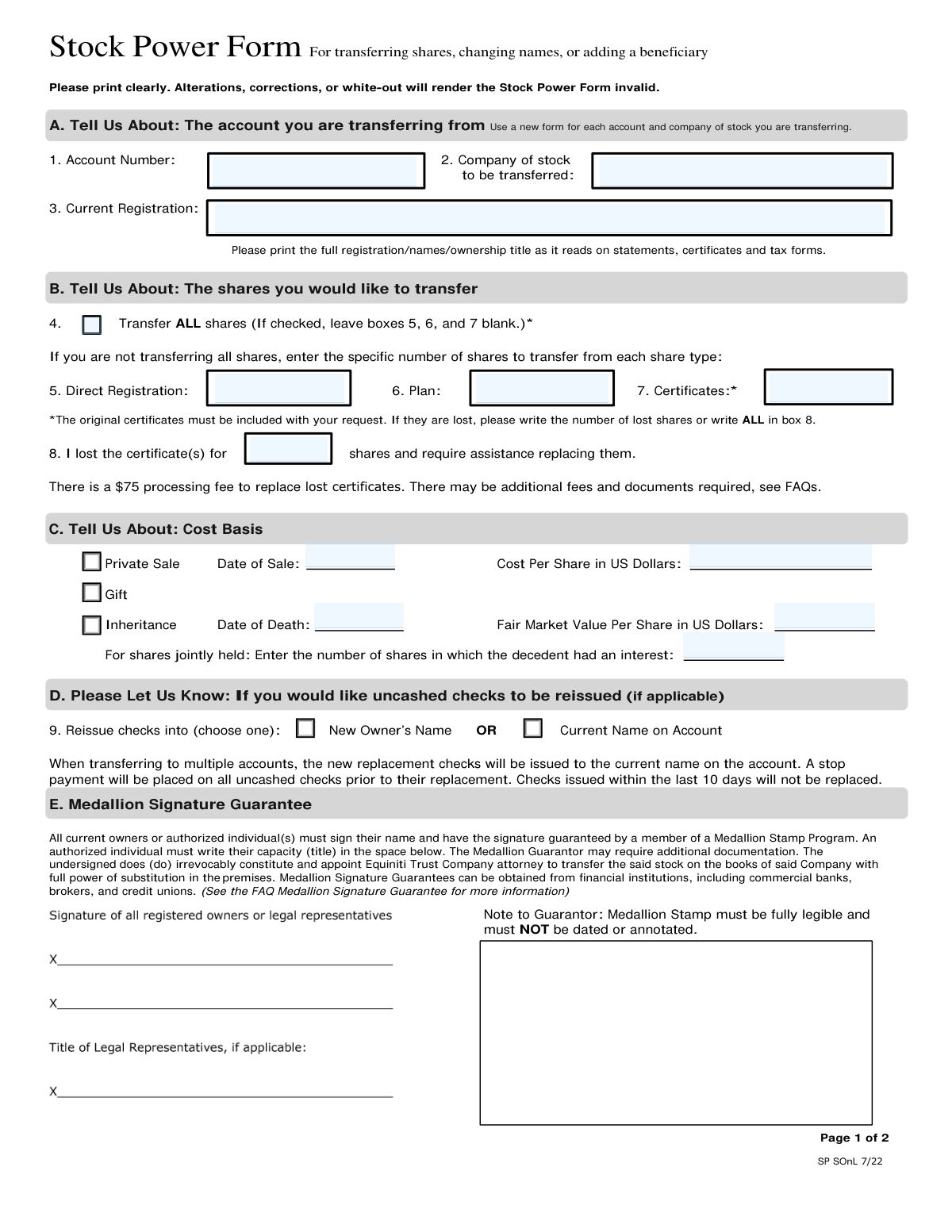
Yes! You can use AI to fill out Stock Power Form For transferring shares, changing names, or adding a beneficiary
Don't type 63 fields by hand. Tell our AI about yourself, or upload a document you already have, and it fills every field in seconds. You check it, then download, print or sign.
The AI does the filling. You just check it.
No typing into boxes, nothing to install.
What this form asks for
The AI fills all of it, from your answers or your documents.
The AI checks your answers before you download
13 checks built for this form, so a wrong date or a missing answer is caught before anyone else sees it.
Verifies the submitted form is completely free of any alterations, corrections, or the use of white-out. The form explicitly states that any such modifications will render it invalid. This check is critical for legal and compliance purposes to ensure the document's integrity and prevent fraudulent changes. A form with any visible corrections must be rejected, and the user must submit a new, clean form.
Confirms that a Medallion Signature Guarantee stamp is present in Section E, is fully legible, and is not dated or otherwise annotated. This specialized guarantee is required to authenticate the owner's signature and authorize the transfer, protecting all parties from fraudulent activity. If the stamp is missing, illegible, or improperly marked, the transfer cannot be processed and the form must be returned for a proper guarantee.
Ensures that either the 'Transfer ALL shares' checkbox (Box 4) is checked OR specific share counts are entered in boxes 5, 6, and 7, but not both simultaneously. This logic prevents ambiguity in the transfer instructions. If both the 'ALL' box and specific share counts are provided, the user's intent is unclear, and the form must be rejected for clarification to avoid processing an incorrect number of shares.
Validates that if a cost basis reason is selected in Section C (e.g., 'Private Sale' or 'Inheritance'), the corresponding required fields are filled. For a 'Private Sale,' the 'Date of Sale' and 'Cost Per Share' are mandatory. For an 'Inheritance,' the 'Date of Death' and 'Fair Market Value' are required. This information is essential for accurate tax reporting for the new owner, and incomplete forms will be held pending receipt of the missing data.
Checks that the required name and information lines in Section F are completed based on the 'Registration for the New Account' type selected. For example, if 'Custodian for Minor' is checked, Lines 1 (Custodian), 2a (Minor), and 2b (Minor's State) must be filled. This validation ensures the new account is set up correctly according to the legal standards for that ownership type. An improperly completed section will result in the rejection of the form.
Verifies that the Tax ID provided in Section F for the new account is a 9-digit number and that the corresponding box ('SSN' or 'EIN') is checked. This Taxpayer Identification Number is legally required by the IRS for all tax reporting. An invalid, missing, or incomplete Tax ID will subject the account to backup withholding and prevent proper account setup, requiring the form to be returned for correction.
And 7 more checks
- W-9 Certification Signature Match
- Original Certificate Inclusion for Transfer
- Trust Registration Date Requirement
- Single Form per Company and Account
- Current Registration Field Completion
- Account Number Format and Presence
- Sale Request ABA Routing Number Format
Let AI fill out your Stock Power Form
No typing. Every field filled in seconds, checked, ready to sign.
How to Fill Out Stock Power Form Online for Free in 2026
What the AI walks you through.
- Navigate to Instafill.ai and upload your Stock Power Form or select it from our template library.
- Use the AI assistant to provide information about the account you are transferring from, including the account number, company of stock, and current registration details.
- Specify the shares to be transferred (all or a specific number) and provide the necessary cost basis information for tax purposes, such as private sale, gift, or inheritance.
- Enter the new owner's details, including their registration type (e.g., Individual, Joint Tenancy, Trust), address, and Tax ID number for the integrated Substitute Form W-9.
- Review all the information populated by the AI for accuracy, as alterations or white-out can invalidate the form.
- Download the completed form and print it. All current owners must sign the form and obtain a Medallion Signature Guarantee from an eligible financial institution.
- Mail the original, signed document, along with any physical stock certificates if applicable, to the transfer agent's address provided in the form instructions.
Common Mistakes in Completing Stock Power Form
The ones the AI is built to catch.
Obtaining a Notary Seal Instead of a Medallion Signature Guarantee
Making Corrections or Using White-Out
Mismatching the 'Current Registration' Name
Incorrect or Missing Signature on Substitute Form W-9
Providing Conflicting Share Transfer Instructions
Failing to Include Original Stock Certificates
Using a Single Form for Multiple New Owners
Submitting a Dated or Annotated Medallion Stamp
Omitting Cost Basis Details for Inherited Shares
Faxing, Emailing, or Mailing a Copy of the Form
Frequently Asked Questions About Stock Power Form
Is it really free for 7 days?
Can I fill other forms too?
How do I cancel?
How does the AI fill out Stock Power Form?
What happens to my information?
How complex is Stock Power Form to fill out?
What is the purpose of the Stock Power Form?
What is a Medallion Signature Guarantee and where do I get one?
What should I do if I've lost my stock certificates?
Can I submit this form by fax or email?
What happens if I make a mistake or use white-out on the form?
How do I transfer shares to multiple new owners?
How do I change my name on the account?
Do I need to fill out the Substitute Form W-9 in Section G?
How will I know when the stock transfer is complete?
Should I sign the back of my paper stock certificates?
Can AI tools help me fill out this Stock Power Form?
How can I fill out this form online if I only have a PDF copy?
The PDF I downloaded isn't fillable. What can I do?
Where do I find my account number?
Get your Stock Power Form filled out by AI
$0 today. Cancel before Nov 1 and you pay nothing.
Other forms like this one
beneficiary forms: Form I-130A, Supplemental Info for Spouse Beneficiary, Affidavit and Representations Regarding Next of Kin (Preference Beneficiary Affidavit) (The Hartford) – Form LC-7086-17, VA Form 21-0788, Information Regarding Apportionment of Beneficiary's Award, California Schedule K-1 (541) (2025), Beneficiary’s Share of Income, Deductions, Credits, etc., Form I-130A, Supplemental Information for Spouse Beneficiary, Fidelity Investments® Beneficiary Distribution Form, Fidelity Investments 403(b) Beneficiary Designation, Fidelity Advisor IRA Beneficiary Designation, Fidelity Investments Qualified Plan Beneficiary Designation, Fidelity Investments 403(b)/401(a) Beneficiary Designation, The Church of the Nazarene 403(b) Retirement Savings Plan Beneficiary Designation Form, Fidelity Investments Qualified Plan Beneficiary Designation, IRA/HSA Beneficiary Designation, Fidelity IRA Beneficiary Distribution — Charity, Foundation, or a University, Designated Beneficiary Plan Agreement, Designated Beneficiary Plan Agreement, Beneficiary Designation Form For IRA and 403(b)(7) Accounts, Designated Beneficiary Plan Agreement, IRA Beneficiary Designation Form, Distribution Due to Death for Spouse Beneficiary - Elevator Constructors Union Local No. 1 Annuity and 401(k) Fund
stock transfer forms: Fidelity Stock Plan Services (SPS) Transfer Request Form, How to Transfer Assets from Morgan Stanley to Fidelity Investments (Fidelity Stock Plan Services Guide), Material Charge Out / Stock Transfer Form
transfer forms: Form REG 227, Application for Replacement or Transfer of Title, City of Harvey Real Estate Transfer Declaration & Application (with Certificate for Exemption), DBPR ABT-6002 – Application for Transfer of Ownership of an Alcoholic Beverage License, DBPR ABT-6002, Division of Alcoholic Beverages and Tobacco Application for Transfer of Ownership of an Alcoholic Beverage License, Request for Transfer of Records (Adelaide Health Care) – AHC-0013-05-PS (Version 2), DBPR Form ABT-6002, Division of Alcoholic Beverages and Tobacco Application for Transfer of Ownership of an Alcoholic Beverage License, Pfändungs- und Überweisungsbeschluss (Garnishment and Transfer Order) – German Civil Enforcement Court Form, Fidelity Funds Account Transfer of Assets Form, Fidelity Stock Plan Services (SPS) Transfer Request Form, How to Transfer Assets from Morgan Stanley to Fidelity Investments (Fidelity Stock Plan Services Guide), Transfer Due to Divorce — IRA/HSA/529, Fidelity Investments Transfer/Rollover/Exchange Form, Fidelity Investments Standing Transfer Instructions Form, Fidelity Investments Transfer/Rollover Form, Group Transfer Form Fidelity Health Savings Account (HSA), Plan–to-Plan Transfer, Plan Exchange, or Service Credit Authorization Form, Beneficiaries — Nonretirement Transfer on Death, Transfer Shares as a Gift — Nonretirement, Form APP13017-29, Transfer Your Account to Schwab, Transfer of Assets Out - Partial Account or Charitable Gift Transfers
Let AI fill out your Stock Power Form
Your trial starts once a card is added. You pay nothing before Nov 1.
Our AI already knows this form, all 63 fields of it. Skip the typing: tell it about yourself, or upload what you have, and it fills the whole form in seconds.
- AI fills every field on all 9 pages, checkboxes included
- No typing into boxes: answer a few questions, or upload a document you already have, an old copy of this form, a photo of a document
- The AI checks the answers; you review and change anything before you download
- Download the finished PDF, print it, or sign it online
- Encrypted, and never used to train AI
Cancel before Nov 1 and you pay nothing.
A card is needed to start the trial. Cancel in two clicks from your account.
Terms · Privacy