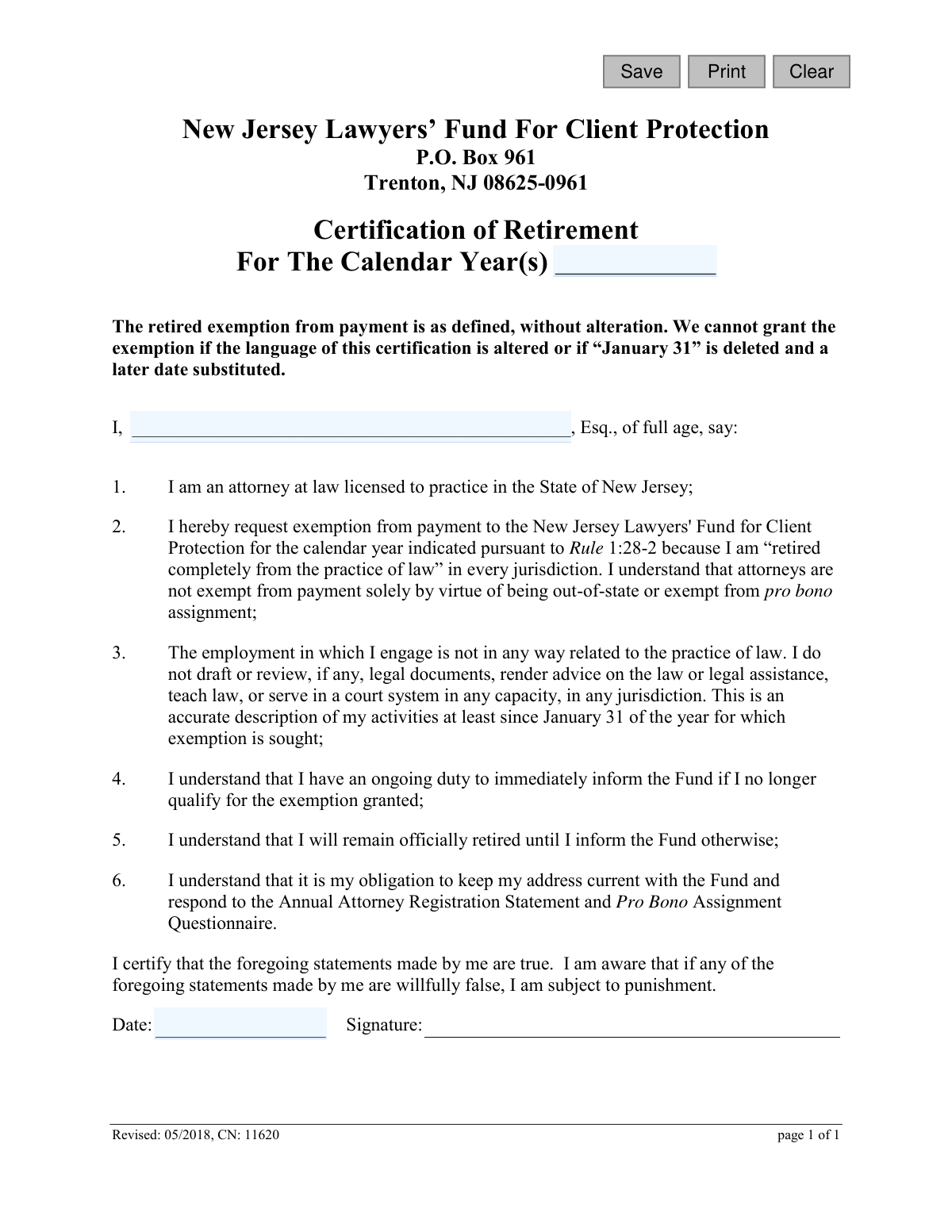
Yes! You can use AI to fill out New Jersey Lawyers’ Fund For Client Protection Certification of Retirement

The New Jersey Certification of Retirement is a legal document used by attorneys licensed in New Jersey to formally certify that they have completely retired from the practice of law in all jurisdictions. By submitting this form, an attorney requests an exemption from mandatory payments to the New Jersey Lawyers' Fund for Client Protection. Today, this form can be filled out quickly and accurately using AI-powered services like Instafill.ai, which can also convert non-fillable PDF versions into interactive fillable forms.
CN 11620 is part of the New Jersey forms and retirement fund forms categories on Instafill.
Our AI automatically handles information lookup, data retrieval, formatting, and form filling.
It takes less than a minute to fill out CN 11620 using our AI form filling.
Securely upload your data. Information is encrypted in transit and deleted immediately after the form is filled out.

Form specifications

Form name: New Jersey Lawyers’ Fund For Client Protection Certification of Retirement
Number of fields: 6
Number of pages: 1
Language: English
main-image

Instafill Demo: How to fill out PDF forms in seconds with AI

How to Fill Out CN 11620 Online for Free in 2026

Are you looking to fill out a CN 11620 form online quickly and accurately? Instafill.ai offers the #1 AI-powered PDF filling software of 2026, allowing you to complete your CN 11620 form in just 37 seconds or less.
Follow these steps to fill out your CN 11620 form online using Instafill.ai:
  1. 1 Navigate to Instafill.ai and upload or select the Certification of Retirement form.
  2. 2 Enter the calendar year or years for which you are claiming the retirement exemption.
  3. 3 Provide your full name as a licensed attorney in the designated field.
  4. 4 Carefully read and confirm the six certification statements, ensuring you meet all criteria for being 'retired completely from the practice of law'.
  5. 5 Use the platform's tools to securely add your digital signature and the current date to certify the statements.
  6. 6 Review the entire completed form for accuracy before downloading it for your records or submitting it to the New Jersey Lawyers’ Fund For Client Protection.

Our AI-powered system ensures each field is filled out correctly, reducing errors and saving you time.

Why Choose Instafill.ai for Your Fillable CN 11620 Form?

Speed

Complete your CN 11620 in as little as 37 seconds.

Up-to-Date

Always use the latest 2026 CN 11620 form version.

Cost-effective

No need to hire expensive lawyers.

Accuracy

Our AI performs 10 compliance checks to ensure your form is error-free.

Security

Your personal information is protected with bank-level encryption.

Frequently Asked Questions About Form CN 11620

This form is used by New Jersey attorneys to certify that they are completely retired from the practice of law in all jurisdictions. Submitting this form allows you to request an exemption from paying the annual fee to the New Jersey Lawyers’ Fund for Client Protection.

Any attorney licensed in New Jersey who is fully retired from practicing law and wishes to be exempt from the annual payment to the Lawyers' Fund for Client Protection should complete this form.

It means you do not engage in any law-related activities in any jurisdiction, including drafting legal documents, giving legal advice, teaching law, or serving in a court system. Simply being out-of-state or exempt from pro bono work does not qualify you as retired for this purpose.

In this field, you should enter the specific calendar year or years for which you are seeking the retirement exemption. Your retirement must have been effective since at least January 31 of the earliest year you list.

You should mail the completed and signed form to the New Jersey Lawyers’ Fund For Client Protection at P.O. Box 961, Trenton, NJ 08625-0961.

The form requires that your retirement status be effective as of January 31 of the year for which you seek an exemption. It is crucial not to alter this date on the certification when you sign.

Yes, even after filing for retirement, you must keep your address current with the Fund and continue to respond to the Annual Attorney Registration Statement and Pro Bono Assignment Questionnaire.

You have an ongoing duty to immediately inform the Fund if you no longer qualify for the retirement exemption. Your retired status remains official until you notify the Fund otherwise.

No, the form explicitly states that you cannot claim the exemption if you teach law. To qualify, you must not engage in any employment related to the practice of law.

No, this form is for attorneys who are retired from practicing law in every jurisdiction. If you are actively practicing law anywhere, you do not qualify for this exemption.

You will need to provide the calendar year(s) for the exemption, your full name, the date, and your signature. By signing, you certify that you meet all the stated conditions for complete retirement from the practice of law.

Yes, services like Instafill.ai use AI to accurately auto-fill form fields with your information, which can save you time and help prevent errors.

Simply upload the form to the Instafill.ai platform. The AI will identify the fields like your name and the calendar year, and you can then review and fill them in digitally before printing the form for your signature.

You can use a service like Instafill.ai, which can convert flat, non-fillable PDFs into interactive forms. This allows you to type your information directly onto the form before printing.

Compliance CN 11620
Validation Checks by Instafill.ai

1
Certification Year(s) Presence
Validates that the 'For The Calendar Year(s)' field is not empty. This is a mandatory field as the exemption is granted for specific years, and without this information, the certification is incomplete and cannot be processed. A failed validation will prevent form submission and prompt the user to enter the relevant year(s).
2
Certification Year(s) Format
Ensures the calendar year(s) are entered in a valid format, such as a single four-digit year (YYYY), a range (YYYY-YYYY), or a comma-separated list (YYYY, YYYY). This prevents data entry errors and ensures the data is consistent and machine-readable for record-keeping. If the format is invalid, the user should be shown an example of the correct format.
3
Attorney Name Presence
Verifies that the attorney's full name has been entered in the 'I, ..., Esq.' field. The name is the primary identifier for the individual making the certification. Submitting the form without a name would render the legal attestation anonymous and invalid, so this field is mandatory.
4
Attorney Name Format
Checks that the attorney's name field contains only alphabetical characters, spaces, hyphens, and apostrophes, and does not contain numbers or excessive special characters. This validation helps ensure a valid, human-readable name is captured for official records. It prevents garbage data from being entered into a critical identification field.
5
Signature Date Presence
Confirms that the 'Date' field has been filled out. The signature date is legally significant as it establishes the exact time the certification was made. An undated certification is legally deficient, so this field must be completed before submission.
6
Signature Date Format
Validates that the signature date is entered in a recognized and valid date format, such as MM/DD/YYYY. Enforcing a standard format prevents ambiguity and ensures the date is correctly interpreted and stored in the system. An invalid format would trigger an error message guiding the user to correct the entry.
7
Signature Date Is Not in the Future
Checks that the entered signature date is not a future date. A certification cannot be post-dated, as it attests to a current state of affairs. This logical check prevents accidental or intentional post-dating, ensuring the integrity of the legal statement.
8
Logical Date Consistency with Certification Year
Performs a critical cross-field validation to ensure the signature date is on or after January 31st of the year for which the exemption is sought. The form text explicitly states this condition for the description of activities. This rule is fundamental to the exemption's validity and prevents premature or invalid certifications.
9
Digital Signature or Attestation
Ensures that a digital signature has been applied or that a corresponding 'I certify' checkbox has been ticked before submission. The signature is the action that makes the statements on the form a binding certification. Without it, the form is just an unverified collection of information and has no legal effect.
10
Prohibition of Form Text Alteration
Verifies that the fixed legal language of the certification has not been altered, as explicitly forbidden on the form. In a digital system, this could involve checking that read-only fields have not been tampered with on the client-side before submission. This is crucial because any alteration voids the specific terms required for the exemption.
11
Attorney License Verification
A backend validation that cross-references the provided attorney name with the New Jersey Bar's official database of licensed attorneys. This check confirms the individual's status as an 'attorney at law licensed to practice in the State of New Jersey' as stated in point #1. A mismatch would flag the submission for review as it questions the submitter's eligibility to even file this form.
12
Submission Completeness Check
Acts as a final gatekeeper validation that runs upon clicking the submit button, ensuring all mandatory fields (Year, Name, Date, Signature) are complete. This prevents the submission of a partially filled form that would require manual follow-up. If any required field is empty, the submission is blocked and the user is notified of all missing information.

Common Mistakes in Completing CN 11620

Entering an Incorrect or Ambiguous Calendar Year

Attorneys may enter the wrong year, a partial year (e.g., '24' instead of '2024'), or a date range when a single year is expected. This confusion can cause the exemption to be applied to the incorrect billing cycle or lead to rejection. To avoid this, carefully enter the full four-digit calendar year for which you are seeking the retirement exemption.

Misunderstanding the 'Completely Retired' Requirement

Many attorneys mistakenly believe 'retired' only applies to their practice in New Jersey, while they continue to perform some legal work in another state, as a mediator, or pro bono. The form requires complete retirement from law-related activities in *every* jurisdiction. Submitting a false certification can result in penalties and disciplinary action, so you must cease all law-related work as defined in the form to qualify.

Altering the Certification Language

Some individuals may try to cross out words or add qualifying statements to make the certification fit their specific situation. The form explicitly states that it will be rejected if the language is altered in any way. To avoid immediate rejection, you must accept and sign the certification exactly as written; if you cannot truthfully do so, you do not qualify for the exemption.

Providing an Incomplete or Mismatched Name

Filers sometimes provide a nickname or omit a middle initial or the required 'Esq.' suffix. This can cause a mismatch with the official records at the New Jersey Lawyers' Fund, delaying verification and processing. Always enter your full, legal name exactly as it appears on your New Jersey bar registration to ensure a smooth process.

Forgetting to Physically or Digitally Sign the Form

An unsigned certification is invalid. In the rush to complete and submit paperwork, the signature line is a commonly missed step. This oversight will cause the form to be returned and will delay the exemption. Before submitting, double-check that you have provided a valid signature in the designated space, whether it's a wet signature for a mailed copy or a valid electronic signature if submitted online.

Using an Incorrect or Inconsistent Date Format

The signature date field is often filled out with ambiguous formats (e.g., 01/02/24) or left blank entirely. An undated or unclearly dated legal certification can be questioned or rejected. To prevent issues, use a clear MM/DD/YYYY format or write out the month (e.g., January 31, 2024). AI-powered tools like Instafill.ai can help by auto-formatting dates correctly.

Misinterpreting 'Law-Related' Employment

The definition of law-related activities in point #3 is very broad, and attorneys may not realize their work in compliance, mediation, or contract management disqualifies them. If your role involves drafting documents, rendering advice on the law, or teaching law, you are not eligible. This misinterpretation can lead to a false certification, so you must carefully review your duties against the form's specific prohibitions.

Failing to Submit the Form After Filling It Out

It's common for people to fill out a PDF, save it to their desktop, and then forget the final step of mailing or uploading it. This gives a false sense of completion, but the Fund will have no record of the request and will bill for the annual fee. To avoid this, create a clear final step in your process to immediately submit the form after completion and signing.

Submitting a Scanned, Non-Fillable PDF with Poor Quality

Often, the only available version of a form is a flat, non-fillable PDF. Users may print, fill by hand, and scan it, resulting in illegible handwriting and poor scan quality that can lead to data entry errors by the recipient or outright rejection. To avoid this, use a service like Instafill.ai, which can convert any flat PDF into a clean, fillable form, ensuring all your entries are typed and perfectly legible.

Assuming the Exemption is Granted Automatically Upon Retirement

A retiring attorney might simply stop paying the annual fee, assuming the Fund is aware of their new status. However, the exemption is not automatic and requires this specific certification to be filed and approved. Failure to file results in delinquency, late fees, and potential administrative penalties, so you must always proactively submit this form to request the exemption.
Saved over 80 hours a year

“I was never sure if my IRS forms like W-9 were filled correctly. Now, I can complete the forms accurately without any external help.”

Kevin Martin Green

Your data stays secure with advanced protection from Instafill and our subprocessors

Robust compliance program

Transparent business model

You’re not the product. You always know where your data is and what it is processed for.

ISO 27001, HIPAA, and GDPR

Our subprocesses adhere to multiple compliance standards, including but not limited to ISO 27001, HIPAA, and GDPR.

Security & privacy by design

We consider security and privacy from the initial design phase of any new service or functionality. It’s not an afterthought, it’s built-in, including support for two-factor authentication (2FA) to further protect your account.

Fill out CN 11620 with Instafill.ai

Worried about filling PDFs wrong? Instafill securely fills new-jersey-lawyers-fund-for-client-protection-certification-of-retirement forms, ensuring each field is accurate.

Related forms by category

New Jersey forms State of New Jersey Alternate Benefit Program Withdrawal Request Acknowledgement Receipt, Horizon Blue Cross Blue Shield of New Jersey Applied Behavior Analysis Supplemental Information Form, State of New Jersey Application for Employment (Form DPF-663), New Jersey Judiciary Plea Form (Plea 01), Supplemental Plea Form for Certain Sexual Offenses: Megan’s Law/Parole Supervision for Life/Community Supervision for Life (Plea 05), Financial Questionnaire to Establish Indigency, New Jersey Judiciary Resource Family Information Form, Foreclosure Case Information Statement (FCIS) - Appendix XII-B2, New Jersey Judiciary Records Request Form, Superior Court of New Jersey, Application for Appeal and Order, FL Certification of Requested Background Checks for Kinship Legal Guardianship, Certification of Caregiver as to Knowledge of Identity and/or Location of Parents, FL Order Judgment for Kinship Legal Guardianship, New Jersey Judiciary Certification of Repair and Plea of Guilty, Uniform Summary Support Order (USSO), New Jersey Judiciary Volunteer Application (CN 10293), Application to Take the New Jersey Court Interpreter Oral Examination, New Jersey Judiciary Attorney Fee Arbitration Request, Order to Show Cause with Temporary Restraints Pursuant to Rule 4:52, Tax Court of New Jersey, State Tax Complaint · + 227 more →
retirement fund forms Easy Transfer Form: Moving Funds to an Employer-Sponsored Retirement Plan at TIAA, Form F10462, Moving Funds to an Employer-Sponsored Retirement Plan at TIAA, Moving Funds to an Employer-Sponsored Retirement Plan at TIAA, ABA Retirement Funds Program Distribution Request Form, Authorization to transfer funds from a bank retirement account, New York Life Investments Funds Individual Retirement Account Application and NYLIFE Securities LLC Investor Profile, TIAA-CREF Funds Beneficiary Designation Form (Retail Class Only), Vanguard Super Nominate or cancel a beneficiary