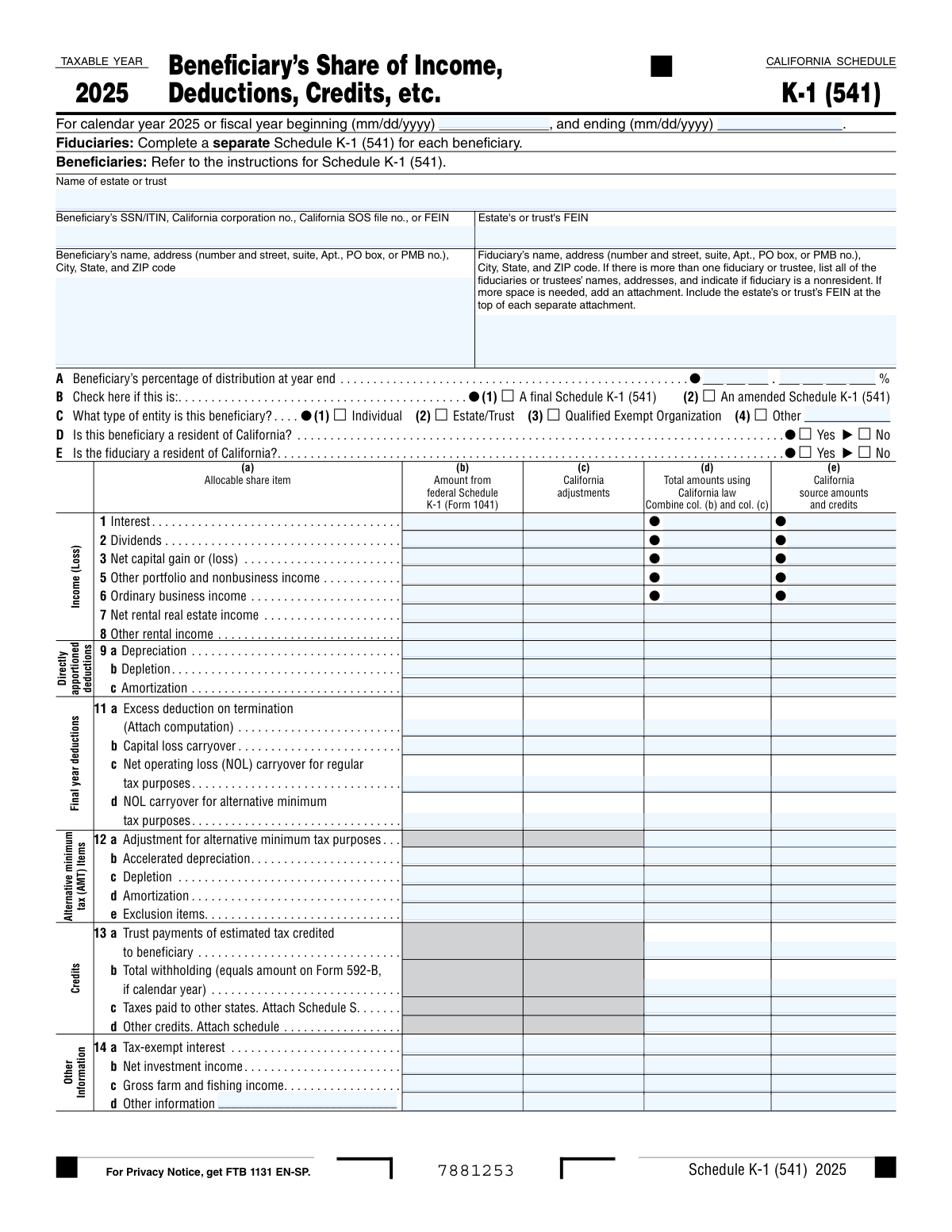
Yes! You can use AI to fill out California Schedule K-1 (541) (2025), Beneficiary’s Share of Income, Deductions, Credits, etc.

California Schedule K-1 (541) is a California Franchise Tax Board form prepared by an estate or trust (fiduciary) to allocate and report each beneficiary’s share of income (such as interest, dividends, and capital gains), deductions, credits, and other information for the taxable year. Beneficiaries use the amounts on this schedule to correctly complete their California tax returns, including California-source income and any California-specific adjustments from federal amounts. It is important because it documents how the estate or trust’s taxable items flow through to each beneficiary and supports proper reporting and compliance. Today, this form can be filled out quickly and accurately using AI-powered services like Instafill.ai, which can also convert non-fillable PDF versions into interactive fillable forms.
Our AI automatically handles information lookup, data retrieval, formatting, and form filling.
It takes less than a minute to fill out Schedule K-1 (541) using our AI form filling.
Securely upload your data. Information is encrypted in transit and deleted immediately after the form is filled out.

Form specifications

Form name: California Schedule K-1 (541) (2025), Beneficiary’s Share of Income, Deductions, Credits, etc.
Number of pages: 1
Language: English
Categories: California tax forms, California FTB forms, state tax forms, trust tax forms, income forms
main-image

Instafill Demo: filling out a legal form in seconds

How to Fill Out Schedule K-1 (541) Online for Free in 2026

Are you looking to fill out a SCHEDULE K-1 (541) form online quickly and accurately? Instafill.ai offers the #1 AI-powered PDF filling software of 2026, allowing you to complete your SCHEDULE K-1 (541) form in just 37 seconds or less.
Follow these steps to fill out your SCHEDULE K-1 (541) form online using Instafill.ai:
  1. 1 Go to Instafill.ai and upload the California Schedule K-1 (541) (2025) PDF (or select it from the form library).
  2. 2 Enter or import the tax year/period (calendar year 2025 or fiscal-year begin and end dates) and confirm the estate or trust name and FEIN.
  3. 3 Add the beneficiary’s identifying information (SSN/ITIN or other identifier) and the beneficiary’s name and mailing address; then enter the fiduciary’s name and mailing address (attach additional fiduciaries if needed).
  4. 4 Complete the distribution and status section: beneficiary distribution percentage, whether the K-1 is final or amended, beneficiary entity type, and California residency status for both beneficiary and fiduciary.
  5. 5 Use AI-assisted extraction to populate the income and deduction lines (e.g., interest, dividends, capital gain/loss, business and rental items, depreciation/depletion/amortization) across federal amounts, California adjustments, California totals, and California-source amounts.
  6. 6 Enter credits and other information items (estimated tax credited to beneficiary, withholding, taxes paid to other states, other credits, tax-exempt interest, net investment income, and any additional disclosures), attaching required schedules where applicable.
  7. 7 Review validations and totals, export the completed Schedule K-1 (541) for delivery to the beneficiary and for inclusion with the estate/trust California filing, and save a copy for records.

Our AI-powered system ensures each field is filled out correctly, reducing errors and saving you time.

Why Choose Instafill.ai for Your Fillable Schedule K-1 (541) Form?

Speed

Complete your Schedule K-1 (541) in as little as 37 seconds.

Up-to-Date

Always use the latest 2026 Schedule K-1 (541) form version.

Cost-effective

No need to hire expensive lawyers.

Accuracy

Our AI performs 10 compliance checks to ensure your form is error-free.

Security

Your personal information is protected with bank-level encryption.

Frequently Asked Questions About Form Schedule K-1 (541)

Schedule K-1 (541) reports each beneficiary’s share of an estate’s or trust’s income, deductions, credits, and other items for California tax purposes. Beneficiaries use it to prepare their California tax return.

The fiduciary (executor/trustee) completes a separate Schedule K-1 (541) for each beneficiary. The beneficiary generally does not fill it out, but uses the information to file their own return.

This version is for taxable year 2025. Enter either the calendar year dates (01/01/2025–12/31/2025) or the fiscal year beginning and ending dates in mm/dd/yyyy format.

You must enter the estate or trust’s FEIN and the beneficiary’s SSN/ITIN or other applicable identifier (such as a CA corporation number, CA SOS file number, or FEIN). Use the exact numbers shown on official records to avoid processing issues.

List all fiduciaries/trustees with their addresses and indicate if any fiduciary is a nonresident. If you need more space, attach an additional sheet and include the estate/trust FEIN at the top of each attachment.

It’s the beneficiary’s ownership/distribution percentage as of the end of the tax year. Enter the whole-number portion and the fractional (decimal) portion in the separate fields provided.

Check “final” when this is the last K-1 the beneficiary will receive from the estate or trust (for example, the trust terminates or the beneficiary’s interest ends). This helps the beneficiary and FTB understand no future K-1s are expected.

Check “amended” if you are correcting or replacing a previously issued Schedule K-1 (541) for that beneficiary. Provide the corrected amounts so the beneficiary can amend their return if needed.

Select the box that matches the beneficiary (Individual, Estate/Trust, Qualified Exempt Organization, or Other). If you select “Other,” you must also provide the entity type code/description as requested on the form.

Check Yes/No based on whether the beneficiary and fiduciary are California residents for the tax year. These answers can affect how California-source amounts and credits are reported.

Column (b) is the amount from the federal Schedule K-1 (Form 1041), column (c) is California adjustments, and column (d) is the total under California law (b + c). Column (e) reports the California-source portion and related credits, if applicable.

Attachments are required in certain cases, such as line 11a “Excess deduction on termination” (attach a computation) and when reporting taxes paid to other states (attach Schedule S). You may also need an attachment if there are multiple fiduciaries and the form doesn’t have enough space.

Report trust payments of estimated tax credited to the beneficiary on line 13a and total withholding on line 13b (often tied to Form 592-B for calendar-year withholding). These amounts help the beneficiary claim credits on their California return.

Yes—AI form-filling services like Instafill.ai can help auto-fill fields by extracting data from your documents (such as the federal Schedule K-1 (Form 1041), trust records, and withholding forms). This can reduce manual entry errors and save time.

Upload the Schedule K-1 (541) PDF to Instafill.ai, add your source documents (e.g., federal K-1 (Form 1041), Form 592-B, and trust accounting), and let the AI map values into the correct fields for review. If the PDF is flat/non-fillable, Instafill.ai can convert it into an interactive fillable form before auto-filling.

Compliance Schedule K-1 (541)
Validation Checks by Instafill.ai

1
Tax period dates are valid mm/dd/yyyy and within Taxable Year 2025
Validate that the tax period begin and end dates are present (when a fiscal year is used), are in mm/dd/yyyy format, and represent real calendar dates. Ensure the begin date is on or after 01/01/2025 and the end date is on or before 12/31/2025 for a calendar-year filing, or that the fiscal year corresponds to the 2025 taxable year rules for the form. If the dates are missing or malformed, the submission should be rejected or flagged because the K-1 cannot be tied to the correct taxable period.
2
Tax period begin date precedes or equals tax period end date
Check that the begin date is not later than the end date and that the period length is reasonable (e.g., not negative and not an implausible multi-year span). This prevents inverted periods that would invalidate allocations and sourcing. If the check fails, require correction before accepting the form because downstream calculations and matching to the estate/trust return will be unreliable.
3
Estate or trust name completeness and character validation
Ensure the 'Name of estate or trust' field is populated and contains a plausible legal name (not only numbers/symbols, not blank/whitespace, and within allowed character limits). This is essential for matching the K-1 to the corresponding Form 541 filing and for beneficiary records. If invalid, the form should be flagged for correction because the issuer cannot be reliably identified.
4
Estate or trust FEIN format validation (XX-XXXXXXX) and not all zeros
Validate that the estate/trust FEIN is exactly 9 digits and conforms to the standard FEIN presentation (optionally allowing hyphen formatting), and reject known invalid patterns (e.g., 00-0000000, 111111111). The FEIN is a primary identifier used for matching and compliance checks. If it fails validation, block submission or require re-entry to prevent mis-association with the wrong entity.
5
Beneficiary identifier type and format validation (SSN/ITIN/CA IDs/FEIN)
Validate that the beneficiary identifier is present and matches one of the allowed identifier formats: SSN (9 digits, not all zeros), ITIN (9 digits typically beginning with 9 and valid ITIN ranges), FEIN (9 digits), or California corporation/SOS file number formats as configured by the system. This ensures the beneficiary can be uniquely identified and matched for reporting. If the identifier is missing or does not match any accepted pattern, the form should be rejected or routed to manual review.
6
Beneficiary name and mailing address completeness (including city/state/ZIP)
Require beneficiary name plus a complete mailing address: street/PO box, city, state, and ZIP code. Validate state as a 2-letter code and ZIP as 5 digits (optionally ZIP+4), and ensure fields are not placeholders (e.g., 'N/A') when required. If incomplete or malformed, the submission should be flagged because correspondence and statutory delivery requirements may fail.
7
Fiduciary name and mailing address completeness and multi-fiduciary attachment rule
Ensure fiduciary name and full mailing address are provided, including city/state/ZIP, with the same state/ZIP format rules as the beneficiary. If the filer indicates or provides multiple fiduciaries/trustees, validate that all are listed or that an attachment is present and that the estate/trust FEIN appears at the top of each attachment as required by the form instructions. If missing, flag for correction because the responsible party cannot be determined and the filing may be noncompliant.
8
Distribution percentage is numeric, within 0.0000%–100.0000%, and properly composed from whole + fractional parts
Validate that the whole-percent and fractional-percent fields are numeric and combine to a single percentage between 0 and 100 inclusive. Enforce that the fractional portion contains only digits (no percent sign) and does not cause the combined value to exceed 100. If invalid, reject or flag because distribution percentage drives allocation and must be mathematically meaningful.
9
Mutual exclusivity and selection rules for Final vs Amended Schedule K-1 flags
Validate that 'Final Schedule K-1' and 'Amended Schedule K-1' are not both checked unless the business rules explicitly allow a K-1 to be both final and amended (most workflows require one or neither). Also ensure at least one is selected only when the filing context requires it (e.g., amendment workflow). If the flags conflict, the submission should be stopped for clarification because it affects processing, replacement logic, and beneficiary expectations.
10
Beneficiary entity type selection is exactly one, and 'Other' requires description/code
Ensure exactly one entity type checkbox is selected among Individual, Estate/Trust, Qualified Exempt Organization, or Other. If 'Other' is selected, require the entity type code/value and a non-empty description on the provided line; if 'Other' is not selected, ensure the 'Other' description/code fields are blank. If this validation fails, flag because entity type affects downstream tax treatment and matching rules.
11
Residency status fields (D and E) require exactly one of Yes/No each
For both beneficiary residency (D) and fiduciary residency (E), validate that exactly one of Yes or No is checked and that neither is left ambiguous (both checked or neither checked). Residency drives California-source reporting and withholding/credit logic. If invalid, the form should be rejected or routed to manual review because sourcing and credit fields cannot be interpreted reliably.
12
Column arithmetic validation: California total (col. d) equals federal amount (col. b) plus California adjustments (col. c)
For each line item that has columns (b), (c), and (d), validate that col. d equals col. b + col. c using consistent rounding rules (e.g., whole dollars if required by the form/system). This prevents transcription errors and ensures the California-law totals are internally consistent. If the arithmetic does not reconcile, flag the specific line(s) and require correction before acceptance.
13
California source amounts/credits (col. e) are consistent with totals and residency context
Validate that col. e values are numeric and do not exceed the corresponding California total in col. d in absolute value (and follow sign conventions for losses/negative amounts). Additionally, if the beneficiary is a California resident, apply the system’s rule set for whether col. e should be blank, equal to col. d, or otherwise consistent with instructions; if nonresident, ensure col. e is provided where required for CA-source reporting. If inconsistent, flag because CA-source allocation and credit computation will be incorrect.
14
Numeric field validation for all monetary amounts (allowed negatives, no invalid characters, reasonable magnitude)
Ensure all amount fields accept only valid numeric input (optionally allowing a leading minus sign for losses/negative adjustments) and reject currency symbols, commas in wrong positions, or text. Apply reasonable magnitude checks (e.g., prevent accidental extra zeros) and enforce the system’s rounding/precision policy. If invalid, block submission or flag because non-numeric values will break calculations and e-filing schemas.
15
Attachment-required validations for specific lines (11a computation, 13c Schedule S, 13d other credits schedule)
If line 11a 'Excess deduction on termination' is populated, require an attached computation as indicated by the form. If line 13c 'Taxes paid to other states' is populated, require Schedule S attachment; if line 13d 'Other credits' is populated, require an attached schedule describing the credits. If attachments are missing when required, the submission should be rejected or marked incomplete because the amounts cannot be substantiated or processed correctly.

Common Mistakes in Completing Schedule K-1 (541)

Using the wrong tax year or leaving the fiscal-year dates blank

People often assume the form is always for a calendar year and forget to complete the fiscal-year beginning/ending dates (mm/dd/yyyy) when the estate or trust uses a fiscal year. This can cause mismatches with the filed Form 541 and the federal Schedule K-1 (Form 1041), triggering notices or delays. Always confirm whether the return is calendar-year or fiscal-year and enter both dates in the required mm/dd/yyyy format. AI-powered tools like Instafill.ai can validate date formats and ensure the period aligns across related forms.

Mixing up the beneficiary identifier and the estate/trust FEIN

A very common error is entering the estate or trust FEIN in the beneficiary SSN/ITIN/business identifier field (or vice versa), especially when both numbers are available. This can lead to incorrect matching by the FTB and problems for the beneficiary when claiming the K-1 amounts on their return. Double-check that the beneficiary field contains the beneficiary’s SSN/ITIN (or entity ID if applicable) and that the estate/trust FEIN is entered only in the estate/trust FEIN box. Instafill.ai can help by recognizing identifier types and formatting/placing them in the correct fields.

Incomplete or non-standard mailing addresses (missing unit, PO box, ZIP+4 issues)

Filers frequently omit apartment/suite/PMB numbers, use an outdated address, or enter city/state/ZIP in the wrong line, which can prevent delivery of correspondence and corrected K-1s. Address errors also create inconsistencies with the beneficiary’s tax return and the fiduciary’s records. Use the full USPS-style mailing address, including unit designators and the correct 5-digit ZIP (and ZIP+4 if known), and keep it consistent with official records. Instafill.ai can standardize and validate addresses to reduce returned mail and processing delays.

Not listing all fiduciaries/trustees or forgetting the nonresident indication/attachment

When there is more than one fiduciary or trustee, people often list only one name/address and skip the required nonresident indication or fail to attach an additional sheet. This can create compliance issues and lead to follow-up requests from the FTB. If multiple fiduciaries exist, list all names/addresses and clearly indicate nonresident status; if space is insufficient, attach a sheet and include the estate/trust FEIN at the top of each attachment as instructed. Instafill.ai can prompt for missing co-fiduciary details and ensure attachments are properly labeled.

Entering the beneficiary distribution percentage in the wrong format (whole vs fractional fields)

This form separates the distribution percentage into a whole-number portion and a fractional/decimal portion, and many people either enter the full percentage in one box or use a percent sign/decimal incorrectly. Incorrect percentages can cause the K-1 allocations to be questioned and may not reconcile to the trust’s total distributions. Enter the whole percent in the whole-number field and only the decimal portion in the fractional field (and ensure the total is reasonable and consistent with the trust accounting). Instafill.ai can enforce numeric formatting and flag percentages that don’t look valid.

Checking the wrong box for Final vs Amended Schedule K-1 (or checking neither when required)

Filers often misunderstand “final” (no further K-1s will be issued) versus “amended” (correcting a previously issued K-1) and may check the wrong box or forget to mark an amended K-1. This can confuse beneficiaries and cause them to file incorrect returns or miss the need to amend their own filings. Confirm whether the trust/estate is terminating (final) or whether you are correcting prior information (amended), and mark the appropriate box clearly. Instafill.ai can help by asking clarifying questions and ensuring the correct status is selected based on the scenario.

Selecting the wrong beneficiary entity type (Line C) or failing to describe 'Other'

People frequently default to “Individual” even when the beneficiary is an estate, trust, exempt organization, or another entity, or they check “Other” but don’t provide the required description. The wrong entity type can affect withholding, sourcing, and how the beneficiary reports the income. Verify the beneficiary’s legal status (individual vs entity) and, if “Other” is selected, provide a clear entity description exactly as requested. Instafill.ai can reduce this error by mapping beneficiary records to the correct entity type and requiring the description when “Other” is chosen.

Incorrect California residency boxes for beneficiary (D) and fiduciary (E)

Residency is often guessed or left inconsistent with the address on the form, especially when the beneficiary moved during the year or the fiduciary lives out of state. Incorrect residency selections can lead to wrong California-source reporting and withholding/credit treatment, increasing the chance of notices or amended filings. Determine residency under California rules for the tax year (not just mailing address) and check exactly one box (Yes or No) for each of D and E. Instafill.ai can flag conflicts (e.g., out-of-state address but “CA resident = Yes”) and prompt for confirmation.

Putting amounts in the wrong columns (federal vs CA adjustments vs total vs CA source)

A frequent mistake is entering the same number in every column or placing California adjustments in the federal column (b), which breaks the required logic: column (d) should equal (b) + (c). This causes totals that don’t reconcile and can misstate California taxable income and source income. Always start with the federal Schedule K-1 (Form 1041) amount in column (b), enter only the difference required by California law in column (c), and compute column (d) as the sum; then enter only the California-source portion in column (e). Instafill.ai can automatically calculate column (d), validate that (d) = (b) + (c), and help ensure column (e) is not incorrectly set to the full amount.

Missing required attachments for specific lines (e.g., 11a computation, Schedule S, other credits schedule)

Lines like 11a (excess deduction on termination) require an attached computation, and credits such as taxes paid to other states require Schedule S; people often enter a number but forget the supporting attachment. Missing attachments can lead to disallowed deductions/credits or follow-up correspondence. Review each line that explicitly says “Attach
” and include the required schedules/computations, labeled with the estate/trust FEIN where instructed. If you’re working from a flat, non-fillable PDF, Instafill.ai can convert it into a fillable version and help track required attachments so they aren’t overlooked.
Saved over 80 hours a year

“I was never sure if my IRS forms like W-9 were filled correctly. Now, I can complete the forms accurately without any external help.”

Kevin Martin Green

Your data stays secure with advanced protection from Instafill and our subprocessors

Robust compliance program

Transparent business model

You’re not the product. You always know where your data is and what it is processed for.

ISO 27001, HIPAA, and GDPR

Our subprocesses adhere to multiple compliance standards, including but not limited to ISO 27001, HIPAA, and GDPR.

Security & privacy by design

We consider security and privacy from the initial design phase of any new service or functionality. It’s not an afterthought, it’s built-in, including support for two-factor authentication (2FA) to further protect your account.

Fill out Schedule K-1 (541) with Instafill.ai

Worried about filling PDFs wrong? Instafill securely fills california-schedule-k-1-541-2025-beneficiarys-share-of-income-deductions-credits-etc forms, ensuring each field is accurate.