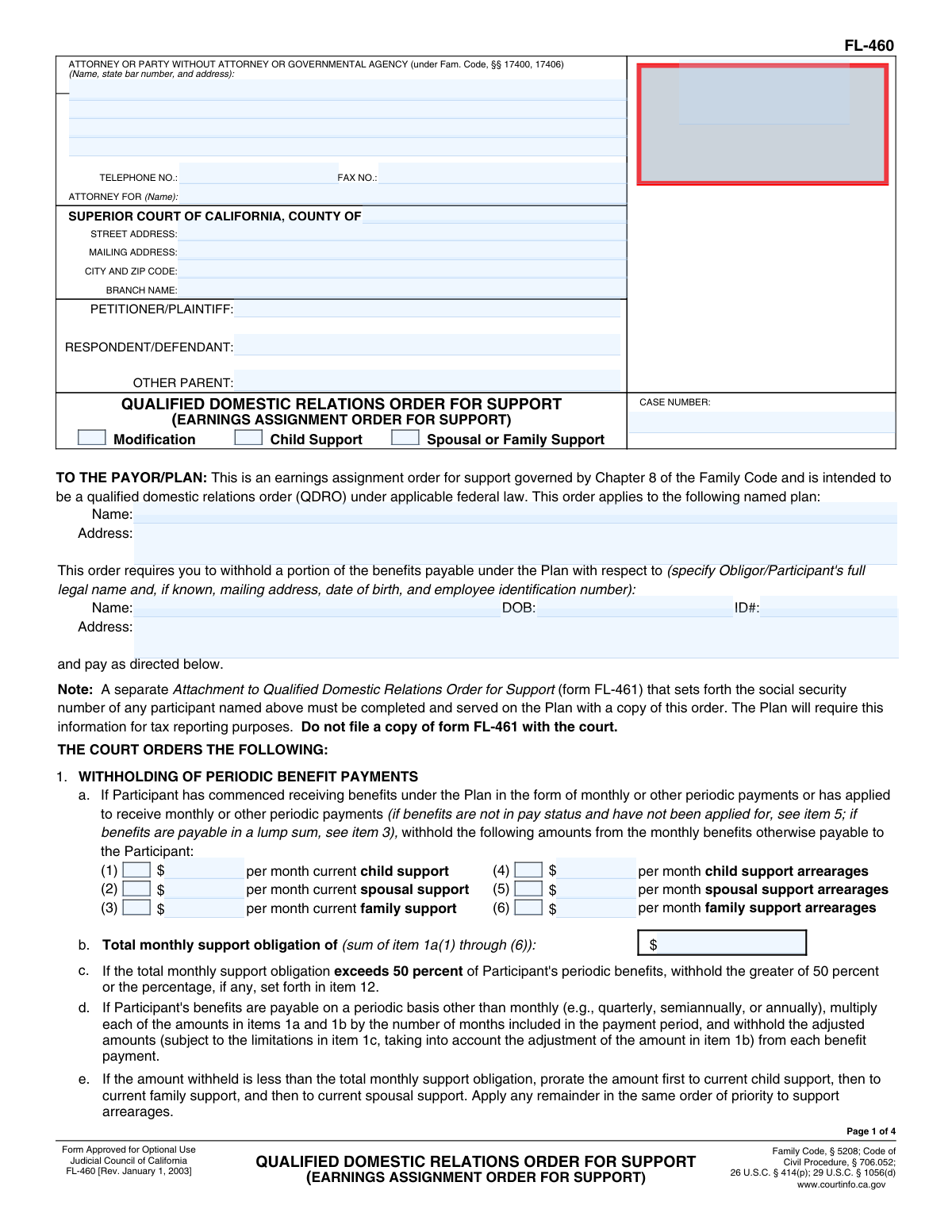
Yes! You can use AI to fill out Form FL-460, Qualified Domestic Relations Order for Support (Family Law)

Form FL-460, the Qualified Domestic Relations Order for Support, is a critical legal document used in California divorce and family law proceedings. It serves as a court order that instructs a retirement plan administrator to pay a portion of a plan participant's benefits directly to an 'alternate payee' (such as a former spouse or child) to satisfy child, spousal, or family support obligations. This order is essential for enforcing support payments from retirement assets, ensuring that dependents receive their court-ordered financial support. Today, this form can be filled out quickly and accurately using AI-powered services like Instafill.ai, which can also convert non-fillable PDF versions into interactive fillable forms.
FL-460 is part of the domestic relations forms and family law forms categories on Instafill.
Our AI automatically handles information lookup, data retrieval, formatting, and form filling.
It takes less than a minute to fill out FL-460 using our AI form filling.
Securely upload your data. Information is encrypted in transit and deleted immediately after the form is filled out.

Form specifications

Form name: Form FL-460, Qualified Domestic Relations Order for Support (Family Law)
Number of fields: 95
Number of pages: 4
Language: English
main-image

Instafill Demo: How to fill out PDF forms in seconds with AI

How to Fill Out FL-460 Online for Free in 2026

Are you looking to fill out a FL-460 form online quickly and accurately? Instafill.ai offers the #1 AI-powered PDF filling software of 2026, allowing you to complete your FL-460 form in just 37 seconds or less.
Follow these steps to fill out your FL-460 form online using Instafill.ai:
  1. 1 Navigate to Instafill.ai and upload or select the FL-460 form.
  2. 2 Enter the court and case information, including the county, court address, party names, and case number.
  3. 3 Specify the type of support order by checking the appropriate boxes for child, spousal, or family support and indicating if it's a modification.
  4. 4 Provide the retirement plan's information and the personal details of the obligor/participant, such as name, date of birth, and address.
  5. 5 Detail the specific monthly support amounts, including current payments and any arrearages for child, spousal, or family support.
  6. 6 List the names and birthdates of the children involved and provide the information for the alternate payee or agent who will receive the payments.
  7. 7 Review the completed form for accuracy, then proceed to have it signed by all required parties and the judge before submitting it to the plan administrator.

Our AI-powered system ensures each field is filled out correctly, reducing errors and saving you time.

Why Choose Instafill.ai for Your Fillable FL-460 Form?

Speed

Complete your FL-460 in as little as 37 seconds.

Up-to-Date

Always use the latest 2026 FL-460 form version.

Cost-effective

No need to hire expensive lawyers.

Accuracy

Our AI performs 10 compliance checks to ensure your form is error-free.

Security

Your personal information is protected with bank-level encryption.

Frequently Asked Questions About Form FL-460

This form is a court order, likely a Qualified Domestic Relations Order (QDRO), used to direct a benefit plan to pay child, spousal, or family support from a plan participant's benefits.

The 'Obligor/Participant' is the individual whose retirement or benefit plan is being used to make the support payments. Their personal information, including date of birth and ID number, must be provided.

Current support is the ongoing monthly amount ordered by the court for child, spousal, or family support. Arrearages are past-due support payments that have been missed and are now owed.

You will need the court case number, the full name and address of the benefit plan, and the personal details for both the plan participant and the person receiving support. You also need the specific support and arrearage amounts from your court order.

This total is calculated by adding up all the monthly payment amounts you entered for current support and arrearages across child, spousal, and family support categories.

You can designate the recipient in the 'Spousal or Family Alternate Payee Information' or 'Child Support Agent Information' sections. Payments can go directly to the payee or to a designated agent.

Checking the 'Supplements Existing QDRO' box means this order adds new payment obligations but does not change or cancel any previous Qualified Domestic Relations Orders already in place.

The person filing the form, whether it's an attorney or a party representing themselves, must provide their contact information and identify the specific Superior Court handling the case.

Once it is an official court order, it must be sent to the benefit plan administrator, whose name and address are listed in the 'Plan Information' section, so they can begin withholding and making payments.

Yes, services like Instafill.ai use AI to help you accurately auto-fill form fields from your saved information, which saves time and reduces the chance of errors.

You can use a service like Instafill.ai to upload a scan or photo of the form. The platform can make it an interactive, fillable document that you can complete and save online.

If you have a non-fillable or 'flat' PDF, you can upload it to a platform like Instafill.ai. It can convert the document into an interactive form that you can easily fill out on your computer.

Yes, if the order is for child support, you must provide the full name and date of birth for each child who is a beneficiary of the support order in the designated section.

Compliance FL-460
Validation Checks by Instafill.ai

1
Case Number Presence and Format
This check ensures that the 'Case Number' field is not empty and follows the expected format for the jurisdiction. The case number is a critical identifier for linking the form to the correct legal proceeding. If this validation fails, the form cannot be correctly filed or associated with the court case, leading to processing delays or rejection.
2
Order Type Selection Requirement
Validates that at least one of the order type checkboxes ('Child Support', 'Spousal or Family Support') has been selected. This is crucial for defining the fundamental purpose of the legal order. Without a selection, the nature of the support obligation is unknown, making the form legally ambiguous and unenforceable.
3
Total Monthly Support Calculation Accuracy
This validation verifies that the 'Total Monthly Support Obligation' field correctly equals the sum of all specified monthly support and arrearage payment amounts (e.g., Current Child Support, Monthly Child Support Arrearages, etc.). An incorrect total can lead to incorrect withholding amounts and legal disputes. The system should flag any discrepancy between the individual components and the stated total.
4
Conditional Child Information Entry
Ensures that child information fields (e.g., 'First Child's Name', 'First Child's Date of Birth') are only filled out if the 'Child Support' order type checkbox is selected. This prevents irrelevant or erroneous data from being entered for orders that do not pertain to child support. If the 'Child Support' box is checked, this validation also ensures at least one child's information is provided.
5
Conditional Arrearage Amount Entry
This check confirms that if a checkbox for a specific type of arrearage (e.g., 'Child Support Arrearages') is checked, the corresponding amount field (e.g., 'Monthly Child Support Arrearages') must contain a valid monetary value. Conversely, if the checkbox is not checked, the amount field should be empty. This prevents incomplete entries and ensures that all indicated financial obligations are quantified.
6
Date of Birth Validity
Verifies that all date of birth fields ('Obligor/Participant Date of Birth', 'First Child's Date of Birth', etc.) contain a valid date format and represent a date in the past. This is a fundamental data integrity check to prevent impossible dates from being entered. An invalid date of birth can cause significant issues with identity verification and eligibility determination for benefits.
7
California County Name Validation
This check validates the 'County Name' field against a predefined list of official California counties. This ensures the form is routed to the correct Superior Court jurisdiction within the state. An incorrect or misspelled county name could result in the document being filed in the wrong location, causing significant legal and administrative delays.
8
Telephone Number Format
Ensures the 'Telephone Number' field contains a valid, standard phone number format (e.g., (XXX) XXX-XXXX or XXXXXXXXXX). This is important for ensuring that court staff, plan administrators, or other parties can successfully contact the attorney or party if needed. An improperly formatted number could prevent essential communication regarding the case.
9
Arrearage 'As Of' Date Requirement
This validation ensures that if a total arrearage amount is entered (e.g., 'Child Support Arrearage Amount'), the corresponding 'As Of Date' field (e.g., 'Child Support Arrearage As Of Date') must also be filled. The 'As Of Date' is critical as it provides the specific point in time when the arrearage total was calculated. Without this date, the arrearage amount is ambiguous and cannot be properly enforced.
10
QDRO Status Exclusivity
Validates that the checkboxes 'Amends/Replaces Existing QDRO' and 'Supplements Existing QDRO' are mutually exclusive, meaning only one can be selected at a time. An order cannot simultaneously amend and supplement a previous order in this context; they are distinct legal actions. Allowing both to be selected would create a legally contradictory and invalid instruction for the plan administrator.
11
Maximum Withholding Percentage Range
This check verifies that the value entered in the 'Maximum Withholding Percentage' field is a numeric value between 0 and 100. This is a logical constraint to ensure the percentage is valid and prevents erroneous data entry that could lead to incorrect benefit calculations. A value outside this range would be nonsensical and would be rejected by the plan administrator.
12
Logical Date Consistency Between Parent and Child
This validation compares the 'Obligor/Participant Date of Birth' with the date of birth of any children listed on the form. It ensures that a child's date of birth is logically after the parent's (Obligor's) date of birth. This check prevents obvious data entry errors that would be factually impossible and would undermine the credibility of the submitted information.
13
Conditional Agent Information Requirement
Ensures that if the 'Spousal or Family Alternate Payee's Agent' checkbox is selected, all related agent fields ('Agent Name', 'Agent Capacity', 'Agent Address') must be completed. This is a completeness check to ensure that when a payment agent is designated, all necessary information to identify and locate that agent is provided. Failure to provide this information would make it impossible to direct payments as requested.

Common Mistakes in Completing FL-460

Using Incomplete or Informal Party Names

Filers often use nicknames, initials, or fail to enter the full legal names for the Petitioner, Respondent, and Obligor/Participant. This creates discrepancies with official court records and plan documents, which can lead to the form's rejection by the court or the plan administrator. To avoid this, always use the full legal name as it appears on birth certificates and other legal filings to ensure proper identification and prevent processing delays.

Entering an Incorrect Case Number

The case number is the primary identifier for the legal proceeding, and simple typos or transposed digits are common mistakes. An incorrect case number will cause the document to be misfiled or rejected outright, leading to significant delays and potential non-compliance with court deadlines. Always double-check the case number against other official court documents before submission to ensure accuracy.

Failing to Specify the Correct Court Branch

Filers frequently list the main county courthouse address instead of the specific branch handling their family law case. This error causes the document to be sent to the wrong location, delaying processing until it is manually rerouted to the correct department. To prevent this, verify and enter the exact street address, mailing address, and branch name for the specific court division hearing your case.

Mismatching Checkboxes and Corresponding Amount Fields

The form requires checking a box to indicate a type of support (e.g., 'Child Support Arrearages') and then entering the corresponding monthly amount. A common error is to enter an amount but forget to check the box, or vice versa, creating ambiguity for the plan administrator. This can result in that portion of the support order being ignored, leading to incorrect payment amounts and requiring a corrected order to be filed.

Miscalculating the Total Monthly Support Obligation

This form requires manually summing up to six different support and arrearage amounts to calculate the 'Total Monthly Support Obligation'. Mathematical errors are frequent and can lead to incorrect withholding from the participant's benefits, either too much or too little. Carefully add all applicable amounts from items 1a(1) through 1a(6) and double-check the total before entering it to ensure the order reflects the court's ruling.

Omitting the 'As Of' Date for Arrearages

When listing total arrearage amounts for child, spousal, or family support, filers often forget to include the specific 'As Of' date. This date is critical for the court and plan administrator to accurately calculate ongoing interest and verify the total debt owed at a specific point in time. Without it, the arrearage claim may be considered incomplete and unenforceable until a clarification is filed.

Providing an Incorrect or Vague Benefit Plan Name

Users may list the employer's common name instead of the specific legal name of the benefit or pension plan (e.g., 'My Company' vs. 'My Company 401(k) Savings Plan'). This is a critical error, as the order is directed to the plan administrator, not the employer. An incorrect plan name will cause the order to be rejected, halting the entire process until the correct information is provided via an amended order.

Confusing Obligor, Payee, and Case Party Roles

The legal terms 'Obligor/Participant' (the person paying support) and 'Alternate Payee' (the person receiving support) can be confusing. Filers sometimes enter their own information in the wrong section, which would reverse the payment direction or make the order nonsensical. This fundamental error invalidates the order and requires a complete refiling, wasting time and resources.

Forgetting to Include the Attorney's State Bar Number

Attorneys filling out the form on behalf of a client sometimes omit their state bar number, or a self-represented party might mistakenly try to fill it. This field is essential for the court to verify the attorney's credentials and standing. An omission can lead to the form being returned for correction, causing unnecessary delays in the case. AI-powered tools like Instafill.ai can help attorneys by auto-populating this information consistently.

Incomplete Information for Children or Payees

The form requires the full name and date of birth for each child benefiting from support, as well as for the alternate payee. People sometimes forget to list all children or provide incomplete details, especially if there are more children than fields provided. This missing information can prevent the plan from properly establishing benefits for the correct individuals and may require a court amendment to fix.

Failing to Specify Payment Agent Details Correctly

When support payments are directed to an agent (like a state disbursement unit or guardian) instead of directly to the payee, filers often check the box but forget to provide the agent's full name, capacity, and address. This leaves the plan administrator with no instructions on where to send the money, causing payments to be suspended until the information is provided. Ensure all agent details are complete if payments are not being made directly to the payee.

Incorrectly Selecting QDRO Amendment Options

The form asks whether the order 'Amends/Replaces' or 'Supplements' a prior Qualified Domestic Relations Order (QDRO), which have very different legal effects. Choosing the wrong option can inadvertently terminate a previous order or create conflicting obligations for the plan administrator. This mistake often requires legal clarification and can result in further litigation to correct the intended outcome. If the form is a non-fillable PDF, a tool like Instafill.ai can convert it to a fillable version, making it easier to review and select the correct options.
Saved over 80 hours a year

“I was never sure if my IRS forms like W-9 were filled correctly. Now, I can complete the forms accurately without any external help.”

Kevin Martin Green

Your data stays secure with advanced protection from Instafill and our subprocessors

Robust compliance program

Transparent business model

You’re not the product. You always know where your data is and what it is processed for.

ISO 27001, HIPAA, and GDPR

Our subprocesses adhere to multiple compliance standards, including but not limited to ISO 27001, HIPAA, and GDPR.

Security & privacy by design

We consider security and privacy from the initial design phase of any new service or functionality. It’s not an afterthought, it’s built-in, including support for two-factor authentication (2FA) to further protect your account.

Fill out FL-460 with Instafill.ai

Worried about filling PDFs wrong? Instafill securely fills form-fl-460-qualified-domestic-relations-order-for-support-family-law forms, ensuring each field is accurate.

Related forms by category

domestic relations forms Uniform Domestic Relations Form – Affidavit 1 AFFIDAVIT OF BASIC INFORMATION, INCOME, AND EXPENSES, I.B.E.W. & Electrical Industry Local 697 Money Purchase Plan and Trust Direct Rollover Request Form Due to Qualified Domestic Relations Order, Elevator Constructors Union Local No.1 Annuity and 401(k) Fund Distribution Request Due to Qualified Domestic Relations Order, Supreme Court of Ohio Uniform Domestic Relations Form 17, Petition for Dissolution of Marriage and Waiver of Service of Summons, Form MC 21, Confidential Case Inventory (Domestic Relations and Juvenile Code), MC 281b, Domestic Relations Mediator Application, Supreme Court of Ohio Uniform Domestic Relations Form 7, Complaint for Divorce with Children
family law forms Form 12.902(b), Family Law Financial Affidavit (Short Form), Florida Supreme Court Approved Family Law Form 12.901(b)(3), Petition for Dissolution of Marriage with No Dependent or Minor Child(ren) or Property (02/18), Form FL-170, Declaration for Default or Uncontested Dissolution or Legal Separation (Family Law), Form FL-100, Petition—Marriage/Domestic Partnership (Family Law), Florida Supreme Court Approved Family Law Form 12.915, Designation of Current Mailing and E-mail Address, declaration-of-marriage-for-court-proceeding-california-family-law, Florida Supreme Court Approved Family Law Form 12.902(d), Uniform Child Custody Jurisdiction and Enforcement Act (UCCJEA) Affidavit, Florida Family Law Rules of Procedure Form 12.910(a), Summons: Personal Service on an Individual, Florida Supreme Court Approved Family Law Form 12.941(a), Petition for Enforcement of Out-of-State Custody Decree and for Order to Pick Up Minor Child(ren), Florida Supreme Court Approved Family Law Form 12.970(a), Petition for Temporary Custody by Extended Family, Form FL-110, Summons (Family Law), Form FL-120, Response—Marriage/Domestic Partnership (Family Law), ADOPT-200, Adoption Request, ADOPT-200, Stepparent Adoption Request, ADOPT-210, Adoption Agreement, ADOPT-310, Contact After Adoption Agreement, Adoption Assistance Program Nonrecurring Adoption Expense Agreement and Claim, Adoption Request (Stepparent), Adoption and Safe Families Act (ASFA) Survey, Florida Family Law Rules of Procedure Form 12.900(b), Notice of and Consent to Limited Appearance · + 76 more →