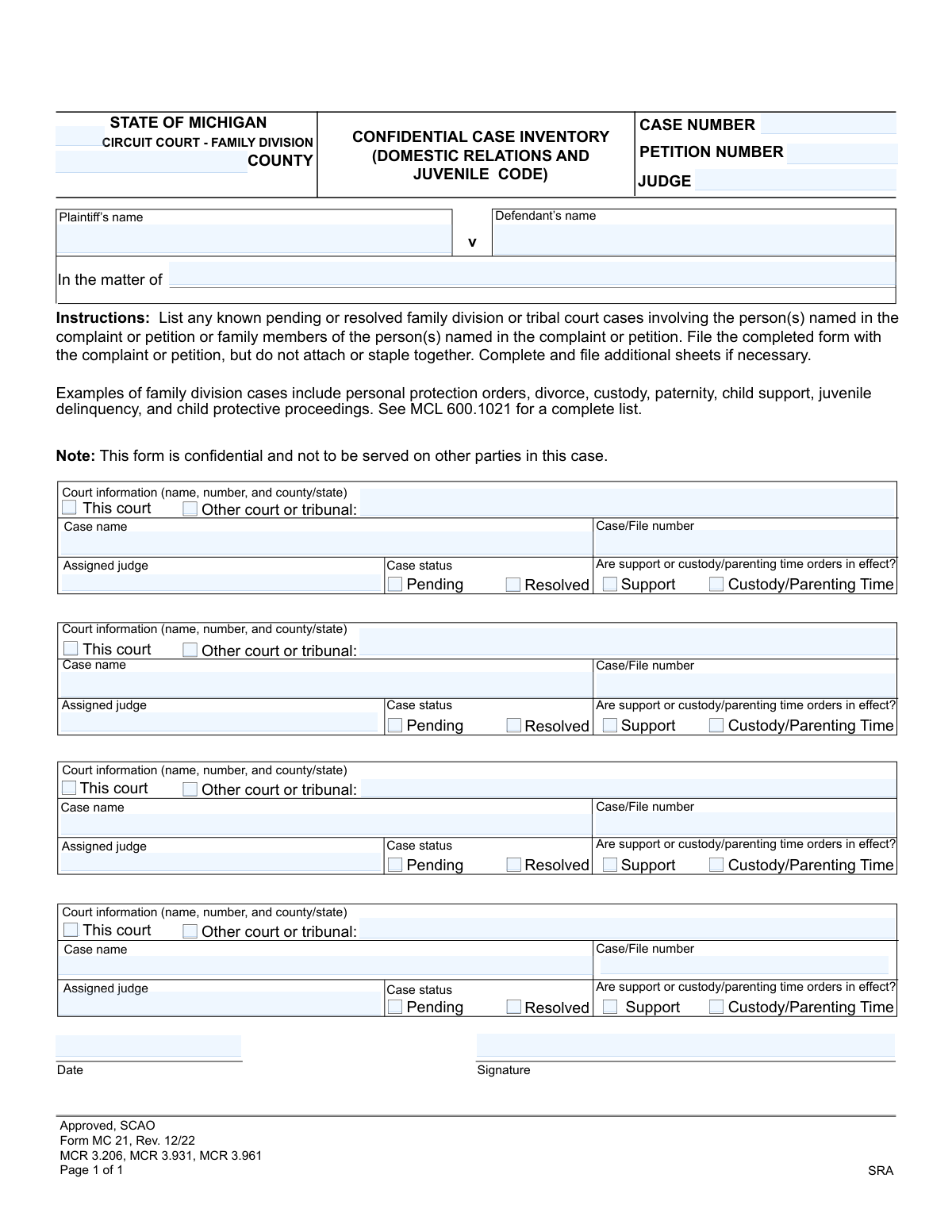
Yes! You can use AI to fill out Form MC 21, Confidential Case Inventory (Domestic Relations and Juvenile Code)

Form MC 21 is a confidential document required by the Michigan Circuit Court's Family Division. Its purpose is to provide the court with a comprehensive list of any other known pending or resolved family division or tribal court cases involving the parties or their family members. This inventory helps the court avoid conflicting orders and understand the full legal context of the family's situation. Today, this form can be filled out quickly and accurately using AI-powered services like Instafill.ai, which can also convert non-fillable PDF versions into interactive fillable forms.
MC 21 is part of the domestic relations forms and Michigan court forms categories on Instafill.
Our AI automatically handles information lookup, data retrieval, formatting, and form filling.
It takes less than a minute to fill out MC 21 using our AI form filling.
Securely upload your data. Information is encrypted in transit and deleted immediately after the form is filled out.

Form specifications

Form name: Form MC 21, Confidential Case Inventory (Domestic Relations and Juvenile Code)
Number of fields: 50
Number of pages: 1
Language: English
main-image

Instafill Demo: How to fill out PDF forms in seconds with AI

How to Fill Out MC 21 Online for Free in 2026

Are you looking to fill out a MC 21 form online quickly and accurately? Instafill.ai offers the #1 AI-powered PDF filling software of 2026, allowing you to complete your MC 21 form in just 37 seconds or less.
Follow these steps to fill out your MC 21 form online using Instafill.ai:
  1. 1 Navigate to Instafill.ai and upload or select the Michigan Confidential Case Inventory (Form MC 21).
  2. 2 Provide the initial case details, including the county, court division, case number, and judge's name.
  3. 3 Enter the names of the plaintiff and defendant, or the name of the person the matter concerns.
  4. 4 For each relevant past or current case, use the guided fields to input the court information, case name, file number, and assigned judge.
  5. 5 Indicate the status of each listed case (Pending or Resolved) and specify if any support or custody/parenting time orders are in effect.
  6. 6 Review all the information you've entered for accuracy, then date and apply your digital signature to certify the document.
  7. 7 Download the completed, confidential MC 21 form, ready to be filed with the court as per its specific instructions.

Our AI-powered system ensures each field is filled out correctly, reducing errors and saving you time.

Why Choose Instafill.ai for Your Fillable MC 21 Form?

Speed

Complete your MC 21 in as little as 37 seconds.

Up-to-Date

Always use the latest 2026 MC 21 form version.

Cost-effective

No need to hire expensive lawyers.

Accuracy

Our AI performs 10 compliance checks to ensure your form is error-free.

Security

Your personal information is protected with bank-level encryption.

Frequently Asked Questions About Form MC 21

This form's purpose is to inform the court of any other pending or resolved family division cases involving the parties or their family members. This helps the court manage related cases and avoid conflicting orders.

The person who starts the case, known as the plaintiff or petitioner, is required to complete and file this form. It must be submitted along with the initial complaint or petition.

Confidential means this form is for the court's internal use only and will not be shared with the other party in your case. It is kept separate from the public case file to protect the privacy of the information listed.

No, you should not send this form to the other party. The instructions clearly state that it is confidential and not to be served on other parties in the case.

You should list any known family division or tribal court cases, such as those related to divorce, custody, parenting time, child support, paternity, personal protection orders, juvenile delinquency, or child protective proceedings.

You should provide as much information as you possibly can. If you don't know the case number or judge, you can write 'Unknown,' but be sure to list the court, county, and names of the parties involved.

Even if you have no other cases to list, you must still complete the top portion of the form with your current case information, sign it, and file it with the court. You can simply write 'None' in the first case section.

If you run out of space, you can complete and attach additional copies of the Confidential Case Inventory form. Make sure your name and the case number are on every page you submit.

The 'In the matter of' field is used for cases that don't have a traditional Plaintiff vs. Defendant structure, such as juvenile cases or certain petitions. In those situations, you would list the name of the person the case is about, like the minor child.

You must file the completed form with the court clerk at the same time you file your complaint or petition. The instructions specify that you should not attach or staple it to your other documents.

Yes, services like Instafill.ai use AI to help you fill out forms accurately and efficiently. These tools can auto-fill your information into the correct fields, which saves time and helps prevent mistakes.

To use Instafill.ai, simply upload the form to their platform. Their AI will make the document fillable online, allowing you to type your information directly into the fields and ensure everything is legible and correctly placed.

If you have a non-fillable or 'flat' PDF, you can use a service like Instafill.ai. It can convert the static document into an interactive, fillable form that you can easily complete on your computer.

Compliance MC 21
Validation Checks by Instafill.ai

1
County Name Presence
Checks that the 'County' field at the top of the form is not empty. This is a mandatory field as it determines the specific circuit court jurisdiction where the case is being filed, which is essential for proper legal processing. If this field is left blank, the form submission will be rejected, as the case cannot be routed correctly.
2
Primary Party Identification
Validates that the form identifies the case parties by ensuring either the 'Plaintiff's name' and 'Defendant's name' fields are completed, or the 'In the matter of' field is filled. A case cannot proceed without clearly identified parties, so the form is considered incomplete and will be rejected if none of these fields are provided. This ensures the case has a proper subject.
3
Date of Submission Validity
Ensures the 'Date' field is filled with a valid date in a recognized format (e.g., MM/DD/YYYY) and is not a date in the future. This is critical for establishing the official filing date of the inventory, which has legal significance for deadlines and case timelines. An invalid or future date will result in a validation error, requiring the user to correct it before submission.
4
Signature Requirement
Verifies that the form has been signed, which in a digital system could mean a digital signature is applied or a confirmation checkbox is ticked. An unsigned legal document is invalid and has no legal force. The system will prevent submission of the form until the signature requirement is met.
5
Inventory Section Completeness
For each of the four case inventory sections, this check ensures that if any single field is filled out, then all core fields for that section (Case Name, Case/File Number, Assigned Judge, and a Case Status) are also completed. This prevents the submission of partial or unusable information about related cases, which could hinder the court's ability to review case histories. Incomplete sections will trigger an error, forcing the user to either complete or clear the section.
6
Court Selection Exclusivity
In each inventory section, this validation confirms that the user has selected either 'This court' or 'Other court or tribunal,' but not both. This choice is mutually exclusive and critical for determining the location of the related case file. If neither or both are selected in a partially filled section, the user will be prompted to make a single, valid choice.
7
Conditional 'Other Court' Details
This rule checks that if 'Other court or tribunal' is selected for a related case, the corresponding text field for the court's name, number, and location is filled out. Without this information, the court cannot locate the specified external case file, rendering the entry useless. The submission will be blocked until this required detail is provided.
8
Case Status Selection Requirement
For any inventory section that is being filled out, this validation ensures that exactly one case status—either 'Pending' or 'Resolved'—is selected. The status of a related case is fundamental information for the judge to understand its current relevance. The form will be rejected if a status is missing for a listed case.
9
Case Number Format and Presence
Validates that the main 'Case Number' field at the top of the form is present and adheres to the standard format used by Michigan circuit courts. This number is the primary identifier for the new case being filed and is essential for all future tracking and document linking. An incorrect or missing case number will prevent the form from being filed correctly.
10
Duplicate Case Inventory Entry
Scans all filled inventory sections to ensure that the same 'Case/File number' is not entered more than once. Entering the same related case multiple times clutters the inventory and can create confusion for court staff and the judge. The system should display a warning and require the user to remove the duplicate entry before proceeding.
11
'Other Court' Field Inactivation Logic
Ensures that the text field for 'Other Court Or Tribunal Name Number And County State' is disabled and cannot contain data if the 'This court' option is selected. This prevents users from entering contradictory or confusing information about the case's jurisdiction. If data exists in the field when 'This court' is selected, it should be automatically cleared.
12
Plaintiff and Defendant Name Completeness
Checks that if the case is a 'v' (versus) case, both the 'Plaintiff's name' and 'Defendant's name' fields are filled out. These adversarial cases require both parties to be identified for the case to be valid. A missing plaintiff or defendant name will cause the submission to fail.

Common Mistakes in Completing MC 21

Providing Incomplete or Vague Court Information

People often write a generic court name like 'Family Court' instead of the full, specific details required, such as '13th Circuit Court - Family Division, Antrim County, Michigan.' This happens due to haste or not having the exact records on hand. Incomplete information forces court clerks to search for the case, causing delays and potentially leading to the wrong case being identified. To avoid this, always refer to official court documents for the exact court name, number, and location, or use online court record portals to verify the information.

Omitting Required Past or Pending Cases

The form requires listing *all* known pending or resolved family division cases, but individuals frequently list only the most recent or obvious ones, like their own divorce. They may forget about older paternity cases, child protective proceedings, or cases involving other family members as instructed. This omission can be seen as a failure to disclose, potentially complicating the current case and delaying proceedings while the court gathers the complete history. It's crucial to carefully review personal and family legal history and include every relevant case, using additional sheets if necessary.

Using an Incorrect or Informal Case Name

Instead of using the official case caption (e.g., 'Jane Smith v. John Smith'), people might write an informal description like 'My custody case' or 'PPO against my ex.' This makes it difficult for court staff to locate the correct file, as the official case name is critical for accurate record-linking. To prevent this, copy the case name exactly as it appears on previous court orders or documents for that specific case.

Entering an Incorrect or Incomplete Case/File Number

Case numbers can be long and complex, leading to common data entry errors like transposed digits or missing characters. An incorrect case number is one of the most frequent mistakes and can make it impossible for the court to find the corresponding file, causing significant processing delays. Always double-check the case number against an official document before writing it down. AI-powered form filling tools like Instafill.ai can help by storing and accurately auto-filling this information once it has been entered correctly, reducing the risk of manual error on subsequent forms.

Misinterpreting Case Status as 'Pending' or 'Resolved'

A user might incorrectly mark a case as 'Pending' if there are ongoing obligations like child support, even if the underlying legal matter (like the divorce) is legally 'Resolved.' This confusion can mislead the court about the current legal landscape. A 'Resolved' case is one where a final judgment has been entered, even if orders from that judgment are still active; 'Pending' means the core legal dispute is not yet finalized.

Forgetting to Sign and Date the Form

An unsigned or undated legal form is invalid and will be rejected by the court clerk. This is a simple oversight that happens frequently when people are focused on the complex details of the form's content. A rejected form can delay the filing of the entire case, potentially missing important deadlines. Always perform a final review of the form specifically to check for a signature and the correct date before submission.

Improperly Filing or Serving the Confidential Form

The form gives two explicit instructions that are often missed: 'do not attach or staple together' and 'not to be served on other parties.' People may staple it to the main complaint out of habit, or serve it with the rest of the documents, violating confidentiality. Breaching confidentiality can have serious procedural consequences, and improper bundling can cause the form to be misfiled by the clerk's office. Always read and follow all filing instructions on a legal document.

Incorrectly Filling the Party Information

The top of the form distinguishes between cases with a Plaintiff/Defendant and cases 'In the matter of' (often used for juvenile cases). Users may get confused and fill out the wrong section or list names incorrectly, for example, listing parents as Plaintiff/Defendant in a juvenile case titled 'In the matter of [Child's Name]'. This can cause confusion and require correction, delaying the initial filing. It's essential to use the exact case caption that will be on the main complaint or petition.

Failing to List Cases of Other Family Members

The instructions clearly state to include cases involving 'family members of the person(s) named in the complaint,' not just the plaintiff and defendant. Filers often overlook this, focusing only on their own direct legal history. Forgetting a child's separate juvenile case or a PPO involving another relative can be a critical omission, as these cases provide context the court needs. To avoid this, think broadly about who constitutes a 'family member' in the context of the case and list any related court actions.

Overlooking Active Support or Custody/Parenting Time Orders

After filling out the details of a resolved case, a person might forget to check the boxes indicating whether 'Support' or 'Custody/Parenting Time' orders are still in effect. This is crucial information for the new judge, as existing orders will impact any new decisions. This oversight can lead to conflicting orders or require additional hearings to clarify the status of existing obligations. It is vital to accurately report whether any financial or custodial orders from a previous case are still active.

Using a Non-Fillable PDF

Many court forms are only available online as flat, non-fillable PDFs, forcing users to print them and fill them out by hand. This leads to illegible handwriting, which can cause data entry errors by court clerks, and makes it impossible to save a digital copy for your records. To avoid this, you can use a tool like Instafill.ai, which can convert a non-fillable PDF into an interactive, fillable form, allowing you to type your answers clearly and save the completed document.
Saved over 80 hours a year

“I was never sure if my IRS forms like W-9 were filled correctly. Now, I can complete the forms accurately without any external help.”

Kevin Martin Green

Your data stays secure with advanced protection from Instafill and our subprocessors

Robust compliance program

Transparent business model

You’re not the product. You always know where your data is and what it is processed for.

ISO 27001, HIPAA, and GDPR

Our subprocesses adhere to multiple compliance standards, including but not limited to ISO 27001, HIPAA, and GDPR.

Security & privacy by design

We consider security and privacy from the initial design phase of any new service or functionality. It’s not an afterthought, it’s built-in, including support for two-factor authentication (2FA) to further protect your account.

Fill out MC 21 with Instafill.ai

Worried about filling PDFs wrong? Instafill securely fills form-mc-21-confidential-case-inventory-domestic-relations-and-juvenile-code forms, ensuring each field is accurate.