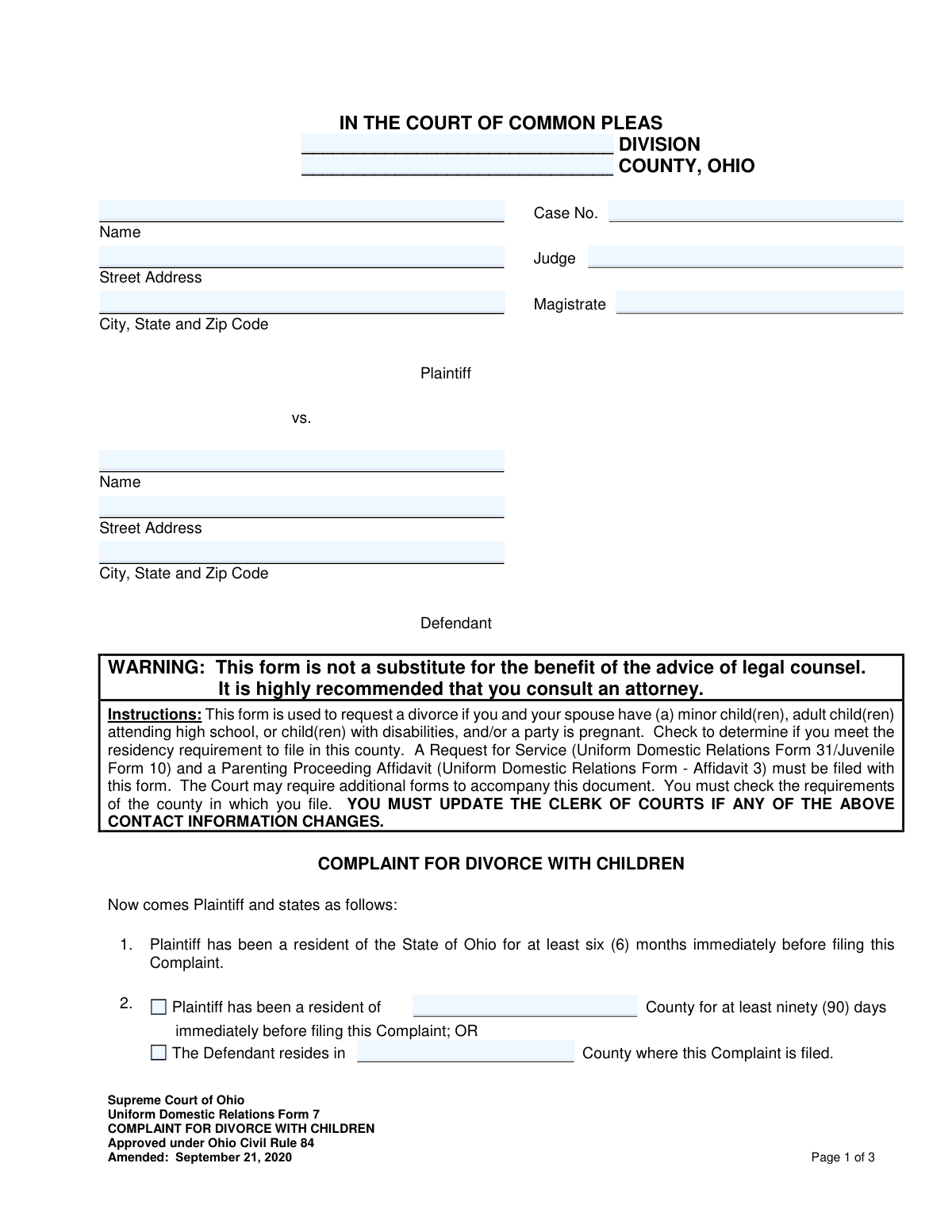
Yes! You can use AI to fill out Supreme Court of Ohio Uniform Domestic Relations Form 7, Complaint for Divorce with Children
The Complaint for Divorce with Children (Uniform Domestic Relations Form 7) is a legal document used in Ohio to initiate divorce proceedings for couples who have minor children, adult children still in high school, or children with disabilities. It establishes the grounds for divorce and outlines the plaintiff's requests regarding child custody, support, and division of property. Today, this form can be filled out quickly and accurately using AI-powered services like Instafill.ai, which can also convert non-fillable PDF versions into interactive fillable forms.
Uniform Domestic Relations Form 7 is part of the
domestic relations forms category on Instafill.
Our AI automatically handles information lookup, data retrieval, formatting, and form filling.
It takes less than a minute to fill out Uniform Domestic Relations Form 7 using our AI form filling.
Securely upload your data. Information is encrypted in transit and deleted immediately after the form is filled out.
Form specifications
| Form name: | Supreme Court of Ohio Uniform Domestic Relations Form 7, Complaint for Divorce with Children |
| Number of fields: | 89 |
| Number of pages: | 3 |
| Language: | English |
Instafill Demo: How to fill out PDF forms in seconds with AI
How to Fill Out Uniform Domestic Relations Form 7 Online for Free in 2026
Are you looking to fill out a UNIFORM DOMESTIC RELATIONS FORM 7 form online quickly and accurately? Instafill.ai offers the #1 AI-powered PDF filling software of 2026, allowing you to complete your UNIFORM DOMESTIC RELATIONS FORM 7 form in just 37 seconds or less.
Follow these steps to fill out your UNIFORM DOMESTIC RELATIONS FORM 7 form online using Instafill.ai:
- 1 Navigate to Instafill.ai and upload or select the Ohio Complaint for Divorce with Children (Form 7).
- 2 Provide the court, case, plaintiff, and defendant information in the designated fields.
- 3 Enter details about the marriage, residency status, and information for all children involved, including birth dates and parentage.
- 4 Select the applicable grounds for divorce from the checklist provided, such as incompatibility or living separate and apart.
- 5 Specify your requests regarding child custody, parenting time, child support, spousal support, and property division.
- 6 Review all the information populated by the AI for accuracy and completeness, making any necessary edits.
- 7 Sign the document electronically or print it for a physical signature, then download the completed form for filing with the appropriate Ohio Court of Common Pleas.
Our AI-powered system ensures each field is filled out correctly, reducing errors and saving you time.
Why Choose Instafill.ai for Your Fillable Uniform Domestic Relations Form 7 Form?
Speed
Complete your Uniform Domestic Relations Form 7 in as little as 37 seconds.
Up-to-Date
Always use the latest 2026 Uniform Domestic Relations Form 7 form version.
Cost-effective
No need to hire expensive lawyers.
Accuracy
Our AI performs 10 compliance checks to ensure your form is error-free.
Security
Your personal information is protected with bank-level encryption.
Frequently Asked Questions About Form Uniform Domestic Relations Form 7
This form, also known as Uniform Domestic Relations Form 7, is used to officially begin the legal process for a divorce in Ohio when the couple has minor children, children still in high school, or children with disabilities.
The person initiating the divorce (the Plaintiff) fills out this form if they and their spouse have children together and meet Ohio's residency requirements. It is also used if one of the parties is pregnant.
You must file a 'Request for Service' (Form 31) and a 'Parenting Proceeding Affidavit' (Affidavit 3) along with this complaint. Your local county court may have additional requirements, so it's important to check with the Clerk of Courts.
Yes, the person filing must have been a resident of Ohio for at least six months and a resident of the county where they are filing for at least 90 days before filing the complaint.
These are the legal reasons for the divorce. You can check all that apply, with the most common being 'incompatibility' or living 'separate and apart' for one year.
Section 6 of the form requires you to disclose if either party is an active-duty servicemember. This is critical because federal laws provide special legal protections to military members during divorce proceedings.
You must indicate in Section 4 if a party is pregnant. This is legally important for the court to address future custody, parenting time, and support for the child once born.
You must file the form with the Clerk of Courts at the Court of Common Pleas, Domestic Relations Division, in the Ohio county where you meet the residency requirements.
This means you are asking the court to divide all marital assets and debts in a way that is fair and equitable, though not necessarily a 50/50 split. The court will consider many factors to determine a fair division.
Yes, in the final section of the form, you can check a box and write in your former name to request that the court restore it to you as part of the divorce decree.
Yes, services like Instafill.ai use AI to accurately auto-fill form fields, which saves time and helps prevent errors. However, AI tools are for assistance with filling the form and are not a substitute for legal advice from an attorney.
You can upload the 'Complaint for Divorce with Children' PDF to the Instafill.ai platform. The service will make the form interactive, allowing you to enter your information once and have it automatically populate all the correct fields.
If you have a non-fillable or 'flat' PDF, you can use a service like Instafill.ai to convert it into an interactive, fillable form. Simply upload the file, and the platform will make it easy to complete on your computer.
Compliance Uniform Domestic Relations Form 7
Validation Checks by Instafill.ai
1
Residency Jurisdiction Logic Check
This validation ensures that at least one of the two residency options in Section 2 is selected and that the corresponding county name is provided. This is a critical jurisdictional requirement for the court to hear the case. If neither option is selected or the county name is missing, the filing may be rejected for lack of jurisdiction.
2
Date of Marriage Validity
This check verifies that the 'Date of Marriage' is a valid, complete date in a recognized format (e.g., MM/DD/YYYY) and that the date is not in the future. A valid marriage date is fundamental to establishing the timeline of the marriage for matters like property division and child-related issues. An invalid or future date would render the complaint logically inconsistent and legally invalid.
3
Child's Birth Date vs. Marriage Date Consistency
This validation cross-references the 'Date of Birth' for any child listed as 'born from or adopted during this marriage' against the 'Date of Marriage'. The child's date of birth must be on or after the date of marriage. This check prevents logical impossibilities in the legal record and ensures the correct classification of children. A failure would require the filer to correct the dates or the child's classification.
4
Exclusive Pregnancy Status Selection
This check ensures that in Section 4, the user selects either 'Neither party is pregnant' OR 'a party is pregnant,' but not both. These options are mutually exclusive. This information is crucial as a pregnancy can significantly impact the proceedings, potentially requiring a delay until after the child is born. Selecting both or neither would create ambiguity and halt processing.
5
Mandatory Grounds for Divorce Selection
This validation confirms that at least one checkbox is selected in Section 7, 'Grounds for Divorce'. A legal complaint for divorce must state a valid reason or 'ground' for the request as defined by state law. Submitting a complaint without specifying the grounds would result in an immediate rejection for failing to state a valid cause of action.
6
Conditional Child Information Entry
This check verifies that if any checkbox in Section 5 regarding children is selected (e.g., 'born from or adopted during this marriage'), then the name and date of birth for at least one child must be entered in the corresponding section. This prevents incomplete filings where the presence of children is declared but no identifying information is provided. An error would prompt the user to either provide the child's details or uncheck the declaration box.
7
Conditional Former Name Entry
This validation ensures that if the 'Plaintiff be restored to former name' checkbox is selected in Section 8, the 'Former Name' text field is not empty. The court cannot grant the request to restore a name without knowing what that name is. A failure would result in a prompt for the user to provide the name or deselect the option.
8
Party Information Completeness
This check ensures that the full name and complete address (street, city, state, zip) for both the Plaintiff and Defendant are provided. This information is legally required to properly identify the parties involved and to ensure legal notices can be properly served. Missing information would lead to the rejection of the filing as it would be incomplete and potentially unenforceable.
9
Custody Request Consistency
This validation ensures that if children are listed in Section 5, at least one custody-related request in Section 8 (e.g., Plaintiff as residential parent, Defendant as residential parent, or Shared Parenting) is selected. The court must make an order regarding the care and custody of minor children in a divorce. Failure to request a custody arrangement would leave a critical issue unresolved, making the complaint incomplete.
10
Valid Date of Birth Format
This check validates that all 'Date of Birth' fields for children are entered in a valid date format and represent a date in the past. Accurate birth dates are essential for determining child support obligations, custody jurisdiction, and emancipation timelines. An invalid format or future date would cause data processing errors and legal ambiguity.
11
Mandatory Military Service Declaration
This validation ensures that a selection is made in Section 6 regarding the military service status of the parties. Federal laws, such as the Servicemembers Civil Relief Act (SCRA), provide special protections for active-duty military personnel in civil cases. Failing to declare the military status could violate federal law and invalidate the proceedings.
12
Contact Information Format Validation
This check verifies that the 'Phone Number' and 'E-mail' fields for the filing party or their attorney are in a standard, valid format. This is crucial for the Clerk of Courts and other parties to maintain communication regarding case updates, hearings, and notices. Invalid contact information can lead to missed deadlines and procedural delays.
13
Residency and Court County Match
This validation compares the county entered at the top of the form ('Court County') with the county specified in the residency declaration (Section 2). For the court to have jurisdiction, the filing county must match the county where at least one of the residency requirements is met. A mismatch indicates a potential jurisdictional defect that would cause the case to be dismissed or transferred.
14
Signature and Printed Name Presence
This check confirms that the 'Signature' and 'Printed Name' fields for the attorney or self-represented party are not empty. A signature serves as a certification that the information in the complaint is true to the best of the filer's knowledge and is a fundamental requirement for a legal document's validity. A missing signature would render the entire complaint invalid and un-fileable.
Common Mistakes in Completing Uniform Domestic Relations Form 7
The form instructions explicitly state that a 'Request for Service' and a 'Parenting Proceeding Affidavit' must be filed with the complaint. People often overlook this instruction, focusing only on the complaint itself. Filing without these mandatory companion documents will result in the court clerk rejecting the filing or a judge dismissing the case, causing significant delays. Always read the instructions carefully and check local court rules for any additional required paperwork.
In Section 2, the filer must correctly establish the court's jurisdiction by confirming residency. A common error is misinterpreting the '90 days in the county' rule or the alternative 'Defendant resides in the county' option. An incorrect assertion of residency can lead to the case being dismissed for lack of jurisdiction, forcing the plaintiff to refile in the correct county and start the process over. It is crucial to verify you meet at least one of the residency requirements before filing.
Section 5 has multiple, distinct categories for children (e.g., born before marriage, born during marriage, disabled). Filers often list children in the wrong category or forget to check the appropriate box for each situation, which can create legal confusion regarding paternity, custody, and support obligations. To avoid this, carefully review each child's circumstances and place them in the correct section, ensuring all children are accounted for. Using a tool like Instafill.ai can help guide you through these complex conditional sections to ensure accuracy.
The court must be able to legally notify the Defendant that a divorce has been filed, a process called 'service'. Providing an old, incomplete, or incorrect address for the Defendant will cause service to fail. This halts the entire legal proceeding until a valid address is provided and service is successfully completed, delaying the case by weeks or months. Always verify the Defendant's current and complete mailing address before filing.
In Section 8, the plaintiff must check boxes for everything they are asking the court to grant, such as spousal support, restoration of a former name, or payment of attorney fees. People frequently forget to check a box for something they want, and failing to request it in the initial complaint can make it much more difficult or impossible to obtain later. Carefully review all options and check every box that applies to your desired outcome. AI-powered form fillers can highlight these optional but important fields to prevent oversight.
Section 8 allows the plaintiff to request that they be the residential parent, that the defendant be the residential parent, or that they have shared parenting. A common mistake is checking multiple conflicting options, such as asking for both sole residential parent status and shared parenting without filing the required Shared Parenting Plan. This ambiguity forces the court to seek clarification and can delay custody orders. You should decide on a primary custody request and ensure your selections are consistent.
Section 6 asks about the military status of both parties. Incorrectly stating that a spouse is not an active-duty servicemember when they are can have serious legal consequences, as the Servicemembers Civil Relief Act (SCRA) provides specific legal protections that can affect the divorce proceedings. This mistake can lead to delays or even void court orders. It is essential to confirm the military status of both parties before completing this section.
The form explicitly warns that individual county courts may have additional requirements or forms. A frequent error is assuming this statewide uniform form is sufficient on its own. Filing without adhering to local rules (e.g., specific cover sheets, number of copies) will lead to the filing being rejected by the clerk. Before filing, always visit the website or call the Clerk of Courts for the specific county to get a checklist of all required documents.
Simple data entry errors, such as misspelling the plaintiff's or defendant's name, using a nickname instead of a full legal name, or entering an incorrect date of marriage, are very common. These inconsistencies can cause mismatches with official records like birth certificates and marriage licenses, leading to clerical rejections and delays. To prevent this, double-check all names and dates against official documents. An AI tool like Instafill.ai can help by auto-filling information consistently and validating date formats, and it can also make a flat PDF form fillable to reduce handwriting errors.
A legal complaint is not valid until it is signed by the filing party or their attorney. In the stress of completing the form, it is surprisingly common for individuals to forget to sign and date the last page. An unsigned complaint will be immediately rejected by the court clerk, stopping the entire process before it even begins. Always perform a final review of the document to ensure the signature, printed name, and date are all present and correct.
Saved over 80 hours a year
“I was never sure if my IRS forms like W-9 were filled correctly. Now, I can complete the forms accurately without any external help.”
Kevin Martin Green
Your data stays secure with advanced protection from Instafill and our subprocessors

Robust compliance program
Transparent business model
You’re not the product. You always know where your data is and what it is processed for.
ISO 27001, HIPAA, and GDPR
Our subprocesses adhere to multiple compliance standards, including but not limited to ISO 27001, HIPAA, and GDPR.
Security & privacy by design
We consider security and privacy from the initial design phase of any new service or functionality. It’s not an afterthought, it’s built-in, including support for two-factor authentication (2FA) to further protect your account.
Fill out Uniform Domestic Relations Form 7 with Instafill.ai
Worried about filling PDFs wrong? Instafill securely fills supreme-court-of-ohio-uniform-domestic-relations-form-7-complaint-for-divorce-with-children forms, ensuring each field is accurate.