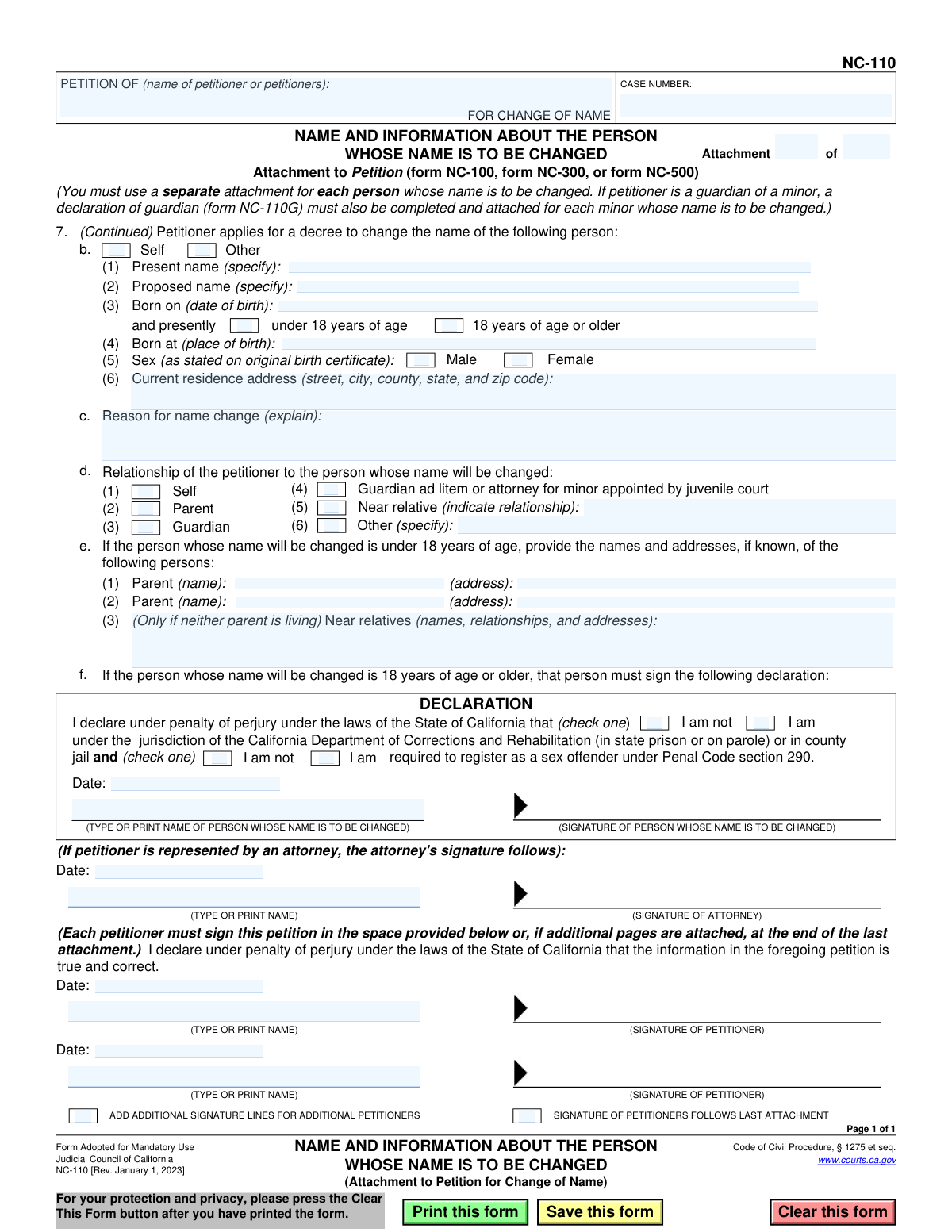
Yes! You can use AI to fill out Form NC-110, Name and Information About the Person Whose Name is to be Changed (Attachment to Petition for Change of Name)
Form NC-110, Name and Information About the Person Whose Name is to be Changed, is a crucial legal document in California required when petitioning the court for a name change. It serves as a mandatory attachment to the main petition (like Form NC-100), detailing the personal information of the individual whose name is being changed, including their current and proposed names, birth information, and the reason for the change. Today, this form can be filled out quickly and accurately using AI-powered services like Instafill.ai, which can also convert non-fillable PDF versions into interactive fillable forms.
Our AI automatically handles information lookup, data retrieval, formatting, and form filling.
It takes less than a minute to fill out NC-110 using our AI form filling.
Securely upload your data. Information is encrypted in transit and deleted immediately after the form is filled out.
Form specifications
| Form name: | Form NC-110, Name and Information About the Person Whose Name is to be Changed (Attachment to Petition for Change of Name) |
| Number of fields: | 48 |
| Number of pages: | 1 |
| Language: | English |
Instafill Demo: How to fill out PDF forms in seconds with AI
How to Fill Out NC-110 Online for Free in 2026
Are you looking to fill out a NC-110 form online quickly and accurately? Instafill.ai offers the #1 AI-powered PDF filling software of 2026, allowing you to complete your NC-110 form in just 37 seconds or less.
Follow these steps to fill out your NC-110 form online using Instafill.ai:
- 1 Navigate to Instafill.ai and upload or select Form NC-110 from the forms library.
- 2 Enter the petitioner's name and the court case number in the header section.
- 3 Complete the information for the person whose name is to be changed, including their present and proposed names, date and place of birth, and the reason for the change.
- 4 Indicate the relationship of the petitioner to the person whose name is being changed (e.g., self, parent, guardian).
- 5 If the person is under 18, provide the names and addresses of their parents. If the person is 18 or older, they must complete and sign the declaration regarding their legal status.
- 6 The petitioner must carefully review all entered information, then date and sign the declaration at the bottom of the form.
- 7 Securely download, print, or e-file the completed Form NC-110 to attach to your main Petition for Change of Name.
Our AI-powered system ensures each field is filled out correctly, reducing errors and saving you time.
Why Choose Instafill.ai for Your Fillable NC-110 Form?
Speed
Complete your NC-110 in as little as 37 seconds.
Up-to-Date
Always use the latest 2026 NC-110 form version.
Cost-effective
No need to hire expensive lawyers.
Accuracy
Our AI performs 10 compliance checks to ensure your form is error-free.
Security
Your personal information is protected with bank-level encryption.
Frequently Asked Questions About Form NC-110
Form NC-110 is a mandatory attachment to a Petition for Change of Name in California. It provides the court with specific, detailed information about the individual whose name is to be changed, and it must be submitted with the main petition form (like NC-100).
No, this form is an attachment. It must be filed along with a primary petition form, such as Form NC-100 (Petition for Change of Name), NC-300 (Petition to Establish Fact, Time, and Place of Birth), or NC-500 (Petition for Change of Name and/or Gender).
You must complete and submit a separate Form NC-110 for each person whose name you are petitioning to change. Each form will contain the specific details for one individual.
If you are the person whose name is being changed, you are the petitioner. In section 7d, you should check the box next to 'Self'.
If the person whose name is being changed is under 18, you must provide the names and last known addresses for both of the minor's parents. If neither parent is living, you must list the names, relationships, and addresses of near relatives.
The declaration in section 'f' must be signed by the person whose name is being changed, but only if they are 18 years of age or older. This section is not applicable and should be left blank for minors.
The petitioner or petitioners must sign at the bottom of the form, under penalty of perjury. The petitioner is the person filing the case, who may be the person changing their name or a parent/guardian filing on behalf of a minor.
No. In addition to Form NC-110, a guardian of a minor must also complete and attach Form NC-110G, 'Declaration of Guardian for Change of Name of Minor'.
Provide a brief and truthful explanation for your request. Common reasons include marriage, divorce, simplifying a name, or aligning with one's gender identity, but you should state your specific, personal reason.
Yes, services like Instafill.ai use AI to auto-fill form fields accurately and save time. This can help ensure consistency and reduce errors when filling out multiple related court forms.
You can use a service like Instafill.ai to complete this form online. Simply upload the PDF, and the platform will make it an interactive, fillable form that you can complete, save, and print.
If you have a non-fillable or 'flat' PDF, you can use a tool like Instafill.ai. It can convert the static document into an interactive, fillable form that you can easily complete on your computer.
The petitioner is the person who is officially filing the name change case with the court. This can be the adult changing their own name, or a parent or legal guardian filing on behalf of a minor.
Compliance NC-110
Validation Checks by Instafill.ai
1
Ensures Present and Proposed Names are Provided
This check verifies that both the 'Present name' (7.b.1) and 'Proposed name' (7.b.2) fields are filled out. These fields are fundamental to the petition's purpose. Failure to provide both names will result in an incomplete application and immediate rejection by the court clerk.
2
Validates Proposed Name is Different from Present Name
This check ensures the 'Proposed name' (7.b.2) is not identical to the 'Present name' (7.b.1). A name change petition is logically invalid if the new name is the same as the old one. This validation prevents nonsensical submissions and ensures the petition has a valid legal purpose.
3
Date of Birth Format and Plausibility
This validation confirms that the 'Born on (date of birth)' field (7.b.3) contains a valid date, is in a standard format (e.g., MM/DD/YYYY), and is not a date in the future. An accurate date of birth is required to establish the person's age and identity. An invalid or future date will cause the form to be rejected for data inaccuracy.
4
Age Checkbox and Date of Birth Consistency
This check cross-references the 'Date of Birth' (7.b.3) with the selected age checkbox ('under 18 years of age' or '18 years of age or older'). The selected checkbox must accurately reflect the person's calculated age. This is critical because different legal requirements and form sections apply to minors versus adults, and a mismatch will lead to processing errors or rejection.
5
Reason for Name Change Explanation Requirement
This validation ensures that the 'Reason for name change' field (7.c) is not empty and contains a textual explanation. The court requires a reason to evaluate the petition and ensure it is not for fraudulent purposes. A missing or nonsensical reason will result in the petition being deemed incomplete and likely denied.
6
Petitioner Relationship Selection Completeness
This check verifies that exactly one checkbox is selected in section 7.d to indicate the petitioner's relationship to the person whose name is being changed. This information is required to establish the petitioner's legal standing to file the petition. Failure to select a relationship or selecting multiple options will cause confusion and lead to form rejection.
7
Conditional Relationship Specification
This validation ensures that if the 'Near relative' (7.d.5) or 'Other' (7.d.6) checkbox is selected, the corresponding text field is filled out with a specific relationship. The court needs this detail to understand the petitioner's standing. An empty specification field for these options makes the filing incomplete and will require correction.
8
Conditional Logic for Minor's Information (Section 7.e)
This check verifies that section 7.e (parental information) is filled out if and only if the person is 'under 18 years of age'. This section is legally required for minors to ensure parental rights are addressed but is irrelevant for adults. Incorrectly filling or omitting this section based on age will lead to rejection.
9
Parental Information Completeness for Minors
When the subject is a minor, this check ensures that the names and addresses for at least one parent are provided in section 7.e, or that the 'Near relatives' section is completed if neither parent is living. This is a strict legal requirement for notifying interested parties. Missing this information will halt the legal process.
10
Conditional Logic for Adult Declaration (Section 7.f)
This check validates that the declaration in section 7.f is completed if and only if the person is '18 years of age or older'. This declaration regarding criminal history is a mandatory legal requirement for adults but does not apply to minors. A mismatch between age and the completion of this section will result in rejection.
11
Adult Declaration Checkbox Completion
For adults (18+), this check verifies that one option has been selected for both mandatory declarations in section 7.f (i.e., jurisdiction of Dept. of Corrections and sex offender registration status). These declarations are required by law to screen for fraudulent or inappropriate name changes. Failure to complete both parts of the declaration will render the petition invalid.
12
Adult Declaration Signature Requirement
This validation ensures that if the person whose name is to be changed is 18 or older, they have signed, dated, and printed their name in the declaration section (7.f). This signature confirms the adult's consent and attests to the truthfulness of their declaration under penalty of perjury. A missing signature invalidates the declaration and the petition.
13
Petitioner Signature and Date Presence
This check confirms that at least one petitioner has signed, dated, and printed their name at the end of the form. The petitioner's signature is a legal requirement that attests to the truthfulness of all information provided in the petition. A missing signature will cause the entire filing to be rejected.
14
Case Number Presence
This validation ensures the 'CASE NUMBER' field at the top of the form is filled in. The case number is the primary identifier for the legal action within the court system. Submitting a form without a case number (for an existing case) or without space for one to be assigned will prevent it from being filed correctly.
Common Mistakes in Completing NC-110
People often mistakenly list the person whose name is being changed in the 'PETITION OF' field at the top, especially when an adult is changing their own name. The petitioner is the person *filing* the request, who could be a parent or guardian. This confusion can lead to incorrect legal standing on the petition, causing rejection by the court clerk and requiring refiling.
In section 7c, applicants often write a generic phrase like 'personal reasons' or 'I just want a new name.' The court requires a clear, specific, and non-fraudulent reason to grant the change, such as conforming to a name used in daily life or for family reasons. A vague explanation can lead the judge to question the motive or delay the petition to request more information, so it's crucial to be explicit and honest.
When the name change is for a person under 18, section 7e must be fully completed with the names and addresses of both parents, if known. This is a common oversight, especially in single-parent households, but it is a strict legal requirement for notification purposes. Failure to provide this information will result in the petition being rejected or significantly delayed until all parties are properly notified.
Section 7f is a mandatory declaration for any person 18 or older whose name is being changed, confirming their status regarding incarceration and sex offender registration. Adults often overlook this section or forget to check the boxes, rendering the form incomplete. Since this is a declaration under penalty of perjury, an incorrect or missing declaration will cause immediate rejection of the filing.
This form has multiple signature lines that are frequently confused or left blank. The petitioner must sign the bottom declaration, while an adult whose name is changing must sign the declaration in section 7f. A common error is signing in the wrong place, forgetting a required signature, or omitting the typed/printed name, all of which invalidate the legal declarations and lead to rejection.
In section 7b(1), 'Present name,' individuals sometimes enter a nickname or a shortened version of their name instead of their full legal name as it appears on their birth certificate. The court needs the exact legal name to process the change correctly and issue a valid decree. Using an incorrect present name can create legal and administrative problems later on, so you must always reference your official documents for accuracy.
The form specifically asks for the 'Sex (as stated on original birth certificate)' in section 7b(5). Applicants may mistakenly enter their current gender identity, which may not match the information on their original birth certificate as requested. This discrepancy can cause processing delays while the court verifies the information against the source document.
The form explicitly states, 'You must use a separate attachment for each person whose name is to be changed.' Families filing together often miss this instruction and try to list more than one person on a single NC-110 form. This will lead to the filing being rejected, as each name change requires its own distinct record and attachment. To avoid this, a separate NC-110 form must be completed for every individual.
The 'CASE NUMBER' field at the top right of the form is crucial for associating this attachment with the main petition (e.g., Form NC-100). Filers often leave this blank, assuming the clerk will fill it in. This can cause the attachment to become separated from the case file, leading to significant delays or the court deeming the petition incomplete. Always write the case number on every page submitted to the court.
In section 7d, which asks for the petitioner's relationship, options like '(5) Near relative' and '(6) Other' include a line for specification. People frequently check the box but forget to write in the exact relationship (e.g., 'Aunt' or 'Grandparent'). This omission leaves the petitioner's legal standing unclear, which can cause the court to request clarification and delay the process. AI-powered tools like Instafill.ai can help prevent this by flagging required fields that have been left blank next to a checked box.
Saved over 80 hours a year
“I was never sure if my IRS forms like W-9 were filled correctly. Now, I can complete the forms accurately without any external help.”
Kevin Martin Green
Your data stays secure with advanced protection from Instafill and our subprocessors

Robust compliance program
Transparent business model
You’re not the product. You always know where your data is and what it is processed for.
ISO 27001, HIPAA, and GDPR
Our subprocesses adhere to multiple compliance standards, including but not limited to ISO 27001, HIPAA, and GDPR.
Security & privacy by design
We consider security and privacy from the initial design phase of any new service or functionality. It’s not an afterthought, it’s built-in, including support for two-factor authentication (2FA) to further protect your account.
Fill out NC-110 with Instafill.ai
Worried about filling PDFs wrong? Instafill securely fills form-nc-110-name-and-information-about-the-person-whose-name-is-to-be-changed-attachment-to-petition-for-change-of-name forms, ensuring each field is accurate.