
Yes! You can use AI to fill out Fidelity Advisor Name Change Authorization
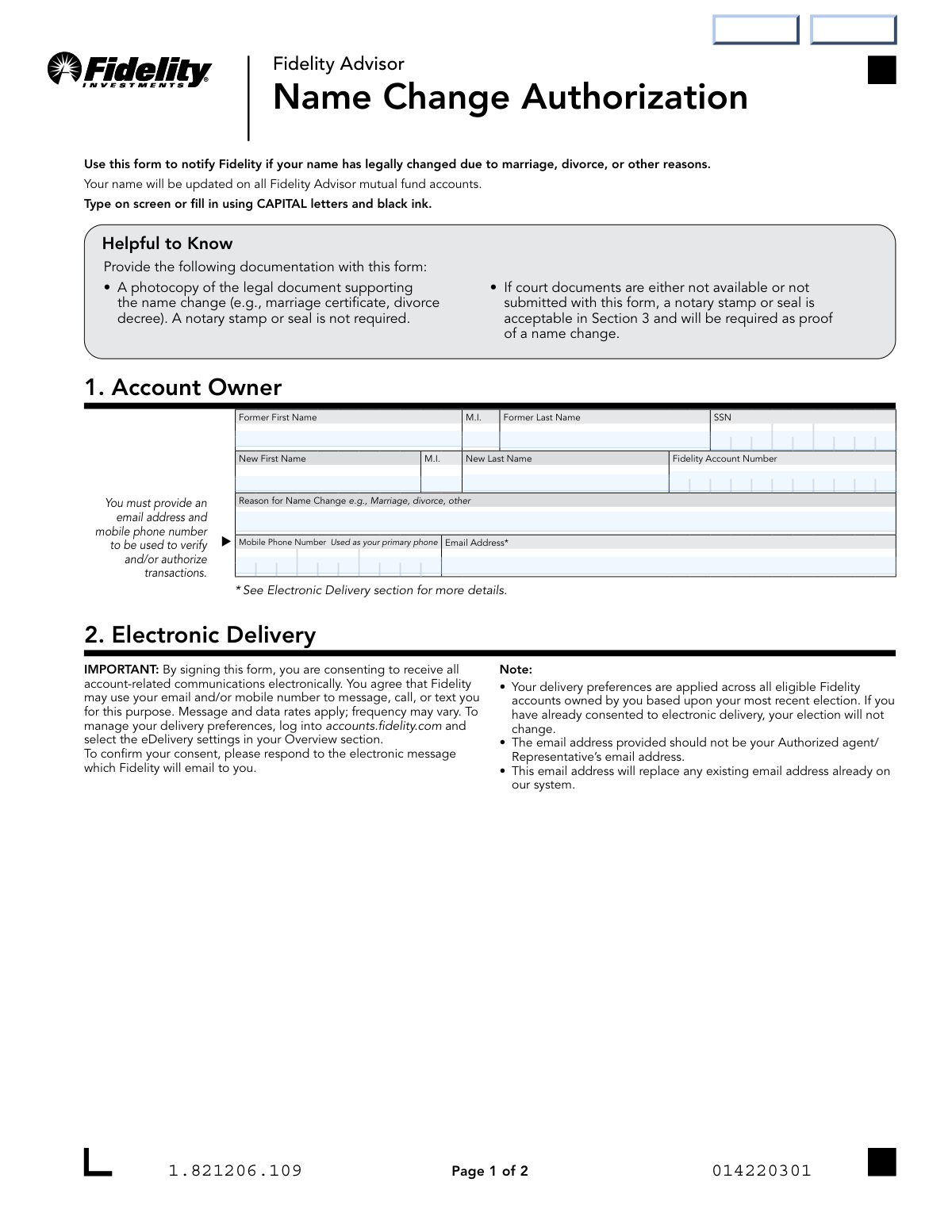
Don't type 21 fields by hand. Tell our AI about yourself, or upload a document you already have, and it fills every field in seconds. You check it, then download, print or sign.
The AI does the filling. You just check it.
No typing into boxes, nothing to install.
What this form asks for
The AI fills all of it, from your answers or your documents.
The AI checks your answers before you download
12 checks built for this form, so a wrong date or a missing answer is caught before anyone else sees it.
Checks that the Social Security Number (SSN) field contains exactly nine digits, ignoring any hyphens. This validation ensures the number is structurally correct before it is used for identity verification against backend systems. An incorrectly formatted SSN will cause an immediate processing failure and requires correction by the user.
Verifies that all required fields, including Former Name, New Name, SSN, Account Number, Mobile Phone, and Email Address, are filled out. This check is critical to ensure the form is complete and can be processed without needing to contact the user for missing information. Incomplete forms will be rejected, delaying the name change request.
Compares the 'Former Name' fields against the 'New Name' fields to ensure they are not identical. This validation confirms that a name change is actually being requested, preventing submissions where the user may have filled out the form by mistake. If the names are the same, the form submission should be flagged for review or rejected.
Ensures the 'Print Owner Name' in Section 3 exactly matches the 'New First Name', 'M.I.', and 'New Last Name' provided in Section 1. This is a critical step to certify that the person signing the form is the one assuming the new legal name on the account. A mismatch could indicate an error or potential fraud and will halt the processing of the request.
Validates that the provided email address follows the standard '[email protected]' format. A valid email is essential because the user is consenting to electronic delivery of all account communications and will receive a confirmation message at this address. An invalid format would prevent communication and render the electronic delivery consent void.
Checks that the 'Mobile Phone Number' field contains a valid 10-digit phone number, ignoring common formatting characters like parentheses or hyphens. This number is designated as the primary contact for verifying and authorizing transactions, so its accuracy is paramount for account security. An invalid number will prevent the user from receiving security codes or alerts.
And 6 more checks
- Account Owner Signature Date Logic
- Fidelity Account Number Existence
- Conditional Notary Section Completion
- Notary Commission Expiration Date Validity
- Notary and Owner Signature Date Consistency
- Reason for Name Change Presence
Let AI fill out your Fidelity Name Change Authorization
No typing. Every field filled in seconds, checked, ready to sign.
How to Fill Out Fidelity Name Change Authorization Online for Free in 2026
What the AI walks you through.
- Navigate to Instafill.ai and upload the Fidelity Advisor Name Change Authorization form or select it from their template library.
- Use the AI assistant to automatically fill in Section 1 with your former name, new name, Social Security Number, and Fidelity account number.
- Provide your reason for the name change, along with your mobile phone number and email address for verification and electronic delivery consent.
- Review the electronic delivery terms in Section 2 to understand how Fidelity will communicate with you.
- In Section 3, electronically sign with your new legal name and date the form to authorize the change.
- Gather and attach a digital copy of the required supporting legal document (e.g., marriage certificate) or prepare to have the form notarized if necessary.
- Download the completed form and submit it along with any attachments to Fidelity via their web portal, fax, or mail as instructed on the form.
Common Mistakes in Completing Fidelity Name Change Authorization
The ones the AI is built to catch.
Signing with the Former Legal Name
Failure to Provide Required Legal Documentation
Misunderstanding the Notary Requirement
Uploading or Faxing a Form Requiring an Original Notary Seal
Entering Incorrect SSN or Fidelity Account Number
Using a Third-Party Email Address
Using Illegible Handwriting
Mixing Up 'Former' and 'New' Name Fields
Forgetting to Complete the Notary Section
Misunderstanding the Scope of eDelivery Consent
Frequently Asked Questions About Fidelity Name Change Authorization
Is it really free for 7 days?
Can I fill other forms too?
How do I cancel?
How does the AI fill out Fidelity Name Change Authorization?
What happens to my information?
How complex is Fidelity Name Change Authorization to fill out?
What is the purpose of the Fidelity Name Change Authorization form?
Who needs to fill out this form?
What documents do I need to submit with this form?
What if I don't have a legal document like a marriage certificate?
Should I sign the form with my old name or my new name?
How can I submit the completed form?
By providing my email, am I automatically signed up for electronic delivery?
Why do I need to provide a mobile phone number and email address?
Will this form update my name on just one of my accounts?
Do I need to get this form notarized?
Can I use an AI tool to help me fill out this form?
How can I fill out this form online?
What should I do if the PDF I downloaded is not fillable?
Where do I mail the form if it needs to be notarized?
Get your Fidelity Name Change Authorization filled out by AI
$0 today. Cancel before Nov 1 and you pay nothing.
Other forms like this one
authorization forms: Form I-765, Application for Employment Authorization, Form CMS-588, EFT Authorization Agreement, Form 8821, Tax Information Authorization, Form 8879, IRS e-file Signature Authorization, Form SSA-827, Authorization to Disclose Information, Form I-905, Application for Authorization to Issue Certification for Health Care Workers, Form G-1650, Authorization for ACH Transactions, Arizona Form 285, General Disclosure/Representation Authorization Form, Arizona Form 285-I, Individual Income Tax Disclosure/Representation Authorization Form, The Department of Medical Assistance Services Applied Behavior Analysis Preservice Service Authorization Request Form (Effective Dates of Service 09/01/2025 and after), Form CH-006: PA-BH-Res-PCS, Oregon Behavioral Health Support Program Plan of Care Authorization (Plan of Care Request for Behavioral Health Residential or Personal Care Services), Continental American Insurance Company (CAIC) / Aflac Group Critical Illness Claim Form (with Attending Physician’s Statement, HIPAA Authorization to Obtain Information, and Electronic Funds Transaction Authorization), HIPAA Authorization Form, Authorization for the Release of Protected Health Information, Form G-1450, Authorization for Credit Card Transactions, Prior Authorization (PA) Request Form – Adult Palliative Care (Alameda Alliance for Health), Alameda Alliance for Health Prior Authorization (PA) Request Form – Adult Palliative Care, Manulife Group Benefits Drug Prior Authorization Form – Mounjaro (Tirzepatide) (GL5197E), Manulife Group Benefits Drug Prior Authorization Form (Ozempic/Semaglutide) – GL5197E, Out-of-Network Pre-Authorization and Exception Request Form, Form SSA-827 (06-2024), Authorization to Disclose Information to the Social Security Administration (SSA)
Fidelity forms: Fidelity Funds Account Transfer of Assets Form, Fidelity Stock Plan Services (SPS) Transfer Request Form, How to Transfer Assets from Morgan Stanley to Fidelity Investments (Fidelity Stock Plan Services Guide), Fidelity Investments Transfer/Rollover/Exchange Form, Fidelity Investments Standing Transfer Instructions Form, Fidelity Charitable 144/145 Contribution Form, One-Time Withdrawal – IRA, Fidelity Investments, Fidelity Investments Transfer/Rollover Form, Fidelity Advisor 403(b) Distribution Request Form, Fidelity Advisor IRA Distribution Request for Automatic Rollover Accounts, Special Tax Notice: Your Rollover Options - Fidelity Investments, Fidelity Charitable Letter of Authorization, Fidelity Advisor Trading Authorization and Indemnification, Fidelity Investment-Only (Non-Prototype) Retirement Account Application, Fidelity NetBenefits Send a Document Form, Fidelity NetBenefits Auditor's Guide: An Overview of Fidelity's 2024 Plan Year Reporting Package, Fidelity NetBenefits Distribution - Recurring Payments, Fidelity Investments® Beneficiary Distribution Form, Fidelity Investments Distribution Form, Fidelity One-Time Withdrawal Form — Nonretirement
name change forms: Letter of Authorization for Name Mismatch, Form NC-100, Petition for Change of Name, Form GRE-50, Member Name/Address Change, Form NC-130, Decree Changing Name, Form NC-110, Name and Information About the Person Whose Name is to be Changed (Attachment to Petition for Change of Name), How to Ask the Court to Change Your Name - Adults Only (For Use in the Superior Court of New Jersey - Law Division - Civil Part), CN 10551, Dissolution (FM) Judgment for Name Change and Addendum, Petition to Change the Name of an Adult (Form FM-NCA-100), FM-NCA-112, Declaration for Prove-Up of Adult Name Change, FM-NCA-200, Order Changing the Name of an Adult, Form DS-5504, Application for a U.S. Passport for Eligible Individuals: Correction, Name Change to Passport Issued 1 Year Ago or Less, and Limited Passport Replacement
Let AI fill out your Fidelity Name Change Authorization
Your trial starts once a card is added. You pay nothing before Nov 1.
Our AI already knows this form, all 21 fields of it. Skip the typing: tell it about yourself, or upload what you have, and it fills the whole form in seconds.
- AI fills every field on both pages, checkboxes included
- No typing into boxes: answer a few questions, or upload a document you already have, an old copy of this form, a photo of a document
- The AI checks the answers; you review and change anything before you download
- Download the finished PDF, print it, or sign it online
- Encrypted, and never used to train AI
Cancel before Nov 1 and you pay nothing.
A card is needed to start the trial. Cancel in two clicks from your account.
Terms · Privacy