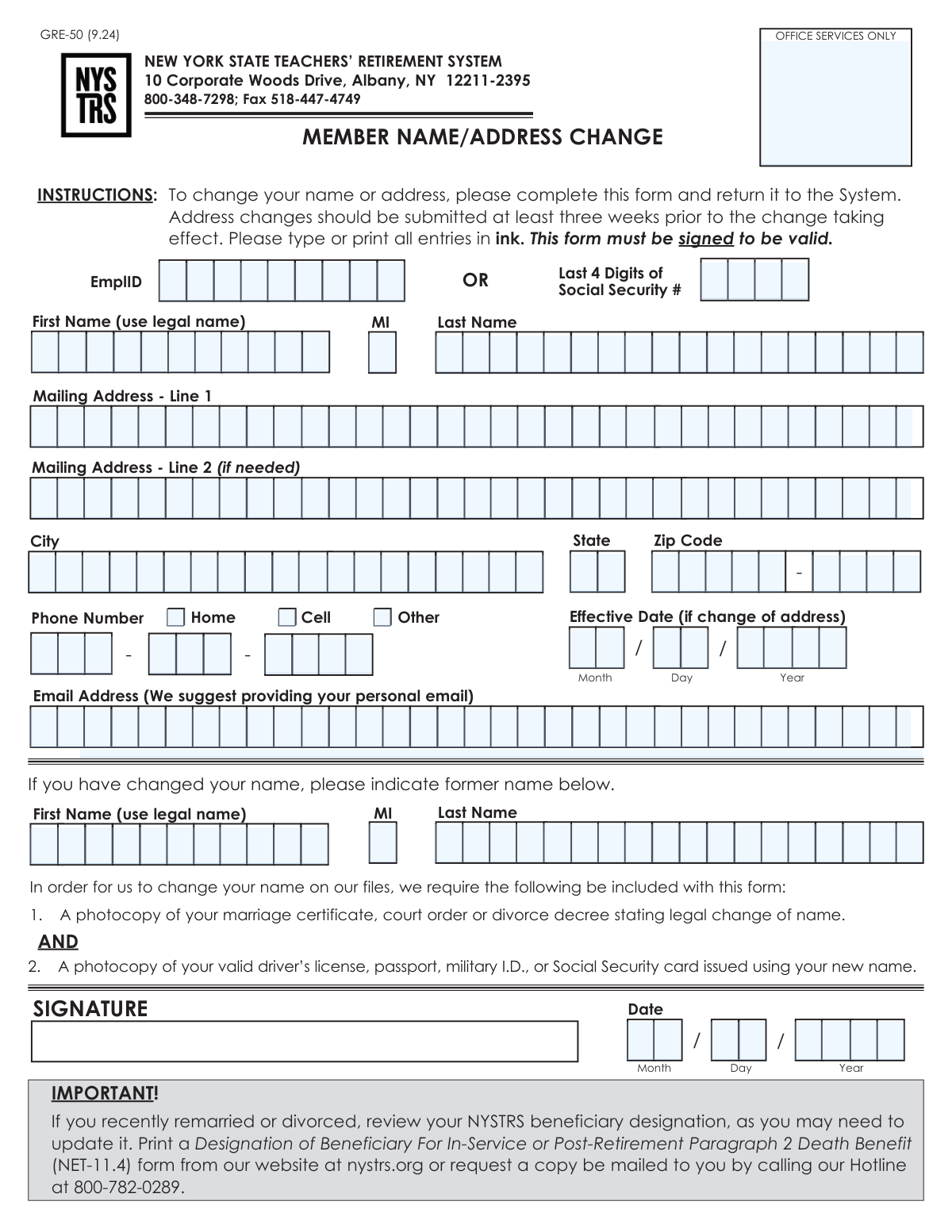
Yes! You can use AI to fill out Form GRE-50, Member Name/Address Change

Form GRE-50, the Member Name/Address Change form, is an official document for the New York State Teachers' Retirement System (NYSTRS). Members use this form to notify the system of any changes to their legal name or mailing address, ensuring that all correspondence, benefit information, and payments are sent to the correct person and location. Today, this form can be filled out quickly and accurately using AI-powered services like Instafill.ai, which can also convert non-fillable PDF versions into interactive fillable forms.
Our AI automatically handles information lookup, data retrieval, formatting, and form filling.
It takes less than a minute to fill out GRE-50 using our AI form filling.
Securely upload your data. Information is encrypted in transit and deleted immediately after the form is filled out.

Form specifications

Form name: Form GRE-50, Member Name/Address Change
Number of pages: 1
Language: English
main-image

Instafill Demo: How to fill out PDF forms in seconds with AI

How to Fill Out GRE-50 Online for Free in 2026

Are you looking to fill out a GRE-50 form online quickly and accurately? Instafill.ai offers the #1 AI-powered PDF filling software of 2026, allowing you to complete your GRE-50 form in just 37 seconds or less.
Follow these steps to fill out your GRE-50 form online using Instafill.ai:
  1. 1 Navigate to Instafill.ai and upload or select the NYSTRS Form GRE-50.
  2. 2 Provide your personal identification details, including your full legal name, Employee ID, and the last four digits of your Social Security Number.
  3. 3 If changing your address, enter the new mailing address, phone number, and the date the change becomes effective.
  4. 4 If changing your name, enter your new legal name in the top section and your former name in the designated area below.
  5. 5 For a name change, gather and prepare photocopies of the required supporting documents, such as a marriage certificate and a new photo ID, to submit with the form.
  6. 6 Carefully review all the information you have entered for accuracy, then sign and date the form in the signature section.
  7. 7 Download the completed and signed form, and submit it along with any required documentation to the NYSTRS via mail or fax as per the form's instructions.

Our AI-powered system ensures each field is filled out correctly, reducing errors and saving you time.

Why Choose Instafill.ai for Your Fillable GRE-50 Form?

Speed

Complete your GRE-50 in as little as 37 seconds.

Up-to-Date

Always use the latest 2026 GRE-50 form version.

Cost-effective

No need to hire expensive lawyers.

Accuracy

Our AI performs 10 compliance checks to ensure your form is error-free.

Security

Your personal information is protected with bank-level encryption.

Frequently Asked Questions About Form GRE-50

This form is used by members of the New York State Teachers' Retirement System (NYSTRS) to officially update their legal name or mailing address in the system's records.

Any NYSTRS member who has legally changed their name or moved to a new address should complete and submit this form to ensure their information is current.

For a name change, you must include a photocopy of a legal document (like a marriage certificate or court order) and a photocopy of an updated ID (like a driver's license or passport) showing your new name.

No, supporting documents are not required for an address change. Simply complete the address fields, provide an effective date, and sign the form.

You should submit the form at least three weeks before your address change takes effect. This ensures your mail from NYSTRS is sent to the correct location without interruption.

You can mail the signed form to NYSTRS at 10 Corporate Woods Drive, Albany, NY 12211-2395, or fax it to 518-447-4749.

No, this form only updates your name on file. You must separately review and update your beneficiary designation using the 'Designation of Beneficiary' form (NET-11.4) if your life event warrants a change.

The 'Effective Date' field is only for an address change. It tells NYSTRS the specific date on which they should start using your new mailing address.

Yes, the form is not valid unless it is signed and dated. Your requested changes will not be processed without your signature.

The EmplID is your unique employee identification number used by the retirement system. You can usually find this number on your NYSTRS annual statement or on your pay stub.

Yes, services like Instafill.ai use AI to help you accurately auto-fill form fields from your saved profile, which can save time and reduce errors.

You can use a service like Instafill.ai to complete the form online. Simply upload the PDF, and the tool will help you fill in the fields before you print it for signing and submission.

If you have a non-fillable or 'flat' PDF, you can upload it to Instafill.ai. The service can convert it into an interactive, fillable form that you can easily complete on your computer.

Compliance GRE-50
Validation Checks by Instafill.ai

1
Signature Date Presence and Validity
This check ensures the Signature Date fields (Month, Day, Year) are all filled out and constitute a valid calendar date that is not in the future. A dated signature is required to legally validate the member's request and establish a timestamp for the change. If the date is missing, invalid, or in the future, the form submission will be rejected as it cannot be processed.
2
Member Identification Completeness
Validates that either the 'EmplID' or the 'Last 4 Digits of Social Security #' field is completed. Providing at least one of these unique identifiers is critical for the system to accurately locate and update the correct member's account. Failure to provide an identifier will result in the form being rejected to prevent potential errors or fraudulent changes.
3
Social Security Number Last 4 Digits Format
This check verifies that the 'Last 4 Digits of Social Security #' field, if filled, contains exactly four numeric digits. This specific format is required for matching against system records and maintaining data integrity. Submissions with non-numeric characters or an incorrect number of digits will be flagged for correction.
4
Legal Name Completeness
Ensures that both the 'First Name (legal)' and 'Last Name (legal)' fields are filled. These fields are the primary identifiers for the member's record and are mandatory for any change request. An incomplete name will cause the submission to fail, as the system cannot process a request for an unspecified individual.
5
Address Change Completeness
If any new address field (e.g., 'Mailing Address - Line 1', 'City', 'Effective Date') is filled, this check ensures that 'Mailing Address - Line 1', 'City', 'State', and 'ZIP Code' are all present. A partial address is unusable for mailing and indicates an incomplete request. The submission will be rejected pending completion of all required address components.
6
State Abbreviation Format
Validates that the 'State' field contains a valid, two-letter U.S. state or territory postal abbreviation. Using a standardized abbreviation is essential for mail processing and ensuring data consistency within the system. An invalid entry will cause a validation error, requiring the user to correct the field before the form can be submitted.
7
ZIP Code Format
This check confirms that the 'ZIP Code (5 digits)' field contains exactly five numeric digits. It also checks that the optional 'ZIP+4' field, if used, contains exactly four numeric digits. A valid ZIP code is mandatory for mail delivery, and incorrect formatting will lead to processing delays or returned mail.
8
Phone Number Integrity
Ensures that if any part of the phone number is entered (Area Code, Prefix, or Line Number), all three parts are filled and are numeric. A partial phone number is not usable for contact purposes. The submission will be flagged for correction if the number is incomplete.
9
Phone Number Type Selection
This validation verifies that if a phone number is provided, at least one of the corresponding type checkboxes ('Home', 'Cell', 'Other') is selected. Classifying the phone number type is important for communication preferences and record-keeping. A submission with a phone number but no type selected will be considered incomplete and returned for correction.
10
Email Address Format
Checks that the value entered in the 'Email Address' field, if provided, adheres to the standard email format (e.g., '[email protected]'). This ensures the system can successfully send electronic communications and notifications to the member. An invalid format will trigger an error, preventing submission until it is corrected.
11
Name Change Logic and Documentation Flag
This check verifies that if any 'Former Name' field is filled, the new 'First Name' or 'Last Name' is different from the former name. It flags the submission for manual review to ensure the required legal documentation (e.g., marriage certificate, court order) is attached as stated in the form instructions. A submission indicating a name change without the new name being different, or without documentation, will be halted for clarification.
12
Address Change and Effective Date Coherence
Validates that if an 'Effective Date' for an address change is provided, the new address fields are also filled out. The effective date is meaningless without a new address to apply it to. If the date is present but the address is missing, the form will be rejected as illogical and incomplete.
13
Logical Date Sequence: Effective Date vs. Signature Date
This check ensures that the 'Effective Date' for an address change is on or after the 'Signature Date'. An effective date that precedes the date the form was signed is logically impossible and indicates a user error. Such a discrepancy will cause a validation failure, requiring the member to correct one or both dates.

Common Mistakes in Completing GRE-50

Forgetting to Sign and Date the Form

Applicants often complete all the fields but forget to sign and date the form in the designated signature box. The form explicitly states it must be signed to be valid. An unsigned form is immediately rejected, causing significant processing delays for the name or address change and potentially leading to missed mailings.

Submitting Incomplete Documents for a Name Change

For a name change, the form requires two separate pieces of documentation: a photocopy of the legal document authorizing the change (e.g., marriage certificate) AND a photocopy of an updated ID (e.g., driver's license). A common error is sending only one of these items. This results in an incomplete application that cannot be processed until all required documentation is received.

Submitting an Address Change Too Late

The instructions advise submitting address changes at least three weeks before they take effect. People often wait until they have already moved, which is too late. This can cause critical documents, such as tax forms, account statements, or even pension checks, to be sent to the old address and become lost or delayed.

Illegible Handwriting

When filling out the form by hand, poor or rushed handwriting can make names, addresses, and numbers difficult to read. This leads to data entry errors by the processing staff, resulting in incorrect records, returned mail, and failed contact attempts. To avoid this, print clearly in block letters. If you have a non-fillable PDF, a tool like Instafill.ai can convert it into a fillable version, allowing you to type your information for maximum clarity before printing.

Confusing the 'Effective Date' with the 'Signature Date'

The form has two separate date fields: an 'Effective Date' for address changes and a 'Date' next to the signature. Applicants may mistakenly enter the current date in both fields. This can cause an address change to be processed prematurely, long before the member has actually moved, leading to mail being sent to the wrong location.

Missing Crucial Identification Numbers

Forgetting to enter the 'EmplID' or the 'Last 4 Digits of Social Security #' is a frequent oversight. These numbers are essential for the retirement system to accurately locate and verify the member's account. Without this information, the form cannot be processed, leading to rejections and delays until the member can be properly identified.

Incorrectly Formatting the Phone Number

The form splits the phone number into three separate fields: Area Code, Prefix, and Line Number. People are used to entering a full number in one field and may incorrectly place all ten digits in the first box or misalign them. This can cause the number to be recorded incorrectly in the system, preventing NYSTRS from being able to contact the member. AI-powered tools like Instafill.ai can automatically parse and correctly place the digits into their respective fields.

Forgetting to Update Beneficiary Designation After a Life Event

The form includes an important reminder to review beneficiary designations after a marriage or divorce, but since it's not a required field, it's often ignored. Failing to update a beneficiary after a major life event can have devastating consequences, as death benefits could be paid to an ex-spouse or other unintended individual. This is a separate but critical action that should be completed immediately after a name change.

Using a Work Email Instead of a Personal One

The form suggests providing a personal email address, but many members provide their work email out of habit. This is risky because if the member changes jobs or retires, they will lose access to that email account. This severs a key communication channel with NYSTRS, causing them to miss important updates about their retirement benefits and account.

Leaving Out Secondary Address Information

Members living in apartment buildings, condos, or multi-unit dwellings often forget to include their apartment, unit, or suite number in the 'Mailing Address - Line 2' field. This omission makes the address incomplete and can lead to failed mail delivery. All mail from NYSTRS, including sensitive financial documents, will be returned as undeliverable.

Entering a Nickname Instead of a Legal Name

The form requires the member's 'legal name', but people sometimes use a common nickname or a shortened version of their name (e.g., 'Mike' instead of 'Michael'). This creates a mismatch with official records and the required supporting documents, causing the name change request to be rejected. Always use the full legal name as it appears on official identification.

Forgetting to Select a Phone Number Type

After carefully entering their phone number across three separate boxes, applicants often overlook the adjacent checkboxes for 'Home', 'Cell', or 'Other'. While the system may still capture the number, it lacks important context for the NYSTRS staff. This can lead to communication inefficiencies, such as calling a home landline during business hours when a cell phone would be more appropriate.
Saved over 80 hours a year

“I was never sure if my IRS forms like W-9 were filled correctly. Now, I can complete the forms accurately without any external help.”

Kevin Martin Green

Your data stays secure with advanced protection from Instafill and our subprocessors

Robust compliance program

Transparent business model

You’re not the product. You always know where your data is and what it is processed for.

ISO 27001, HIPAA, and GDPR

Our subprocesses adhere to multiple compliance standards, including but not limited to ISO 27001, HIPAA, and GDPR.

Security & privacy by design

We consider security and privacy from the initial design phase of any new service or functionality. It’s not an afterthought, it’s built-in, including support for two-factor authentication (2FA) to further protect your account.

Fill out GRE-50 with Instafill.ai

Worried about filling PDFs wrong? Instafill securely fills form-gre-50-member-nameaddress-change forms, ensuring each field is accurate.