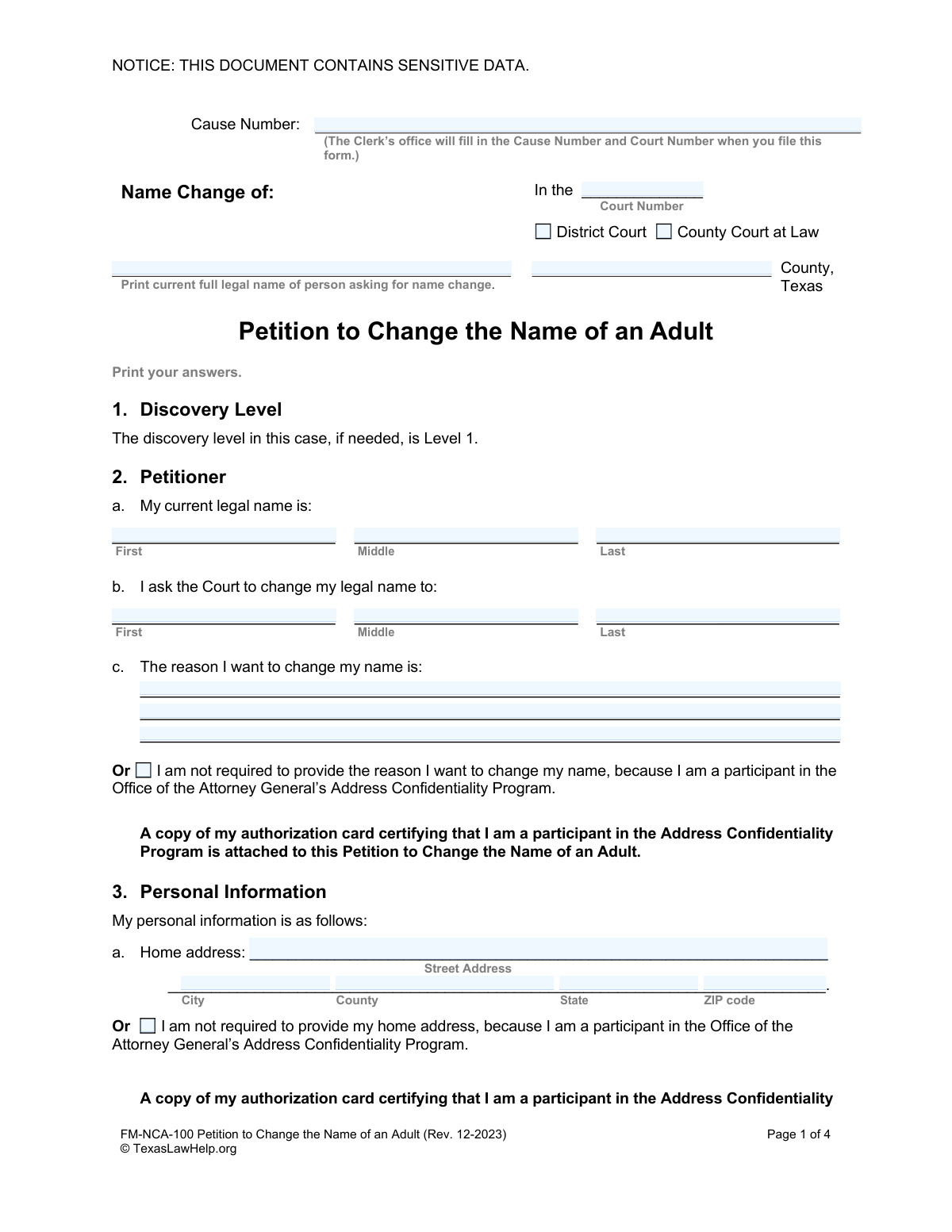
Yes! You can use AI to fill out Petition to Change the Name of an Adult (Form FM-NCA-100)

This document is a legal petition filed with a Texas court by an adult seeking to legally change their name. It requires the petitioner to provide detailed personal information, including their current and desired names, address, date of birth, and criminal history. Completing this form accurately is the first crucial step in the legal name change process. Today, this form can be filled out quickly and accurately using AI-powered services like Instafill.ai, which can also convert non-fillable PDF versions into interactive fillable forms.
FM-NCA-100 is part of the name change forms category on Instafill.
Our AI automatically handles information lookup, data retrieval, formatting, and form filling.
It takes less than a minute to fill out FM-NCA-100 using our AI form filling.
Securely upload your data. Information is encrypted in transit and deleted immediately after the form is filled out.

Form specifications

Form name: Petition to Change the Name of an Adult (Form FM-NCA-100)
Number of fields: 143
Number of pages: 1
Language: English
main-image

Instafill Demo: How to fill out PDF forms in seconds with AI

How to Fill Out FM-NCA-100 Online for Free in 2026

Are you looking to fill out a FM-NCA-100 form online quickly and accurately? Instafill.ai offers the #1 AI-powered PDF filling software of 2026, allowing you to complete your FM-NCA-100 form in just 37 seconds or less.
Follow these steps to fill out your FM-NCA-100 form online using Instafill.ai:
  1. 1 Navigate to Instafill.ai and upload the FM-NCA-100 form or select it from their template library.
  2. 2 Provide your personal information, including your current legal name, the name you wish to change to, address, and date of birth.
  3. 3 Answer the questions regarding your criminal history, providing details of any charges or convictions as required by the form.
  4. 4 State the reason for your name change, or indicate if you are exempt from this requirement.
  5. 5 Review all the information automatically populated by the AI to ensure it is correct and complete.
  6. 6 Electronically sign the verification section, declaring the information is true under penalty of perjury.
  7. 7 Download the completed petition and gather all required attachments, such as fingerprint cards and proof of pardon, before filing with the court.

Our AI-powered system ensures each field is filled out correctly, reducing errors and saving you time.

Why Choose Instafill.ai for Your Fillable FM-NCA-100 Form?

Speed

Complete your FM-NCA-100 in as little as 37 seconds.

Up-to-Date

Always use the latest 2026 FM-NCA-100 form version.

Cost-effective

No need to hire expensive lawyers.

Accuracy

Our AI performs 10 compliance checks to ensure your form is error-free.

Security

Your personal information is protected with bank-level encryption.

Frequently Asked Questions About Form FM-NCA-100

This form is the official 'Petition to Change the Name of an Adult' in Texas. You use it to formally ask a court to legally change your name.

Any adult residing in Texas who wishes to legally change their name must complete and file this petition with the appropriate court to begin the process.

You are required to attach a legible fingerprint card. Depending on your criminal history or participation in the Address Confidentiality Program, you may also need to attach other documents like proof of a pardon or your program authorization card.

Yes, you must state the reason for your name change, unless you are a participant in the Attorney General’s Address Confidentiality Program. If you are in this program, you can check the box and attach a copy of your authorization card instead.

You should leave the 'Cause Number' and 'Court Number' fields at the top of the form blank. The court clerk's office will assign these numbers and fill them in when you file your petition.

Yes, Section 4 of the form requires you to list all Class A or B misdemeanors and felonies with which you have been charged, even if you were not convicted.

Yes, but with conditions. You must provide proof that you were pardoned, or that at least two years have passed since you were discharged or completed supervision for each felony conviction.

The 'Verification' section is a sworn statement where you declare under penalty of perjury that the information you provided is true and correct. Signing this section makes your statements legally binding.

You should include any prior legal names, common nicknames, or any other names you have been known by, especially if they appear on official records like arrest records.

If you are required to register as a sex offender, you must first notify the appropriate local law enforcement authority of your proposed name change. You must then attach proof of this notification to your petition.

Yes, services like Instafill.ai use AI to help you accurately auto-fill form fields with your personal information, which can save time and reduce the chance of errors.

You can upload the 'Petition to Change the Name of an Adult' PDF to the Instafill.ai platform. Their service will make the form interactive, allowing you to type your answers directly into the fields before downloading the completed document.

You can use a service like Instafill.ai, which can convert flat, non-fillable PDFs into interactive forms. Simply upload the document, and the platform will make it possible for you to type your information directly onto the form.

Compliance FM-NCA-100
Validation Checks by Instafill.ai

1
Verifies Proposed Name is a Change
This check ensures the proposed new name in Section 2b is different from the current legal name in Section 2a. The purpose of the petition is to change a name, so submitting identical names would be a logical error. If the names are the same, the form submission should be blocked with an error message prompting the user to enter a different proposed name.
2
Ensures Reason for Change is Provided or Exempted
This validation confirms that the petitioner has either provided a text reason for the name change in Section 2c or has checked the box indicating they are a participant in the Address Confidentiality Program. It is a legal requirement to provide a reason unless this specific exemption applies. A failure would prompt the user to complete one of the two mutually exclusive options.
3
Validates Social Security Number Entry
This check verifies that either a Social Security Number is entered in the correct 9-digit format (XXX-XX-XXXX or XXXXXXXXX) in Section 3b, or the 'I do not have a Social Security Number' checkbox is selected. The system must prevent both the field from being filled and the checkbox from being ticked simultaneously. This ensures data integrity and prevents ambiguous or conflicting information.
4
Validates Date of Birth and Petitioner's Age
This validation confirms that the date of birth in Section 3c is a valid, real date and that it occurred in the past. Furthermore, it calculates the petitioner's age to ensure they are an adult (typically 18 years or older), as this is a 'Petition to Change the Name of an Adult'. If the date is invalid or indicates the petitioner is a minor, the submission should be rejected.
5
Conditional Requirement for Criminal Charge Details
This check enforces a conditional rule based on the answer in Section 4a. If the petitioner answers 'Yes' to 'Have you ever been charged with a Class A or B misdemeanor or a felony?', then the fields for FBI/SID number and the details of each charge become mandatory. This is crucial for the court to have a complete criminal history for its decision, and failure to provide details would result in an incomplete petition.
6
Conditional Requirement for Felony Conviction Details
This validation is triggered if the petitioner answers 'Yes' to having a felony conviction in Section 4b. The system must then require the user to fill out the details of each felony conviction. It should also flag that supporting documentation, such as proof of pardon or discharge, is required as stated in the form instructions.
7
Verifies Name Consistency in Verification Section
This check cross-references the name entered in the 'Verification' section (Section 6) against the 'current legal name' provided in Section 2a. These two fields must be an exact match to ensure the legal declaration under penalty of perjury is being made by the correct individual. A mismatch would indicate a data entry error and could invalidate the sworn statement.
8
Verifies Date of Birth Consistency in Verification Section
This validation ensures the date of birth entered in the 'Verification' section (Section 6) is identical to the date of birth provided in the 'Personal Information' section (Section 3c). This cross-check confirms the identity of the declarant and maintains consistency in the sworn statement. An error would prompt the user to correct the discrepancy before submission.
9
Validates Address Confidentiality Program Exemption
This check is triggered if the petitioner selects the checkbox for the Address Confidentiality Program in Section 3a. The system should then verify that the home address fields are left blank, as providing an address would be contradictory. It also serves as a flag to ensure the required authorization card is attached, preventing submission of an incomplete petition.
10
Ensures Driver's License History is Addressed
This validation ensures the petitioner has addressed their driver's license history in Section 3d. The petitioner must either provide at least one driver's license number and issuing state from the last 10 years or explicitly check the box stating 'I have not had a driver’s license during the last 10 years'. This prevents the section from being left blank, ensuring a complete history is provided to the court.
11
Flags Attachment Requirement for Sex Offender Registry
This validation rule is triggered when a petitioner answers 'Yes' to the question 'Are you required to register as a sex offender?' in Section 4c. The system must then flag that proof of notification to the local law enforcement authority is a mandatory attachment. This check ensures that legally required notifications and proofs are not overlooked, which is critical for public safety and the petition's validity.
12
Validates Completeness of Petitioner's Signature Block
This check ensures all fields in the petitioner's signature block (Section 5) are filled out, including the signature date, printed name, phone number, and full mailing address. While a digital signature cannot be verified for authenticity, its presence and the completeness of associated contact information are essential for the document's legal standing. An incomplete block would render the petition invalid.

Common Mistakes in Completing FM-NCA-100

Incomplete or Inaccurate Criminal History Disclosure

Petitioners often mistakenly omit charges that did not result in a conviction or forget to list all Class A/B misdemeanors and felonies as required in Section 4. This happens due to misunderstanding the scope of the question, which covers all charges, not just convictions. An incomplete history will be discovered during the mandatory background check, leading to immediate rejection of the petition and potential legal consequences. To avoid this, carefully review your records and list every charge as required.

Missing Signature on Verification Section

The form requires two signatures, but many people overlook the second one in Section 6, the 'Verification'. This section is a sworn statement made under penalty of perjury, and its signature is legally distinct from the one in Section 5. A missing verification signature invalidates the entire petition, causing the court clerk to reject the filing on the spot. Always double-check the document for all required signature lines, especially the final verification, before filing.

Failure to Attach Mandatory Supporting Documents

The petition is invalid without specific attachments listed on the final page, most notably a complete fingerprint card. Petitioners with special circumstances, such as a felony history or participation in the Address Confidentiality Program, often forget to include the required proof. This oversight leads to an automatic rejection of the filing, wasting time and filing fees. Create a checklist from the form's final page and ensure every required 'Exhibit' is included with your submission.

Omitting Aliases, Nicknames, or Prior Names

Petitioners frequently leave Section 3i blank, not realizing that 'aliases' includes common nicknames, maiden names, or any other name they have been known by. The court uses this information for the background check to ensure a comprehensive search across all known identities. Omitting these names can be viewed as an attempt to hide information and will likely cause delays or rejection of the petition.

Providing Inconsistent Personal Information

It is common for individuals to enter their name or address slightly differently in the main petition (Section 3) compared to the Verification section (Section 6). For example, they might use an initial in one field and a full middle name in another. Such inconsistencies can raise questions about the data's accuracy and may slow down processing. AI form fillers like Instafill.ai excel at preventing this by automatically populating repeated data from a single source of truth, ensuring perfect consistency.

Using Nicknames Instead of Full Legal Names

In Section 2a ('My current legal name is'), petitioners sometimes enter a common nickname or an incomplete version of their name instead of the full name as it appears on their birth certificate or other legal documents. This creates a discrepancy that can halt the legal process, as the court needs to know the exact name being changed. Always use your full, official legal name in this section to ensure the petition is processed correctly.

Filling in Fields Reserved for the Court Clerk

The top of the first page contains fields for 'Cause Number' and 'Court Number,' which are explicitly marked to be filled in by the Clerk's office. Some petitioners attempt to fill these in themselves, which can confuse the filing process and may require them to complete a new form. Intelligent form fillers like Instafill.ai are programmed to recognize and lock fields that are reserved for official use, preventing users from accidentally filling them in.

Forgetting to Attach Proof for Felony Convictions

If a petitioner has a felony conviction, Section 4b requires them to attach specific proof, such as a pardon or evidence that at least two years have passed since discharge from supervision. Many people check 'Yes' to a felony conviction but fail to attach this mandatory documentation. Without this proof, the court cannot legally grant the name change, and the petition will be denied.

Incomplete Driver's License History

Section 3d asks for all driver's license numbers issued in the last 10 years, including those from different states. People often only list their current license, forgetting about previous or out-of-state licenses. This incomplete information can hinder the background check process and cause delays. To avoid this, review your records and list every license you have held in the past decade.

Forgetting to Sign or Date the Petition

While it seems basic, petitioners under stress can forget to sign or date the petition in Section 5. An unsigned or undated petition is not a valid legal request and will be immediately rejected by the court clerk, requiring a refiling. Since this form is a non-fillable PDF, a tool like Instafill.ai can convert it into an interactive version that highlights all signature and date fields to ensure none are missed before printing.
Saved over 80 hours a year

“I was never sure if my IRS forms like W-9 were filled correctly. Now, I can complete the forms accurately without any external help.”

Kevin Martin Green

Your data stays secure with advanced protection from Instafill and our subprocessors

Robust compliance program

Transparent business model

You’re not the product. You always know where your data is and what it is processed for.

ISO 27001, HIPAA, and GDPR

Our subprocesses adhere to multiple compliance standards, including but not limited to ISO 27001, HIPAA, and GDPR.

Security & privacy by design

We consider security and privacy from the initial design phase of any new service or functionality. It’s not an afterthought, it’s built-in, including support for two-factor authentication (2FA) to further protect your account.

Fill out FM-NCA-100 with Instafill.ai

Worried about filling PDFs wrong? Instafill securely fills petition-to-change-the-name-of-an-adult-form-fm-nca-100 forms, ensuring each field is accurate.