Yes! You can use AI to fill out Letter of Authorization for Name Mismatch
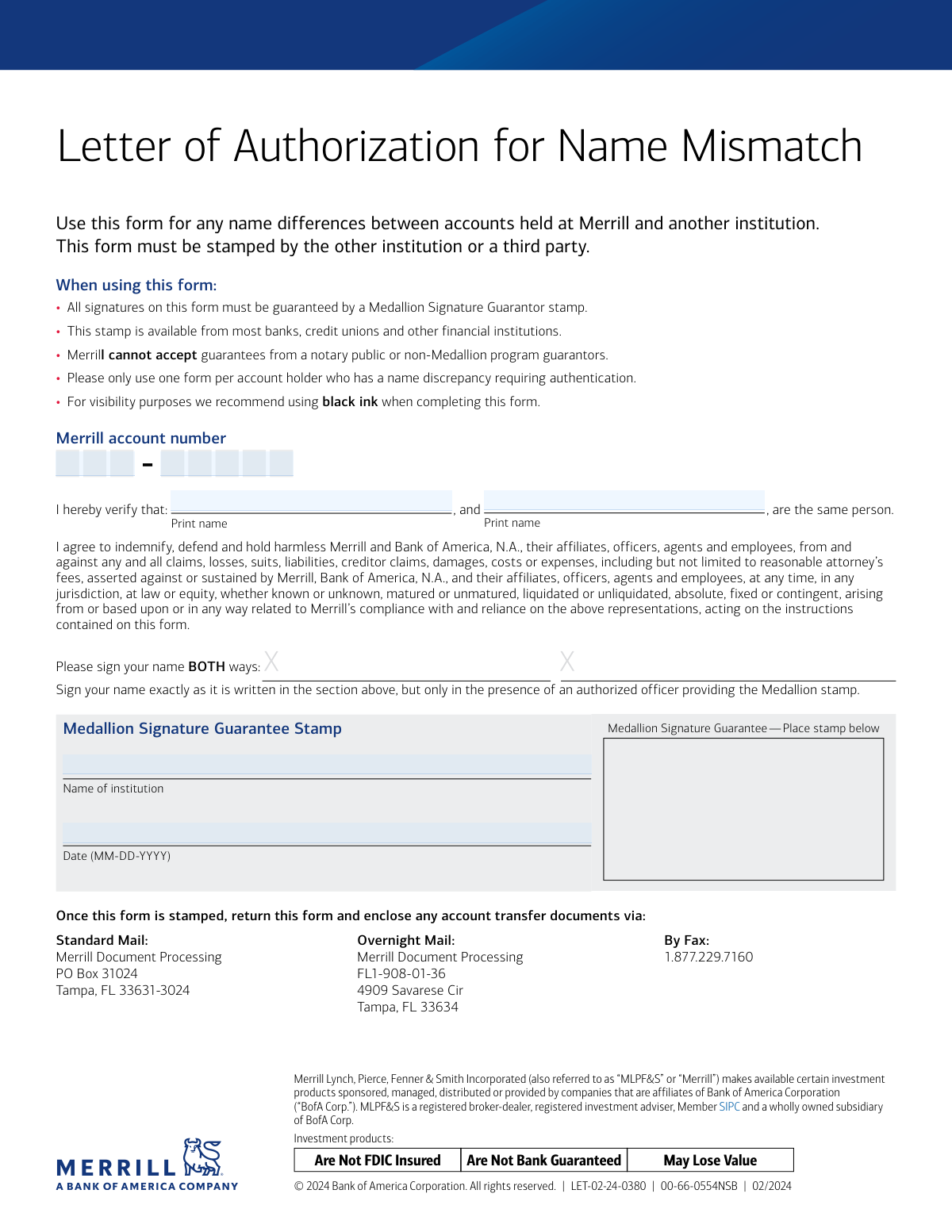
This form is a legal declaration used by Merrill (a subsidiary of Bank of America) to resolve discrepancies in a person's name between their Merrill account and an account at another financial institution. It is essential for ensuring smooth account transfers and other transactions by officially stating that two different printed names refer to the same individual, and it requires a Medallion Signature Guarantee for validation. Today, this form can be filled out quickly and accurately using AI-powered services like Instafill.ai, which can also convert non-fillable PDF versions into interactive fillable forms.
Our AI automatically handles information lookup, data retrieval, formatting, and form filling.
It takes less than a minute to fill out LET-02-24-0380 using our AI form filling.
Securely upload your data. Information is encrypted in transit and deleted immediately after the form is filled out.
Form specifications
| Form name: | Letter of Authorization for Name Mismatch |
| Number of pages: | 1 |
| Language: | English |
| Categories: | authorization forms |
Instafill Demo: How to fill out PDF forms in seconds with AI
How to Fill Out LET-02-24-0380 Online for Free in 2026
Are you looking to fill out a LET-02-24-0380 form online quickly and accurately? Instafill.ai offers the #1 AI-powered PDF filling software of 2026, allowing you to complete your LET-02-24-0380 form in just 37 seconds or less.
Follow these steps to fill out your LET-02-24-0380 form online using Instafill.ai:
- 1 Navigate to Instafill.ai and upload or select the Merrill Letter of Authorization for Name Mismatch form.
- 2 Use the AI tool to automatically detect and label the form fields, such as the name fields and Merrill account number.
- 3 Enter the two different versions of your name into the designated 'Print name' fields and provide your Merrill account number.
- 4 Carefully review all the information entered on the form to ensure it is accurate and complete before printing.
- 5 Print the completed form. Note that this document requires a physical signature and a special stamp.
- 6 Take the printed form to a qualified financial institution (e.g., your bank or credit union) to obtain a Medallion Signature Guarantee stamp and sign the form in the presence of the authorized officer.
- 7 Submit the fully executed and stamped form to Merrill using the mail or fax instructions provided on the document.
Our AI-powered system ensures each field is filled out correctly, reducing errors and saving you time.
Why Choose Instafill.ai for Your Fillable LET-02-24-0380 Form?
Speed
Complete your LET-02-24-0380 in as little as 37 seconds.
Up-to-Date
Always use the latest 2026 LET-02-24-0380 form version.
Cost-effective
No need to hire expensive lawyers.
Accuracy
Our AI performs 10 compliance checks to ensure your form is error-free.
Security
Your personal information is protected with bank-level encryption.
Frequently Asked Questions About Form LET-02-24-0380
This form is used to officially verify that two different versions of your name, one on a Merrill account and one at another institution, belong to the same person. It is typically required to process account transfers or link accounts with name variations.
You need to complete this form if your name is spelled or formatted differently on your Merrill account compared to an account at another financial institution, and this discrepancy is holding up a transaction.
A Medallion Signature Guarantee is a special stamp from a financial institution that verifies your identity and signature with a higher level of security than a notary. You can obtain one from most banks, credit unions, or brokerage firms, though you may need to be a customer.
No, the form explicitly states that Merrill cannot accept guarantees from a notary public. You must obtain a Medallion Signature Guarantee for the form to be processed.
Print the two different name variations in the designated fields. You must then sign the form in the presence of the official providing the Medallion stamp, signing your name exactly as it appears in the first printed name field.
You can submit the form via standard mail, overnight mail to the specified addresses in Tampa, FL, or by fax to 1.877.229.7160. Be sure to include any other required account transfer documents.
When you return this form, you should also enclose any associated account transfer documents that are part of the transaction you are trying to complete.
The instructions advise using one form per account holder with a name discrepancy. You should enter the specific Merrill account number related to the transfer or transaction on the form.
This is a standard legal clause stating that you agree Merrill is not responsible for any claims or losses that result from them acting on your instruction and relying on your statement that both names belong to you.
Yes, services like Instafill.ai use AI to accurately auto-fill form fields, which can save you time and help prevent errors before you print the document for the required physical signature and stamp.
Simply upload the form's PDF to the Instafill.ai platform. The AI will make the fields interactive, allowing you to type your information directly onto the form before printing it.
You can use a service like Instafill.ai, which is designed to convert non-fillable PDFs into interactive, fillable forms. This allows you to easily type your information for a clean, legible document to be printed.
Compliance LET-02-24-0380
Validation Checks by Instafill.ai
1
Ensures Both Name Variations are Provided
This check verifies that both 'Print name 1' and 'Print name 2' fields are filled out. The core purpose of the form is to reconcile two different names, so both must be present for the document to be valid. If either name is missing, the form is incomplete and cannot be processed.
2
Verifies Name Fields are Different
This validation confirms that the text in 'Print name 1' is not identical to the text in 'Print name 2'. The form is explicitly for a name mismatch, so if the names are the same, the form is being used incorrectly. This check prevents the processing of unnecessary or erroneous submissions.
3
Confirms Merrill Account Number is Present
This check ensures the 'Merrill account number' field is not empty. This number is the primary identifier used to link the name authorization to the correct client account. Without a valid account number, the authorization cannot be applied, leading to processing failure.
4
Validates Merrill Account Number Format
This check verifies that the provided Merrill account number conforms to the expected format (e.g., specific length, alphanumeric characters). This is a crucial first-pass validation to catch obvious data entry errors or incomplete numbers. An incorrectly formatted number will fail system lookups and must be corrected.
5
Requires Name of Stamping Institution
This validation ensures the 'Name of institution' field has been completed. This field identifies the financial institution that provided the Medallion Signature Guarantee, which is a mandatory requirement for authenticating the form. A missing institution name invalidates the guarantee and the entire document.
6
Checks for Valid Date Format (MM-DD-YYYY)
This check validates that the date is entered in the specified MM-DD-YYYY format. Enforcing a standard format is essential for accurate data capture, system processing, and maintaining a consistent audit trail. Forms with an incorrect date format will be flagged for manual review and correction.
7
Ensures Date is Not in the Future
This validation confirms that the date provided on the form is not later than the current processing date. A future date is a logical impossibility for a document that has already been signed and submitted. This check prevents the processing of fraudulent or clearly erroneous forms.
8
Detects Presence of Medallion Signature Guarantee Stamp
This check uses image analysis to confirm that a stamp is physically present in the designated 'Medallion Signature Guarantee Stamp' area. The form explicitly states this stamp is mandatory and cannot be substituted by a notary. If the stamp is missing, the form is legally invalid and must be rejected immediately.
9
Verifies Printed Names Contain Valid Characters
This check ensures that both 'Print name' fields contain primarily alphabetic characters and standard name punctuation (e.g., hyphens, apostrophes, spaces). It serves as a data quality check to filter out entries that are clearly not names, such as random numbers or symbols. This helps prevent garbage data from entering the system.
10
Confirms Presence of Required Signatures
This check uses image analysis to detect ink in the signature areas where the user is instructed to sign their name. The physical signatures, guaranteed by the Medallion stamp, are the legal basis of the authorization. A missing signature renders the document void and non-binding, requiring rejection.
11
Validates Date is a Real Calendar Date
This check verifies that the provided date is a valid calendar date (e.g., it rejects '02-30-2024' or '13-15-2024'). This prevents data entry errors and ensures that the date recorded in the system is accurate for compliance and record-keeping. An impossible date would cause the form to be rejected for correction.
12
Checks for Form Recency
This validation checks that the form's date is within a reasonable timeframe (e.g., not older than 180 days). Financial institutions often have policies against accepting stale-dated instructions to mitigate risk and ensure the client's intent is current. An outdated form would be rejected, requiring the client to submit a new one.
Common Mistakes in Completing LET-02-24-0380
People often confuse a Medallion Signature Guarantee with a more common notary public stamp. This form explicitly states that notary stamps are not accepted, as a Medallion Guarantee provides a financial liability guarantee that a notary does not. Submitting the form with a notary stamp will lead to immediate rejection and significant delays in processing your request.
The form requires the signature to be witnessed by the authorized officer providing the Medallion stamp to verify the signer's identity. Signing the document beforehand invalidates this crucial step, and the guarantor will refuse to apply the stamp. Always bring the unsigned form to the financial institution and sign it only when instructed to do so by the Medallion guarantor.
The 'Name of institution' field is meant to identify the other financial institution where the name mismatch exists, not Merrill. Applicants sometimes mistakenly enter 'Merrill' or 'Bank of America' out of habit. This error creates confusion and can lead to rejection, as it fails to specify the external party involved in the name discrepancy.
A simple typo, transposed digit, or missing character in the Merrill account number is a frequent mistake. Without the correct account number, Merrill cannot locate the account to apply the name authorization, rendering the form useless and requiring the process to be restarted. To prevent this, carefully copy the full account number from your Merrill statement; AI-powered tools like Instafill.ai can help by auto-filling and validating such data to ensure accuracy.
This form links two different name variations to one person, and it's crucial to enter them correctly. A common error is to put the name as it appears at the other institution in the field intended for the Merrill account name, or vice-versa. This can cause confusion and processing delays, so carefully verify which name variation corresponds to which account before writing.
The instructions state to 'Please sign your name BOTH ways,' corresponding to the two printed names being linked. Applicants may overlook this and only provide one signature, which is insufficient for authorization. This omission will cause the form to be rejected, so ensure you sign your name exactly as it corresponds to each printed name variation in the designated signature areas.
This Letter of Authorization is often a supplementary document for a larger transaction, like an account transfer. The instructions mention to 'enclose any account transfer documents' when returning the form. Forgetting to include the primary transfer paperwork means the name authorization cannot be applied to any action, halting the entire process.
The form specifies the date format as MM-DD-YYYY. Applicants may default to other formats like DD-MM-YYYY, which can cause data entry errors and processing delays. Always follow the specified format exactly to ensure smooth processing. AI form-filling tools like Instafill.ai can automatically format dates correctly, preventing this common error.
The form recommends using black ink, but issues also arise from poor handwriting or low-quality faxes and scans. If the names, account number, or Medallion stamp details are unreadable, the processing office will reject the document. If the original is a non-fillable PDF, tools like Instafill.ai can convert it to a fillable version, ensuring all text is typed and perfectly legible.
Because this is a legal document requiring a Medallion Guarantee, any alterations using correction fluid (like White-Out) or scribbled-out errors can void the form. Financial institutions require a clean, unaltered document for compliance and fraud prevention. If you make a mistake, it is safest to print a new, clean copy of the form and start over.
Saved over 80 hours a year
“I was never sure if my IRS forms like W-9 were filled correctly. Now, I can complete the forms accurately without any external help.”
Kevin Martin Green
Your data stays secure with advanced protection from Instafill and our subprocessors

Robust compliance program
Transparent business model
You’re not the product. You always know where your data is and what it is processed for.
ISO 27001, HIPAA, and GDPR
Our subprocesses adhere to multiple compliance standards, including but not limited to ISO 27001, HIPAA, and GDPR.
Security & privacy by design
We consider security and privacy from the initial design phase of any new service or functionality. It’s not an afterthought, it’s built-in, including support for two-factor authentication (2FA) to further protect your account.
Fill out LET-02-24-0380 with Instafill.ai
Worried about filling PDFs wrong? Instafill securely fills letter-of-authorization-for-name-mismatch forms, ensuring each field is accurate.