Yes! You can use AI to fill out Fidelity Advisor Name Change Authorization Form

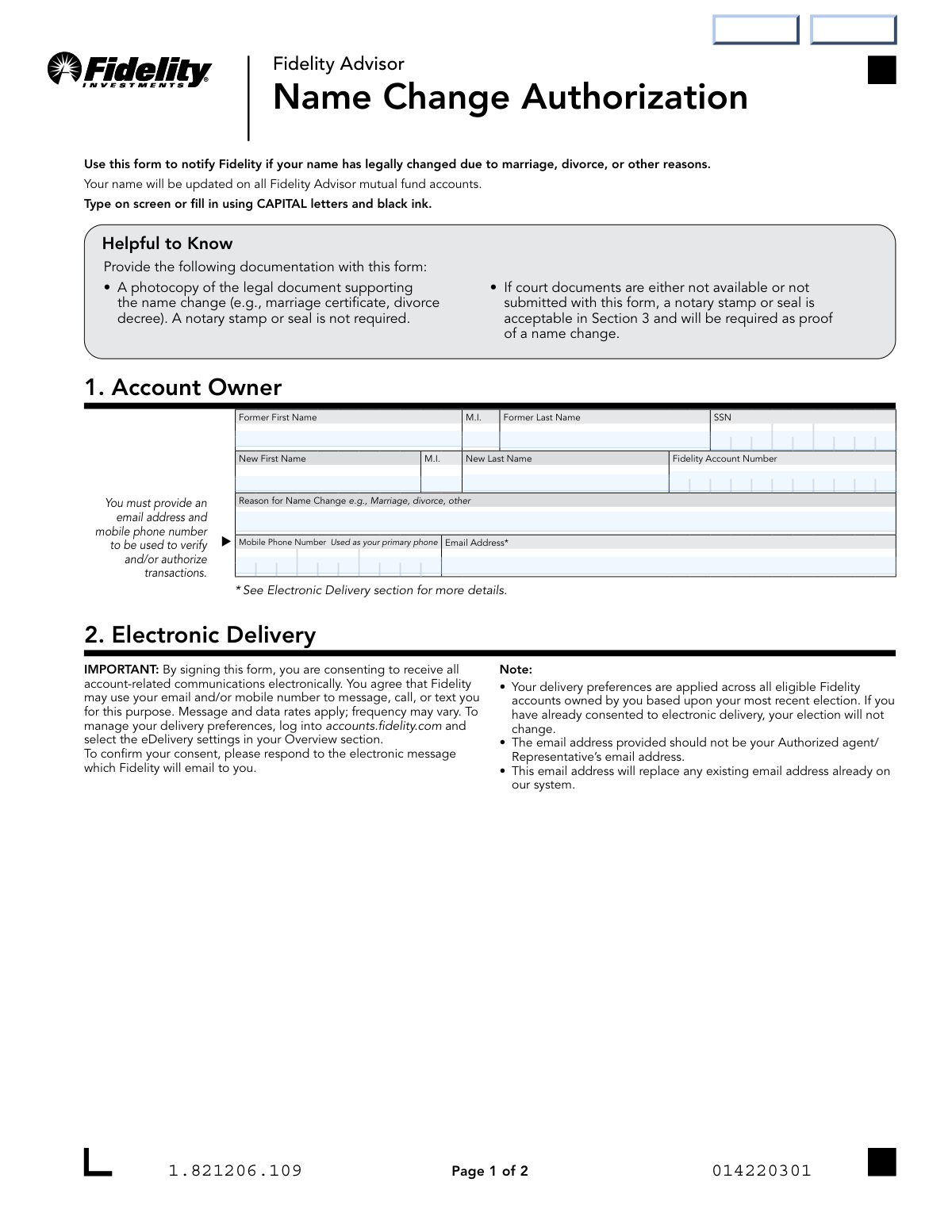
The Fidelity Advisor Name Change Authorization form is an official document that allows account holders to update their legal name on all Fidelity Advisor mutual fund accounts following a name change due to marriage, divorce, or other legal reasons. The form requires the account owner's former and new name, Social Security Number, Fidelity account number, contact information, and supporting legal documentation such as a marriage certificate or divorce decree. A notary stamp or seal may be required if court documents are unavailable. Today, this form can be filled out quickly and accurately using AI-powered services like Instafill.ai, which can also convert non-fillable PDF versions into interactive fillable forms.
Our AI automatically handles information lookup, data retrieval, formatting, and form filling.
It takes less than a minute to fill out Fidelity Name Change Authorization using our AI form filling.
Securely upload your data. Information is encrypted in transit and deleted immediately after the form is filled out.

Form specifications

Form name: Fidelity Advisor Name Change Authorization Form
Number of pages: 1
Filled form examples: Form Fidelity Name Change Authorization Examples
Language: English
main-image

Instafill Demo: filling out a legal form in seconds

How to Fill Out Fidelity Name Change Authorization Online for Free in 2026

Are you looking to fill out a FIDELITY NAME CHANGE AUTHORIZATION form online quickly and accurately? Instafill.ai offers the #1 AI-powered PDF filling software of 2026, allowing you to complete your FIDELITY NAME CHANGE AUTHORIZATION form in just 37 seconds or less.
Follow these steps to fill out your FIDELITY NAME CHANGE AUTHORIZATION form online using Instafill.ai:
  1. 1 Navigate to Instafill.ai and upload the Fidelity Advisor Name Change Authorization form or select it from the available form library.
  2. 2 Enter your former name (first, middle initial, last) and Social Security Number in the Account Owner section.
  3. 3 Provide your new legal name (first, middle initial, last), your Fidelity account number, and the reason for the name change (e.g., marriage, divorce).
  4. 4 Enter your mobile phone number and email address for electronic communications and consent to Fidelity's electronic delivery terms.
  5. 5 Gather and attach supporting legal documentation, such as a photocopy of your marriage certificate or divorce decree, or arrange for a notary stamp/seal if court documents are unavailable.
  6. 6 Sign the form using your new legal name, print your name, and enter the date in the Signature and Date section; complete the Notary Public section if required.
  7. 7 Submit the completed form to Fidelity by uploading it through Accounts.Fidelity.com, sending via webfax to 888-321-7349, or mailing it to the appropriate Fidelity Investments Institutional Operations Company LLC address.

Our AI-powered system ensures each field is filled out correctly, reducing errors and saving you time.

Why Choose Instafill.ai for Your Fillable Fidelity Name Change Authorization Form?

Speed

Complete your Fidelity Name Change Authorization in as little as 37 seconds.

Up-to-Date

Always use the latest 2026 Fidelity Name Change Authorization form version.

Cost-effective

No need to hire expensive lawyers.

Accuracy

Our AI performs 10 compliance checks to ensure your form is error-free.

Security

Your personal information is protected with bank-level encryption.

Frequently Asked Questions About Form Fidelity Name Change Authorization

This form is used to notify Fidelity that your name has legally changed due to marriage, divorce, or other legal reasons. Once submitted, your new name will be updated across all your Fidelity Advisor mutual fund accounts.

Any Fidelity Advisor mutual fund account owner whose legal name has changed needs to complete this form. This includes name changes resulting from marriage, divorce, court orders, or any other legal process.

You must provide a photocopy of the legal document supporting your name change, such as a marriage certificate or divorce decree. A notary stamp or seal is not required if you submit the legal documents, but if court documents are unavailable, a notary stamp or seal in Section 3 is required as proof of the name change.

You must sign the form using your NEW legal name. The form also requires you to print your new name (First, M.I., Last) in the designated field in Section 3.

A notary is not required if you submit a photocopy of the supporting legal document (e.g., marriage certificate or divorce decree). However, if court documents are not available or not submitted with the form, a notary stamp or seal in Section 3 is required as proof of the name change.

By providing your email address and signing the form, you are consenting to receive all account-related communications electronically. The email address you provide will replace any existing email address on file, and Fidelity may use it to message, call, or text you regarding your account.

You can submit the form by uploading it through Accounts.Fidelity.com, faxing it to 888-321-7349, or mailing it to Fidelity Investments Institutional Operations Company LLC (FIIOC) at P.O. Box 770002, Cincinnati, OH 45277-0082 (regular mail) or 100 Crosby Parkway, KC1G, Covington, KY 41015 (overnight). Note that if an original notary is required, the form must be mailed.

Yes, you can upload the form online by logging into Accounts.Fidelity.com. Shareholders should go to 'Manage Accounts, Other Services' and click 'Upload Documents,' while Financial Representatives should use the 'Upload Documents' link under 'Quick Links' on the landing page. However, if a notary is required, the form must be mailed.

Yes, your name will be updated on all Fidelity Advisor mutual fund accounts associated with you. Additionally, your electronic delivery preferences will be applied across all eligible Fidelity accounts you own.

In Section 1, you need to provide your former first name, middle initial, and last name along with your Social Security Number (SSN), your new first name, middle initial, and last name, your Fidelity account number, the reason for the name change, your mobile phone number, and your email address.

Yes, AI-powered services like Instafill.ai can help you accurately auto-fill this form's fields, saving you time and reducing errors. These tools guide you through each section and ensure all required information is entered correctly before submission.

You can visit Instafill.ai, upload the Fidelity Advisor Name Change Authorization PDF, and the AI will help you fill in all the required fields digitally. Once completed, you can download the filled form and submit it to Fidelity via upload, fax, or mail.

If your PDF version of the form is not interactive or fillable, Instafill.ai can convert it into a fillable form, allowing you to type directly into the fields digitally. This eliminates the need to print and handwrite your information.

Yes, California Notaries are permitted to submit a separate page notary document, but it must identify the document being notarized. Additionally, California residents should note that a Notary Public only verifies the identity of the signer and not the truthfulness, accuracy, or validity of the document.

Financial Representatives can call 800-522-7297 for assistance, while Shareholders can call 877-208-0098. You can also visit accounts.fidelity.com for additional help and resources.

Compliance Fidelity Name Change Authorization
Validation Checks by Instafill.ai

1
SSN Format and Completeness Validation
Validates that the Social Security Number (AO_SSN) is exactly 9 digits and follows the standard XXX-XX-XXXX format. The SSN is a critical identifier used to locate and update the correct account holder's records across all Fidelity Advisor mutual fund accounts. If the SSN is missing, incorrectly formatted, or contains non-numeric characters, the form cannot be processed and the name change request will be rejected.
2
Former Name Fields Completeness Check
Ensures that at minimum the Former First Name (PI_FirstName) and Former Last Name (PI_LastName) fields are populated, as these are required to identify the existing account holder. The former name must match the name currently on file with Fidelity to correctly locate the account. If either field is blank, Fidelity cannot verify the account owner's identity or locate the correct account to update.
3
New Name Fields Completeness Check
Validates that at minimum the New First Name (PI_NewFirstName) and New Last Name (PI_NewLastName) fields are populated, as these represent the legally changed name that will replace the former name on all Fidelity Advisor mutual fund accounts. The new name must reflect the legal name as shown on the supporting documentation submitted with the form. If either field is blank, the name change cannot be applied and the form will be returned incomplete.
4
Former and New Name Distinctness Check
Verifies that the combination of the new name fields (PI_NewFirstName, PI_NewMI, PI_NewLastName) is meaningfully different from the former name fields (PI_FirstName, PI_MI, PI_LastName). Submitting a name change form where the former and new names are identical suggests a data entry error and would result in no actual change to the account. If the names are the same, the form should be flagged for review before processing.
5
Fidelity Account Number Format Validation
Checks that the Fidelity Account Number (AO_Fidelity Account Number) is present and conforms to Fidelity's standard account number format, typically a numeric string of a defined length. The account number is essential for ensuring the name change is applied to the correct account or set of accounts. An incorrectly formatted or missing account number will prevent Fidelity from identifying the specific account and may delay or reject the name change request.
6
Reason for Name Change Field Completeness
Ensures that the Reason for Name Change field (AO_NewNameReason) is not left blank, as it provides context for the name change (e.g., marriage, divorce, court order). This field helps Fidelity determine what type of supporting legal documentation should accompany the form. If the reason is omitted, it may create ambiguity about the required documentation and could delay processing of the name change request.
7
Mobile Phone Number Format Validation
Validates that the Mobile Phone Number (AI_MobileNumber) is provided and follows a valid 10-digit U.S. phone number format (e.g., XXX-XXX-XXXX or (XXX) XXX-XXXX), with no letters or special characters other than standard separators. The mobile number is required as a primary contact method and is used to verify and authorize transactions on the account. If the phone number is missing or improperly formatted, Fidelity will be unable to send verification messages, which could block the processing of the name change.
8
Email Address Format and Presence Validation
Checks that the Email Address field (AI_Email) is populated and conforms to a valid email format (e.g., contains an '@' symbol, a domain name, and a valid top-level domain). The email address is mandatory because by signing the form the account owner consents to electronic delivery, and Fidelity will send a confirmation message to this address. If the email is missing or invalid, the electronic consent cannot be confirmed and the form cannot be fully processed.
9
Email Address Is Not a Representative's Email
Validates that the provided email address (AI_Email) does not appear to belong to an authorized agent or financial representative, as the form explicitly states the email should not be the representative's address. This check may involve cross-referencing known representative email domains or flagging entries that differ from the account owner's previously recorded contact information. Using a representative's email would incorrectly redirect account communications and could compromise the account owner's privacy and security.
10
Signature Section Print Name Completeness and Consistency
Ensures that the Print Owner Name field (SaD_PrintParticipantName) in the Signature and Date section is populated and matches the new name provided in the New Name fields (PI_NewFirstName, PI_NewMI, PI_NewLastName). The form explicitly requires the account owner to sign with their NEW name, so the printed name must reflect the legally changed name. If the printed name is blank or matches the former name instead of the new name, the signature section is invalid and the form cannot be accepted.
11
Signature Date Format and Validity Check
Validates that the owner's signature date (SaD_Date) is present and follows the required MM-DD-YYYY format, and that the date is a valid calendar date that is not in the future. A missing or future-dated signature date raises questions about the authenticity and timing of the authorization. If the date is improperly formatted, missing, or logically invalid, the form's legal authorization is compromised and it will be returned for correction.
12
Notary Section Completeness When Required
Checks that if the notary section is being used (i.e., when legal documentation is not submitted), all required notary fields are populated, including Notary Name (N_NotaryName), State (N_State), County (N_County), Identification (N_Identification), Commission Expiration (N_CommissionExpires), and Notary Signature Date (SaD_Date02). Per the form instructions, a notary stamp or seal is required as proof of name change when court documents are not submitted. If any notary field is incomplete, the form lacks the necessary verification and cannot be processed without supporting legal documentation.
13
Notary Commission Expiration Date Validity
Validates that the Notary Commission Expiration date (N_CommissionExpires) is in the required MM-DD-YYYY format and that the commission had not expired on or before the date the form was signed (SaD_Date02). An expired notary commission renders the notarization legally invalid, which would mean the form lacks proper authentication if no supporting legal documents were provided. If the commission expiration date precedes the notarization date, the form must be rejected or resubmitted with a valid notary.
14
Notary Date Format and Logical Consistency with Signature Date
Ensures that the Notary Date (SaD_Date02) follows the MM-DD-YYYY format, is a valid calendar date, and is not earlier than the account owner's signature date (SaD_Date). The notary must witness the signing, so the notarization date should be the same as or later than the owner's signature date. A notary date that precedes the owner's signature date is logically inconsistent and would indicate a data entry error or potential fraud.
15
Middle Initial Field Length and Character Validation
Validates that the Middle Initial fields (PI_MI for former name and PI_NewMI for new name), if provided, contain only a single alphabetic character. Middle initials are optional but, when entered, must be a single letter to correctly represent the account holder's name on official records. If a middle initial field contains more than one character or a non-alphabetic character, it should be flagged as a data entry error to prevent incorrect name records.
16
Name Fields Character Restriction Validation
Checks that all name fields (PI_FirstName, PI_MI, PI_LastName, PI_NewFirstName, PI_NewMI, PI_NewLastName, SaD_PrintParticipantName) contain only valid alphabetic characters, hyphens, apostrophes, or spaces, and do not include numbers or special characters that would not appear in a legal name. Invalid characters in name fields can cause system errors when updating account records and may result in the name being stored incorrectly. If prohibited characters are detected, the form should be returned to the submitter for correction.

Common Mistakes in Completing Fidelity Name Change Authorization

Signing with the old (former) name instead of the new legal name

Many people instinctively sign their old name out of habit, especially if the name change is recent. The form explicitly requires the account owner to sign with their NEW legal name in Section 3. Signing with the former name will invalidate the form and cause processing delays. Double-check before signing that you are using your new legal name as it appears on your supporting documentation.

Failing to attach supporting legal documentation

A very common oversight is submitting the form without a photocopy of the legal document supporting the name change, such as a marriage certificate or divorce decree. Without this documentation, Fidelity cannot process the name change unless a notary stamp or seal is provided in Section 3. Always review the 'Helpful to Know' section and attach the required documents before submitting. Tools like Instafill.ai can include document checklists to remind users of required attachments.

Entering the SSN in the wrong field or omitting it entirely

The Social Security Number (SSN) field is associated with the former name row, and some users either skip it thinking it is optional or accidentally enter it in the wrong area of the form. The SSN is critical for Fidelity to locate and verify the correct account. Omitting or misplacing the SSN will delay or prevent processing. Always enter your full 9-digit SSN in the designated field next to your former name.

Using lowercase letters or non-black ink instead of CAPITAL letters and black ink

The form clearly instructs users to type on screen or fill in using CAPITAL letters and black ink, yet many people fill out the form in mixed case or use blue or other colored ink. This can cause scanning and processing issues at Fidelity's operations center. Always use all capital letters and black ink when completing the form by hand, or use a digital form-filling tool like Instafill.ai to ensure proper formatting automatically.

Providing an authorized agent's or representative's email address instead of the account owner's

The form explicitly warns that the email address provided should not be your authorized agent's or representative's email address. Some account owners, particularly those working with financial advisors, mistakenly enter their advisor's contact email. This causes the electronic delivery consent confirmation to go to the wrong person and may result in the account owner missing important communications. Always enter the account owner's personal email address.

Leaving the Fidelity Account Number blank or entering it incorrectly

Some users confuse their SSN with their Fidelity Account Number or leave the account number field blank, assuming Fidelity can locate the account by name alone. The Fidelity Account Number is a distinct identifier needed to ensure the name change is applied to the correct account(s). Locate your account number on a recent statement or by logging into your Fidelity account before completing the form. Instafill.ai can help pre-populate known account details to reduce this type of error.

Failing to complete the Notary section when no legal documents are available

When court documents or legal name change documents are not submitted with the form, a notary stamp or seal in Section 3 is required as proof of the name change. Many users leave the notary section blank, assuming their signature alone is sufficient, which causes the form to be rejected. If you cannot provide supporting legal documentation, you must have a licensed Notary Public complete and stamp Section 3 before submitting the form.

Submitting the form electronically when a notary or signature guarantee is required

The form warns that if an original signature guarantee or notary is required, the form must be mailed — it cannot be uploaded or faxed. Users who require notarization often still attempt to submit digitally, which results in rejection and significant delays. Carefully determine whether your submission requires notarization before choosing your submission method, and mail the form if notarization is needed.

Entering an incorrect or improperly formatted mobile phone number

The mobile phone number is used as the primary contact for verifying and authorizing transactions, and entering an incorrect number — such as a landline, a number with missing digits, or an old number — can prevent Fidelity from completing identity verification. This can block the processing of the name change and future transactions. Always double-check that the mobile number entered is current, active, and correctly formatted. Instafill.ai can validate phone number formats in real time to prevent such errors.

Leaving the reason for name change blank or being too vague

The 'Reason for Name Change' field requires a clear explanation such as 'Marriage,' 'Divorce,' or 'Court Order,' but some users leave it blank or write something vague like 'personal reasons.' This can prompt Fidelity to request additional clarification, delaying the update. Always provide a specific, recognized reason that aligns with the supporting documentation you are submitting.

Printing the owner name in Section 3 using the old name instead of the new name

Section 3 asks you to print the owner name (First, M.I., Last) as well as sign with the new name, but users frequently print their former name by habit. Since the entire purpose of the form is to update to the new name, both the printed name and the signature in Section 3 must reflect the new legal name. Review this section carefully before finalizing the form to ensure consistency with your new legal identity.

Entering an incorrect or expired notary commission expiration date

When notarization is required, the Notary Public must provide their commission expiration date in MM-DD-YYYY format. Errors such as entering the wrong date, using an incorrect format, or having an already-expired commission can invalidate the notarization and cause the form to be rejected. Notaries should verify their commission details before completing the form, and account owners should confirm the notary's commission is current and valid at the time of signing.
Saved over 80 hours a year

“I was never sure if my IRS forms like W-9 were filled correctly. Now, I can complete the forms accurately without any external help.”

Kevin Martin Green

Your data stays secure with advanced protection from Instafill and our subprocessors

Robust compliance program

Transparent business model

You’re not the product. You always know where your data is and what it is processed for.

ISO 27001, HIPAA, and GDPR

Our subprocesses adhere to multiple compliance standards, including but not limited to ISO 27001, HIPAA, and GDPR.

Security & privacy by design

We consider security and privacy from the initial design phase of any new service or functionality. It’s not an afterthought, it’s built-in, including support for two-factor authentication (2FA) to further protect your account.

Fill out Fidelity Name Change Authorization with Instafill.ai

Worried about filling PDFs wrong? Instafill securely fills fidelity-advisor-name-change-authorization-form forms, ensuring each field is accurate.