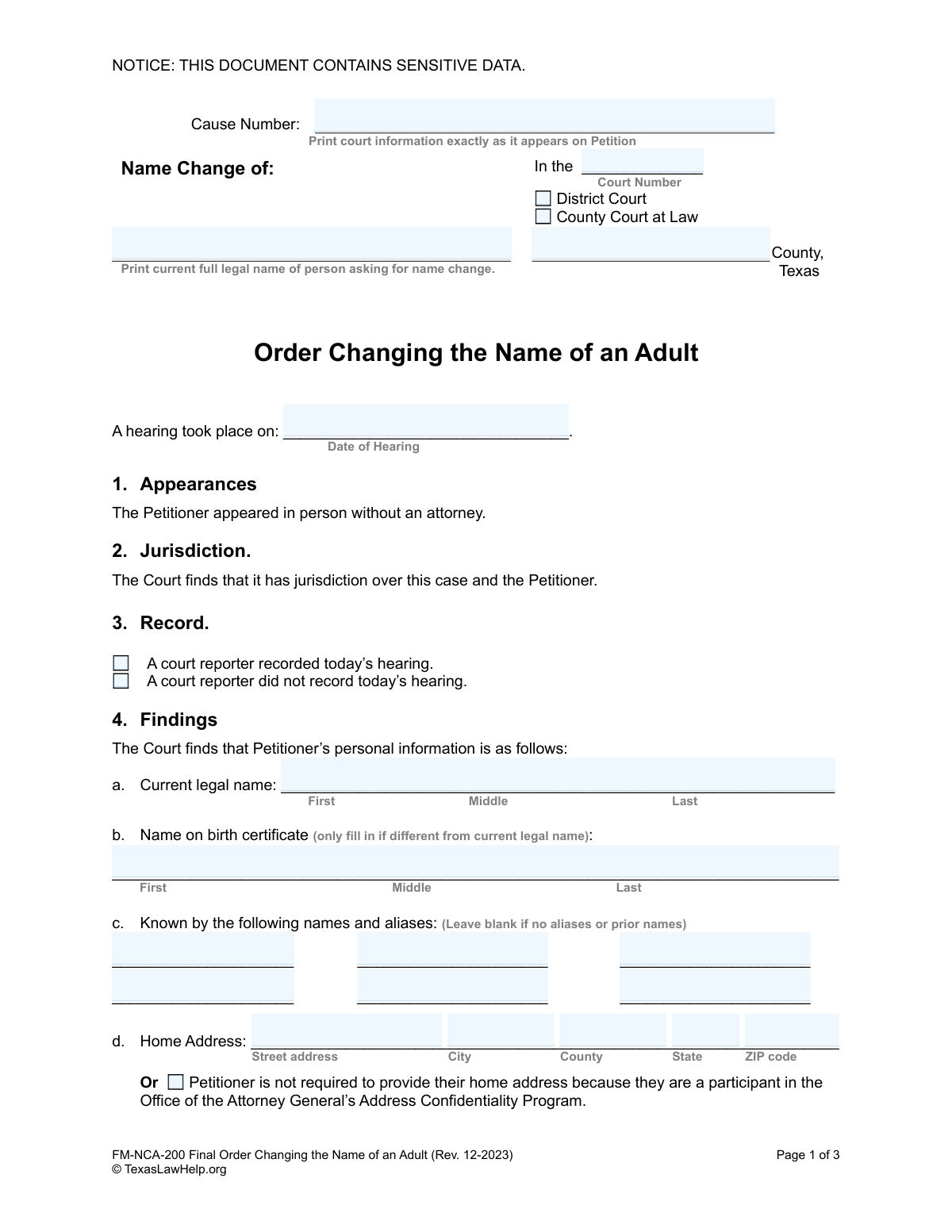
Yes! You can use AI to fill out FM-NCA-200, Order Changing the Name of an Adult

Form FM-NCA-200, Order Changing the Name of an Adult, is a Texas court order that legally finalizes an adult's request to change their name. This document is signed by a judge after a hearing and serves as the official record of the name change, which is crucial for updating identification, social security records, and other legal documents. Today, this form can be filled out quickly and accurately using AI-powered services like Instafill.ai, which can also convert non-fillable PDF versions into interactive fillable forms.
FM-NCA-200 is part of the name change forms category on Instafill.
Our AI automatically handles information lookup, data retrieval, formatting, and form filling.
It takes less than a minute to fill out FM-NCA-200 using our AI form filling.
Securely upload your data. Information is encrypted in transit and deleted immediately after the form is filled out.

Form specifications

Form name: FM-NCA-200, Order Changing the Name of an Adult
Number of fields: 98
Number of pages: 1
Language: English
main-image

Instafill Demo: How to fill out PDF forms in seconds with AI

How to Fill Out FM-NCA-200 Online for Free in 2026

Are you looking to fill out a FM-NCA-200 form online quickly and accurately? Instafill.ai offers the #1 AI-powered PDF filling software of 2026, allowing you to complete your FM-NCA-200 form in just 37 seconds or less.
Follow these steps to fill out your FM-NCA-200 form online using Instafill.ai:
  1. 1 Navigate to Instafill.ai and upload or select the 'Order Changing the Name of an Adult' form.
  2. 2 Enter the court information, including the cause number, court number, and county, exactly as it appears on your petition.
  3. 3 Provide the petitioner's detailed personal information, including current legal name, address, date of birth, and social security number.
  4. 4 Answer the series of questions regarding the petitioner's criminal history, FBI/SID numbers, and sex offender registration status.
  5. 5 Clearly specify the current legal name and the desired new name in the 'Orders' section.
  6. 6 Review all the information populated by the AI for accuracy, make any necessary corrections, and then download the completed form to present at your court hearing.

Our AI-powered system ensures each field is filled out correctly, reducing errors and saving you time.

Why Choose Instafill.ai for Your Fillable FM-NCA-200 Form?

Speed

Complete your FM-NCA-200 in as little as 37 seconds.

Up-to-Date

Always use the latest 2026 FM-NCA-200 form version.

Cost-effective

No need to hire expensive lawyers.

Accuracy

Our AI performs 10 compliance checks to ensure your form is error-free.

Security

Your personal information is protected with bank-level encryption.

Frequently Asked Questions About Form FM-NCA-200

This is the official court document signed by a judge that legally finalizes your name change. It is the final step in the legal process, not the initial application you fill out.

No, you do not fill out this specific form. This 'Order' is prepared for the judge to sign after your hearing, based on the information you provided in your initial 'Petition to Change the Name of an Adult'.

The purpose of this form is for a judge to officially grant a legal name change. Once signed by the judge, this order serves as your legal proof of a new name, which you can use to update other official documents.

The order includes your personal details like your old and new names, date of birth, address, and driver's license number. It also includes findings about your criminal history and confirms the change is in the public's interest.

Yes, it may still be possible, but you must disclose your history. The form has sections to detail felony convictions or Class A/B misdemeanor charges, and specific conditions must be met, such as being pardoned or having completed your sentence.

That is acceptable. The form has specific checkboxes for the court to indicate that you do not have a Social Security Number or have not had a driver's license in the last 10 years.

This is a program for survivors of family violence, sexual assault, or stalking. If you are a participant, the court can order your address information to be kept confidential and not released to the public.

Yes, there is an optional section on the order that the judge can use to change the name on your birth certificate. You must request this when you originally file your petition with the court.

After the judge signs the order, you should obtain certified copies from the court clerk. You will need these certified copies to update your name on your Social Security card, driver's license, bank accounts, and other official records.

The form notes that a legible copy of your fingerprints was included with your Petition. This is a legal requirement in Texas to allow for a criminal history background check as part of the name change process.

The 'Petition' is the document you file with the court to start the name change process and request a hearing. This 'Order' is the final document the judge signs at the end of the process to legally grant your name change.

Yes, services like Instafill.ai can help you accurately fill out your initial 'Petition to Change the Name of an Adult'. AI can auto-fill fields from your provided information, saving you time and reducing errors.

You can upload your name change petition form to the Instafill.ai platform. The AI will identify the fields, allowing you to quickly fill them out online and then download or print the completed document.

You can use a service like Instafill.ai to solve this problem. It can convert flat, non-fillable PDFs into interactive, fillable forms that you can complete easily on your computer.

Compliance FM-NCA-200
Validation Checks by Instafill.ai

1
Validates Hearing Date
Checks that the 'Date of Hearing' is a valid calendar date and is not in the future. This ensures the order reflects a hearing that has already occurred, which is a prerequisite for the order's validity. If the date is invalid or in the future, the system should display an error and prevent submission until corrected.
2
Ensures Current Legal Name is Provided
Validates that the 'Current legal name' field in section 4a is not empty. This name is the basis for the legal action and is required for identification and to populate the 'Current name' in the final order section. Failure to provide this name makes the entire order meaningless, so submission should be blocked.
3
Verifies New Name is Different from Current Name
Compares the 'Current name' and the 'to this name' fields in section 5 to ensure they are not identical. A name change order where the new name is the same as the old name is logically invalid and serves no purpose. The system should flag this as an error, as it likely indicates a data entry mistake.
4
Conditional SSN Field Validation
This check ensures logical consistency for the Social Security Number field. If the user checks the box indicating 'Petitioner does not have a Social Security Number', the SSN input field should be disabled and cleared. Conversely, if the SSN field is filled, the checkbox must be unchecked to prevent contradictory information.
5
Address Confidentiality Program Logic Check
Validates that if the 'Petitioner is not required to provide their home address...' box is checked, the 'Home Address' fields (Street, City, County, State, ZIP) are empty. This is critical for protecting the petitioner's safety and complying with the Address Confidentiality Program. Submitting both an address and the ACP checkbox should be prevented with a clear error message.
6
Validates Date of Birth for Adulthood
Checks that the 'Date of birth' is a valid calendar date in the MM/DD/YYYY format and that the date makes the petitioner at least 18 years old. Since this is an 'Order Changing the Name of an Adult', the petitioner must legally be an adult. An invalid date or a date indicating a minor should trigger an error and prevent form submission.
7
Criminal Charge Details Completeness
This check is triggered if the petitioner selects 'has been charged with the following class A or B misdemeanors or felonies'. It then validates that at least one row of charge details (Offense, Case Number, County, Court) is filled out. Selecting this option without providing details creates an incomplete and potentially misleading legal record, so the form should not be submittable in this state.
8
Enforces Single Selection for Exclusive Choices
Validates that for mutually exclusive options, only one choice is selected. This applies to sections like 'Record' (court reporter recorded/did not record), 'Petitioner's criminal history' (has not been charged/has been charged), and 'Felony conviction status'. The system should use radio buttons or a similar control to enforce this, preventing logically impossible submissions.
9
Conditional Driver's License Field Validation
Ensures that if the checkbox for 'Petitioner has not had a driver’s license during the last 10 years' is selected, the corresponding fields for 'Driver’s License Number' and 'State that Issued License' are empty. This prevents contradictory data entry. The system should display an error if both the checkbox is selected and license information is entered.
10
FBI/SID Number Field Completeness
This validation checks that if the user selects 'has a Federal Bureau of Investigations (FBI) number' or 'has a State Identification (SID) number', the corresponding text field for that number is not left blank. This information is critical for background checks and identity verification. The form should be considered incomplete and block submission if a number is indicated but not provided.
11
Ensures Consistency of Current Name Across Form
Verifies that the 'Current legal name' entered in section 4a is identical to the 'Current name' entered in section 5. This ensures consistency and accuracy throughout the legal document, preventing ambiguity about who the order applies to. A mismatch should trigger a warning or error to prompt the user to correct the discrepancy.
12
Mandatory Felony Conviction Status Selection
This validation ensures that the user has made a selection in section 4m regarding felony convictions. The petitioner must declare their status by choosing one of the four available options. Failing to make a selection leaves a critical piece of required legal information blank, so the form submission should be blocked until a choice is made.
13
Birth Certificate Name Change Completeness
Validates that if the checkbox in section 5 for changing the name on the birth certificate is checked, both the original birth certificate name and the new name are filled in. Checking the box without providing the necessary names makes the order incomplete and unenforceable for this purpose. The system should require these fields if the box is checked.
14
Validates ZIP Code Format
Checks that the 'ZIP code' field, if filled, contains a valid 5-digit or 9-digit (ZIP+4) format. This is important for data integrity and for any mailings that may result from this order. An incorrectly formatted ZIP code can cause delivery failures and should be flagged with an error message.

Common Mistakes in Completing FM-NCA-200

Inconsistent Court Information

Users often incorrectly transcribe the court information, such as the Cause Number, Court Number, or County, from their original Petition. This mistake happens when rushing or not having the Petition for reference, leading to a mismatch between documents. An inconsistency can cause the judge to reject the Order, delaying the name change process until a corrected version is submitted. Always double-check that the court information on this Order exactly matches the information on the filed Petition.

Incorrectly Entering Name Variations

Petitioners frequently confuse the fields for 'Current legal name', 'Name on birth certificate', and the final 'Orders' section where the new name is requested. For example, they might put their desired new name in the 'Current legal name' field. This error can invalidate the entire order, as the legal record must be perfectly clear about the name being changed *from* and the name being changed *to*. Carefully read each field's label to ensure the correct name is entered in the appropriate box.

Inaccurate or Incomplete Criminal History Reporting

The criminal history section (4.l, 4.m) is complex and legally significant, yet it is often filled out incorrectly. Users may forget a past charge, misunderstand the difference between a charge and a conviction, or simply fail to check any box. Providing false or incomplete information, even unintentionally, can lead to the denial of the name change and may have serious legal repercussions. It is crucial to be thorough and honest, and if unsure, to review personal records before completing this section.

Omitting Aliases or Prior Names

People often leave the 'Known by the following names and aliases' section (4.c) blank, even if they have used other names, such as a maiden name or common nicknames. They may assume it's not important or only for formal aliases. Failing to disclose all names can create legal and administrative confusion later on. To avoid this, list all previous last names, professional names, and any significant aliases you have used.

Overlooking Mandatory Checkbox Selections

This form contains numerous critical checkboxes that require a selection (e.g., criminal history, sex offender status, court reporter presence). It's easy to overlook one of these small boxes, leaving a section incomplete. An unanswered question can halt the process, as the court requires a definitive 'yes' or 'no' for these items. To prevent this, review the form specifically to ensure every 'Check one' instruction has been followed.

Transposing Current and Requested Names in the Final Order

In the 'Orders' section (5), petitioners sometimes mistakenly write their current name in the 'to this name' field and their new name in the 'Current name' field. This simple transposition error completely reverses the intent of the legal order. This mistake would result in the order being rejected and requiring correction and re-submission. Carefully read the labels 'from' and 'to' before writing the names to ensure the order is legally effective.

Incomplete Driver's License History

The form requires listing all driver's license numbers from the last 10 years, but people often list only their current license or forget to include the issuing state. Alternatively, they may have no license history but forget to check the corresponding box. Incomplete information can trigger a records check delay. To avoid this, gather all old licenses or contact the relevant DMVs for your history, or be sure to check the 'Petitioner has not had a driver's license' box if applicable.

Mishandling Address Confidentiality Program Information

Participants in the Address Confidentiality Program may mistakenly fill out their physical home address instead of checking the box indicating their participation. Conversely, non-participants might ignore the section, not realizing its importance. This error can either compromise a protected address or cause confusion for the court. Participants must check the box and provide their Cause Number to protect their sensitive information.

Illegible Handwriting on Non-Fillable Forms

This legal document is often provided as a non-fillable PDF, forcing users to print and complete it by hand. This frequently results in illegible handwriting, especially for complex information like case numbers or names, which can lead to data entry errors by the court clerk and rejection of the form. Using a tool like Instafill.ai can convert the non-fillable PDF into a fillable format, allowing you to type your answers for perfect clarity and professionalism, preventing delays caused by unreadable information.
Saved over 80 hours a year

“I was never sure if my IRS forms like W-9 were filled correctly. Now, I can complete the forms accurately without any external help.”

Kevin Martin Green

Your data stays secure with advanced protection from Instafill and our subprocessors

Robust compliance program

Transparent business model

You’re not the product. You always know where your data is and what it is processed for.

ISO 27001, HIPAA, and GDPR

Our subprocesses adhere to multiple compliance standards, including but not limited to ISO 27001, HIPAA, and GDPR.

Security & privacy by design

We consider security and privacy from the initial design phase of any new service or functionality. It’s not an afterthought, it’s built-in, including support for two-factor authentication (2FA) to further protect your account.

Fill out FM-NCA-200 with Instafill.ai

Worried about filling PDFs wrong? Instafill securely fills fm-nca-200-order-changing-the-name-of-an-adult forms, ensuring each field is accurate.