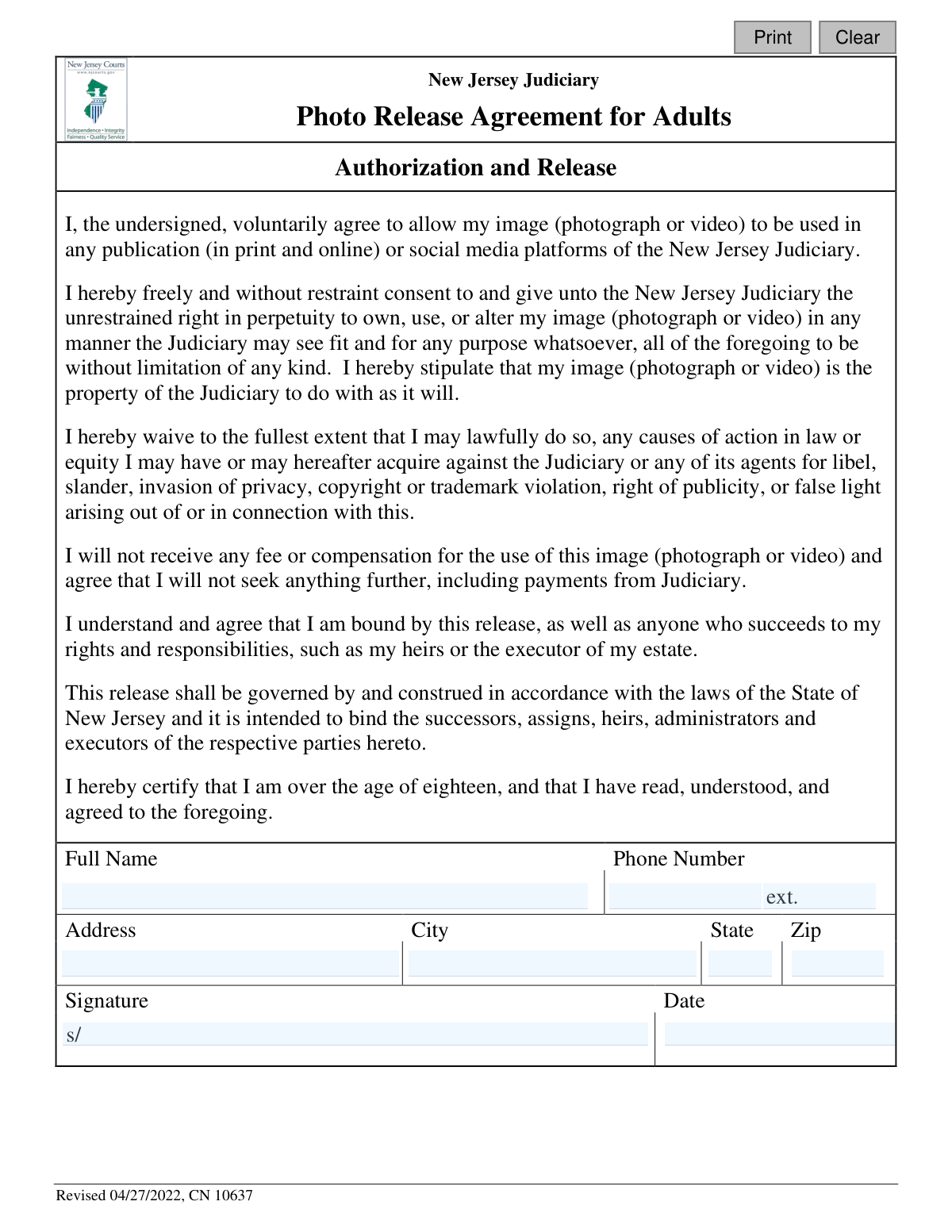
Yes! You can use AI to fill out New Jersey Judiciary Photo Release Agreement for Adults

This form is a legal authorization and release agreement where an adult voluntarily grants the New Jersey Judiciary the right to own, use, and alter their image (photograph or video) in perpetuity for any purpose, including publications and social media, without compensation. It is important as it waives any future legal claims against the Judiciary related to the image's use, such as libel or invasion of privacy. Today, this form can be filled out quickly and accurately using AI-powered services like Instafill.ai, which can also convert non-fillable PDF versions into interactive fillable forms.
CN 10637 is part of the lease agreement forms and New Jersey forms categories on Instafill.
Our AI automatically handles information lookup, data retrieval, formatting, and form filling.
It takes less than a minute to fill out CN 10637 using our AI form filling.
Securely upload your data. Information is encrypted in transit and deleted immediately after the form is filled out.

Form specifications

Form name: New Jersey Judiciary Photo Release Agreement for Adults
Number of fields: 11
Number of pages: 1
Language: English
main-image

Instafill Demo: How to fill out PDF forms in seconds with AI

How to Fill Out CN 10637 Online for Free in 2026

Are you looking to fill out a CN 10637 form online quickly and accurately? Instafill.ai offers the #1 AI-powered PDF filling software of 2026, allowing you to complete your CN 10637 form in just 37 seconds or less.
Follow these steps to fill out your CN 10637 form online using Instafill.ai:
  1. 1 Navigate to Instafill.ai and upload or select the New Jersey Judiciary Photo Release Agreement for Adults.
  2. 2 Allow the AI to scan the document and automatically identify all the fillable fields, such as name, address, and signature.
  3. 3 Carefully read the 'Authorization and Release' section to fully understand the rights you are granting to the New Jersey Judiciary.
  4. 4 Enter your personal information into the designated fields, including your full name, phone number, and complete mailing address.
  5. 5 Electronically sign and date the agreement to certify that you are over 18 and agree to all the terms outlined in the release.
  6. 6 Review the completed form for accuracy, then download, print, or securely share the final document as required.

Our AI-powered system ensures each field is filled out correctly, reducing errors and saving you time.

Why Choose Instafill.ai for Your Fillable CN 10637 Form?

Speed

Complete your CN 10637 in as little as 37 seconds.

Up-to-Date

Always use the latest 2026 CN 10637 form version.

Cost-effective

No need to hire expensive lawyers.

Accuracy

Our AI performs 10 compliance checks to ensure your form is error-free.

Security

Your personal information is protected with bank-level encryption.

Frequently Asked Questions About Form CN 10637

This form grants the New Jersey Judiciary legal permission to use your photograph or video in its publications, on its website, and on social media platforms. It is required if your image is being used for official Judiciary communications.

Any individual who is 18 years of age or older and agrees to have their photo or video used by the New Jersey Judiciary must sign this form. This form is not for minors.

You must provide your full name, phone number, and complete address (street, city, state, and zip code). A valid signature and the current date are also required to make the agreement effective.

No. The agreement explicitly states that you will not receive any fee or compensation for the use of your image and that you agree not to seek any future payments.

By signing this form, you grant the Judiciary the right to use your image 'in perpetuity,' which means forever. This right does not expire.

This is a legally binding release that is intended to be permanent. Once signed, you waive your right to revoke consent or bring future claims related to the use of your image as outlined in the agreement.

This gives the Judiciary permission to make changes like cropping, resizing, or applying color correction to your image to fit the needs of a specific publication or design. It allows them to use the image effectively across different media.

You should return the completed and signed form to the New Jersey Judiciary representative or department that requested it from you. They will provide specific instructions for submission.

Yes, services like Instafill.ai use AI to auto-fill form fields accurately and save time. This can help you complete the personal information sections quickly and without errors.

To fill this form online, you can upload the PDF to Instafill.ai. The platform will make the fields interactive, allowing you to type your information, add a digital signature, and download the completed document.

If you have a non-fillable or 'flat' PDF, you can use a service like Instafill.ai. It can convert the document into an interactive, fillable form that you can complete on your computer or mobile device.

You are waiving your right to sue the Judiciary for issues like libel, invasion of privacy, or copyright infringement arising from their use of your image. This release protects the Judiciary from potential future legal claims.

Compliance CN 10637
Validation Checks by Instafill.ai

1
Full Name Presence
Verifies that the 'Full Name' field (`releaseName`) is not empty. This is a mandatory field as it legally identifies the individual granting the photo release. A submission without a name is invalid and cannot be processed, as the Judiciary would not know who has given consent.
2
Full Name Format
Checks that the 'Full Name' field (`releaseName`) contains at least two words and does not include numbers or excessive special characters. This helps ensure a valid first and last name are provided, which is crucial for legal identification. An invalid format could indicate a data entry error or a nonsensical entry, requiring user correction.
3
Phone Number Format Validation
Ensures the 'Phone Number' field (`releasePh`) contains a valid 10-digit phone number, ignoring common formatting like parentheses, spaces, or hyphens. A valid contact number is essential for communication if any questions arise regarding the release agreement. If the format is incorrect, the system cannot reliably contact the individual.
4
Street Address Presence
Validates that the 'Address' field (`addrStr`) is filled out. A complete physical address is a standard requirement for legal agreements to properly identify the party and for any potential formal correspondence. An incomplete submission will be rejected to ensure the legal integrity of the document.
5
City Presence
Checks that the 'City' field (`addrCity`) is not left blank. The city is a critical component of the individual's full address, necessary for legal identification and mail correspondence. The form cannot be accepted without a specified city.
6
State Abbreviation Format
Verifies that the 'State' field (`addrSt`) contains a valid 2-letter US state abbreviation. Using a standardized format prevents ambiguity and ensures the address data is clean and usable for mailings or record-keeping. An invalid entry will trigger an error, prompting the user to use the correct format.
7
ZIP Code Format
Ensures the 'Zip' field (`addrZip`) is a valid 5-digit or 9-digit (ZIP+4) numeric format. A correct ZIP code is essential for mail delivery and for verifying the validity of the overall address. Submissions with improperly formatted ZIP codes will be flagged for correction.
8
Address Component Consistency
Performs a logical check to ensure the provided 'City' (`addrCity`), 'State' (`addrSt`), and 'Zip' (`addrZip`) correspond to a real geographic location. This validation can use an external or internal database to prevent data entry errors, such as mismatching a New Jersey ZIP code with a city in California. An inconsistent address is considered invalid and must be corrected.
9
Signature Presence
Confirms that the 'Signature' field (`sigName`) has been filled out. The signature is the most critical part of the agreement, signifying the individual's consent and legal acceptance of the terms. A form submitted without a signature is legally non-binding and must be rejected.
10
Signature Date Presence
Validates that the 'Date' field (`sigDt`) next to the signature is not empty. The date of signature establishes the exact moment the agreement becomes effective, which is a crucial piece of information for legal and archival purposes. The submission is incomplete without this date.
11
Signature Date Format
Checks that the 'Date' field (`sigDt`) is entered in a valid date format, such as MM/DD/YYYY. A consistent and recognizable date format is necessary for accurate record-keeping and to avoid ambiguity about when the release was signed. The user will be prompted to correct any non-standard or unparseable date entries.
12
Signature Date Logical Validity
Ensures the 'Date' (`sigDt`) is not a future date and is not a date prior to the form's revision date of April 27, 2022. This prevents nonsensical entries and confirms the individual is signing the current version of the agreement. A date outside this logical range would render the agreement's timing questionable and invalid.
13
Name and Signature Consistency
Compares the 'Full Name' (`releaseName`) with the typed 'Signature' name (`sigName`) to check for a reasonable match. While minor variations are acceptable, a significant discrepancy could indicate an error or that someone other than the named individual signed the form. A mismatch should trigger a warning or require manual review to ensure authenticity.
14
Phone Extension Format
Validates that if a value is entered into the phone extension field (`releaseExt`), it consists only of numeric digits. This field is optional, but if used, it must be a valid number to ensure it can be correctly dialed. Non-numeric characters would make the extension unusable and should be corrected.

Common Mistakes in Completing CN 10637

Illegible or Incomplete Full Name

Individuals often write their name illegibly or use a nickname instead of their full legal name as requested. This can create ambiguity and make it difficult for the Judiciary to properly identify the signatory, potentially weakening the legal validity of the release. To avoid this, print your full legal name clearly in the designated field. AI-powered form fillers like Instafill.ai can prevent this by populating the field with your verified legal name in a clear, typed font.

Invalid or Printed Signature

A common error is printing the name in the signature field or using a highly stylized, illegible mark that doesn't resemble a traditional signature. A legal agreement like this requires a valid, binding signature to be enforceable. Printing your name does not constitute a legal signature and can invalidate the entire agreement. Always provide a genuine, handwritten signature in the space provided.

Incorrect or Missing Date

Forgetting to enter the date or writing it in an ambiguous format (e.g., 01/02/03) is a frequent mistake. The date is a critical legal component that establishes when consent was granted. An undated or improperly dated form could be challenged or deemed invalid. Always use the full, unambiguous date (e.g., MM/DD/YYYY) to ensure the agreement's timeline is clear and legally sound.

Signing Without Reading the Agreement

Many people sign release forms without fully reading or understanding the terms, especially the clauses about perpetual use and waiver of rights. This can lead to future regret when they realize they have given the Judiciary the permanent, unrestricted right to use and alter their image without compensation. Before signing, carefully read every sentence to ensure you understand the significant rights you are permanently waiving.

Incomplete Address Information

Applicants frequently omit parts of their address, such as the street suffix (e.g., Dr., Ct., Ave.), apartment number, or zip code. An incomplete address hinders the Judiciary's ability to maintain accurate records or send correspondence if needed. This oversight can be avoided by double-checking all address fields for completeness before submission. Using a tool like Instafill.ai helps ensure all address components are automatically and accurately filled in.

Underage Individual Signing an Adult Form

A person under the age of 18 might mistakenly fill out and sign this form. The document explicitly requires the signatory to be over eighteen, so a minor's signature is legally void. This invalidates the release and could create legal complications for the Judiciary. Individuals under 18 should not sign this form; a parent or legal guardian must sign a separate minor consent form on their behalf.

Incorrect Phone Number Formatting

Entering a phone number with transposed digits, missing the area code, or including unnecessary characters like parentheses or dashes in a digital field that doesn't support them is a common data entry error. This prevents the Judiciary from being able to contact the person if questions arise regarding the release. To prevent this, carefully type the 10-digit phone number and double-check it for accuracy.

Using Non-Standard State Abbreviations

When filling out the address, people sometimes use outdated or incorrect abbreviations for the state, such as 'N.J.' or 'New Jer.' instead of the standard two-letter postal code 'NJ'. While seemingly minor, this creates data inconsistencies for record-keeping. Always use the official two-letter postal abbreviation for the state to ensure uniformity and accuracy. AI form-filling tools automatically use standardized formats to prevent this type of error.

Illegible Handwriting Throughout the Form

If the form is printed and filled out by hand, poor handwriting can make the entire document unusable. If the name, address, and phone number cannot be deciphered, the form fails its purpose of creating a clear legal record of consent. If the form is a non-fillable PDF, tools like Instafill.ai can convert it into a fillable version, allowing you to type your information for maximum clarity and ensuring your submission is perfectly legible.
Saved over 80 hours a year

“I was never sure if my IRS forms like W-9 were filled correctly. Now, I can complete the forms accurately without any external help.”

Kevin Martin Green

Your data stays secure with advanced protection from Instafill and our subprocessors

Robust compliance program

Transparent business model

You’re not the product. You always know where your data is and what it is processed for.

ISO 27001, HIPAA, and GDPR

Our subprocesses adhere to multiple compliance standards, including but not limited to ISO 27001, HIPAA, and GDPR.

Security & privacy by design

We consider security and privacy from the initial design phase of any new service or functionality. It’s not an afterthought, it’s built-in, including support for two-factor authentication (2FA) to further protect your account.

Fill out CN 10637 with Instafill.ai

Worried about filling PDFs wrong? Instafill securely fills new-jersey-judiciary-photo-release-agreement-for-adults forms, ensuring each field is accurate.

Related forms by category

lease agreement forms Commercial Lease Agreement (C.A.R. Form CL, Revised 10/01), California Association of REALTORS® (C.A.R.) Form LR, Residential Lease or Month-to-Month Rental Agreement (Revised 12/19), Form 300, Buyer Representation Agreement, Authority for Purchase or Lease, OREA Form 210, Listing Agreement Landlord Representation Agreement, Authority to Offer for Lease
New Jersey forms State of New Jersey Alternate Benefit Program Withdrawal Request Acknowledgement Receipt, Horizon Blue Cross Blue Shield of New Jersey Applied Behavior Analysis Supplemental Information Form, State of New Jersey Application for Employment (Form DPF-663), New Jersey Judiciary Plea Form (Plea 01), Supplemental Plea Form for Certain Sexual Offenses: Megan’s Law/Parole Supervision for Life/Community Supervision for Life (Plea 05), Financial Questionnaire to Establish Indigency, New Jersey Judiciary Resource Family Information Form, Foreclosure Case Information Statement (FCIS) - Appendix XII-B2, New Jersey Judiciary Records Request Form, Superior Court of New Jersey, Application for Appeal and Order, FL Certification of Requested Background Checks for Kinship Legal Guardianship, Certification of Caregiver as to Knowledge of Identity and/or Location of Parents, FL Order Judgment for Kinship Legal Guardianship, New Jersey Judiciary Certification of Repair and Plea of Guilty, Uniform Summary Support Order (USSO), New Jersey Judiciary Volunteer Application (CN 10293), Application to Take the New Jersey Court Interpreter Oral Examination, New Jersey Judiciary Attorney Fee Arbitration Request, Order to Show Cause with Temporary Restraints Pursuant to Rule 4:52, Tax Court of New Jersey, State Tax Complaint · + 158 more →