Yes! You can use AI to fill out New Jersey Judiciary Photo Release Agreement for Minors
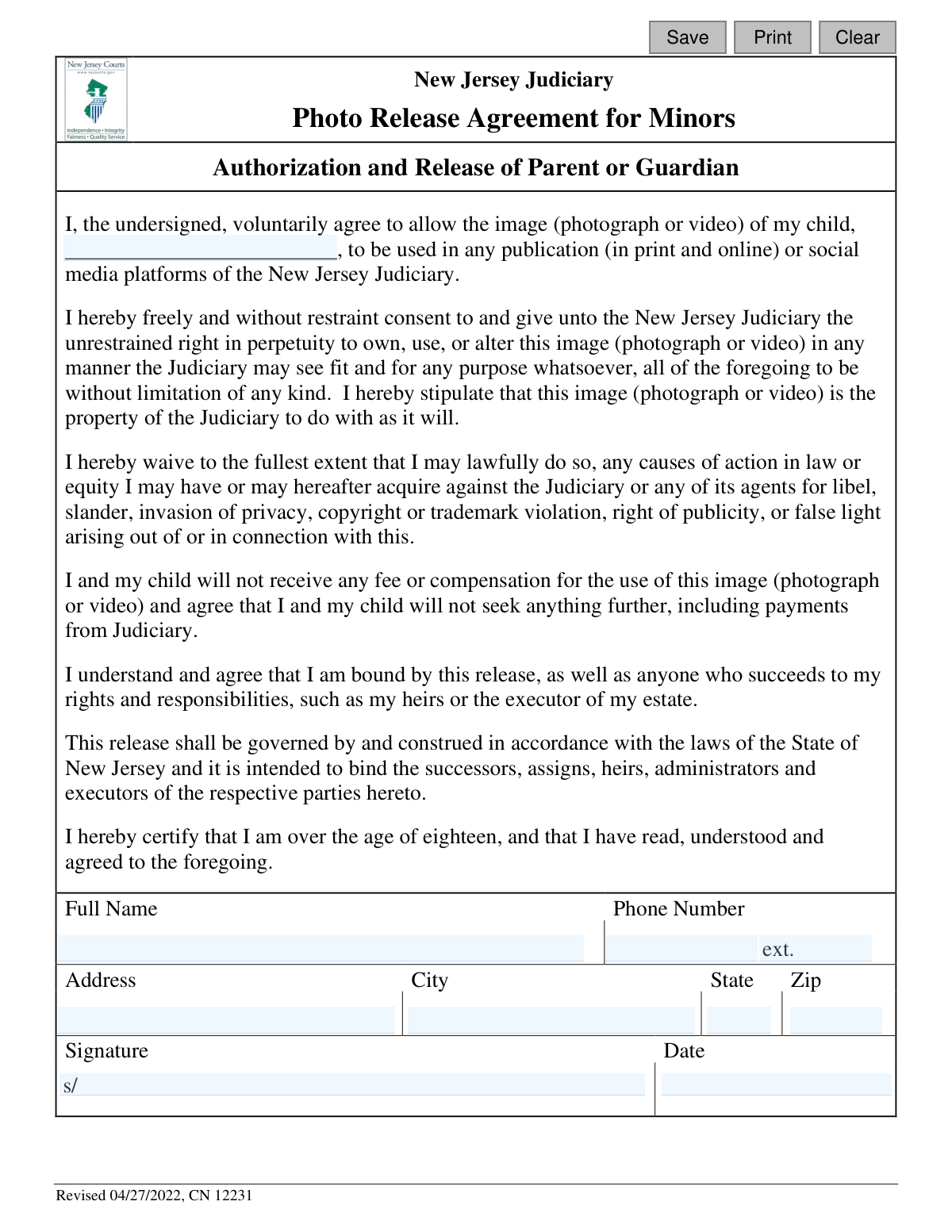
This form is a legal authorization and release agreement provided by the New Jersey Judiciary. A parent or guardian signs it to grant the Judiciary the right to use their child's photograph or video in publications and on social media platforms without compensation. It is important as it legally waives any future claims against the Judiciary related to the use of the image. Today, this form can be filled out quickly and accurately using AI-powered services like Instafill.ai, which can also convert non-fillable PDF versions into interactive fillable forms.
Our AI automatically handles information lookup, data retrieval, formatting, and form filling.
It takes less than a minute to fill out CN 12231 using our AI form filling.
Securely upload your data. Information is encrypted in transit and deleted immediately after the form is filled out.
Form specifications
| Form name: | New Jersey Judiciary Photo Release Agreement for Minors |
| Number of fields: | 13 |
| Number of pages: | 1 |
| Language: | English |
Instafill Demo: How to fill out PDF forms in seconds with AI
How to Fill Out CN 12231 Online for Free in 2026
Are you looking to fill out a CN 12231 form online quickly and accurately? Instafill.ai offers the #1 AI-powered PDF filling software of 2026, allowing you to complete your CN 12231 form in just 37 seconds or less.
Follow these steps to fill out your CN 12231 form online using Instafill.ai:
- 1 Navigate to Instafill.ai and upload or select the Photo Release Agreement for Minors form.
- 2 Use the AI assistant to enter your child's full name in the designated authorization field.
- 3 Provide your personal details as the parent or guardian, including your full name, phone number, and complete address (street, city, state, zip).
- 4 Carefully review all the information you've entered to ensure it is accurate and complete.
- 5 Electronically sign and date the form in the appropriate sections to certify your agreement with the release terms.
- 6 Download, print, or submit your completed and signed agreement as required by the New Jersey Judiciary.
Our AI-powered system ensures each field is filled out correctly, reducing errors and saving you time.
Why Choose Instafill.ai for Your Fillable CN 12231 Form?
Speed
Complete your CN 12231 in as little as 37 seconds.
Up-to-Date
Always use the latest 2026 CN 12231 form version.
Cost-effective
No need to hire expensive lawyers.
Accuracy
Our AI performs 10 compliance checks to ensure your form is error-free.
Security
Your personal information is protected with bank-level encryption.
Frequently Asked Questions About Form CN 12231
This form is a legal document used by the New Jersey Judiciary to obtain a parent or guardian's permission to use their child's photograph or video in official publications, both in print and online.
The parent or legal guardian of the minor child must complete and sign this form. The person signing must be over 18 years of age.
No, the agreement explicitly states that you and your child will not receive any fee or compensation for the use of the image. By signing, you waive any right to payment.
The form grants permission for the image to be used in any New Jersey Judiciary publication, which includes print materials, online content on their websites, and social media platforms.
This means your consent is permanent and does not expire. Once you sign the release, the New Jersey Judiciary has the right to own and use the image forever.
No, this is a binding legal release that grants permanent rights. Once you have signed the agreement, you cannot withdraw your consent for the use of the image.
You must provide your child's full name, your own full name, your complete address, and a phone number. You must also sign and date the form to certify your agreement.
You should write your child's full name in the first blank line. Your own name, as the parent or guardian, is entered in the fields at the bottom of the form.
By signing, you waive your right to bring legal action against the Judiciary for things like libel, slander, invasion of privacy, or copyright infringement related to the use of the image.
You should return the completed and signed form to the New Jersey Judiciary representative or office that requested it. If you are unsure, contact the person who provided you with the form for instructions.
Yes, the agreement gives the Judiciary the 'unrestrained right...to alter this image' as they see fit. This can include cropping, color correction, or other edits for their publications.
Yes, services like Instafill.ai use AI to accurately auto-fill form fields with your information, which can save time and help you complete the form correctly.
You can use a service like Instafill.ai to upload the PDF and fill it out on your computer or mobile device. The platform allows you to type your information, add a digital signature, and download the completed form.
If you have a non-fillable or 'flat' PDF, you can upload it to a tool like Instafill.ai. It can convert the document into an interactive, fillable form that you can easily complete and sign online.
Compliance CN 12231
Validation Checks by Instafill.ai
1
Child's Name Is Required
This check ensures the 'childName' field is not left blank. The entire purpose of the release form is to authorize the use of a specific minor's image, so their name is a critical piece of information. If this field is empty, the form submission will be rejected as it is legally incomplete and unenforceable.
2
Guardian's Full Name Is Required
This validation verifies that the 'releaseName' field, representing the parent or guardian, has been filled out. This name identifies the individual legally authorized to grant consent on behalf of the minor. A missing name invalidates the consent, so the form cannot be processed without it.
3
Signature Name Matches Guardian Name
This check compares the typed signature in 'sigName' with the full name provided in 'releaseName' to ensure they are identical. This is a crucial integrity check to confirm that the person granting consent is the same person signing the legal document. A mismatch would indicate a potential error or unauthorized signature, causing the submission to fail.
4
Full Address Is Required
This validation ensures that all address components ('addrStr', 'addrCity', 'addrSt', 'addrZip') are completed. A full and valid address is necessary for legal records and potential future correspondence regarding the release agreement. An incomplete address makes the record deficient and will prevent the form from being submitted.
5
Valid State Abbreviation
This check validates that the 'addrSt' field contains a valid, 2-letter US state abbreviation. Using a standardized format ensures data quality and consistency for legal and administrative records. An invalid entry, such as a full state name or incorrect code, will trigger an error and require correction.
6
Valid ZIP Code Format
This validation ensures the 'addrZip' field contains a properly formatted 5-digit or 9-digit (ZIP+4) US postal code. A valid ZIP code is essential for address verification and maintaining accurate legal records. The system should reject any input that does not conform to the numeric XXXXX or XXXXX-XXXX format.
7
Geographic Address Validation
This check performs a logical verification to ensure the provided 'addrCity', 'addrSt', and 'addrZip' fields correspond to a real geographic location. For example, it would flag an entry where the ZIP code does not exist within the specified city and state. This prevents data entry errors and confirms the validity of the provided address for legal purposes.
8
Contact Phone Number Is Required
This validation confirms that the 'releasePh' field is not empty. A contact phone number is essential for the Judiciary to reach the parent or guardian if any questions or issues arise concerning the photo release. Submissions without a phone number will be rejected to ensure a reliable point of contact is on file.
9
Valid Phone Number Format
This check ensures the 'releasePh' field is formatted as a valid 10-digit US phone number (e.g., XXX-XXX-XXXX). Proper formatting is crucial for data integrity and ensuring the number is usable in communication systems. The system should guide the user to correct any non-standard entries before allowing submission.
10
Signature Date Is Required
This validation verifies that the 'sigDt' field has been filled out. The signature date is a critical legal component that establishes when the consent was officially granted. A form without a signature date is considered incomplete and legally unsound, so the submission will be blocked.
11
Valid Signature Date Format
This check ensures the 'sigDt' field is entered in a valid and recognizable date format, such as MM/DD/YYYY. Consistent date formatting is necessary for accurate record-keeping and to prevent ambiguity in legal documents. The system should reject improperly formatted dates and prompt the user for correction.
12
Signature Date Is Not in the Future
This validation confirms that the date entered in 'sigDt' is not a future date. A signature date must be the current date or a date in the past to be legally valid, as one cannot legally agree to something in the future. This check prevents logical errors and ensures the document's temporal validity.
13
Signature Date Post-Revision
This check verifies that the signature date ('sigDt') is on or after the form's revision date of 04/27/2022. This is important to ensure the parent or guardian is agreeing to the most current version of the release terms. A signature dated before the revision would be invalid as it would apply to a previous, superseded version of the agreement.
14
Signature Name Is Required
This validation ensures the 'sigName' field, which serves as the digital signature, is not empty. The signature is the legal act of assenting to the terms of the release agreement. Without a signature, the form is non-binding and has no legal effect, so the submission must be rejected.
Common Mistakes in Completing CN 12231
Using the child's full legal name is crucial, but parents often use a nickname or abbreviated name out of habit. This can make the agreement legally ambiguous and unenforceable, as the minor is not clearly identified. To avoid this, always use the name as it appears on official documents; AI-powered tools like Instafill.ai can help by saving and correctly populating full legal names for family members.
Failing to provide a complete address, such as omitting an apartment number or using an incorrect ZIP code, is a frequent error. This can prevent the Judiciary from sending important correspondence and may raise questions about the signer's identity. AI form fillers like Instafill.ai can prevent this by auto-filling your complete, validated address, ensuring accuracy every time.
Many people mistakenly type or print their name on the signature line instead of providing a valid, distinct signature. This often occurs on digital forms where the process isn't clear, and it can invalidate the entire legal agreement. To ensure legal validity, use a proper e-signature tool; if the form is a non-fillable PDF, a tool like Instafill.ai can convert it to a fillable version that supports secure e-signatures.
Entering an ambiguous date (e.g., 5/6/24) or forgetting the year can create legal vulnerabilities regarding when consent was granted. This happens due to rushing or differing regional formats. To prevent this, use the full MM/DD/YYYY format; smart form fillers like Instafill.ai automatically insert the current date in the correct, unambiguous format, eliminating this risk.
A critical error is having someone other than the child's legal parent or guardian sign the form, which completely invalidates the release. This can happen when another caregiver is present and asked to sign. While AI tools can't verify legal guardianship, the signer must always ensure they have the legal authority to act on behalf of the child before completing the form.
Overlooking required fields, especially the child's name or the signature date, is a common mistake made when rushing. An incomplete form is legally unenforceable and will be rejected, causing delays. AI-powered tools like Instafill.ai help prevent this by highlighting all fillable fields and flagging any required fields that have been missed before submission.
Signing without reading the fine print is a significant mistake, as this release grants broad and perpetual rights to the Judiciary. Parents may not realize they are permanently waiving rights to control, alter, or receive compensation for their child's image. It is essential to read the entire document carefully to fully understand the rights you are relinquishing on behalf of your child.
When filling out a paper copy, providing illegible information for the name or address is a common issue that can lead to rejection or data entry errors. If a form is only available as a non-fillable PDF, tools like Instafill.ai can convert it into a fillable digital version. This allows you to type information, ensuring it is perfectly clear, legible, and professional.
A user might accidentally write their own name in the blank for the child's name, or vice-versa, due to quickly scanning the form. This error invalidates the release as it fails to identify the correct minor. AI form fillers like Instafill.ai can reduce this error by using saved profiles for different family members and intelligently suggesting the correct name for the corresponding field.
People may inadvertently use an old version of the form found online, not realizing it has been updated, which could lead to its rejection. The form is marked 'Revised 04/27/2022,' and using a prior version is risky. Always obtain legal documents directly from the official source, in this case, the New Jersey Judiciary website, to ensure you are using the current, valid version.
Saved over 80 hours a year
“I was never sure if my IRS forms like W-9 were filled correctly. Now, I can complete the forms accurately without any external help.”
Kevin Martin Green
Your data stays secure with advanced protection from Instafill and our subprocessors

Robust compliance program
Transparent business model
You’re not the product. You always know where your data is and what it is processed for.
ISO 27001, HIPAA, and GDPR
Our subprocesses adhere to multiple compliance standards, including but not limited to ISO 27001, HIPAA, and GDPR.
Security & privacy by design
We consider security and privacy from the initial design phase of any new service or functionality. It’s not an afterthought, it’s built-in, including support for two-factor authentication (2FA) to further protect your account.
Fill out CN 12231 with Instafill.ai
Worried about filling PDFs wrong? Instafill securely fills new-jersey-judiciary-photo-release-agreement-for-minors forms, ensuring each field is accurate.