
Yes! You can use AI to fill out OREA Form 210, Listing Agreement Landlord Representation Agreement, Authority to Offer for Lease
Don't type 56 fields by hand. Tell our AI about yourself, or upload the listing or an old lease, and it fills every field in seconds. You check it, then download, print or sign.
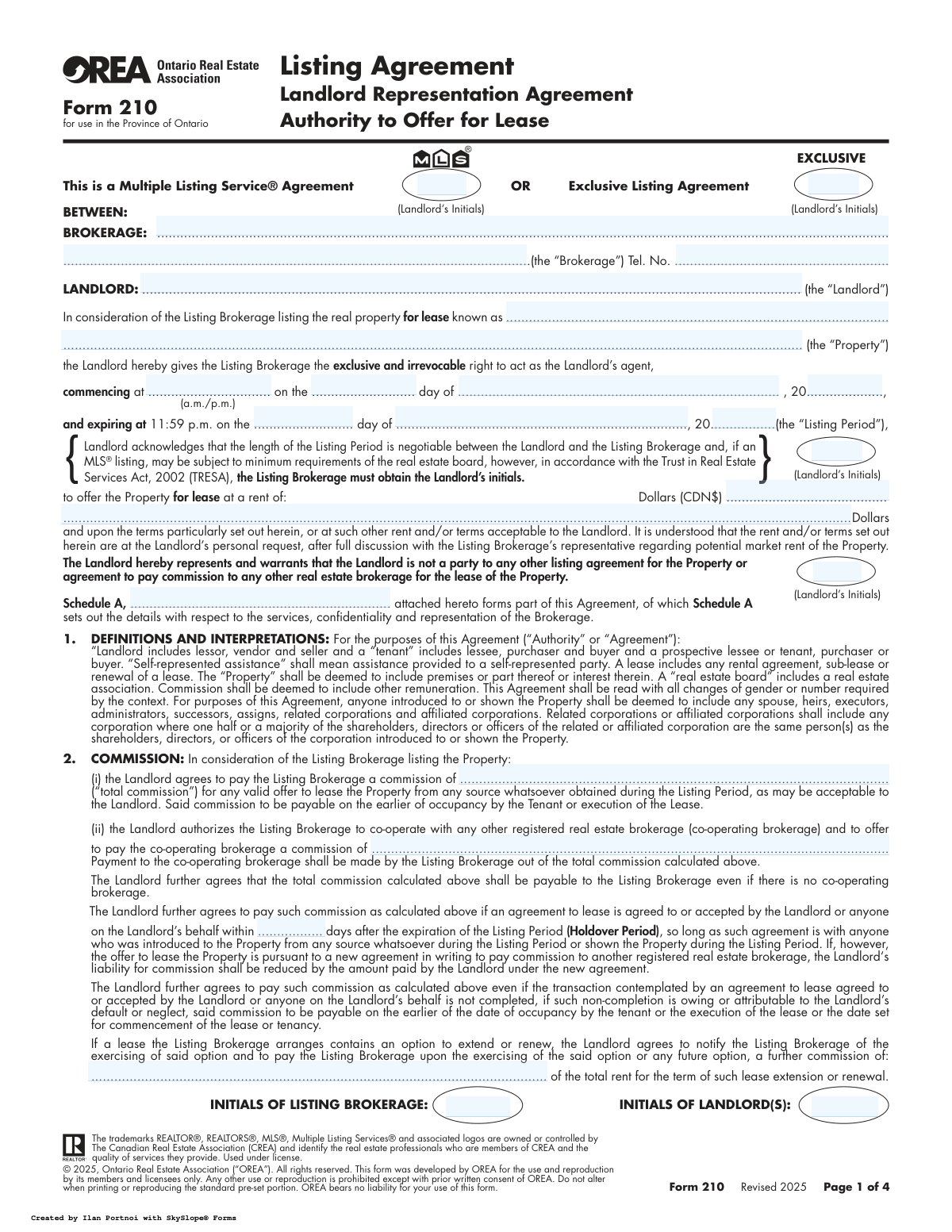
The AI does the filling. You just check it.
No typing into boxes, nothing to install.
What this form asks for
The AI fills all of it, from your answers or your documents.
The AI checks your answers before you download
14 checks built for this form, so a wrong date or a missing answer is caught before anyone else sees it.
This check ensures that the landlord has initialed exactly one of the two agreement type options: 'Multiple Listing Service® Agreement' or 'Exclusive Listing Agreement'. It is critical to define the nature of the listing, as it dictates marketing rules and brokerage cooperation. If neither or both are initialed, the agreement is ambiguous and legally unenforceable, so the form submission should be rejected with a request for clarification.
This validation verifies that the 'Expiry Date' of the listing period occurs after the 'Commencement Date'. An expiry date that is on or before the start date would create an invalid or instantly expired contract. This check prevents logical impossibilities and ensures the agreement has a valid, forward-looking term as intended by both parties.
This check ensures the agreement's 'Commencement Date' is not set to a date prior to the current date of submission. Backdating an agreement can have significant legal and compliance implications, particularly regarding when marketing activities officially began. If the date is in the past, the system should flag it for review or require correction to ensure the contract's timeline is accurate and defensible.
This validation confirms that the full legal names for the 'Brokerage' and 'Landlord', as well as the complete 'Property Address', are provided. These fields are fundamental to identifying the parties and the subject of the agreement. An omission would render the contract vague and potentially void, so the form cannot be processed until this essential information is supplied.
This check ensures that the 'Rent Amount' is a positive numerical value greater than zero. The purpose of the agreement is to lease a property for a specified rent, making this a critical term. A zero, negative, or non-numeric value would be invalid and must be rejected to ensure the financial terms of the lease offering are clear and correct.
This validation ensures that the commission offered to a 'Co-operating Brokerage' is not greater than the 'Listing Brokerage Commission' (the total commission). The co-operating brokerage's share is paid out of the total commission, so it cannot logically exceed the whole amount. This check prevents financial errors and ensures the commission distribution is mathematically sound.
And 8 more checks
- Holdover Period Format
- Conditional MLS Listing Period Acknowledgment
- Exclusive Consent for Post-Termination Marketing
- Signature and Date Association
- Purchase Commission Option Clarity
- Spousal Consent Field Completeness
- Schedule A Cross-Reference Consistency
- Acknowledgement Date Integrity
Let AI fill out your OREA Form 210
No typing. Every field filled in seconds, checked, ready to sign.
How to Fill Out OREA Form 210 Online for Free in 2026
What the AI walks you through.
- Navigate to Instafill.ai and upload your OREA Form 210 or select it from the template library.
- Use the AI assistant to automatically populate the Landlord and Brokerage information, including names, addresses, and contact details.
- Enter the specific details of the property being leased, the agreed-upon rental price, and the commencement and expiry dates for the listing period.
- Define the commission structure, specifying the total commission payable to the listing brokerage and the portion offered to any co-operating brokerage.
- Review the sections on representation, marketing, and distribution of information, providing initials where required to confirm consent.
- Carefully review the entire completed agreement for accuracy, then e-sign the document in the designated fields.
- Download the finalized agreement and share it with the brokerage representative for their signature and records.
Common Mistakes in Completing OREA Form 210
The ones the AI is built to catch.
Incorrectly Initialing Agreement Type
Forgetting Required Initials on Key Clauses
Using Vague or Unclear Commission Terms
Providing an Incomplete or Incorrect Property Address
Incorrect or Incomplete Listing Period Dates
Overlooking the Spousal Consent Section
Leaving the Holdover Period Blank
Incomplete or Inconsistent Signature Sections
Ambiguous Consent for Post-Termination Contact
Forgetting to Attach and Reference Schedule A
Frequently Asked Questions About OREA Form 210
Is it really free for 7 days?
Can I fill other forms too?
How do I cancel?
How does the AI fill out OREA Form 210?
What happens to my information?
How complex is OREA Form 210 to fill out?
What is the purpose of Form 210, the Landlord Representation Agreement?
Who needs to fill out and sign this form?
What is the difference between an MLS® Listing and an Exclusive Listing Agreement?
What is the 'Holdover Period' in the commission section?
When is the commission payable to the brokerage?
What is 'Multiple Representation' and how does it affect me?
What should I do if a potential tenant contacts me directly about the property?
What happens if my tenant decides to buy the property?
What key information do I need to have ready to fill out this form?
Can I use AI to help me fill out this form?
How can I fill out OREA Form 210 online?
The PDF version of this form I have is not fillable. What can I do?
What is Schedule A?
What happens to my property's photos and information?
Get your OREA Form 210 filled out by AI
$0 today. Cancel before Nov 5 and you pay nothing.
Let AI fill out your OREA Form 210
Your trial starts once a card is added. You pay nothing before Nov 5.
Our AI already knows this form, all 56 fields of it. Skip the typing: tell it about yourself, or upload what you have, and it fills the whole form in seconds.
- AI fills every field on all 4 pages, tables and checkboxes included
- No typing into boxes: answer a few questions, or upload the listing or an old lease, an old copy of this form, a photo of a document
- The AI checks the answers; you review and change anything before you download
- Download the finished PDF, print it, or sign it online
- Encrypted, and never used to train AI
Cancel before Nov 5 and you pay nothing.
A card is needed to start the trial. Cancel in two clicks from your account.
Terms · Privacy