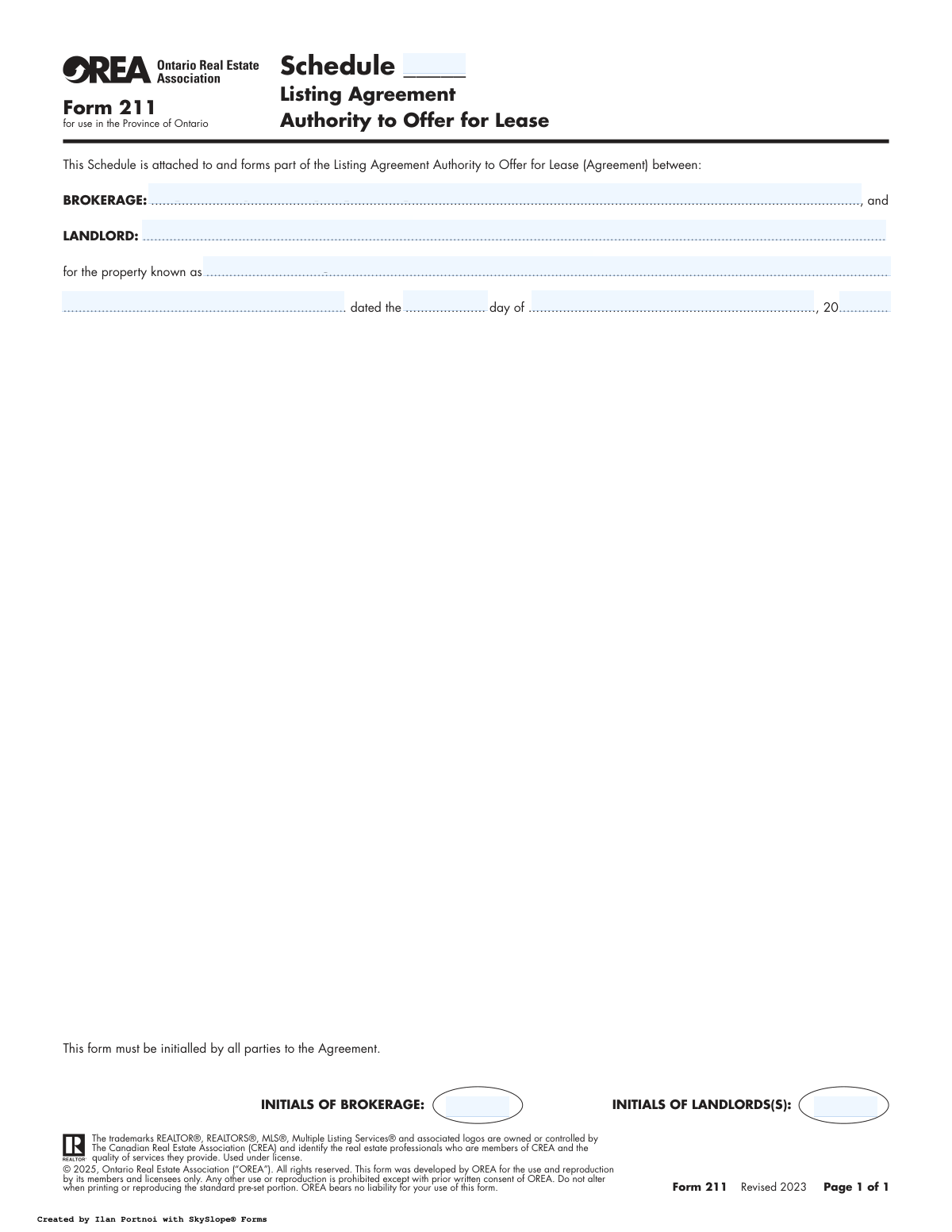
Yes! You can use AI to fill out Form 211, Listing Agreement Authority to Offer for Lease

OREA Form 211 is a legal document used in Ontario by real estate professionals to establish a formal agreement with a landlord. It grants the brokerage the exclusive authority to market, show, and secure a tenant for the landlord's property. This agreement outlines the terms, duration, and commission structure for the leasing services provided. Today, this form can be filled out quickly and accurately using AI-powered services like Instafill.ai, which can also convert non-fillable PDF versions into interactive fillable forms.
OREA Form 211 is part of the lease agreement forms and listing agreement forms categories on Instafill.
OREA Form 211 has a simple Form Complexity Index of 28/100 — 10 fillable fields across 1 page. Instafill’s AI completes it accurately in under a minute.

Form specifications

Form name: Form 211, Listing Agreement Authority to Offer for Lease
Number of fields: 10
Number of pages: 1
FCI: Simple (28/100)
Language: English
Our AI automatically handles information lookup, data retrieval, formatting, and form filling.
It takes less than a minute to fill out OREA Form 211 using our AI form filling.
Securely upload your data. Information is encrypted in transit and deleted immediately after the form is filled out.
main-image

Instafill Demo: How to fill out PDF forms in seconds with AI

How to Fill Out OREA Form 211 Online for Free in 2026

Are you looking to fill out a OREA FORM 211 form online quickly and accurately? Instafill.ai offers the #1 AI-powered PDF filling software of 2026, allowing you to complete your OREA FORM 211 form in just 37 seconds or less.
Follow these steps to fill out your OREA FORM 211 form online using Instafill.ai:
  1. 1 Navigate to Instafill.ai and upload or select the OREA Form 211, Listing Agreement Authority to Offer for Lease.
  2. 2 Use the AI assistant to input the full legal names of the Brokerage and the Landlord(s).
  3. 3 Provide the complete property address and its legal description as prompted by the interactive fields.
  4. 4 Enter the agreement date, including the day, month, and year, along with the specific schedule number if applicable.
  5. 5 Follow the prompts to place the initials for both the brokerage representative and all landlords in the designated areas.
  6. 6 Review all the information auto-filled by the AI for accuracy and make any necessary corrections before finalizing.
  7. 7 Securely sign, download, and share the completed Form 211 with all relevant parties.

Our AI-powered system ensures each field is filled out correctly, reducing errors and saving you time.

Why Choose Instafill.ai for Your Fillable OREA Form 211 Form?

Speed

Complete your OREA Form 211 in as little as 37 seconds.

Up-to-Date

Always use the latest 2026 OREA Form 211 form version.

Cost-effective

No need to hire expensive lawyers.

Accuracy

Our AI performs 10 compliance checks to ensure your form is error-free.

Security

Your personal information is protected with bank-level encryption.

Frequently Asked Questions About OREA Form 211

OREA Form 211 has a Form Complexity Index of 28 out of 100, placing it in the simple complexity tier. This score is calculated deterministically from the form’s own structure using Instafill’s published Form Complexity Index methodology, so it can be reproduced and independently verified — it is not a subjective estimate.

For OREA Form 211 specifically, the score reflects 10 fillable fields across 1 page, grouped into 6 sections. The number of fields is the largest factor in the base score (weighted 36%), followed by how difficult those fields are to complete based on their type, where free-text and signature fields count for more than simple checkboxes (26%). The number of pages that actually contain fields (15%), the amount of conditional “fill-only-if” logic (16%), and how many sections the form is divided into (7%) account for the rest of the base. On top of that base, the index adds points for tables and repeating lists, bundled instruction pages, and dense page layouts — capturing difficulty the base alone can miss.

In practical terms, a simple score means the form is quick to complete, with only a handful of straightforward fields. Instafill removes that effort entirely: our AI reads your information, maps each value to the correct field — including the conditional ones — and completes OREA Form 211 accurately in under a minute, with every field available for you to review before you download. See exactly how the Form Complexity Index is calculated.

OREA Form 211 is a schedule that attaches to a Listing Agreement. It formally documents the authority a landlord gives to a real estate brokerage to offer their property for lease in Ontario.

This form must be completed by the property owner (Landlord) and the real estate brokerage they have hired to find a tenant for their property.

No, this is a schedule that is not valid on its own. It must be attached to and form part of the main Listing Agreement - Authority to Offer for Lease.

You need to provide the full legal names of the brokerage and landlord, the property address, the date of the agreement, and the schedule number. Both parties must also initial the form.

Initialing the form signifies that both the landlord and the brokerage have read, understood, and agreed to the terms contained within this schedule as part of their overall agreement.

No, this form is an agreement between the landlord and their real estate agent. The actual residential lease agreement with the tenant is a separate document.

No, the form explicitly states that the standard pre-set portion should not be altered. Any additional terms should be added on a separate addendum or in designated blank spaces.

The Schedule Number is assigned by your real estate professional. It is used to link this document correctly to the main Listing Agreement.

The 'Property Address' is the common municipal street address used for mail. The 'Property Legal Description' is the official description used in land registry records, including lot and plan numbers.

Yes, services like Instafill.ai use AI to help you accurately auto-fill form fields with your saved information, saving time and reducing the risk of errors.

You can use a platform like Instafill.ai to upload the form, fill it out interactively on your computer or mobile device, and sign it digitally without needing to print it.

You can upload the non-fillable PDF to a service like Instafill.ai. Their technology can convert the flat PDF into an interactive, fillable form that you can complete online.

OREA is the Ontario Real Estate Association. They develop and provide standardized forms for their members (REALTORS®) to ensure all real estate transactions are handled with professional consistency and legal compliance.

Compliance OREA Form 211
Validation Checks by Instafill.ai

1
Brokerage Name Completeness
This check ensures the 'Brokerage Name' field is not left empty. The full legal name of the brokerage is required to properly identify the authorized party in this legally binding agreement. A failure to provide this information would render the schedule incomplete and potentially invalid, preventing form submission until the name is entered.
2
Landlord Name Completeness
This validation verifies that the 'Landlord Name' field contains a value. The landlord is the principal party granting authority, and their full legal name is essential for the agreement's validity. If the landlord's name is missing, the form cannot be processed as it's unclear who is entering into the agreement with the brokerage.
3
Property Address Completeness
This check ensures the 'Property Address' field is filled out completely. A full municipal address is critical for accurately identifying the physical location of the property being offered for lease. An incomplete or missing address would create ambiguity and legal risks, so the form submission will be blocked until a valid address is provided.
4
Property Legal Description Presence
This validation confirms that the 'Property Legal Description' field is not empty. While the municipal address identifies the property's location, the legal description is the official identifier used in land title records, which is crucial for legal precision. Failure to provide this description can lead to contractual disputes and will result in a validation error.
5
Agreement Date Component Completeness
This check verifies that all three components of the agreement date—Day, Month, and Year—are filled in. A complete date is fundamental for establishing the agreement's timeline and effective start. If any part of the date is missing, the agreement's timing is ambiguous, and the form will be considered incomplete.
6
Valid Calendar Date Check
This validation ensures the combination of the 'Day', 'Month', and 'Year' fields forms a legitimate calendar date. For example, it would flag an entry like 'April 31' or 'February 30' as invalid. This is important for maintaining data integrity and ensuring the agreement is dated accurately; an impossible date will prevent submission.
7
Plausible Agreement Year
This check validates that the two-digit 'Year' entered is within a reasonable and logical range (e.g., '23' or greater, based on the form's revision date). It prevents clear data entry errors, such as using a year far in the past or future. An illogical year would call the document's authenticity into question and will trigger a validation failure.
8
Agreement Date Chronology
This validation ensures the entered agreement date is not in the future. An agreement cannot be dated for a time that has not yet occurred, as this would be legally problematic. This check prevents post-dating and ensures the document reflects a past or present action, blocking submission if the date is after the current day.
9
Schedule Number Format
This check verifies that the 'Schedule Number' is a valid positive number. This number is used to link this schedule back to the main Listing Agreement, so it must be a clear and simple identifier. Entering non-numeric characters or a negative number could cause referencing errors and will be flagged as invalid.
10
Brokerage Initials Presence
This validation confirms that the 'Brokerage Initials' field is not blank. The initials signify the brokerage's acknowledgment and acceptance of the terms within this schedule. Without these initials, there is no proof of the brokerage's consent, making the schedule incomplete and unenforceable.
11
Landlord Initials Presence
This check ensures the 'Landlord Initials' field has been filled out. The landlord's initials are required to confirm they have read, understood, and agreed to this schedule as part of the overall Listing Agreement. A missing initial indicates a lack of full consent from the landlord, and the form will be rejected.
12
Mutual Acknowledgment via Initials
This validation ensures that initials from both the Brokerage and the Landlord(s) are present, as the form states it 'must be initialled by all parties'. This confirms mutual consent, which is the foundation of any agreement. If one party's initials are missing, the agreement is not fully executed, and the form submission will fail.
13
Month Name Validity
This check ensures the value entered in the 'Month' field is a valid, correctly spelled name of a month (e.g., 'January', 'February'). Misspellings or invalid entries can lead to confusion and errors in date interpretation for legal and administrative purposes. The system should reject any input that is not a recognized month name.

Common Mistakes in Completing OREA Form 211

Confusing Municipal Address with Legal Description

A frequent and critical error is entering the street address into the 'Property Legal Description' field or leaving it blank entirely. The legal description is a specific identifier (e.g., Lot, Plan, Concession) found on the property's title documents, not the mailing address. An incorrect or missing legal description can create ambiguity, invalidate the listing authority, and cause significant delays in the leasing process.

Incomplete or Incorrect Landlord Name

Landlords often enter a nickname, a single name for a jointly-owned property, or misspell their legal name. For the agreement to be legally binding, the name must match the property's title exactly, including all registered owners or the full legal name of a corporation. This mistake can create enforceability issues, and it is crucial to refer to the property deed to ensure accuracy.

Missing or Incorrect Schedule Number

Users often forget to fill in the 'Schedule _____' number at the top of the form, especially when dealing with multiple documents. This number is critical as it links this schedule to the main Listing Agreement. Without it, the schedule is 'unattached,' creating a contractual gap about which agreement these terms apply to, potentially rendering them void.

Forgetting to Initial the Form

The form explicitly states it must be initialled by all parties, yet the fields for 'Brokerage Initials' and 'Landlord(s) Initials' are often left blank due to oversight. Missing initials from any party can signify a lack of agreement on the schedule's terms, making them unenforceable. It is vital to review the document and ensure all required initial boxes are completed before finalizing.

Using an Abbreviated Brokerage Name

Instead of the full legal name of the brokerage (e.g., 'Royal LePage Terrequity Realty'), people may write a shortened version (e.g., 'Royal LePage'). This can create legal ambiguity about which specific entity is being granted authority. It is essential to use the complete, registered name of the brokerage as stated in the main agreement to ensure the contract is clear and valid.

Only One Landlord Initialing for a Jointly Owned Property

When a property is owned by more than one person, all owners listed on the title must initial the agreement. A common mistake is for only one owner to initial, assuming they can act on behalf of the others without proper authority. This can invalidate the agreement, as all legal owners must consent to the listing terms.

Incorrect Date Formatting

The form requires the date to be written out (e.g., '15th day of March, 2024'). Common mistakes include using numerical formats like '03/15/2024' or leaving the date fields blank. This inconsistency can be problematic in legal documents where clarity is paramount, and following the specified format ensures the agreement's date is unambiguous.

Leaving the Property Address Incomplete

Users sometimes provide a partial property address, omitting the unit number, city, or postal code. For multi-unit buildings like condos, the unit number is essential for uniquely identifying the property being leased. An incomplete address can lead to confusion, marketing errors, and ambiguity in the contract.

Illegible Handwriting on a Printed Form

When the form is printed and filled out by hand, illegible writing is a frequent problem, especially for complex details like names and legal descriptions. This can lead to data entry errors, causing delays and potential legal issues if key details are recorded incorrectly. To avoid this, it's best to use a fillable digital version. AI-powered tools like Instafill.ai can convert flat PDFs into fillable forms to ensure all entries are clear and legible.

Using a Full Signature Instead of Initials

The designated spaces specifically ask for initials, not a full signature, to acknowledge the schedule's terms. Providing a signature where initials are required is a deviation from the form's instructions that can cause confusion or require correction. Initials serve as a specific way to acknowledge individual pages or clauses within a larger contract, and using them correctly is important for proper execution.
Saved over 80 hours a year

“I was never sure if my IRS forms like W-9 were filled correctly. Now, I can complete the forms accurately without any external help.”

Kevin Martin Green

Your data stays secure with advanced protection from Instafill and our subprocessors

Robust compliance program

Transparent business model

You’re not the product. You always know where your data is and what it is processed for.

ISO 27001, HIPAA, and GDPR

Our subprocesses adhere to multiple compliance standards, including but not limited to ISO 27001, HIPAA, and GDPR.

Security & privacy by design

We consider security and privacy from the initial design phase of any new service or functionality. It’s not an afterthought, it’s built-in, including support for two-factor authentication (2FA) to further protect your account.

Fill out OREA Form 211 with Instafill.ai

Worried about filling PDFs wrong? Instafill securely fills form-211-listing-agreement-authority-to-offer-for-lease forms, ensuring each field is accurate.