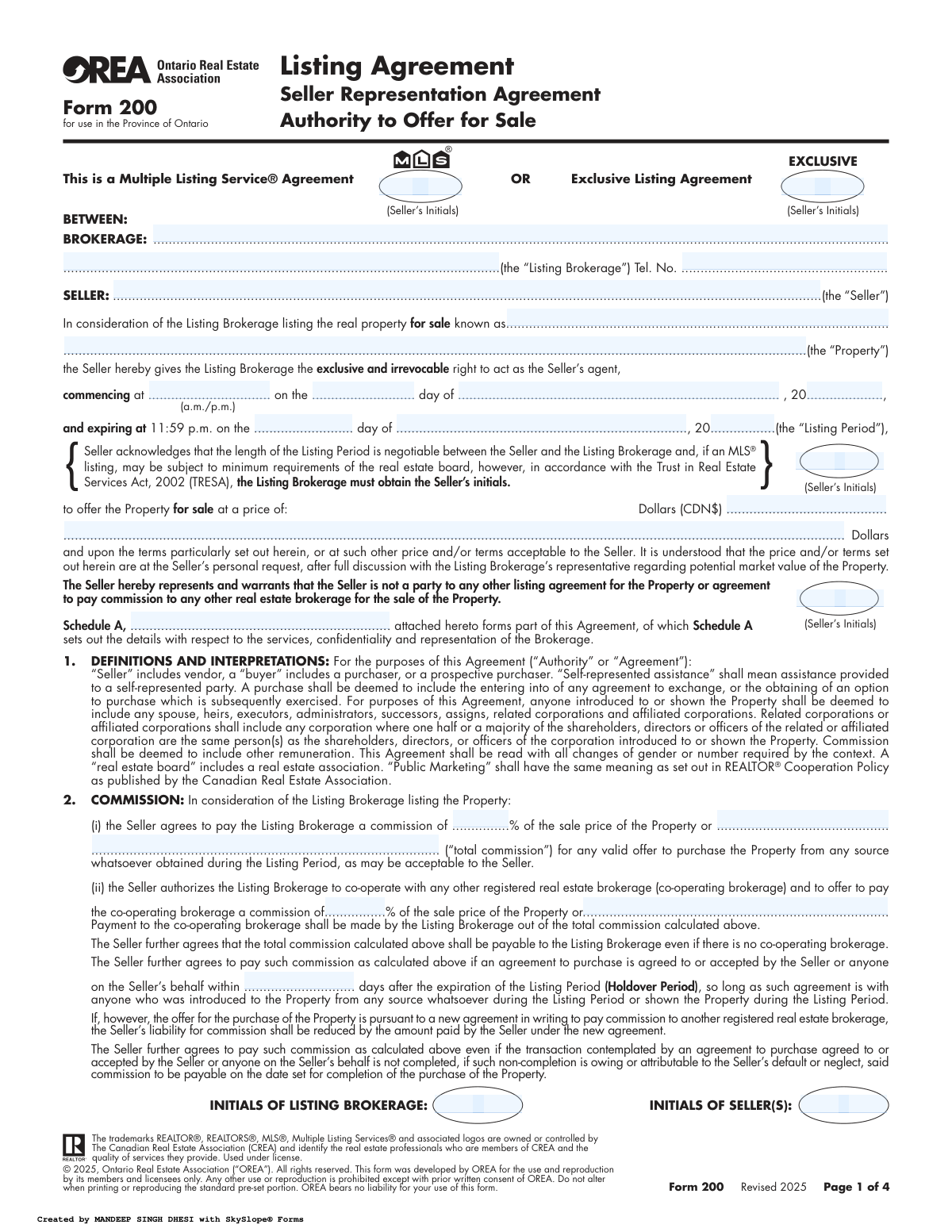
Yes! You can use AI to fill out OREA Form 200 (Revised 2025) — Listing Agreement / Seller Representation Agreement / Authority to Offer for Sale (Ontario)

OREA Form 200 is an Ontario Real Estate Association standard form used to create a formal seller listing relationship with a brokerage, either as an MLS® listing agreement or an exclusive listing agreement. It grants the listing brokerage the exclusive and irrevocable authority to act as the seller’s agent for a defined listing period and to market the property at an agreed price and terms. The form is important because it documents commission obligations (including holdover provisions), marketing authority, representation disclosures (including multiple representation rules), and consents related to information use and MLS® distribution. It also includes Schedule A, which forms part of the agreement and details services, confidentiality, and representation terms that may supplement the standard clauses.
Our AI automatically handles information lookup, data retrieval, formatting, and form filling.
It takes less than a minute to fill out OREA Form 200 using our AI form filling.
Securely upload your data. Information is encrypted in transit and deleted immediately after the form is filled out.

Form specifications

Form name: OREA Form 200 (Revised 2025) — Listing Agreement / Seller Representation Agreement / Authority to Offer for Sale (Ontario)
Number of pages: 4
Filled form examples: Form OREA Form 200 Examples
Language: English
main-image

Instafill Demo: filling out a legal form in seconds

How to Fill Out OREA Form 200 Online for Free in 2026

Are you looking to fill out a OREA FORM 200 form online quickly and accurately? Instafill.ai offers the #1 AI-powered PDF filling software of 2026, allowing you to complete your OREA FORM 200 form in just 37 seconds or less.
Follow these steps to fill out your OREA FORM 200 form online using Instafill.ai:
  1. 1 Select the agreement type (MLS® Agreement or Exclusive Listing Agreement) and enter the listing brokerage’s legal name and contact details.
  2. 2 Enter the seller(s) legal name(s) and the full civic address/legal description of the property being listed.
  3. 3 Set the listing start date/time and the listing expiry date/time (listing period), and have the seller initial where required (including any TRESA-related initials).
  4. 4 Enter the listing price and any special pricing/terms instructions, then complete the commission section: total commission, co-operating brokerage commission, holdover period days, and confirm tax treatment (plus applicable taxes).
  5. 5 Review and complete key relationship/consent sections: representation disclosures, multiple representation consent process, marketing/MLS® placement acknowledgements, and the post-expiry contact consent (Does/Does Not).
  6. 6 Complete Schedule A by adding or confirming service details, confidentiality/representation terms, and any additional clauses; ensure all parties initial Schedule A and any required initials throughout the form.
  7. 7 Finalize execution: obtain signatures, dates, seals (as applicable), spousal consent (if required), insurance declaration by the registrant, and seller acknowledgement of receipt of a copy of the agreement.

Our AI-powered system ensures each field is filled out correctly, reducing errors and saving you time.

Why Choose Instafill.ai for Your Fillable OREA Form 200 Form?

Speed

Complete your OREA Form 200 in as little as 37 seconds.

Up-to-Date

Always use the latest 2026 OREA Form 200 form version.

Cost-effective

No need to hire expensive lawyers.

Accuracy

Our AI performs 10 compliance checks to ensure your form is error-free.

Security

Your personal information is protected with bank-level encryption.

Frequently Asked Questions About Form OREA Form 200

This form authorizes a real estate brokerage to market and offer your Ontario property for sale and to act as your agent during the listing period. It also sets out key terms like listing type, price, commission, marketing permissions, and representation rules.

All registered owners who are selling the property must sign, and the listing brokerage must also sign. Sellers are also required to initial certain sections (including the listing period acknowledgement and Schedule A) as part of the agreement requirements.

An MLS® Agreement generally means the listing will be placed on the MLS® system for cooperation with other REALTORS® and broader exposure. An Exclusive Listing Agreement typically means the property is listed exclusively with the brokerage and may or may not be publicly marketed on MLS®, depending on what is agreed.

You must enter the exact start time (a.m./p.m.) and date the brokerage’s authority begins, and the expiry date (which ends at 11:59 p.m. on that date). The form notes the listing period length is negotiable, and sellers must initial the acknowledgement related to the listing period.

Yes, the form states the listing period is negotiable between the seller and the listing brokerage. If it is an MLS® listing, there may be minimum requirements set by the local real estate board, and the brokerage must obtain the seller’s initials in accordance with TRESA.

Commission is set as either a percentage of the sale price or a fixed amount, as written in the commission section. It is generally payable if a valid offer is obtained during the listing period and accepted by the seller, and it may also apply in certain post-expiry situations described in the holdover clause.

The form allows the listing brokerage to offer a portion of the total commission to a co-operating brokerage that brings a buyer. You do not pay it separately; it is paid by the listing brokerage out of the total commission you agreed to pay.

The holdover period is a number of days after the listing expires during which commission may still be payable if you accept an agreement to purchase with someone introduced to or shown the property during the listing period. The exact number of holdover days is filled in on the form.

The form states commission may still be payable if an agreement to purchase was accepted but the transaction does not complete due to the seller’s default or neglect. In that case, commission is payable on the date set for completion.

The form states that any deposit in respect of a completed transaction is first applied to reduce the commission payable. If the deposit or amounts paid by the seller’s solicitor are not enough to cover commission and taxes, the seller must pay the deficiency on demand.

Yes, the form specifies that all commission amounts are payable plus applicable taxes on the commission. Make sure you understand whether the percentage or amount you negotiated is before tax.

Multiple representation is when the same brokerage represents both the seller and the buyer in the same transaction. The form states the brokerage will require the seller’s written consent before representing both parties, and it also explains limits on what the brokerage can disclose in that situation.

You agree to allow showings at reasonable hours and give the brokerage the exclusive right to place “For Sale” and “Sold” signs. You also consent to the brokerage making advertising decisions and, for MLS® listings, placing the listing on the MLS® system within three (3) days of public marketing.

The form authorizes the brokerage to collect, use, and disclose personal and property information to list and market the property, including posting photos, videos, floor plans, and descriptions to MLS® databases. It also warns that MLS®/board databases may be located outside Canada, meaning the information may be subject to foreign laws.

Schedule A forms part of the agreement and is intended to set out details about services, confidentiality, and representation. The schedule states it must be initialled by all parties, and if there is a conflict between Schedule A and the standard form, the added provisions can supersede the standard wording to the extent of the conflict.

Compliance OREA Form 200
Validation Checks by Instafill.ai

1
Validates Brokerage Legal Name and Contact Completeness
Ensures the BROKERAGE field contains a non-empty legal business name and that the brokerage telephone number is provided. The phone number should be validated to a Canadian/North American format (e.g., 10 digits with optional country code +1) and reject alphabetic-only or obviously invalid values (e.g., 000-000-0000). If missing or invalid, the submission should be blocked because the agreement cannot be attributed to a specific listing brokerage or used for compliance/audit purposes.
2
Ensures Seller Identity Fields Are Complete for All Sellers
Checks that the SELLER field includes the full legal name(s) of all sellers who will sign, and that the number of seller signature blocks completed matches the number of sellers listed. This prevents situations where one seller is named but multiple signatures appear (or vice versa), which can create enforceability and authority issues. If the seller count is inconsistent, the system should require correction or an explicit addendum identifying all parties.
3
Validates Property Address/Legal Description Presence
Verifies the Property field is completed with a sufficiently specific identifier (typically civic address, unit number, municipality, and/or legal description). The check should flag entries that are too vague (e.g., only a street name, or “TBD”) because the agreement must clearly identify the real property being listed. If the property identification is incomplete, the submission should fail and prompt for full address/legal description.
4
Listing Type Selection Consistency (MLS vs Exclusive)
Ensures exactly one listing type is selected: “This is a Multiple Listing Service® Agreement” OR “Exclusive Listing Agreement.” The form also shows “EXCLUSIVE (Seller’s Initials)” which should only be required/active when the Exclusive option is chosen. If both or neither are selected, the system should block submission and require a single, unambiguous selection.
5
Listing Period Start Date/Time Format and Validity
Validates that the commencement time includes a valid time and meridiem (a.m./p.m.) and that the start date is a real calendar date with a 4-digit year. This prevents ambiguous start times and invalid dates that could affect commission entitlement and marketing authority. If invalid or missing, the submission should be rejected and the user prompted to enter a valid start time and date.
6
Listing Period Expiry Date Validity and Chronological Order
Checks that the expiry date is provided, is a valid calendar date, and occurs after the commencement date/time. The expiry time is fixed at 11:59 p.m.; the system should ensure users do not override it or enter conflicting expiry times elsewhere. If the expiry is missing or not after the start, the submission should fail because the listing period would be undefined or illogical.
7
Listing Price Currency/Amount Validation (CDN$)
Ensures the listing price is entered as a positive numeric amount in Canadian dollars, with appropriate formatting (allow commas, optional cents, but reject negative values or text-only entries). If both a numeric box and a written-out amount line are used, the system should require they do not conflict (or require one authoritative field). If the price is missing or invalid, the submission should be blocked because the agreement lacks a core commercial term.
8
Commission Structure Completeness and Range Checks
Validates that the total commission is specified either as a percentage of sale price or as a fixed dollar amount, and that the value is within reasonable bounds (e.g., percentage > 0 and < 100). It should also ensure the co-operating brokerage commission is specified (percentage or fixed amount) when cooperation is authorized, and that it is not negative or nonsensical. If commission fields are incomplete or out of range, the system should fail validation because commission terms are essential and errors can cause disputes.
9
Co-operating Commission Cannot Exceed Total Commission (Logical Consistency)
When both total commission and co-operating brokerage commission are expressed in the same unit (both % or both $), verifies the co-operating amount does not exceed the total commission. This prevents an impossible payout scenario where the listing brokerage would owe more than it receives. If the co-op exceeds total (or units are mixed without clear conversion), the system should require correction or an explicit clarification addendum.
10
Holdover Period Days Field Validation
Ensures the holdover period is completed with a whole number of days (non-negative integer) and is within a reasonable maximum configured by business rules (e.g., 0–365). This is important because holdover affects post-expiry commission entitlement and must be unambiguous. If missing or not an integer, the submission should be blocked and the user prompted to enter a valid number of days.
11
Required Initials Captured for Key Clauses and Schedule A
Checks that all required initials fields are completed: seller initials where indicated (including the TRESA-related acknowledgement about listing period negotiability and any Exclusive-related initials) and initials for Schedule A by all parties. Initials are used to evidence informed consent and acceptance of specific terms, and missing initials can undermine enforceability. If any required initials are absent, the system should prevent finalization and highlight each missing initial location.
12
Post-Expiration Contact Consent Selection (Does / Does Not) Must Be Exclusive
Validates that exactly one option is selected for the clause allowing other board members to contact the seller after expiration/termination (“Does” or “Does Not”). This prevents ambiguous privacy/marketing consent and supports compliance with consent requirements. If both or neither are selected, the system should require a single selection before submission.
13
Signature, Date, and Telephone Number Completeness for Each Signer
Ensures each seller signature line includes a signature (wet or e-sign indicator), a date, and a telephone number, and that the phone number matches an acceptable format. It should also validate that the acknowledgement signatures/dates (receipt of copy) are present for each seller where provided. If any signer’s signature/date/phone is missing or invalid, the submission should be rejected because execution and contactability are incomplete.
14
Spousal Consent Conditional Requirement (Family Law Act Clause)
If the submission indicates spousal consent is necessary (or if the seller is marked as having a spouse with potential interest), verifies the spouse signature, date, and telephone number are completed. This is critical to reduce the risk of later challenges to the listing authority under the Family Law Act. If spousal consent is required but not executed, the system should block submission or require an explicit legal confirmation that consent is not necessary.
15
Authorized Brokerage Signatory Identification and Date Validation
Validates that the “Authorized to bind the Listing Brokerage” signature is present, the printed name of the person signing is provided, and the date is a valid calendar date. This ensures the brokerage has properly executed the agreement and supports audit trails and enforceability. If any element is missing or the date is invalid, the submission should fail and request completion.
16
Schedule A Attachment Presence and Cross-Reference Consistency
Checks that Schedule A is actually attached/included when referenced, and that the Brokerage, Seller, and Property fields on Schedule A match the main agreement (or are at least not contradictory). This prevents orphaned schedules or mismatched parties/property that could create conflicts under the “Conflict or Discrepancy” clause. If Schedule A is missing or inconsistent, the system should block submission until the attachment and fields are corrected.

Common Mistakes in Completing OREA Form 200

Not clearly selecting MLS® vs Exclusive listing

People often overlook the “This is a Multiple Listing Service® Agreement OR Exclusive Listing Agreement” choice or assume the brokerage will decide later. If the type isn’t clearly indicated/consistent, it can create disputes about exposure, cooperation with other brokerages, and board/MLS® requirements. Avoid this by explicitly confirming which option applies and ensuring the rest of the agreement (marketing, MLS timing, cooperation) aligns with that selection.

Incomplete or inconsistent property address/legal description

Sellers frequently enter only a partial civic address (missing unit number, rural route details) or use a nickname for the property rather than the exact address/identifier. This can cause listing errors, MLS® rejection, delays in marketing, and confusion about what is being sold. Use the full civic address (including unit/suite, postal code if requested) and ensure it matches the property identification used in other documents (tax bill, prior listing, or legal description if provided elsewhere).

Incorrect listing start time/date (a.m./p.m. and effective date)

A common mistake is leaving the commencement line blank, mixing up the day/month fields, or forgetting to specify a.m./p.m. This can create uncertainty about when the brokerage’s authority begins, when marketing can start, and when holdover calculations should run. Avoid it by entering a precise start time with a.m./p.m., a complete date, and confirming it matches the intended “go-live” plan.

Wrong or missing listing expiry date/time (11:59 p.m.)

Many people assume the expiry is “end of day” without filling the actual date, or they enter an expiry that conflicts with their planned listing period. An incorrect expiry can lead to unintended extensions, gaps in representation, or disputes about commission entitlement. Prevent this by writing the exact expiry date and remembering the form fixes the time at 11:59 p.m., then double-checking the duration is what you negotiated.

Leaving the list price fields incomplete or using unclear formatting

Sellers sometimes fill only one of the price lines, omit “CDN$,” write a range, or use shorthand like “$1.2M” without clarity. This can cause MLS® data-entry issues, confusion in advertising, and disagreements about what price the brokerage was authorized to market. Enter a single, unambiguous price in Canadian dollars and ensure the numeric and written/secondary line (if used) are consistent.

Commission section errors (total vs co-operating brokerage commission)

A frequent error is mixing up the “total commission” with the amount offered to a co-operating brokerage, leaving one blank, or entering percentages and fixed amounts inconsistently. This can lead to disputes over what is owed, problems attracting cooperating brokerages, and unexpected net proceeds. Avoid it by confirming whether commission is a percentage or a fixed amount, completing both (i) and (ii) clearly, and ensuring the co-operating brokerage amount is understood to be paid out of the total commission.

Forgetting the Holdover Period days or misunderstanding what it means

People often leave the holdover days blank or assume it only applies to buyers who made written offers, not those “introduced to or shown” the property. An incomplete or misunderstood holdover term can create commission disputes if a buyer returns shortly after expiry. Fill in the exact number of holdover days and ask for clarification on how “introduced/shown” is tracked so you understand when commission may still be payable.

Missing required initials throughout (Seller(s) and Brokerage)

This form requires initials in multiple places (including MLS/Exclusive area, TRESA-related acknowledgements, and Schedule A), and signers often miss one or initial in the wrong spot. Missing initials can make parts of the agreement non-compliant, delay processing, or require re-signing before the listing can be activated. Avoid this by doing a page-by-page initial check for every seller and the listing brokerage, including the Schedule A initial block.

Not completing the post-expiry contact consent (Does/Does Not) with initials

Sellers frequently skip the section that asks whether they consent to other board members contacting them after the agreement ends, or they check a box without initialling as required. This can create privacy/consent confusion and lead to unwanted calls or, conversely, missed opportunities if the seller intended to allow contact. Choose “Does” or “Does Not” deliberately and initial exactly as the form requires.

All sellers not signing/initialling consistently (and missing phone numbers/dates)

Where there are multiple owners, one seller may sign but not initial, dates may differ, or telephone numbers may be left blank. This can create enforceability issues, delays, and complications if one owner later disputes authority to list. Ensure every registered owner who must sign does so everywhere required, and that each signature line includes the date and contact number as requested.

Skipping spousal consent when required under the Family Law Act

Sellers often assume only the titled owner must sign and overlook the spousal consent section, especially for matrimonial homes. If spousal consent is required and not obtained, the listing and any resulting transaction can face legal risk, delays, or challenges at closing. Avoid this by confirming with your lawyer/agent whether the property is a matrimonial home and obtaining the spouse’s signed consent on the form when applicable.

Not attaching or completing Schedule A (services/confidentiality/representation details)

Schedule A is stated to form part of the agreement and must be initialled by all parties, but it’s commonly left blank, not attached, or not initialled. This can leave key service commitments and representation details unclear and create disputes about what the brokerage agreed to do. Ensure Schedule A is attached, fully completed (or explicitly states “N/A” where appropriate), and initialled by all required parties.
Saved over 80 hours a year

“I was never sure if my IRS forms like W-9 were filled correctly. Now, I can complete the forms accurately without any external help.”

Kevin Martin Green

Your data stays secure with advanced protection from Instafill and our subprocessors

Robust compliance program

Transparent business model

You’re not the product. You always know where your data is and what it is processed for.

ISO 27001, HIPAA, and GDPR

Our subprocesses adhere to multiple compliance standards, including but not limited to ISO 27001, HIPAA, and GDPR.

Security & privacy by design

We consider security and privacy from the initial design phase of any new service or functionality. It’s not an afterthought, it’s built-in, including support for two-factor authentication (2FA) to further protect your account.

Fill out OREA Form 200 with Instafill.ai

Worried about filling PDFs wrong? Instafill securely fills orea-form-200-revised-2025-listing-agreement-selle forms, ensuring each field is accurate.