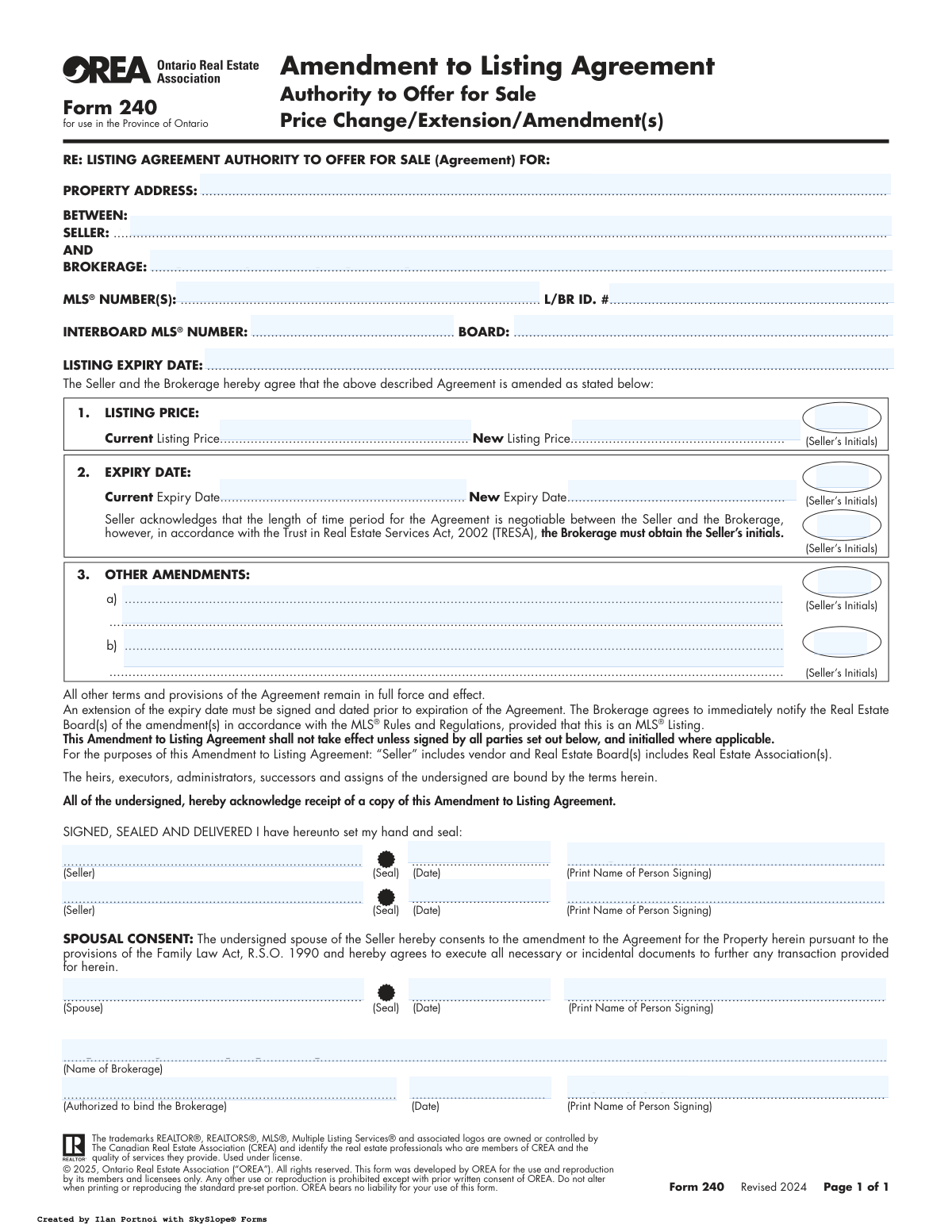
Yes! You can use AI to fill out Form 240, Amendment to Listing Agreement Authority to Offer for Sale
OREA Form 240, Amendment to Listing Agreement, is a legal document used in Ontario to modify the terms of an existing real estate listing contract between a seller and a brokerage. It's essential for formally recording changes such as a new listing price, an extension of the listing period, or other specific alterations to the original agreement. Today, this form can be filled out quickly and accurately using AI-powered services like Instafill.ai, which can also convert non-fillable PDF versions into interactive fillable forms.
OREA Form 240 is part of the
listing agreement forms category on Instafill.
Our AI automatically handles information lookup, data retrieval, formatting, and form filling.
It takes less than a minute to fill out OREA Form 240 using our AI form filling.
Securely upload your data. Information is encrypted in transit and deleted immediately after the form is filled out.
Form specifications
| Form name: | Form 240, Amendment to Listing Agreement Authority to Offer for Sale |
| Number of fields: | 32 |
| Number of pages: | 1 |
| Language: | English |
Instafill Demo: How to fill out PDF forms in seconds with AI
How to Fill Out OREA Form 240 Online for Free in 2026
Are you looking to fill out a OREA FORM 240 form online quickly and accurately? Instafill.ai offers the #1 AI-powered PDF filling software of 2026, allowing you to complete your OREA FORM 240 form in just 37 seconds or less.
Follow these steps to fill out your OREA FORM 240 form online using Instafill.ai:
- 1 Navigate to Instafill.ai and upload or select the OREA Form 240.
- 2 Use the AI assistant to automatically populate identifying information from the original listing agreement, such as property address, seller and brokerage names, and MLS® number.
- 3 Enter the specific amendments required, such as the new listing price or the new expiry date, in the designated sections.
- 4 If there are other changes, clearly describe them in the 'Other Amendments' section.
- 5 Review all entered information for accuracy, using the AI's validation checks to ensure all required fields and initials are completed.
- 6 Electronically sign the document and invite the brokerage's authorized representative and spouse (if applicable) to provide their signatures.
- 7 Download, save, or share the fully executed Amendment to Listing Agreement for your records and for submission to the real estate board.
Our AI-powered system ensures each field is filled out correctly, reducing errors and saving you time.
Why Choose Instafill.ai for Your Fillable OREA Form 240 Form?
Speed
Complete your OREA Form 240 in as little as 37 seconds.
Up-to-Date
Always use the latest 2026 OREA Form 240 form version.
Cost-effective
No need to hire expensive lawyers.
Accuracy
Our AI performs 10 compliance checks to ensure your form is error-free.
Security
Your personal information is protected with bank-level encryption.
Frequently Asked Questions About Form OREA Form 240
This form is used to make official changes to an existing Listing Agreement in Ontario. It allows a seller and brokerage to modify terms like the listing price, the agreement's expiry date, or other conditions without drafting a new contract.
For the amendment to be legally binding, it must be signed by all sellers listed on the original agreement and an authorized representative of the brokerage. In some cases, if the property is a matrimonial home, a spouse's signature may also be required.
In Section 1, "LISTING PRICE", you will enter the current listing price and the new listing price you have agreed upon. The seller must also initial this section to confirm their approval of the price change.
Yes, Section 2 is for extending the agreement's expiry date. You must enter the current and new expiry dates and provide your initials in two separate places, as required by the Trust in Real Estate Services Act (TRESA).
An extension must be signed and dated by all parties *before* the original Listing Agreement expires. You cannot amend an agreement that has already expired; a new one would be required.
This section is for any changes not related to price or expiry date. Common examples include modifying showing instructions, changing the list of included or excluded chattels, or updating marketing terms.
Under Ontario's Family Law Act, if the property is a matrimonial home, the non-owner spouse must consent to the listing amendment. This ensures the transaction can proceed without future legal challenges related to spousal rights.
No, this form only amends the original agreement. The form clearly states that all other terms and provisions of the original agreement remain in full force and effect.
Once signed, the amendments become a legal part of your Listing Agreement. The brokerage is then obligated to immediately notify the real estate board(s) to update the MLS® listing with the new information.
Initials are required next to each specific change to serve as explicit confirmation that you have reviewed and agreed to that particular amendment. This prevents misunderstandings and ensures all parties are aware of every modification being made.
Yes, services like Instafill.ai use AI to help you accurately auto-fill form fields, which can save time and reduce errors. This is especially useful for inputting recurring information like names, addresses, and dates.
You can use a service like Instafill.ai to easily fill out this form online. Simply upload the form, and the platform will identify the fields for you to complete, sign, and share digitally with your brokerage.
You can use a tool like Instafill.ai, which can convert flat, non-fillable PDFs into interactive, fillable forms. This allows you to type your information directly into the fields instead of printing and filling it out by hand.
You will need the full property address, the names of the seller(s) and brokerage, the MLS® number, and the current listing price and expiry date from your original agreement. You should also know the new price or date you wish to implement.
Compliance OREA Form 240
Validation Checks by Instafill.ai
1
New Expiry Date Chronology Check
This validation ensures that the 'New Expiry Date' is chronologically after the 'Current Expiry Date'. An amendment to extend a listing must result in a future expiry date, not one that is the same or earlier. If this check fails, the amendment is logically flawed and would be legally invalid, as it does not properly extend the agreement's term.
2
Amendment Signature Timing Validation
Verifies that all signature dates (Seller, Spouse, and Brokerage) are on or before the 'Current Expiry Date' of the listing. The form explicitly states that an extension must be signed prior to the expiration of the agreement. A signature dated after the expiry would mean the original contract was already void, rendering the amendment ineffective and requiring a completely new listing agreement.
3
Conditional Initials for Price Change
This check ensures that if a 'New Listing Price' is entered, the corresponding 'Seller's Initials' field for the price change is also filled. These initials serve as legal confirmation that the seller has seen and approved the specific modification to the price. Without the initials, the price change is not properly authorized and could be disputed, invalidating that part of the amendment.
4
Conditional Initials for Expiry Date Extension
Validates that if a 'New Expiry Date' is provided, both sets of seller's initials in that section are present. One set confirms the new date, while the other acknowledges TRESA regulations, both of which are mandatory for a valid extension. Missing either set of initials makes the extension legally unenforceable and could lead to disputes over the brokerage's authority.
5
Conditional Initials for Other Amendments
Ensures that if any text is entered into the 'Other Amendment A' or 'Other Amendment B' fields, the corresponding seller's initials are provided. These initials are crucial as they signify the seller's explicit agreement to custom, non-standard changes to the contract. An amendment without initials is not properly ratified and may be deemed non-binding.
6
Primary Property Identifier Completeness
This check verifies that at least one primary identifier, either the 'Property Address' or the 'MLS Number(s)', is filled out. These fields are essential for linking the amendment to the specific property and original listing agreement. Without this information, the document is ambiguous and cannot be processed, as it's unclear which contract is being amended.
7
Signature and Printed Name Consistency
Compares the printed name fields (e.g., 'Seller 1 Printed Name', 'Representative Printed Name') against the names associated with the corresponding signature fields. This validation ensures the identity of the signatory is clear and unambiguous, which is critical for legal enforceability. A mismatch could suggest an unauthorized signature and invalidate the entire amendment.
8
Price Change Section Completeness
If a 'New Listing Price' is entered, this check confirms that the 'Current Listing Price' field is also populated. This provides a clear and complete record of the price modification for auditing and legal purposes. Omitting the original price makes the amendment ambiguous and difficult to interpret.
9
Valid Date Format Validation
This validation ensures that all date fields on the form ('Listing Expiry Date', 'New Expiry Date', signature dates) are entered in a valid, machine-readable format (e.g., YYYY-MM-DD). Incorrect or ambiguous date formats can lead to processing errors and legal disputes over key timelines, such as when the agreement was executed or when it expires. This check maintains data integrity and clarity.
10
Numeric Price Field Validation
Verifies that the 'Current Listing Price' and 'New Listing Price' fields contain only valid numeric or currency data. This is fundamental for maintaining financial accuracy in the listing data and preventing processing errors. Entering non-numeric text would corrupt the data and cause it to be rejected by the MLS system.
11
Brokerage Authorization Completeness
Ensures that the brokerage authorization section is fully completed with a signature, printed name, and date. The brokerage is a primary party to the agreement, and their formal, dated signature is required to execute the amendment. An incomplete authorization section means the brokerage has not legally agreed to the changes, rendering the amendment void.
12
Spousal Consent Section Integrity
If the 'Spouse Signature' field is filled, this check validates that the 'Spouse Printed Name' and 'Spousal Consent Date' are also completed. Under the Family Law Act, full spousal consent details are often necessary to ensure a clear title can be transferred. Incomplete information in this section can create legal risks and potentially jeopardize a future sale.
Common Mistakes in Completing OREA Form 240
A frequent error is signing the amendment to extend the listing *after* the original agreement's expiry date has passed. The form explicitly requires the extension to be signed prior to expiration. An amendment signed post-expiry is invalid, necessitating a completely new listing agreement, which causes significant delays and administrative rework.
This form requires separate initials from the seller to validate a price change, an expiry date change, and any 'Other Amendments'. It is very common to miss one of these initial boxes, especially the second initial required for the expiry date change under TRESA. A missing initial can render that specific amendment non-binding and unrecognized by the real estate board.
Sellers often forget or are unaware that if the property is a matrimonial home, the non-owner spouse must sign the consent section, as required by Ontario's Family Law Act. Failing to secure this signature can create serious legal vulnerabilities and potentially invalidate a future sale. This section should be carefully considered for any residential property.
When using Section 3 for custom amendments, people often write unclear or ambiguous terms, such as 'to adjust commission' without specifying the new rate or terms. This ambiguity can lead to disputes between the seller and the brokerage later on. All amendments must be written with precise, specific language to be enforceable and clearly understood.
In sections for price and expiry date changes, users frequently enter the new information in the 'Current' field and vice-versa. This simple data entry error happens due to haste and can cause confusion, requiring correction and delaying the update on the MLS®. AI-powered tools like Instafill.ai can help prevent this by validating data as it's entered.
The form requires several critical ID numbers, including the MLS® Number, L/BR ID, and Interboard MLS® Number. Transcription errors, such as transposed digits or leaving a field blank, are common. An incorrect number will prevent the amendment from being filed correctly, meaning the price or date change will not be reflected on the live listing.
The names of the Seller and Brokerage entered on the amendment must exactly match the names on the original Listing Agreement. People sometimes use abbreviations, nicknames, or slightly different corporate names, which creates inconsistencies in the legal record. This can lead to processing delays while the brokerage seeks to clarify the discrepancy.
When this form is provided as a non-fillable PDF, it must be completed by hand, often resulting in illegible entries for critical details like prices, dates, and names. Poor handwriting can lead to data entry mistakes by brokerage staff, causing significant errors. Using a tool like Instafill.ai can convert the form into a fillable version, ensuring all entries are clear, accurate, and professional.
The form includes a 'LISTING EXPIRY DATE' field in the top identification section, separate from the 'Current' and 'New' expiry date fields below. Users often mistakenly enter the new expiry date at the top, when this field is intended for the original expiry date for reference. This creates conflicting information on the form and can cause processing confusion.
Saved over 80 hours a year
“I was never sure if my IRS forms like W-9 were filled correctly. Now, I can complete the forms accurately without any external help.”
Kevin Martin Green
Your data stays secure with advanced protection from Instafill and our subprocessors

Robust compliance program
Transparent business model
You’re not the product. You always know where your data is and what it is processed for.
ISO 27001, HIPAA, and GDPR
Our subprocesses adhere to multiple compliance standards, including but not limited to ISO 27001, HIPAA, and GDPR.
Security & privacy by design
We consider security and privacy from the initial design phase of any new service or functionality. It’s not an afterthought, it’s built-in, including support for two-factor authentication (2FA) to further protect your account.
Fill out OREA Form 240 with Instafill.ai
Worried about filling PDFs wrong? Instafill securely fills form-240-amendment-to-listing-agreement-authority-to-offer-for-sale forms, ensuring each field is accurate.