Yes! You can use AI to fill out Listing Agreement - Authority to Offer for Sale
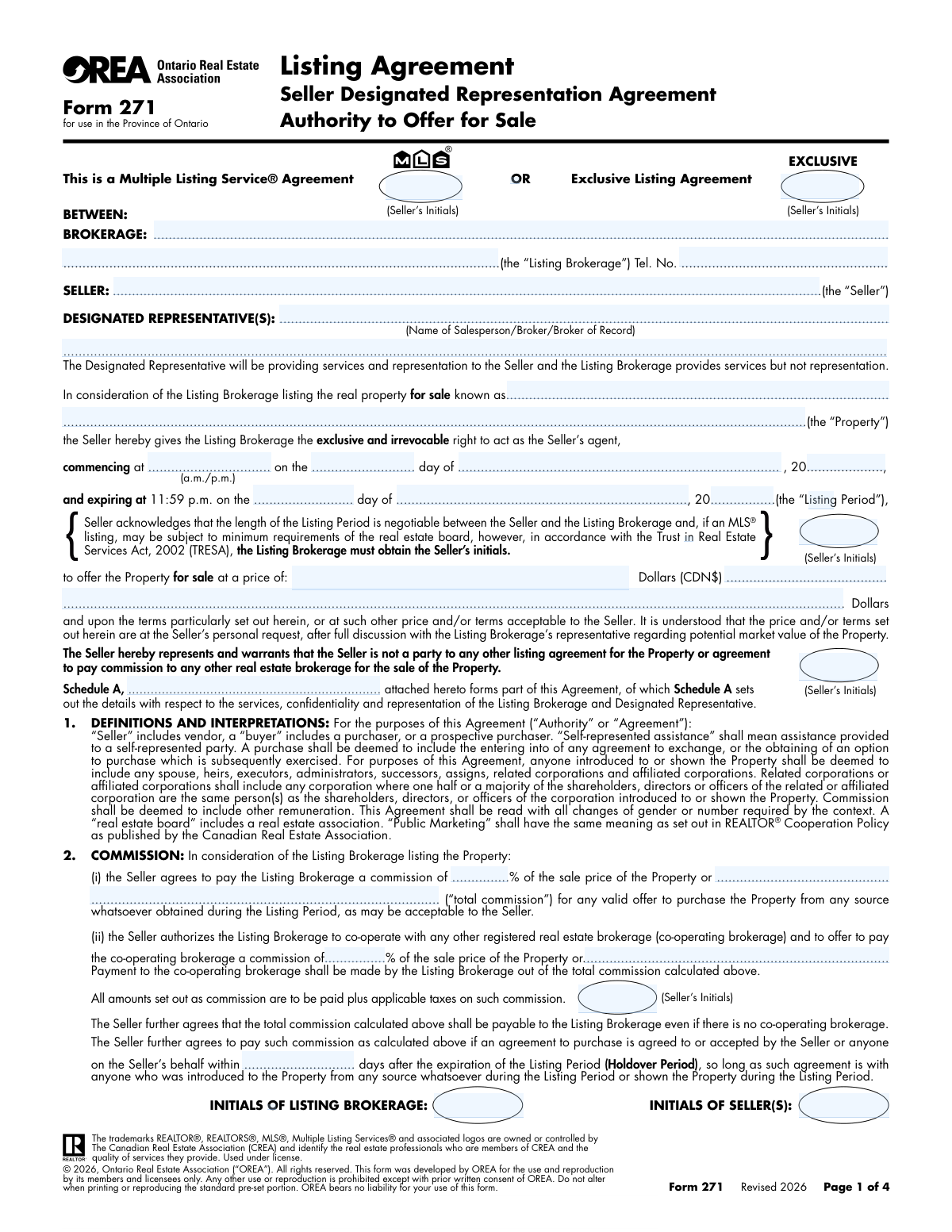
A Listing Agreement is a legal contract that grants a real estate brokerage the authority to act as an agent for a property seller. This document details the terms and conditions of the sale, including the asking price, the duration of the agreement, the commission rate, and whether the property will be listed on the Multiple Listing Service (MLS) or as an exclusive listing. Today, this form can be filled out quickly and accurately using AI-powered services like Instafill.ai, which can also convert non-fillable PDF versions into interactive fillable forms.
Listing Agreement is part of the
listing agreement forms category on Instafill.
Our AI automatically handles information lookup, data retrieval, formatting, and form filling.
It takes less than a minute to fill out Listing Agreement using our AI form filling.
Securely upload your data. Information is encrypted in transit and deleted immediately after the form is filled out.
Form specifications
| Form name: | Listing Agreement - Authority to Offer for Sale |
| Number of fields: | 70 |
| Number of pages: | 4 |
| Filled form examples: | Form Listing Agreement Examples |
| Language: | English |
More forms in Listing agreement forms
Instafill Demo: How to fill out PDF forms in seconds with AI
How to Fill Out Listing Agreement Online for Free in 2026
Are you looking to fill out a LISTING AGREEMENT form online quickly and accurately? Instafill.ai offers the #1 AI-powered PDF filling software of 2026, allowing you to complete your LISTING AGREEMENT form in just 37 seconds or less.
Follow these steps to fill out your LISTING AGREEMENT form online using Instafill.ai:
- 1 Navigate to Instafill.ai and upload or select the Listing Agreement form.
- 2 Choose the listing type by selecting either the 'Multiple Listing Service (MLS) Agreement' or 'Exclusive Listing Agreement' option.
- 3 Enter the seller and brokerage information, property details, listing period, and the agreed-upon asking price.
- 4 Use the AI assistant to fill in details regarding commissions, deposits, and any attached schedules like Schedule A.
- 5 Both the seller(s) and the listing brokerage representative must initial all required sections to acknowledge key terms.
- 6 Carefully review all the information entered for accuracy, then electronically sign and date the agreement to execute the contract.
Our AI-powered system ensures each field is filled out correctly, reducing errors and saving you time.
Why Choose Instafill.ai for Your Fillable Listing Agreement Form?
Speed
Complete your Listing Agreement in as little as 37 seconds.
Up-to-Date
Always use the latest 2026 Listing Agreement form version.
Cost-effective
No need to hire expensive lawyers.
Accuracy
Our AI performs 10 compliance checks to ensure your form is error-free.
Security
Your personal information is protected with bank-level encryption.
Frequently Asked Questions About Form Listing Agreement
This is a Listing Agreement form used by a property seller to authorize a real estate brokerage to market and sell their property. It outlines the key terms of the agreement, including the listing type, price, and duration.
An MLS Agreement authorizes the brokerage to list your property on the Multiple Listing Service (MLS), exposing it to a wide network of agents. An Exclusive Listing gives your brokerage the sole right to market and sell the property, which may or may not include an MLS listing.
The property seller(s) and an authorized representative of the Listing Brokerage must complete and sign this agreement to make it a legally binding contract.
Initialing key sections, such as the listing period, asking price, and listing type, confirms that you have specifically read, understood, and agreed to these critical terms. It acts as a safeguard to ensure mutual understanding on important points.
Schedule A is an attached document that contains additional terms, conditions, or property details that are part of the agreement. You must initial to acknowledge that you have received and agree to the contents of this schedule.
You will need the legal details of your property, your desired asking price, and the preferred start and end dates for the listing period. Be prepared to decide between an MLS or Exclusive listing.
The Listing Period defines the specific start and end dates during which the brokerage is authorized to market and sell your property under the terms of this agreement. You will need to initial this section to confirm the dates.
This section requires initials from both the seller and the brokerage to certify that all information provided throughout the agreement is accurate and true to the best of their knowledge.
Yes, services like Instafill.ai use AI to help you accurately auto-fill form fields from your saved information. This can save you significant time and help prevent errors.
Simply upload the Listing Agreement form to the Instafill.ai platform. Their AI will process the document, identify the fields, and guide you in filling out your information quickly and easily.
If you have a flat or non-fillable PDF, you can upload it to a service like Instafill.ai. The platform can convert it into an interactive, fillable form that you can complete and sign digitally.
Once all parties have signed, you should receive a completed copy for your records. The Listing Brokerage will then begin marketing your property according to the terms you've agreed upon.
The brokerage's initials signify their acceptance of the responsibilities and terms outlined in the agreement. This makes the contract mutually binding for both the seller and the brokerage.
Compliance Listing Agreement
Validation Checks by Instafill.ai
1
Exclusive Listing Type Selection
Ensures that one and only one listing type, either 'Multiple Listing Service (MLS) Agreement' or 'Exclusive Listing Agreement', is selected. This is a fundamental choice that dictates the terms of the entire agreement. If neither or both are selected, the form submission should be rejected with an error prompting the user to make a single, valid choice.
2
Conditional MLS Initials Requirement
Checks that if the 'Multiple Listing Service (MLS) Agreement' option is selected, all related seller initial fields (e.g., 'MLS Seller Initials') are completed. These initials confirm the seller's consent to MLS-specific terms. Failure to provide these initials on an MLS agreement would render those clauses void and the contract incomplete.
3
Conditional Exclusive Listing Initials Requirement
Validates that if the 'Exclusive Listing Agreement' option is selected, the 'Exclusive Listing Seller Initials' field is filled. This is a critical acknowledgement of the brokerage's exclusive right to market the property. An exclusive agreement without this specific initial would be legally ambiguous and unenforceable.
4
Mutual Exclusion of Listing Type Initials
Verifies that initials are not provided for both the MLS and Exclusive listing sections simultaneously. This prevents a contradictory contract where the seller agrees to both an open MLS listing and a private exclusive listing. If initials are found for the non-selected agreement type, an error should be flagged to prevent submission.
5
Listing Period Acknowledgment
Ensures the 'Listing Period Seller Initials' field is not empty. This initial confirms the seller's agreement to the start and end dates of the contract, which defines the legally binding duration of the brokerage's authority to sell the property. Without this acknowledgment, the contract's term is not confirmed.
6
Asking Price Acknowledgment
Checks for the presence of the seller's initials in the 'Asking Price Seller Initials' field. This confirms the seller has reviewed and approved the official asking price for the property. This validation is crucial to prevent disputes about the advertised price of the property after the agreement is signed.
7
Schedule A Acknowledgment
Validates that the 'Schedule A Seller Initials' field has been completed. Schedule A typically contains critical details about the property, chattels, and fixtures included in the sale. Missing initials here indicate the seller has not formally acknowledged this essential addendum, making the agreement incomplete.
8
Seller Initials Completeness Check
Performs a comprehensive check to ensure all required initial fields designated for the 'Seller(s)' are filled across the entire agreement. This is vital for legal enforceability, as each initial signifies understanding and consent to a specific clause or section. The system should highlight all missing seller initial fields upon failure.
9
Listing Brokerage Initials Completeness Check
Ensures that all fields requiring the 'Listing Brokerage Initials' are completed by the brokerage representative. This confirms the brokerage's acceptance of its duties and responsibilities under the agreement. An agreement missing brokerage initials is not mutually executed and therefore not binding.
10
Verification of Information Section Completion
Validates that both the 'Initials — Seller(s)' and 'Initials — Listing Brokerage' fields within the '11. VERIFICATION OF INFORMATION' section are filled. This section confirms that both parties attest to the accuracy of the information provided. Failure to complete this section can lead to legal challenges regarding misrepresentation.
11
Initials Field Format
Checks that all initial fields contain a valid format, typically 2-3 alphabetic characters. This prevents users from entering full signatures, random characters, or leaving the field with invalid data. A consistent format ensures clarity and professionalism on the legal document.
Common Mistakes in Completing Listing Agreement
This form has numerous, separate fields requiring initials from both the seller(s) and the listing brokerage. It is extremely common for one or more of these initial boxes to be missed, especially in sections like 'Schedule A Acknowledgement' or 'Verification of Information'. A missing initial can invalidate that specific clause or even the entire agreement, leading to legal disputes or delays in listing the property. To avoid this, carefully review every page and use the checklist of initial fields as a guide before final submission.
Sellers often get confused and may select both 'Multiple Listing Service (MLS) Agreement' and 'Exclusive Listing Agreement', or they might fail to select either one. This creates ambiguity about the brokerage's authority and how the property will be marketed. This mistake can lead to contract invalidation and requires amendments, delaying the entire selling process. Ensure you understand the difference and select only one option that reflects your agreement with the brokerage.
Many fields specifically request 'Initials', not a full signature. Applicants, in a hurry or not reading closely, often sign their full name, which is not legally the same and can be rejected. This happens because people are more accustomed to signing than initialing. This error requires the form to be re-done, causing delays. Always use only your initials in the designated boxes.
The form includes separate initial fields for the 'Seller(s)' and the 'Listing Brokerage'. A common mistake is for the seller to accidentally place their initials in the box designated for the brokerage representative. This error invalidates the acknowledgement for that section and requires correction. To prevent this, carefully read the label for each initial box before signing. AI-powered form fillers like Instafill.ai can help by clearly designating fields for each party, reducing the chance of crossover errors.
The form requires the seller to initial a clause confirming that 'Schedule A is attached to and forms part of this agreement'. A frequent error is initialing this acknowledgement without physically or digitally attaching the required schedule. This can create a significant legal issue, as the terms contained within the missing schedule are not legally incorporated into the agreement. Always ensure any document referenced in the main agreement is attached before you initial the corresponding clause.
The text fields for seller and brokerage names, addresses, and legal information are often filled out inconsistently or with typographical errors. For example, a seller might use a nickname or an abbreviated company name, which may not match the legal title of the property owner. These discrepancies can cause significant issues during the closing process or if legal verification is required. Ensure all names and details are entered exactly as they appear on official legal documents.
The fields for the listing period start and end dates are prone to error, such as using an incorrect date format, reversing the start and end dates, or leaving them blank. This creates uncertainty about when the agreement is active, potentially leading to disputes over commission or marketing timelines. Double-check that the dates are logical, clearly formatted (e.g., MM/DD/YYYY), and accurately reflect the agreed-upon term. Using a tool like Instafill.ai can help validate date formats automatically.
Towards the end of legal forms, there is often a 'Verification of Information' clause that requires initials from all parties. People tend to treat this as standard boilerplate and may skim over it, missing the required initial fields. Failing to initial this section implies that you have not reviewed and confirmed the accuracy of the information provided, which could weaken your position in a potential dispute. Always treat every section requiring initials with equal importance.
While the form has a field for 'Asking Price Seller Initials', the corresponding field for the actual price might be left blank or filled in ambiguously (e.g., 'Negotiable'). This is a critical omission that makes the agreement incomplete. The asking price is a fundamental term of the listing, and its absence can render the contract unenforceable. Ensure a specific numerical value is entered and that you initial the section to confirm your agreement with that price.
Often, these agreements are provided as flat, non-fillable PDF documents, leading users to print them out and fill them by hand. This manual process increases the likelihood of illegible handwriting, missed fields, and data entry errors. It's a common misconception that such documents cannot be filled digitally. Modern tools like Instafill.ai can convert non-fillable PDFs into interactive, fillable forms, allowing for clean, typed entries and reducing the chance of manual errors.
Saved over 80 hours a year
“I was never sure if my IRS forms like W-9 were filled correctly. Now, I can complete the forms accurately without any external help.”
Kevin Martin Green
Your data stays secure with advanced protection from Instafill and our subprocessors

Robust compliance program
Transparent business model
You’re not the product. You always know where your data is and what it is processed for.
ISO 27001, HIPAA, and GDPR
Our subprocesses adhere to multiple compliance standards, including but not limited to ISO 27001, HIPAA, and GDPR.
Security & privacy by design
We consider security and privacy from the initial design phase of any new service or functionality. It’s not an afterthought, it’s built-in, including support for two-factor authentication (2FA) to further protect your account.
Fill out Listing Agreement with Instafill.ai
Worried about filling PDFs wrong? Instafill securely fills listing-agreement-authority-to-offer-for-sale forms, ensuring each field is accurate.



