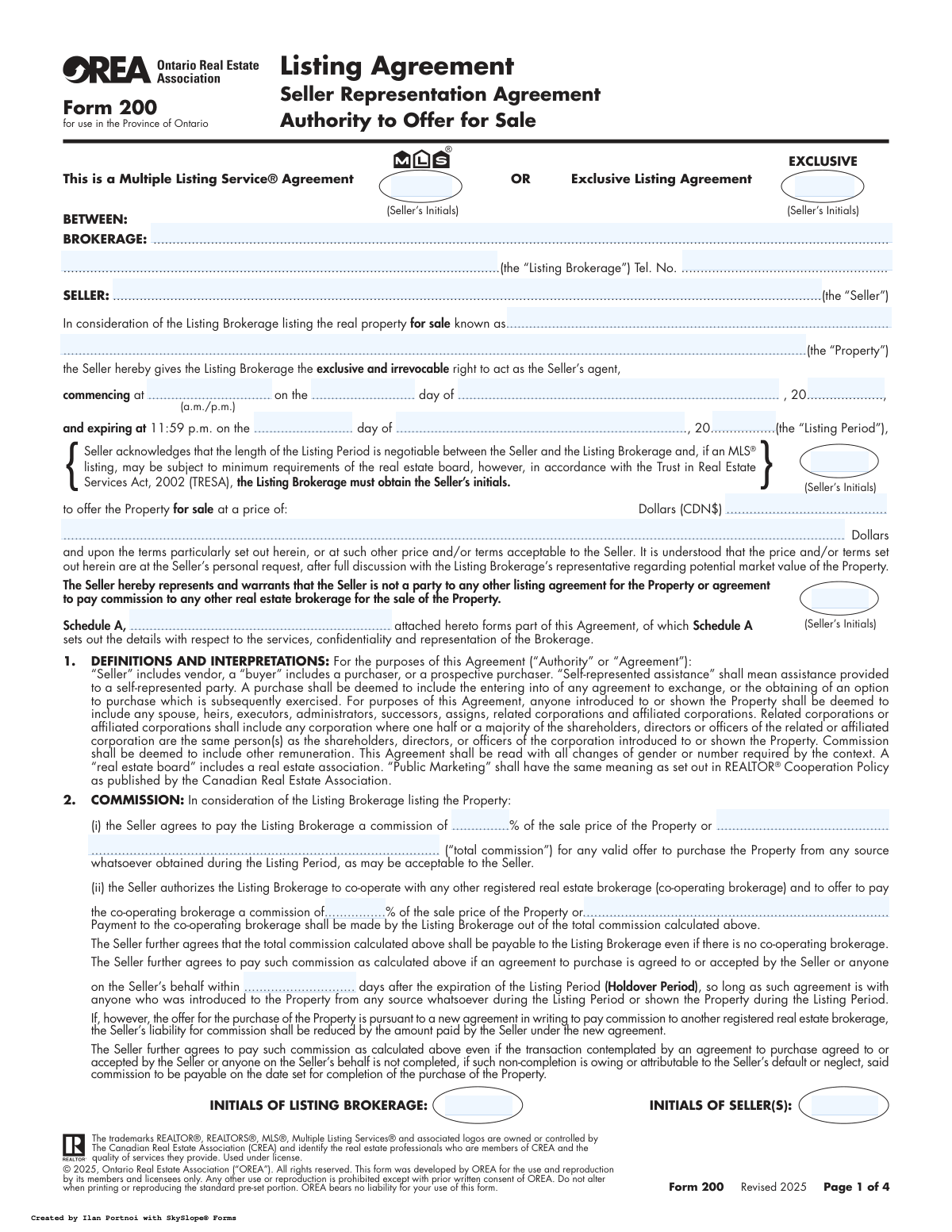
Yes! You can use AI to fill out OREA Form 200, Listing Agreement Seller Representation Agreement Authority to Offer for Sale

OREA Form 200, also known as the Listing Agreement, is a legally binding contract between a property seller and a real estate brokerage in the province of Ontario. This form grants the brokerage the exclusive right to represent the seller and market their property, outlining critical details like the listing price, commission structure, and the duration of the agreement. It is a foundational document for initiating the sale of real estate through a licensed brokerage. Today, this form can be filled out quickly and accurately using AI-powered services like Instafill.ai, which can also convert non-fillable PDF versions into interactive fillable forms.
OREA Form 200 is part of the listing agreement forms and OREA forms categories on Instafill.
Our AI automatically handles information lookup, data retrieval, formatting, and form filling.
It takes less than a minute to fill out OREA Form 200 using our AI form filling.
Securely upload your data. Information is encrypted in transit and deleted immediately after the form is filled out.

Form specifications

Form name: OREA Form 200, Listing Agreement Seller Representation Agreement Authority to Offer for Sale
Number of fields: 58
Number of pages: 4
Filled form examples: Form OREA Form 200 Examples
Language: English
main-image

Instafill Demo: How to fill out PDF forms in seconds with AI

How to Fill Out OREA Form 200 Online for Free in 2026

Are you looking to fill out a OREA FORM 200 form online quickly and accurately? Instafill.ai offers the #1 AI-powered PDF filling software of 2026, allowing you to complete your OREA FORM 200 form in just 37 seconds or less.
Follow these steps to fill out your OREA FORM 200 form online using Instafill.ai:
  1. 1 Navigate to Instafill.ai and upload your OREA Form 200 or select it from the template library.
  2. 2 Enter the full legal names and contact information for the Seller(s) and the Listing Brokerage in the designated fields.
  3. 3 Define the property by providing its full address or legal description, and specify the listing price in Canadian dollars.
  4. 4 Complete the Listing Period section by entering the exact commencement and expiration dates and times for the agreement.
  5. 5 Specify the commission details, including the total commission percentage and the amount to be offered to a co-operating brokerage.
  6. 6 Review all clauses, including representation, marketing, and information use, providing initials where required.
  7. 7 Securely sign the document electronically. The AI tool will guide the seller, brokerage representative, and any consenting spouse to the correct signature and date fields.

Our AI-powered system ensures each field is filled out correctly, reducing errors and saving you time.

Why Choose Instafill.ai for Your Fillable OREA Form 200 Form?

Speed

Complete your OREA Form 200 in as little as 37 seconds.

Up-to-Date

Always use the latest 2026 OREA Form 200 form version.

Cost-effective

No need to hire expensive lawyers.

Accuracy

Our AI performs 10 compliance checks to ensure your form is error-free.

Security

Your personal information is protected with bank-level encryption.

Frequently Asked Questions About Form OREA Form 200

OREA Form 200 is a legally binding contract, also known as a Listing Agreement, between a property seller and a real estate brokerage in Ontario. It grants the brokerage the exclusive authority to market and sell the property on the seller's behalf.

The agreement must be signed by all legal owners of the property (the "Seller"), an authorized representative of the brokerage, and a spouse who is not an owner if the property is a matrimonial home under the Family Law Act.

An MLS® Agreement allows the brokerage to post your property on the Multiple Listing Service®, making it visible to all member real estate agents. An Exclusive Agreement means only your brokerage can represent the sale, and it won't be on the MLS®, which may limit its exposure.

The commission is typically a percentage of the final sale price, as specified in Section 2 of the agreement. It is payable upon the successful completion of the sale, but may also be due if the seller defaults on an accepted offer.

The Holdover Period is a set number of days after the listing agreement expires during which you may still owe commission to the brokerage. This applies if you sell the property to a buyer who was introduced to it during the listing period.

Yes, the form states that the length of the Listing Period is negotiable between the seller and the brokerage. However, it may be subject to minimum requirements set by the local real estate board for MLS® listings.

Multiple Representation occurs when the same brokerage represents both the seller and the buyer in the same transaction. The brokerage must remain impartial and cannot disclose certain confidential information, as detailed in Section 3.

Under Ontario's Family Law Act, if the property is a matrimonial home, the non-titled spouse has legal rights to the property and their consent is required for the sale. The Spousal Consent section ensures this legal requirement is met.

By signing, you consent for the brokerage and real estate board to use listing information, including photos and sales data, for statistical and comparative purposes indefinitely. This data becomes part of the MLS® historical database.

The agreement is an "irrevocable" contract for the specified Listing Period, meaning you cannot unilaterally cancel it. Any early termination would require the written consent and agreement of the brokerage, which may involve compensation.

You will need the full legal names of all sellers, the complete property address, your desired listing price, and be prepared to negotiate the commission rate and the start and end dates for the listing period with your agent.

Yes, AI-powered services like Instafill.ai can help you accurately fill out this form by extracting information and placing it in the correct fields. This saves time and reduces errors, but the final document should always be reviewed by you and your real estate professional.

To fill out this form using Instafill.ai, you can upload the document to their platform. The AI will identify the fields, allowing you to provide the information to have it automatically and accurately populated.

If you have a non-fillable or "flat" PDF, you can use a service like Instafill.ai. Their technology can convert the non-fillable PDF into an interactive, fillable form that you can complete online easily.

Compliance OREA Form 200
Validation Checks by Instafill.ai

1
Agreement Type Exclusivity Check
This validation ensures that the seller has initialed either the 'Multiple Listing Service® Agreement' box or the 'Exclusive Listing Agreement' box, but not both. It is critical to establish the single, correct type of listing agreement from the outset to define marketing rules and obligations. A failure would render the agreement ambiguous and legally problematic, requiring user correction before proceeding.
2
Listing Period Chronology Validation
This check verifies that the 'Listing Period' expiration date is chronologically after the commencement date. An agreement cannot expire before it begins. This is a fundamental logical check to ensure the contract's term is valid and enforceable. If the dates are illogical, the form submission will be rejected, prompting the user to correct the dates.
3
Co-operating Commission Cap
This validation ensures that the commission offered to a co-operating brokerage (whether as a percentage or a flat amount) does not exceed the total commission payable to the listing brokerage. The co-op commission is paid out of the total commission, so it cannot be larger. This prevents illogical and financially impossible commission structures, protecting the listing brokerage from errors.
4
Commission Value Entry Logic
This check validates that for the total commission, either the percentage field or the flat amount field is filled, but not both. The same logic is applied to the co-operating brokerage commission fields. This prevents ambiguity in how the commission is to be calculated. If both are filled or neither is filled, an error is flagged to force a clear choice.
5
MLS-Conditional Acknowledgment
This validation confirms that the 'Seller's Initials (Listing Period Acknowledgment)' field is completed if and only if the 'Multiple Listing Service® Agreement' has been initialed. This acknowledgment is a specific requirement under TRESA for MLS® listings. Failure to provide these initials on an MLS® agreement would make the form incomplete and non-compliant.
6
Termination Consent Exclusivity
This check ensures the seller has initialed exactly one of the two options ('Does' or 'Does Not') regarding consent for contact after the agreement terminates. The seller must make a clear choice. The system will flag an error if both or neither option is initialed, preventing ambiguity about the seller's post-agreement privacy preferences.
7
Holdover Period Format Validation
This validation ensures that the 'Holdover Period' field contains a positive integer representing the number of days. The holdover period is a critical term defining the brokerage's right to a commission after the listing expires, so the value must be a clear and valid number. Non-numeric or negative values would be rejected.
8
Primary Party Identification
This check mandates that the 'Brokerage Name' and 'Seller Name' fields are not empty. These fields identify the primary parties to the contract, and their absence would render the agreement void. This is a basic completeness check to ensure the legal entities entering the agreement are clearly stated.
9
Property Address Completeness
This validation requires the 'Property Full Address' field to be completed. The entire agreement is contingent on identifying the specific real property being offered for sale. An empty or incomplete address makes the contract's subject matter ambiguous and unenforceable. The form cannot be processed without this critical information.
10
Signature and Commencement Date Coherence
This check verifies that the 'Signature Date' of the seller is on or after the 'Commencement Date' of the listing period. A party cannot legally sign and bind themselves to an agreement on a date prior to when the agreement itself is set to begin. This ensures the timeline of events is logical and legally sound.
11
Declaration of Insurance Completeness
This validation confirms that both the 'Salesperson/Broker/Broker of Record Name' and the corresponding 'Signature' are present in the Declaration of Insurance section. This declaration is a regulatory requirement under TRESA to confirm the agent is insured. Missing either the name or the signature results in a non-compliant form.
12
Schedule A Data Consistency
This check cross-references the 'Brokerage Name', 'Seller Name', and 'Property' address fields on Schedule A with the corresponding fields on page 1 of the agreement. These values must match exactly to ensure the schedule is correctly associated with the main agreement. A mismatch would indicate an error and could invalidate the terms on the schedule.
13
Page Initials Requirement
This validation ensures that the initial fields for both the Listing Brokerage and the Seller(s) at the bottom of pages 1, 2, and on Schedule A are not left blank. These initials signify that all parties have reviewed and acknowledged the terms on each page. Missing initials can be used to dispute whether a party agreed to the terms on that specific page.
14
Acknowledgement Date Validation
This check ensures the 'Acknowledgement Date' is present and is on or after the Seller's 'Signature Date'. The acknowledgement confirms the seller has received a copy of the signed agreement. Logically, this must happen on the same day as signing or a later date, but never before.

Common Mistakes in Completing OREA Form 200

Incomplete or Incorrect Seller Names

Sellers often enter nicknames or fail to list all legal owners as they appear on the property's title deed. This mistake occurs when they don't realize the name must be an exact legal match for the contract to be valid. An incorrect name can render the agreement unenforceable and cause significant delays or failure during the property closing process. To avoid this, always reference the property deed to list all owners' full legal names exactly as they appear.

Ambiguous Agreement Type Selection

The form requires the seller to initial for either a 'Multiple Listing Service® Agreement' or an 'Exclusive Listing Agreement,' but not both. Sellers may get confused and initial both options or neither, creating ambiguity about how the property can be marketed. This can lead to disputes with the brokerage over marketing strategy and potential exposure. Before initialing, discuss the pros and cons of each listing type with your agent to make an informed choice.

Conflicting Commission Details

The commission section allows for a percentage or a flat dollar amount, and people sometimes enter values in both fields or leave the co-operating brokerage commission blank. This creates a contradiction that can lead to serious financial disputes after a sale is negotiated. To prevent this, clearly specify the commission as either a percentage or a fixed amount, not both, and ensure the portion offered to a co-operating brokerage is explicitly stated. AI-powered tools like Instafill.ai can help validate that only one format is used, preventing contradictory entries.

Forgetting to Initial All Required Sections

This agreement has numerous places requiring the seller's initials, such as at the bottom of each page and for specific clauses like the listing period acknowledgment. It is easy to overlook one of these small boxes when reviewing a multi-page document. Missing initials can be used to argue that the seller did not see or agree to a specific term, potentially weakening the contract's enforceability. Using a guided digital form filler can highlight all required fields and initial boxes, ensuring nothing is missed before finalization.

Neglecting the Spousal Consent Section

If the property is a matrimonial home under the Family Law Act, the signature of the non-owner spouse is required, a fact sellers often overlook or misunderstand. Failing to secure this consent can give the non-signing spouse the power to invalidate any subsequent sale agreement, causing a successful deal to collapse. This can lead to significant legal and financial repercussions. If the property is a primary family residence, ensure the spousal consent section is completed, or seek legal advice if unsure.

Incorrect or Vague Listing Period Dates

Sellers may make simple data entry errors when filling in the commencement and expiration dates or use vague terms instead of specific calendar dates. This creates uncertainty about the exact duration of the agent's authority to sell the property and can lead to disputes over commission entitlement, especially concerning the holdover clause. Always enter a precise start date (including time) and end date (day, month, year) and double-check them for accuracy. Tools like Instafill.ai can help by providing calendar pickers and validating date formats to reduce errors.

Leaving the Holdover Period Blank

The 'Holdover Period' field specifies a number of days after the listing expires during which the seller may still owe commission. Sellers often miss this field or don't understand its significance, leaving it blank. This creates ambiguity and can lead to unexpected commission claims long after the agreement has seemingly ended. Always negotiate this period with your agent and ensure the agreed-upon number of days is clearly written in the space provided.

Inaccurate Property Address or Description

A seller might provide a common mailing address instead of the full, correct municipal address, or forget a unit number for a condominium. This error often results from rushing or not having official property documents on hand. An inaccurate description can create ambiguity about the subject of the contract, potentially causing issues with marketing on MLS® and legal challenges. To avoid this, use the full address as it appears on your property tax bill or deed.

Failing to Attach and Reference Schedule A

The agreement explicitly states that 'Schedule A... forms part of this Agreement,' but sellers or agents can forget to attach, reference, or initial it. This schedule often contains crucial custom terms, exclusions, or details about the brokerage's services. If not properly attached and acknowledged, these terms may be deemed unenforceable, leading to disputes over the agent's duties. Always ensure Schedule A is completed, attached, and initialed by all parties.
Saved over 80 hours a year

“I was never sure if my IRS forms like W-9 were filled correctly. Now, I can complete the forms accurately without any external help.”

Kevin Martin Green

Your data stays secure with advanced protection from Instafill and our subprocessors

Robust compliance program

Transparent business model

You’re not the product. You always know where your data is and what it is processed for.

ISO 27001, HIPAA, and GDPR

Our subprocesses adhere to multiple compliance standards, including but not limited to ISO 27001, HIPAA, and GDPR.

Security & privacy by design

We consider security and privacy from the initial design phase of any new service or functionality. It’s not an afterthought, it’s built-in, including support for two-factor authentication (2FA) to further protect your account.

Fill out OREA Form 200 with Instafill.ai

Worried about filling PDFs wrong? Instafill securely fills orea-form-200-listing-agreement-seller-representation-agreement-authority-to-offer-for-sale forms, ensuring each field is accurate.