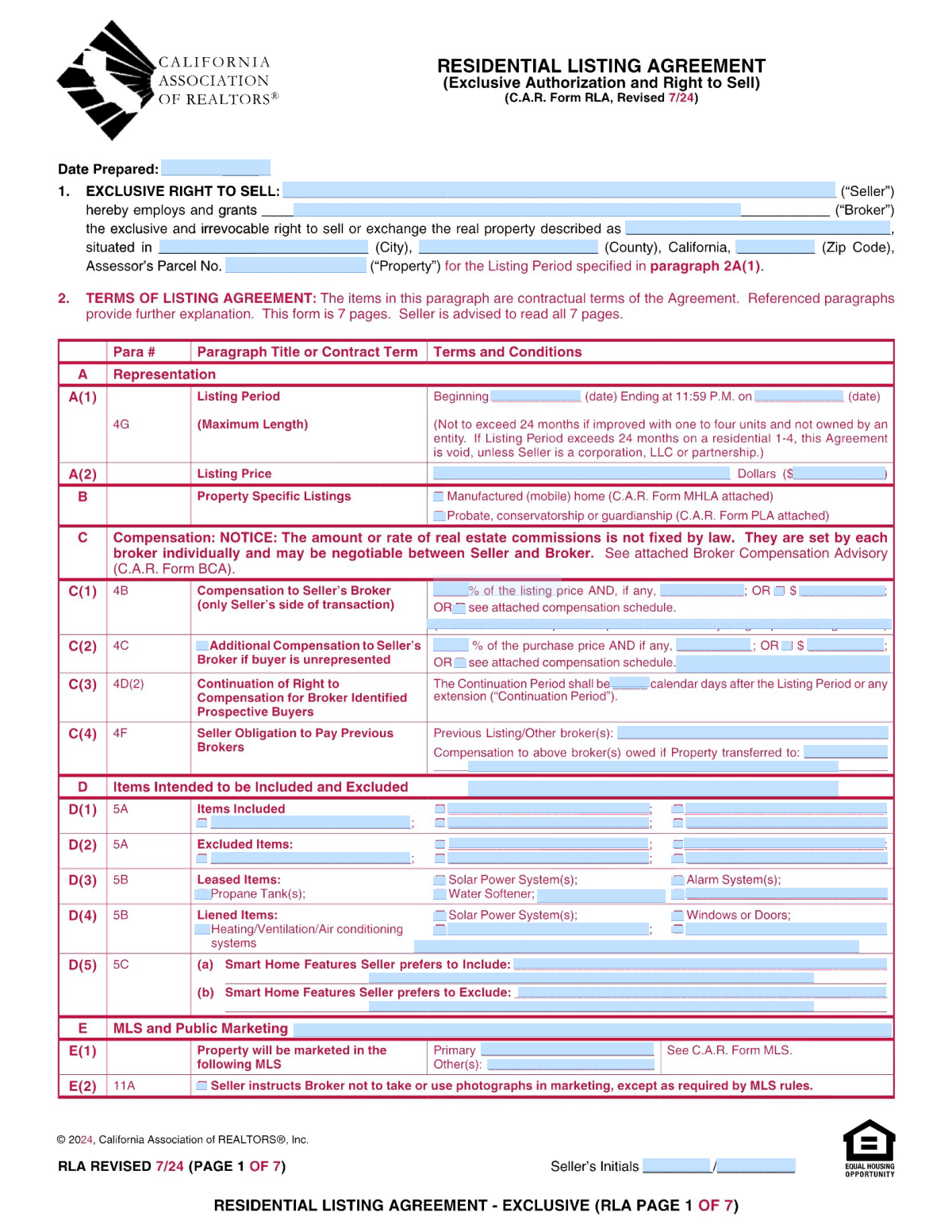
Yes! You can use AI to fill out C.A.R. Form RLA, Residential Listing Agreement (Exclusive Authorization and Right to Sell)

The C.A.R. Form RLA, or Residential Listing Agreement, is a standard contract in California real estate that grants a broker the exclusive authorization to sell a seller's property. It outlines critical terms such as the listing price, the length of the listing period, broker compensation, and marketing permissions, making it a foundational document for the sale process. This agreement protects both the seller and the broker by clearly defining their roles and responsibilities. Today, this form can be filled out quickly and accurately using AI-powered services like Instafill.ai, which can also convert non-fillable PDF versions into interactive fillable forms.
Our AI automatically handles information lookup, data retrieval, formatting, and form filling.
It takes less than a minute to fill out C.A.R. Form RLA using our AI form filling.
Securely upload your data. Information is encrypted in transit and deleted immediately after the form is filled out.

Form specifications

Form name: C.A.R. Form RLA, Residential Listing Agreement (Exclusive Authorization and Right to Sell)
Number of pages: 7
Language: English
main-image

Instafill Demo: How to fill out PDF forms in seconds with AI

How to Fill Out C.A.R. Form RLA Online for Free in 2026

Are you looking to fill out a C.A.R. FORM RLA form online quickly and accurately? Instafill.ai offers the #1 AI-powered PDF filling software of 2026, allowing you to complete your C.A.R. FORM RLA form in just 37 seconds or less.
Follow these steps to fill out your C.A.R. FORM RLA form online using Instafill.ai:
  1. 1 Navigate to Instafill.ai and upload your C.A.R. Form RLA or select it from the template library.
  2. 2 Use the AI assistant to fill in seller and broker information, along with the complete property description including address and APN.
  3. 3 Define the listing period by entering the start and end dates, and specify the listing price.
  4. 4 Detail the broker's compensation, including the commission percentage or flat fee and any additional compensation terms.
  5. 5 Specify all items to be included or excluded from the sale, such as appliances, fixtures, and smart home devices.
  6. 6 Indicate marketing instructions, including MLS entry, and any seller opt-outs for lockboxes or signs.
  7. 7 Attach any required addenda, review the completed agreement for accuracy, and proceed to e-sign the document.

Our AI-powered system ensures each field is filled out correctly, reducing errors and saving you time.

Why Choose Instafill.ai for Your Fillable C.A.R. Form RLA Form?

Speed

Complete your C.A.R. Form RLA in as little as 37 seconds.

Up-to-Date

Always use the latest 2026 C.A.R. Form RLA form version.

Cost-effective

No need to hire expensive lawyers.

Accuracy

Our AI performs 10 compliance checks to ensure your form is error-free.

Security

Your personal information is protected with bank-level encryption.

Frequently Asked Questions About Form C.A.R. Form RLA

This form is a residential listing agreement that grants a real estate broker the exclusive right to market and sell your property for a specified period and price.

The property seller(s) must complete and sign this form in agreement with their chosen real estate broker to officially list the property for sale.

You will need the property's full street address, county, ZIP code, and the Assessor's Parcel Number (APN) to accurately identify the property.

In Section C, you can specify the broker's compensation as a percentage of the listing price, a fixed flat-dollar amount, or by referencing a separate attached compensation schedule.

This is a protection clause for the broker. It specifies a number of days after the listing expires during which the broker is still owed a commission if you sell to a buyer they introduced to the property.

You should list all items that are included in the sale, such as refrigerators or washing machines, in Section D(1) 'Items Included'.

In Section D(3), you must check the box for 'Solar Power System(s)' under 'Leased Items' to indicate they are not owned by you and are subject to a lease agreement.

Yes, Section F(1) allows you to instruct your broker to present offers as soon as they are received, wait until a specific date, or hold them for a set number of days after the property is listed on the MLS.

You can opt out of having signs placed on the property by checking the 'Signs' box in Section I, 'Seller Opt Outs'.

You must indicate this by checking the appropriate box in Section B and attaching the required C.A.R. Form PLA (Probate Listing Addendum).

Yes, services like Instafill.ai use AI to accurately auto-fill form fields from your existing documents, which saves time and helps prevent errors.

Simply upload your form to the Instafill.ai platform. The AI will make all fields interactive, and you can either type in your information or have the AI auto-fill it for you.

You can use a service like Instafill.ai, which can convert flat, non-fillable PDFs into interactive forms that you can easily complete and sign online.

Section D(5) provides separate lines for you to list the specific smart home devices you intend to include with the property and those you plan to exclude and take with you.

Compliance C.A.R. Form RLA
Validation Checks by Instafill.ai

1
Ensures Listing Period End Date is after Start Date
This check verifies that the 'Listing Period — End Date' is chronologically later than the 'Listing Period — Start Date'. A listing agreement cannot legally end before it begins, so this validation is critical for establishing a valid contract term. If this validation fails, the system should flag the error to prevent the creation of a contract with an impossible duration.
2
Verifies Numeric and Written Listing Prices Match
This validation compares the 'Listing Price (numeric)' with the 'Listing Price (words)' to ensure they represent the same amount. It is a crucial legal safeguard to prevent ambiguity or disputes over the property's official asking price. A mismatch could lead to incorrect marketing, confusion for potential buyers, and challenges to the contract's validity.
3
Validates Full Property Address is Provided
This check ensures that the 'Property Street Address', 'Property City', 'Property County', and 'Property ZIP Code' fields are all filled out. A complete and accurate address is fundamental for legally identifying the property in the agreement and for marketing purposes. Failure to provide a full address makes the contract legally ambiguous and prevents the property from being correctly listed in the MLS.
4
Ensures Only One Broker Compensation Method is Selected
This validation checks that for 'C(1) Compensation to Seller's Broker', only one of the primary compensation methods (percentage, flat dollar amount, or attached schedule) is selected. Selecting multiple methods creates a contractual conflict regarding how the broker is to be paid. The system should enforce a single choice to ensure clarity and prevent future payment disputes.
5
Requires Compensation Value when Method is Checked
This check ensures that if a checkbox for a specific compensation type is selected (e.g., '% of Listing Price' or '$ Amount'), the corresponding value field is not empty. A checked box without a value makes the compensation term incomplete and unenforceable. This validation guarantees that any selected compensation method is fully defined with a specific rate or amount.
6
Validates Property ZIP Code Format
This check ensures the 'Property ZIP Code' field contains a valid 5-digit or 9-digit (ZIP+4) numeric code. An incorrect ZIP code can cause issues with mail delivery, online mapping services, and MLS data accuracy. This validation prevents data entry errors and ensures the property's location is correctly categorized for logistical and marketing purposes.
7
Ensures Only One Offer Presentation Timing Method is Selected
This validation checks section F(1) to confirm that only one instruction for presenting offers is selected: 'as soon as practicable', 'on a specified date', or 'X days after MLS listing'. Conflicting instructions on when to present offers would make it impossible for the broker to comply with the seller's wishes. This rule enforces a single, clear directive for handling offers.
8
Requires Specification when 'Other' is Selected
This validation applies to fields like 'F(3) Other (specify)' for investigation reports and 'A - Other Advisory (Specify)'. It ensures that if the 'Other' checkbox is selected, the adjacent text field specifying the item is not empty. This prevents incomplete entries where an option is indicated but not defined, which would create ambiguity in the contract terms.
9
Requires Details for Checked Leased or Liened Items
This check ensures that if a box is checked for a leased item (e.g., 'D(3) Solar Power System(s)') or a liened item (e.g., 'D(4) Windows or Doors'), the corresponding detail field is filled out. It is legally critical to disclose the terms of any leases or liens that affect items on the property. Failure to provide these details can lead to legal liability and complications during the sale.
10
Prevents an Item from being both Included and Excluded
This validation cross-references the lists of items in 'D(1) Items Included' and 'D(2) Excluded Items'. It flags any item that appears on both lists, as this creates a direct contradiction in the contract. Resolving this conflict before signing is essential to prevent disputes over what conveys with the property at closing.
11
Requires Addendum Description when Addendum Box is Checked
This validation ensures that if an addendum checkbox (e.g., 'B - Addendum 1') is checked, the corresponding description field ('Addendum 1 — Form/Description') is filled with the name or form number of the addendum. Simply checking the box without identifying the document makes the reference meaningless and legally insufficient. This check ensures all incorporated documents are clearly identified.
12
Validates Assessor's Parcel Number (APN) Presence
This check verifies that the 'Assessor's Parcel Number (APN)' field is not empty. The APN is a unique identifier used for property tax and legal record-keeping purposes, and it is essential for a clean title transfer. An absent APN can cause significant delays and errors in the title search and closing process.
13
Verifies Seller Initials are Present
This check confirms that the 'Seller Initials 1' and 'Seller Initials 2' (if applicable) fields are filled on each page or section where they are required. Missing initials can call into question whether the seller has reviewed and agreed to all terms of the agreement. This validation helps ensure the contract is fully executed and legally binding.
14
Requires Specification for 'Other Titled Item'
This validation ensures that if the checkbox for 'D(4) Other Titled Item' is checked, the adjacent text field specifying the item is filled in. Indicating an 'other' item exists without describing it creates an incomplete and ambiguous contract term. This check guarantees that any additional titled items included in the sale are explicitly identified.

Common Mistakes in Completing C.A.R. Form RLA

Using Incomplete or Incorrect Seller Names

Sellers often enter nicknames or incomplete versions of their names instead of their full legal names as they appear on the property's title. This mistake can cause significant delays and complications during the title transfer and closing process, as the names on the listing agreement must match the title documents exactly. To avoid this, sellers should reference their property deed or other official ownership documents and enter their names precisely as written. AI-powered tools can help by flagging fields that require legal names and ensuring consistency across documents.

Mismatched Written and Numeric Listing Prices

A frequent error is a discrepancy between the listing price written out in words and the one entered as a number. This can happen due to a simple typo or a last-minute change that is only updated in one of the two fields. Such ambiguity can create legal disputes over the intended price; in many contracts, the written amount legally supersedes the numeric one. Always double-check that both the 'Listing Price (words)' and 'Listing Price (numeric)' fields match perfectly before signing.

Ambiguous Broker Compensation Terms

The compensation section (Section C) is complex, and users often make mistakes like checking both the percentage box and the flat-fee box, or leaving the section entirely blank. This creates confusion and can lead to serious disputes with the broker over their commission. It is crucial to select only one compensation method (percentage, flat fee, or attached schedule) and fill in the corresponding amount clearly. Using a tool like Instafill.ai can help guide users through these conditional fields, preventing contradictory entries.

Vague Descriptions of Included or Excluded Items

Sellers often provide generic descriptions like 'refrigerator' or 'drapes' in the 'Items Included/Excluded' section (Section D). This ambiguity leads to arguments at closing about which specific refrigerator or set of drapes was meant to be included or excluded. To prevent this, be highly specific by including brand, model, color, or location (e.g., 'Samsung stainless steel refrigerator in kitchen' or 'custom silk drapes in living room'). This clarity protects both buyer and seller from misunderstandings.

Forgetting to Disclose Leased or Liened Items

It is a critical error to overlook leased items like solar panels, alarm systems, or water softeners, or owned items that have an outstanding loan (lien). Failing to check the appropriate boxes in Section D and provide details can mislead buyers and jeopardize their financing, potentially causing the entire deal to collapse. Sellers must carefully review all home systems and equipment to identify any leases or liens and disclose them accurately on the form.

Missing the Assessor's Parcel Number (APN)

The street address alone may not be sufficient for a legally precise identification of the property, especially for large lots, condos, or properties with irregular boundaries. Omitting the Assessor's Parcel Number (APN) can create ambiguity in the contract and cause issues with title searches and legal filings. The APN should be copied carefully from a property tax bill or the county assessor's website to ensure the correct parcel of land is under contract.

Forgetting to Attach Referenced Addenda

The form allows for various conditions by referencing other forms, such as the 'Probate' (PLA), 'Short Sale' (SSIA), or other addenda. A common mistake is checking the box to indicate an addendum applies but then failing to physically or digitally attach the specified document. This renders the contract incomplete and the related terms unenforceable. Always ensure that any form or addendum mentioned in the main agreement is fully completed, signed, and attached.

Missing Seller Initials on Pages

Many multi-page legal agreements require initials on each page to confirm that the party has reviewed and acknowledged all terms. Sellers often rush and miss one or more of these initial boxes, particularly at the bottom of pages. This omission can weaken the contract's enforceability, as it could be argued that the seller never saw or agreed to the terms on the uninitialed page. AI form-filling tools can highlight all required signature and initial fields to ensure none are missed.

Conflicting Instructions for Presenting Offers

In Section F, sellers instruct the broker on how to handle incoming offers, but they sometimes select conflicting options, such as checking both 'present offers as soon as practicable' and 'present offers on specified date'. This creates confusion for the broker and can lead to mishandled offers and potential liability. Sellers must choose only one clear instruction for the timing of offer presentations to ensure their strategy is executed correctly.

Ambiguity Over Smart Home Features

With the rise of smart homes, failing to clearly specify which devices are included or excluded (Section D(5)) is a growing source of conflict. Sellers may intend to take their smart thermostat, video doorbell, or smart locks, while the buyer assumes they are fixtures and will remain. It is essential to explicitly list each smart device and state whether it is included or excluded to avoid disputes and surprises before closing. If the form is a non-fillable PDF, a tool like Instafill.ai can convert it into a fillable version to make entering these details easier.
Saved over 80 hours a year

“I was never sure if my IRS forms like W-9 were filled correctly. Now, I can complete the forms accurately without any external help.”

Kevin Martin Green

Your data stays secure with advanced protection from Instafill and our subprocessors

Robust compliance program

Transparent business model

You’re not the product. You always know where your data is and what it is processed for.

ISO 27001, HIPAA, and GDPR

Our subprocesses adhere to multiple compliance standards, including but not limited to ISO 27001, HIPAA, and GDPR.

Security & privacy by design

We consider security and privacy from the initial design phase of any new service or functionality. It’s not an afterthought, it’s built-in, including support for two-factor authentication (2FA) to further protect your account.

Fill out C.A.R. Form RLA with Instafill.ai

Worried about filling PDFs wrong? Instafill securely fills car-form-rla-residential-listing-agreement-exclusive-authorization-and-right-to-sell forms, ensuring each field is accurate.