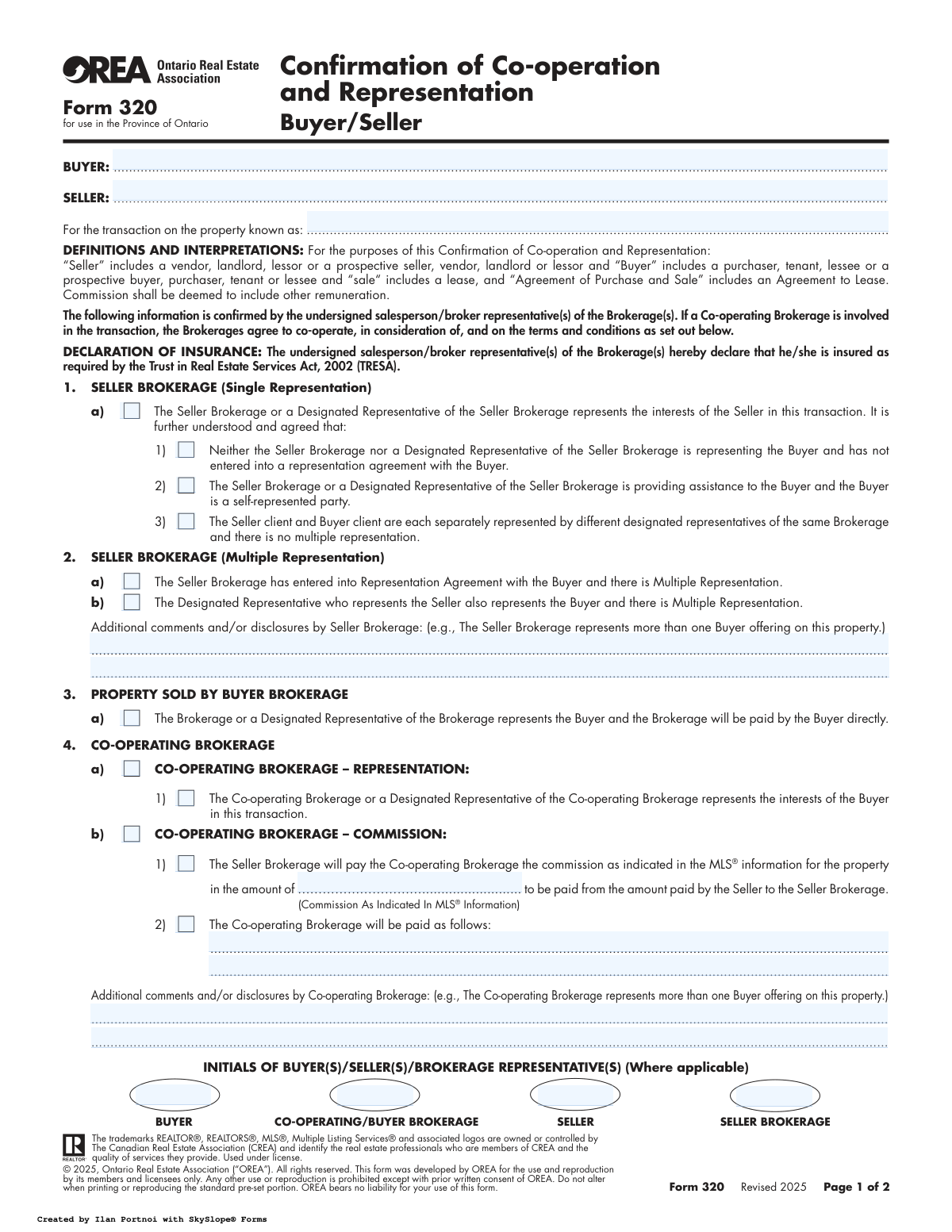
Yes! You can use AI to fill out OREA Form 320, Confirmation of Co-operation and Representation

OREA Form 320 is a mandatory document in Ontario real estate transactions that formally declares the representation relationships between the buyer, seller, and their respective brokerages. It specifies whether a brokerage represents the seller, the buyer, or both (multiple representation), and details the commission agreement between the listing and co-operating brokerages, ensuring transparency and compliance with the Trust in Real Estate Services Act (TRESA). Today, this form can be filled out quickly and accurately using AI-powered services like Instafill.ai, which can also convert non-fillable PDF versions into interactive fillable forms.
Form 320 is part of the OREA forms category on Instafill.
Our AI automatically handles information lookup, data retrieval, formatting, and form filling.
It takes less than a minute to fill out Form 320 using our AI form filling.
Securely upload your data. Information is encrypted in transit and deleted immediately after the form is filled out.

Form specifications

Form name: OREA Form 320, Confirmation of Co-operation and Representation
Number of fields: 55
Number of pages: 2
Filled form examples: Form Form 320 Examples
Language: English
main-image

Instafill Demo: How to fill out PDF forms in seconds with AI

How to Fill Out Form 320 Online for Free in 2026

Are you looking to fill out a FORM 320 form online quickly and accurately? Instafill.ai offers the #1 AI-powered PDF filling software of 2026, allowing you to complete your FORM 320 form in just 37 seconds or less.
Follow these steps to fill out your FORM 320 form online using Instafill.ai:
  1. 1 Navigate to Instafill.ai and upload or select OREA Form 320.
  2. 2 Use the AI assistant to automatically populate the Buyer, Seller, and property information fields.
  3. 3 Clearly define the representation structure by selecting the appropriate options for the Seller Brokerage and, if applicable, the Co-operating Brokerage.
  4. 4 Enter the specific commission details, including the amount and terms of payment between the brokerages as per the MLS® information or other agreements.
  5. 5 Add any required disclosures or additional comments from the Seller or Co-operating Brokerage in the designated sections.
  6. 6 Review all entered information for accuracy, then have all parties—buyers, sellers, and brokerage representatives—provide their initials and signatures in the appropriate fields.
  7. 7 Securely download, save, or share the completed and signed Form 320 with all relevant parties directly from the platform.

Our AI-powered system ensures each field is filled out correctly, reducing errors and saving you time.

Why Choose Instafill.ai for Your Fillable Form 320 Form?

Speed

Complete your Form 320 in as little as 37 seconds.

Up-to-Date

Always use the latest 2026 Form 320 form version.

Cost-effective

No need to hire expensive lawyers.

Accuracy

Our AI performs 10 compliance checks to ensure your form is error-free.

Security

Your personal information is protected with bank-level encryption.

Frequently Asked Questions About Form Form 320

This form is used in Ontario real estate transactions to clearly document the relationship between the buyer, the seller, and their respective brokerages. It confirms who represents whom and details the commission agreement between the brokerages.

The real estate agents for the buyer and seller fill out the form. However, the buyer(s), seller(s), and representatives from both the seller's brokerage and the co-operating (buyer's) brokerage must all sign or initial it to acknowledge the arrangement.

Single representation means a brokerage represents only one party (either the buyer or the seller). Multiple representation occurs when the same brokerage represents both the buyer and the seller in the same transaction, which requires explicit consent from both parties.

The Co-operating Brokerage is the real estate firm that represents the buyer. This section confirms their role and specifies how they will be paid their commission, which is typically paid by the Seller's Brokerage from the funds received from the seller.

This form must be completed and signed when an offer is being prepared and submitted. It ensures that all parties are fully aware of the representation relationships before they are bound by an Agreement of Purchase and Sale.

You will need the full legal names of the buyer(s) and seller(s), the property address, and the commission details as specified in the MLS® listing. The agents will handle the brokerage information and check the appropriate representation boxes.

You only initial this section if your agent's brokerage is representing both you and the other party in the transaction. Your initials confirm that you have been informed of and consent to this arrangement.

This is a legal agreement ensuring that the seller's brokerage holds the commission money in trust for the co-operating (buyer's) brokerage. It guarantees that the buyer's agent will be paid for their work in procuring the offer.

Designated representation is when a single brokerage represents both the buyer and seller, but appoints two different agents from within the brokerage to represent each party individually. This avoids the conflicts of a single agent representing both sides.

Yes, services like Instafill.ai use AI to accurately auto-fill form fields with your information, which can save time and help prevent errors. This can streamline the process for you and your agent.

To fill this form online, you can upload the PDF to Instafill.ai. The platform will make the fields interactive, allowing you to easily type in your information, check boxes, and add digital signatures.

You can use a service like Instafill.ai, which can convert flat, non-fillable PDFs into interactive forms. Simply upload your scanned document, and the tool will allow you to fill it out and sign it electronically.

If the buyer is self-represented, the Seller's Brokerage would check the box under Section 1 indicating they are providing assistance to the buyer, but not representing them. The form clarifies that no representation agreement exists with the buyer.

Compliance Form 320
Validation Checks by Instafill.ai

1
Mandatory Party and Property Information
This check ensures that the full names of the Buyer and Seller, as well as the full Property Address, are provided. These fields are fundamental to the agreement, identifying the parties and the subject of the transaction. A failure means the form is incomplete and legally ambiguous, as it's unclear who the agreement is between or what property it concerns.
2
Mutually Exclusive Representation Selection
Validates that only one primary representation type is selected for the Seller Brokerage (i.e., either an option under 'Single Representation' or an option under 'Multiple Representation', but not both). This is crucial for avoiding contradictory declarations of representation, which could lead to legal disputes and professional misconduct claims. If conflicting options are selected, the form is invalid.
3
Multiple Representation Consent Confirmation
This check verifies that if any 'Multiple Representation' option is selected in Section 2, the 'Consent for Multiple Representation' section is initialed by both the Buyer(s) and Seller(s). This is a strict legal requirement under TRESA to ensure all parties explicitly consent to the conflict of interest inherent in multiple representation. Without these initials, the multiple representation is not properly authorized.
4
Co-operating Brokerage Information Completeness
If a Co-operating Brokerage is indicated in Section 4, this validation ensures that all their essential details (Brokerage Name, Telephone, Authorized Representative Name, Signature, and Date) are fully completed. This information is vital for communication, payment of commission, and establishing a clear chain of responsibility. Missing information can delay closing and commission payments.
5
Co-operating Brokerage Initials Presence
Ensures that if a Co-operating Brokerage is involved in the transaction (Section 4 is completed), their representative's initials are present in the main initials block on page 1. These initials serve as an acknowledgement of the co-operation terms outlined on the first page. Failure to provide initials indicates a potential gap in agreement between the brokerages.
6
Exclusive Commission Payment Method
This validation ensures that for the Co-operating Brokerage commission, either the 'commission as indicated in the MLS' option (4.b.1) or the 'paid as follows' option (4.b.2) is selected, but not both. It also checks that the corresponding detail field (Commission Amount or Commission Payment Details) is filled for the selected option. This prevents ambiguity regarding how the co-operating brokerage will be compensated.
7
Valid Commission Amount Format
When the commission is specified via the MLS information (Section 4.b.1), this check validates that the 'Commission Amount' field contains a properly formatted value. The value should be either a percentage (e.g., '2.5%') or a specific currency amount (e.g., '$10,000.00'). An invalid format would make the commission agreement unenforceable and cause payment disputes.
8
Signature and Date Field Synchronization
This check ensures that for every signature field that is filled (e.g., Buyer Signature, Seller Brokerage Signature), the corresponding date field is also filled. A signature without a date is incomplete and can create uncertainty about when the agreement or acknowledgement was made. The system should flag any signature that is missing its accompanying date.
9
Valid Date Format and Plausibility
Verifies that all date fields on the form are entered in a valid, consistent format (e.g., YYYY-MM-DD) and represent a plausible date. The validation should reject dates that are formatted incorrectly, are in the distant past, or are set in the future. This ensures data integrity and the legal validity of the document's timeline.
10
Seller Brokerage Block Completeness
This validation confirms that the entire signature block for the Seller Brokerage is complete, including their name, telephone number, the printed name of the authorized individual, the signature, and the date. As the listing brokerage, their information is non-negotiable for the form to be valid. An incomplete block would invalidate their side of the co-operation agreement.
11
Final Acknowledgement Signature Requirement
This check ensures that at least one Buyer and one Seller have provided their signature and the date in the final 'ACKNOWLEDGEMENT' section. This signature confirms they have received, read, and understood the representation information disclosed in the form. Without these signatures, there is no proof that the clients have acknowledged the terms of representation.
12
Contextual Comment Field Validation
Ensures that if any 'Additional comments and/or disclosures' fields contain text, the corresponding checkbox or condition that enables that comment field is also selected. For example, if there are comments for the Seller Brokerage, a multiple representation box should be checked. This prevents orphaned comments and ensures all disclosures are properly contextualized.
13
Contact Number Format Validation
This check validates that all telephone and fax number fields are entered in a standard North American format (e.g., (XXX) XXX-XXXX or XXX-XXX-XXXX). Correctly formatted contact numbers are essential for reliable communication between brokerages and other parties. An invalid number could hinder communication at a critical point in the transaction.

Common Mistakes in Completing Form 320

Using Incomplete or Incorrect Legal Names

This error occurs when parties enter nicknames, omit middle names, or use variations of their name instead of the full legal name that appears on government ID and property title documents. The consequences can be severe, including transaction delays and the need to re-draft legal documents for closing. To avoid this, always verify and enter the full legal names for all Buyers and Sellers as they will appear on the deed.

Incorrectly Selecting the Representation Type

Agents often get confused between the various representation options, such as single representation, multiple representation, and designated representation, leading them to check the wrong boxes. This is a critical error that misrepresents the legal duties owed to clients and exposes the brokerage to significant liability. It is vital to carefully read each definition on the form and select the one that accurately reflects the agency relationships for the specific transaction.

Ambiguous or Incomplete Commission Details

In Section 4.b), filers frequently leave the commission amount blank or write vague terms like 'As per MLS®' instead of the specific percentage or flat fee. This ambiguity is a primary cause of commission disputes between brokerages after a successful closing. To prevent conflicts, the exact commission amount (e.g., '2.5% of the sale price') must be explicitly written in the designated space.

Missing Required Initials

This form has several mandatory initialling spots, such as at the bottom of page 1 and in the 'Consent for Multiple Representation' section on page 2, which are easily missed when rushing. Missing initials can invalidate a specific clause or even the entire agreement, as it suggests a party did not review or consent to those terms. Using a guided form-filling tool can help ensure all required initial and signature fields are completed before finalization.

Contradictory Information Across Form Sections

A common mistake is selecting options that conflict, such as stating the Seller Brokerage is assisting a self-represented buyer (Section 1.a.2) while also indicating a Co-operating Brokerage is representing that same buyer (Section 4.a.1). Such contradictions create a legally incoherent document and can void the agreement. AI-powered tools like Instafill.ai can use conditional logic to prevent these errors by flagging conflicting selections.

Improper Consent for Multiple Representation

Even when multiple representation is correctly indicated in Section 2, agents often forget to obtain the separate, explicit consent via initials from both the Buyer and Seller on page 2. This procedural failure means valid consent has not been properly documented, exposing the brokerage to legal and regulatory risks. The two sections must be completed together to be valid.

Incomplete Brokerage and Representative Details

The signature blocks on page 2 require full brokerage details, including the printed name of the representative and the person authorized to bind the brokerage, which are often left incomplete. A signature without a printed name or full contact details makes it difficult to identify the signee and can hinder communication. To avoid this, ensure every line in the signature block is filled out correctly.

Omitting Disclosure of Multiple Buyer Representation

The 'Additional comments' sections are legally significant, yet often overlooked. An agent representing more than one buyer for the same property has a duty to disclose this fact in writing in this section. Forgetting or intentionally omitting this disclosure is a serious ethical and regulatory violation that can lead to severe penalties.

Entering an Incomplete Property Address

Filers sometimes provide a partial property address, omitting the unit number, postal code, or other critical details. This can create ambiguity and legal issues, as the form may not correctly identify the property in question. To prevent this, the full, complete municipal address should always be used. AI-powered form-filling tools like Instafill.ai can help by validating addresses against a database.

Using a Flat PDF without Fillable Fields

Often, these forms are shared as non-fillable PDFs, leading to messy, handwritten submissions that are prone to illegibility and errors. This makes it difficult to ensure all fields are completed correctly and can lead to misinterpretation of the provided information. Tools like Instafill.ai can convert flat PDFs into smart, fillable forms, which helps prevent many common data entry mistakes by guiding the user through the process.
Saved over 80 hours a year

“I was never sure if my IRS forms like W-9 were filled correctly. Now, I can complete the forms accurately without any external help.”

Kevin Martin Green

Your data stays secure with advanced protection from Instafill and our subprocessors

Robust compliance program

Transparent business model

You’re not the product. You always know where your data is and what it is processed for.

ISO 27001, HIPAA, and GDPR

Our subprocesses adhere to multiple compliance standards, including but not limited to ISO 27001, HIPAA, and GDPR.

Security & privacy by design

We consider security and privacy from the initial design phase of any new service or functionality. It’s not an afterthought, it’s built-in, including support for two-factor authentication (2FA) to further protect your account.

Fill out Form 320 with Instafill.ai

Worried about filling PDFs wrong? Instafill securely fills orea-form-320-confirmation-of-co-operation-and-representation forms, ensuring each field is accurate.