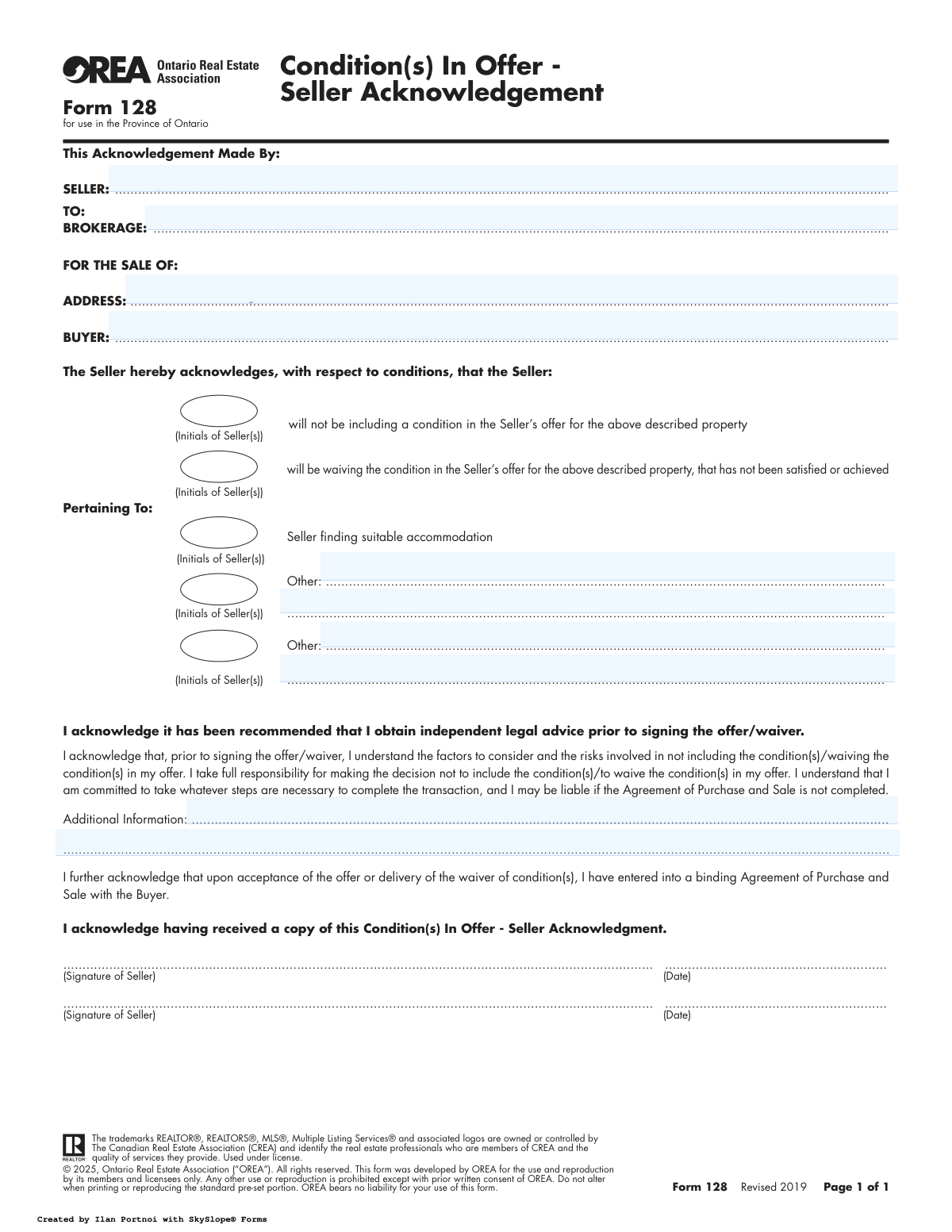
Yes! You can use AI to fill out OREA Form 128, Condition(s) In Offer - Seller Acknowledgement

This form, officially known as the Condition(s) In Offer - Seller Acknowledgement, is used in Ontario real estate transactions. It serves as a formal record that the seller understands and accepts the risks of either not including a protective condition (like finding a new home) or waiving an existing one in their offer. This action makes the Agreement of Purchase and Sale more binding. Today, this form can be filled out quickly and accurately using AI-powered services like Instafill.ai, which can also convert non-fillable PDF versions into interactive fillable forms.
Form 128 is part of the OREA forms category on Instafill.
Our AI automatically handles information lookup, data retrieval, formatting, and form filling.
It takes less than a minute to fill out Form 128 using our AI form filling.
Securely upload your data. Information is encrypted in transit and deleted immediately after the form is filled out.

Form specifications

Form name: OREA Form 128, Condition(s) In Offer - Seller Acknowledgement
Number of fields: 11
Number of pages: 1
Filled form examples: Form Form 128 Examples
Language: English
main-image

Instafill Demo: How to fill out PDF forms in seconds with AI

How to Fill Out Form 128 Online for Free in 2026

Are you looking to fill out a FORM 128 form online quickly and accurately? Instafill.ai offers the #1 AI-powered PDF filling software of 2026, allowing you to complete your FORM 128 form in just 37 seconds or less.
Follow these steps to fill out your FORM 128 form online using Instafill.ai:
  1. 1 Navigate to Instafill.ai and upload or select the OREA Form 128.
  2. 2 Provide the full names of the Seller and Buyer, the name of the Brokerage, and the complete address of the property being sold.
  3. 3 Indicate the seller's decision by checking the box for either not including a condition or waiving a condition in the offer.
  4. 4 Specify the condition being acknowledged by checking the 'Seller finding suitable accommodation' box or by detailing it in the 'Other' sections.
  5. 5 Add any relevant details in the 'Additional Information' section if necessary.
  6. 6 Carefully review all entered information for accuracy, then have the seller(s) initial where required and provide their digital signatures and the date.
  7. 7 Securely download, print, or share the completed and signed Seller Acknowledgement form with the relevant parties.

Our AI-powered system ensures each field is filled out correctly, reducing errors and saving you time.

Why Choose Instafill.ai for Your Fillable Form 128 Form?

Speed

Complete your Form 128 in as little as 37 seconds.

Up-to-Date

Always use the latest 2026 Form 128 form version.

Cost-effective

No need to hire expensive lawyers.

Accuracy

Our AI performs 10 compliance checks to ensure your form is error-free.

Security

Your personal information is protected with bank-level encryption.

Frequently Asked Questions About Form Form 128

This form is used for a seller to formally acknowledge that they are either proceeding with a sale without a protective condition (like finding a new home) or are waiving a condition that was previously in the agreement. It documents that you understand the risks involved in making the sale firm without this condition being met.

The seller(s) of the property must fill out and sign this form. It serves as a record for the brokerage that the seller has been advised of and understands the implications of their decision.

Not including a condition means you are entering an agreement from the start without that specific safety clause. Waiving the condition means a condition was already part of the agreement, but you are now officially removing it to make the deal firm, even if the condition wasn't satisfied.

This is used when you've sold your home but haven't secured your next one yet. By signing, you acknowledge you are proceeding with the sale anyway and are committed to closing, accepting the risk of having to find alternative housing if your search is unsuccessful by the closing date.

The main risk is that you are creating a firm and binding contract to sell your property without your safety net. If you waive a condition and it's not met, you are still legally obligated to complete the sale and may be liable if the transaction fails.

While not mandatory, it is strongly recommended that you seek independent legal advice before signing. A lawyer can explain the specific legal consequences and liabilities you are accepting by waiving your conditions.

Yes, the form states that upon delivery of the waiver, you have entered into a binding Agreement of Purchase and Sale. Once you waive your conditions, you are legally committed to completing the transaction as per the agreement's terms.

You will need the full names of the seller(s) and buyer(s), the name of your brokerage, and the full address of the property being sold. You must also clearly identify the specific condition(s) you are acknowledging.

The 'Other' section is for any unique seller-side condition not explicitly listed, such as obtaining a specific permit, confirming a property severance, or finalizing an estate matter before the sale can proceed.

You should receive a copy for your records, and the original will be kept by your real estate brokerage as part of the transaction file. It serves as proof that you were properly informed of the risks.

Yes, services like Instafill.ai use AI to accurately auto-fill form fields from your data, which can save time and reduce errors. However, AI cannot provide legal advice, so you should still understand the implications of what you are signing.

Simply upload the Form 128 PDF to the Instafill.ai platform. The AI will identify the fields for seller, buyer, property address, and others, allowing you to fill them in quickly and easily online.

You can use a service like Instafill.ai, which can convert flat, non-fillable PDFs into interactive, fillable forms. This allows you to type your information directly onto the form before printing or sharing it digitally.

Compliance Form 128
Validation Checks by Instafill.ai

1
Seller Name Presence
Verifies that the 'Seller' field is not empty. This field is critical as it legally identifies the individual(s) making the acknowledgement. A missing seller name makes the form legally unenforceable and invalidates the entire acknowledgement.
2
Brokerage Name Presence
Ensures the 'Brokerage' field has been filled out. This identifies the real estate brokerage to whom the acknowledgement is being made, which is essential for proper record-keeping and establishing the chain of communication. Failure to populate this field can lead to administrative confusion and disputes.
3
Full Property Address Validation
Checks that the 'Address' field contains a complete and valid-looking property address, including street number, name, city, and province. This is crucial to unambiguously link the acknowledgement to a specific property. An incomplete or incorrect address could lead to the form being applied to the wrong transaction.
4
Buyer Name Presence
Validates that the 'Buyer' field is populated with the name of the buyer. This identifies the other party to the Agreement of Purchase and Sale, which is necessary context for the seller's acknowledgement. Omitting the buyer's name creates ambiguity about which transaction this form pertains to.
5
Mandatory Acknowledgement Action Selection
Confirms that the seller has selected at least one of the primary acknowledgement actions: either 'will not be including a condition' or 'will be waiving the condition'. The entire purpose of the form is to document one of these actions. If neither is selected, the form has no meaning and fails to document the seller's intent.
6
Mandatory Condition Specification
Verifies that if an acknowledgement action is selected, a corresponding condition ('Seller finding suitable accommodation' or 'Other') is also specified. An action without a specified condition is ambiguous and legally meaningless. This check ensures the acknowledgement is precise about what is being waived or not included.
7
Required Text for 'Other' Condition
Ensures that if the 'Other' condition checkbox is selected, the corresponding text description field is not empty. Selecting 'Other' without providing a description makes the acknowledgement vague and unenforceable. This validation forces the user to explicitly define the custom condition being referenced.
8
Initials Verification for Selections
Checks that each selected acknowledgement and condition checkbox has corresponding initials from the seller(s). The initials serve as a micro-signature, confirming the seller's specific agreement to that particular clause. Missing initials can be grounds to dispute whether the seller actually acknowledged that specific item.
9
Signature and Date Presence
Validates that for every signature provided, the corresponding 'Date' field is also filled. The signature and date together are what make the document a legally binding acknowledgement. A missing date for a present signature creates ambiguity about when the document was executed.
10
Signature Date Plausibility
Checks that the signature date is a valid and reasonable date. The date must not be in the future and should be on or after the form's revision date of 2019. This prevents data entry errors and ensures the document's timeline is logical within the context of the transaction.
11
Seller and Signature Count Consistency
Compares the number of sellers listed in the 'Seller' name field with the number of signatures provided. For example, if two sellers are listed (e.g., 'John Doe and Jane Doe'), there should be two signatures. This ensures all parties listed as sellers have properly executed the document, which is critical for its validity.
12
Province Verification for Property Address
Confirms that the property address appears to be located within the Province of Ontario. This form (OREA Form 128) is specifically designed for use in Ontario, and its legal clauses are based on Ontario law. Using it for a property in another province would be inappropriate and could lead to legal complications.

Common Mistakes in Completing Form 128

Missing Seller Initials Beside Conditions

This is a frequent and critical error where sellers check a box for a condition but forget to place their initials in the designated space next to it. Each condition being acknowledged requires initials from all sellers to be valid. The absence of initials can lead to legal disputes, as it may be argued that the acknowledgement for that specific condition was not properly executed, potentially invalidating the waiver.

Incomplete or Incorrect Party Identification

Sellers or buyers may enter partial names, nicknames, or forget to include all legal owners on the title. This creates ambiguity and can cause title transfer issues or legal challenges, as the names on this form must perfectly match the Agreement of Purchase and Sale. To avoid this, always use the full legal names of all parties involved as they appear on government-issued identification.

Contradictory Acknowledgement Selections

A common point of confusion is checking both the 'will not be including a condition' and 'will be waiving the condition' boxes. These are mutually exclusive options; one applies when an offer is made without a condition, while the other applies when removing a condition from an existing agreement. Selecting both makes the form's intent unclear and legally unenforceable.

Only One Seller Signing When Multiple Owners Exist

If a property is co-owned by two or more individuals, all owners listed on the title must sign and date the form. A single signature is not sufficient to bind all parties to the agreement. This oversight can render the entire acknowledgement invalid, jeopardizing the transaction if one owner later disputes the waiver.

Vague Descriptions in 'Other' Condition Fields

When using the 'Other' fields, sellers often write ambiguous phrases like 'subject to financing' without specifying the terms, deadlines, or details. This lack of precision creates a significant risk of disputes over what exactly was acknowledged or waived. Conditions should be described with clear, specific language to ensure all parties have the same understanding.

Forgetting to Date Signatures

A signature without a corresponding date is a simple but common mistake that can create legal uncertainty about when the acknowledgement became effective. The date is crucial for establishing a clear timeline for the transaction's events. To prevent issues, ensure the current date is written next to every signature on the form.

Misunderstanding 'Waiving' vs. 'Not Including'

Sellers frequently confuse the legal distinction between 'waiving' a condition and 'not including' one. 'Not including' is for when an offer is drafted without a seller condition from the outset. 'Waiving' is for when a seller formally removes a condition that was already part of an accepted agreement. Choosing the wrong option misrepresents the transaction's status and can cause contractual confusion.

Ambiguous Property Address

Entering an incomplete property address, such as omitting a unit number for a condominium or a postal code, can lead to serious identification issues. This is especially risky if the seller owns multiple properties. The full, unambiguous municipal address must be entered to ensure the acknowledgement applies to the correct property. AI-powered tools like Instafill.ai can help auto-complete and validate addresses to prevent this.

Using an Informal Brokerage Name

People often write a shorthand or trade name for the real estate brokerage instead of its full legal name. This can cause administrative delays and confusion, particularly in complex transactions. Using the complete, official brokerage name as registered with the real estate governing body is essential for clear and accurate documentation. Form-filling tools can store and correctly populate this official data.

Ignoring the Legal Advice Acknowledgement

Sellers may sign the form without fully appreciating the clause where they acknowledge being recommended to seek independent legal advice. This is not just a formality; it confirms the seller understands the significant risks and liabilities of proceeding without certain conditions. Signing this without due consideration weakens the seller's legal position if a dispute arises later. Since this form is a non-fillable PDF, tools like Instafill.ai can convert it into an interactive version, making it easier to review and complete each section carefully.
Saved over 80 hours a year

“I was never sure if my IRS forms like W-9 were filled correctly. Now, I can complete the forms accurately without any external help.”

Kevin Martin Green

Your data stays secure with advanced protection from Instafill and our subprocessors

Robust compliance program

Transparent business model

You’re not the product. You always know where your data is and what it is processed for.

ISO 27001, HIPAA, and GDPR

Our subprocesses adhere to multiple compliance standards, including but not limited to ISO 27001, HIPAA, and GDPR.

Security & privacy by design

We consider security and privacy from the initial design phase of any new service or functionality. It’s not an afterthought, it’s built-in, including support for two-factor authentication (2FA) to further protect your account.

Fill out Form 128 with Instafill.ai

Worried about filling PDFs wrong? Instafill securely fills orea-form-128-conditions-in-offer-seller-acknowledgement forms, ensuring each field is accurate.