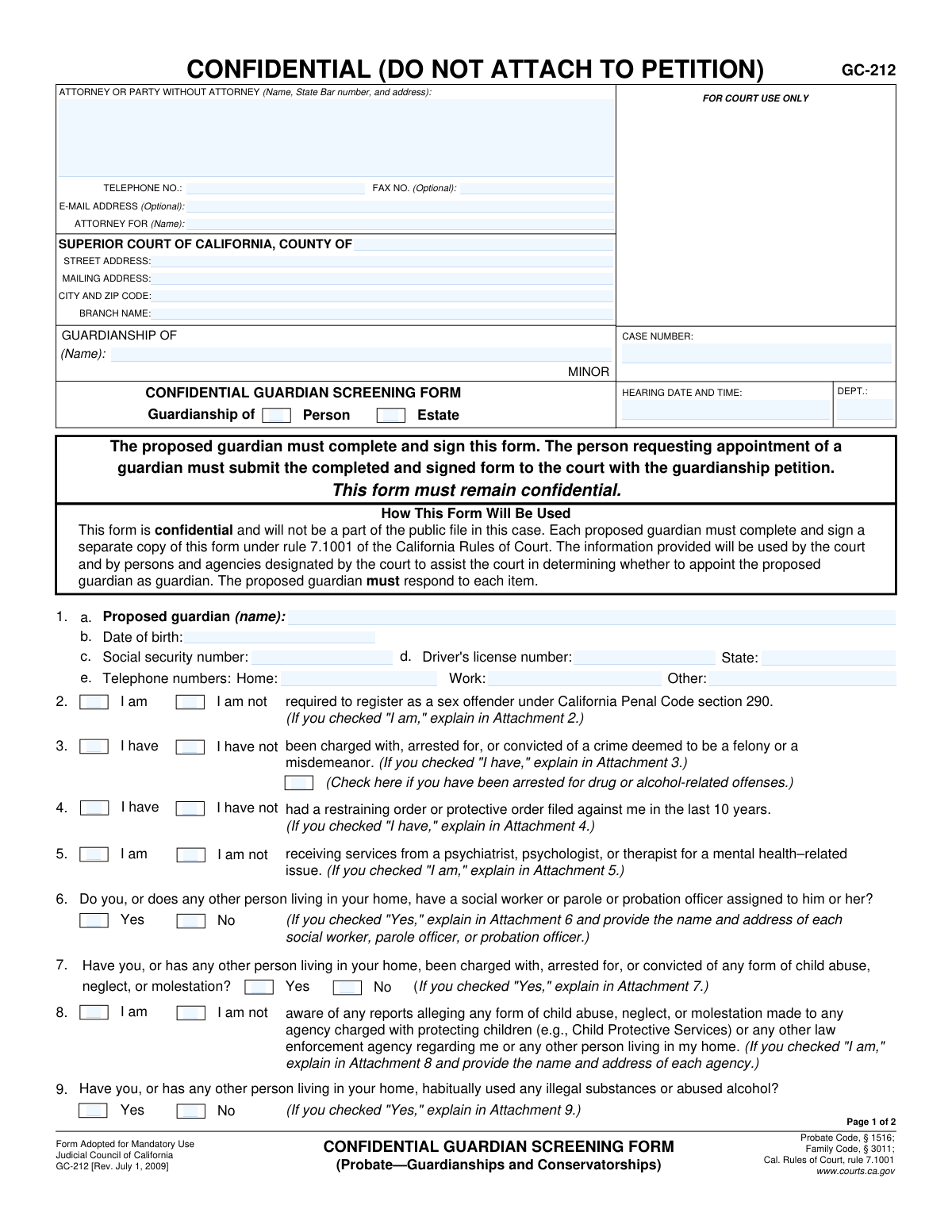
Fill out Form GC-212, Confidential Guardian Screening Form (Probate—Guardianships and Conservatorships) with Instafill.ai
Worried about filling PDFs wrong? Instafill securely fills FORM-GC-212-CONFIDENTIAL-GUARDIAN-SCREENING-FORM-PROBATEGUARDIANSHIPS-AND-CONSERVATORSHIPS forms, ensuring each field is accurate.
#1 AI PDF Filling Software of 2026
3 out of 4 customers say they prepare their GC-212 forms in 37 seconds or less
Secure platform for your PDF forms and personal information
| Form name: | Form GC-212, Confidential Guardian Screening Form (Probate—Guardianships and Conservatorships) |
| Number of fields: | 86 |
| Number of pages: | 1 |
| FCI: | Moderate (60/100) |
Form Complexity Index
Moderate
60 / 100
| Fillable fields | 86 |
| Pages | 2 |
| Fields per page | 43 |
| Sections | 29 |
| Conditional rules | 6 |
| Tables & lists | 1 |
| Instruction pages | — |
| Instafill Form ID | IF-FORM-GC-212-CONFIDENTIAL-GUARDIAN-SCREENING-FORM-PROBATEGUARDIANSHIPS-AND-CONSERVATORSHIPS |
GC-212 has a moderate Form Complexity Index of 60/100. Instafill’s AI completes it accurately in under a minute.
Instafill Demo: How to fill out PDF forms in seconds with AI
Compliance GC-212
Validation Checks by Instafill.ai
1
Validates Social Security Number Format and Structure
This check ensures the Social Security Number in item 1c is entered in a valid XXX-XX-XXXX format and adheres to SSA's structural rules (e.g., no 000, 666, or 900-999 area numbers). This is crucial for accurate background checks and identity verification required by the court. An invalid SSN will prevent the system from processing the screening and will require manual correction.
2
Ensures Proposed Guardian is of Legal Adult Age
This validation verifies that the date of birth entered in item 1b indicates the proposed guardian is at least 18 years old. Appointing a minor as a guardian is legally impermissible, so this check is fundamental to the eligibility of the applicant. If the applicant is underage, the form submission must be rejected as they are not qualified to serve as a guardian.
3
Verifies Mandatory Explanations for Adverse Disclosures
This check confirms that for any question from 2 through 15 and question 19, if the answer indicates a history (e.g., 'I have,' 'Yes,' 'I am'), a corresponding explanation or attachment is provided. The court relies on these explanations to assess the potential risks associated with the proposed guardian. Failure to provide a required explanation will render the form incomplete and halt the review process until the information is supplied.
4
Enforces Mutually Exclusive Selection for Yes/No Questions
This validation ensures that for each numbered question with a pair of checkboxes (e.g., item 2: 'I am' / 'I am not'), only one option is selected. Selecting both or neither option for a question creates ambiguity and makes the response invalid. An error should be flagged, forcing the user to make a single, clear choice for each question before the form can be submitted.
5
Validates Completeness of Driver's License Information
This check ensures that if a Driver's License Number is entered in item 1d, the corresponding 'State' field is also filled out, and vice-versa. This pair of data points is used together for identity verification and background checks. An incomplete entry would hinder these verification processes and should prompt the user to provide both pieces of information.
6
Cross-Validates Case Number Consistency Across Pages
This validation compares the 'CASE NUMBER' field on page 1 with the 'CASE NUMBER' field on page 2 to ensure they are identical. Mismatched case numbers can lead to the form being misfiled or associated with the wrong legal proceeding, causing significant administrative and legal problems. The system should flag a mismatch and require correction before accepting the submission.
7
Ensures Consistency of Minor's Name Across Form Pages
This check verifies that the name of the minor entered in the 'GUARDIANSHIP OF' field is the same on both page 1 and page 2. This consistency is critical for maintaining the integrity of the legal document and ensuring it pertains to the correct child. Any discrepancy could lead to confusion or legal challenges and must be resolved before filing.
8
Validates Conditional Logic for Professional Fiduciaries
This rule checks that if the proposed guardian identifies as a 'private professional fiduciary' by checking 'I am' in item 16, they must then complete item 17 regarding their license status. This information is legally required under the Business and Professions Code for professional fiduciaries. The form should be considered incomplete if item 16 is 'I am' but item 17 is left unanswered.
9
Ensures Corporation Name is Provided for Corporate Officers
This validation ensures that if the user checks 'I am' for item 18, indicating they are a responsible corporate officer, the name of the corporation is filled in the associated text field. The identity of the corporation is essential for the court to verify its non-profit status and authority to act as a guardian. The form is incomplete without the corporation's name if this option is selected.
10
Validates Declaration Date is Present and Not in the Future
This check verifies that the 'Date' field in the final declaration section is filled with a valid calendar date and that this date is not in the future. The date of signature is a critical legal component, attesting to when the declaration was made under penalty of perjury. An invalid or future date would invalidate the declaration and must be corrected.
11
Confirms Presence of Signature and Printed Name in Declaration
This validation ensures that both the printed name and the signature of the proposed guardian are present in the declaration section at the end of the form. A signature is legally required to attest that the information provided is true and correct under penalty of perjury. A missing signature or printed name renders the entire form legally invalid and must be rejected.
12
Validates Format of All Telephone Number Fields
This check ensures that all telephone numbers entered on the form (items 1e, 20, 21, 22) follow a standard format, such as (XXX) XXX-XXXX or XXXXXXXXXX. Correctly formatted phone numbers are essential for the court and investigators to be able to contact the proposed guardian and other relevant parties. The system should flag non-standard entries to ensure data quality and communicability.
13
Ensures Core Guardian Identification Fields are Complete
This validation confirms that the proposed guardian's name (1a), date of birth (1b), and social security number (1c) are all filled out. These three fields are the absolute minimum required for identity verification and initiating the mandatory background checks. The form submission must be blocked if any of these core identification fields are left blank.
14
Validates Explanation and Agency Details for Child Abuse Reports
This check specifically targets item 8, ensuring that if the user indicates they are aware of reports of child abuse, neglect, or molestation, they provide both an explanation and the name and address of the relevant agency. This is a highly sensitive and critical data point for the court's assessment of the minor's safety. The form must be considered incomplete and flagged for immediate follow-up if this information is missing.
15
Validates Explanation for Criminal History Disclosure
This validation ensures that if a proposed guardian checks 'I have' in item 3, indicating a history of being charged, arrested, or convicted of a crime, they provide a detailed explanation in Attachment 3. The court must be able to evaluate the nature, severity, and recency of any criminal history to determine the applicant's suitability. A missing explanation prevents this crucial assessment and must be flagged as an incomplete submission.
Common Mistakes in Completing GC-212
The form requires a detailed explanation in a separate attachment for nearly every affirmative answer (e.g., checking 'I have' or 'Yes' in questions 2-19). A very common mistake is checking the box but failing to write and include the corresponding numbered attachment. This omission renders the form incomplete, leading to immediate rejection by the court clerk or significant delays in the screening process until the missing information is provided.
Questions 6, 7, 8, 9, 10, and 11 explicitly ask about the proposed guardian 'or any other person living in your home.' Applicants often overlook this and only answer for themselves, failing to disclose information about spouses, partners, adult children, or roommates. This is a critical error, as the court needs to assess the entire home environment for the minor's safety, and failure to disclose can be seen as concealment and jeopardize the guardianship petition.
The instructions at the top and bottom of the form clearly state that 'Each proposed guardian must complete and sign a separate copy of this form.' Couples or partners applying to be co-guardians often mistakenly fill out and sign only one form. This will result in an incomplete filing, as the court requires a separate, confidential screening for every individual seeking appointment, causing processing delays until a second form is submitted.
The declaration under penalty of perjury in section 22 is the most critical part for validating the form's contents. Forgetting to physically sign or date the form is a simple but frequent error that makes the document legally invalid. An unsigned or undated form cannot be processed by the court, leading to its rejection and requiring the applicant to re-submit a properly executed copy, delaying the entire case.
When an attachment is required to explain an affirmative answer, applicants often provide vague or insufficient details, such as 'had a misdemeanor' or 'saw a therapist.' The court investigator needs specific information, including dates, case numbers, charges, dispositions, and the context of the event. Incomplete explanations will only lead to further inquiries and slow down the approval process, as the investigator will have to request more detailed supplemental declarations.
The form requires sensitive information like a Social Security Number (SSN) and Driver's License number for background checks. Simple typographical errors, such as transposing digits, are common but have serious consequences. An incorrect identifier will cause the background check to fail or be delayed, halting the court's ability to vet the applicant and bringing the guardianship proceedings to a standstill until the information is corrected.
The top section of the form requires the Case Number, Hearing Date, and Department. Applicants sometimes leave these fields blank, assuming they will be filled in by the court. However, this information is necessary for the clerk to correctly file the confidential document with the right case. This can lead to the form being misplaced or rejected, delaying the hearing. It's crucial to get this information from the main petition (Form GC-210) before submitting.
The form is prominently marked 'CONFIDENTIAL (DO NOT ATTACH TO PETITION)' and is not for the public record. A serious mistake is physically attaching it to the main, public guardianship petition instead of submitting it separately as instructed. This breaches the confidentiality of the sensitive personal data, can lead to its public disclosure, and will be rejected by the court clerk, requiring a refiling. AI-powered tools like Instafill.ai can help manage and organize separate documents for a case to prevent such errors.
This form is often found online as a non-fillable PDF, leading people to print it and fill it out by hand. This can result in illegible handwriting, which makes it difficult for court staff and investigators to read critical information like names, dates, and explanations. Illegible forms can be rejected or cause significant delays. Using a tool like Instafill.ai can convert the flat PDF into a fillable version, ensuring all entries are clear, legible, and professional.
Section 20 asks for the minor's contact details, including school name and telephone number. Applicants may provide incomplete information, not knowing the school's direct phone line or omitting it entirely. This information is used by the court investigator to conduct their assessment, which often includes contacting the school. Missing details force the investigator to spend extra time finding the information, delaying the report and the court's decision.
Saved over 80 hours a year
“I was never sure if my IRS forms like W-9 were filled correctly. Now, I can complete the forms accurately without any external help.”
Kevin Martin Green
Your data stays secure with advanced protection from Instafill and our subprocessors




Robust compliance program
Transparent business model
You’re not the product. You always know where your data is and what it is processed for.
ISO 27001, HIPAA, and GDPR
Our subprocesses adhere to multiple compliance standards, including but not limited to ISO 27001, HIPAA, and GDPR.
Security & privacy by design
We consider security and privacy from the initial design phase of any new service or functionality. It’s not an afterthought, it’s built-in, including support for two-factor authentication (2FA) to further protect your account.
Fill out GC-212 with Instafill.ai
Worried about filling PDFs wrong? Instafill securely fills form-gc-212-confidential-guardian-screening-form-probateguardianships-and-conservatorships forms, ensuring each field is accurate.
