
Yes! You can use AI to fill out Attachment to Notice of Hearing Proof of Personal Service (Probate—Decedents' Estates and Guardianships and Conservatorships)
Don't type 74 fields by hand. Tell our AI about yourself, or upload a document you already have, and it fills every field in seconds. You check it, then download, print or sign.
The AI does the filling. You just check it.
No typing into boxes, nothing to install.
What this form asks for
The AI fills all of it, from your answers or your documents.
The AI checks your answers before you download
12 checks built for this form, so a wrong date or a missing answer is caught before anyone else sees it.
This validation ensures that the 'CASE NUMBER' field is not empty. The case number is a critical identifier that links this proof of service attachment to the correct legal proceeding in the court's system. Without a case number, the document cannot be filed correctly and will be rejected by the court clerk, causing significant delays.
This check verifies that the name of the estate, guardianship, or conservatorship has been filled in. This name provides a clear, human-readable identifier for the case, complementing the case number. A missing name can cause confusion during processing and may lead to the document being returned for correction.
This validation confirms that at least one complete service entry (including name, address, date, and time) has been made on the form. The purpose of this attachment is to provide proof of service, so a form with no entries is functionally empty and serves no purpose. Submitting a blank form would be considered a filing error and would not constitute valid proof.
This check ensures that for any service entry row that is partially filled, all fields in that row are completed. If a person's name is entered, the corresponding address, date, and time of service must also be provided. An incomplete entry is legally insufficient for proving service, as it lacks the necessary details, and would likely be disregarded by the court.
This validation verifies that all 'Date' fields for service are entered in a valid and unambiguous date format, such as MM/DD/YYYY. The date of service is legally significant for establishing timeliness and compliance with procedural rules. An invalid or improperly formatted date could render the proof of service defective.
This check ensures that any 'Date' of service entered is not a future date. Proof of service is a sworn statement attesting to an action that has already occurred. Entering a future date is a logical impossibility and a clear data entry error that would invalidate the document and lead to its immediate rejection.
And 6 more checks
- Service Time Format Validation
- Service Address Plausibility
- Pagination Integrity Check
- Pagination Logical Order
- Duplicate Service Entry Detection
- Case Number Format Plausibility
Let AI fill out your DE-120(PA)/GC-020(PA)
No typing. Every field filled in seconds, checked, ready to sign.
How to Fill Out DE-120(PA)/GC-020(PA) Online for Free in 2026
What the AI walks you through.
- Navigate to Instafill.ai and upload or select the DE-120(PA)/GC-020(PA) form.
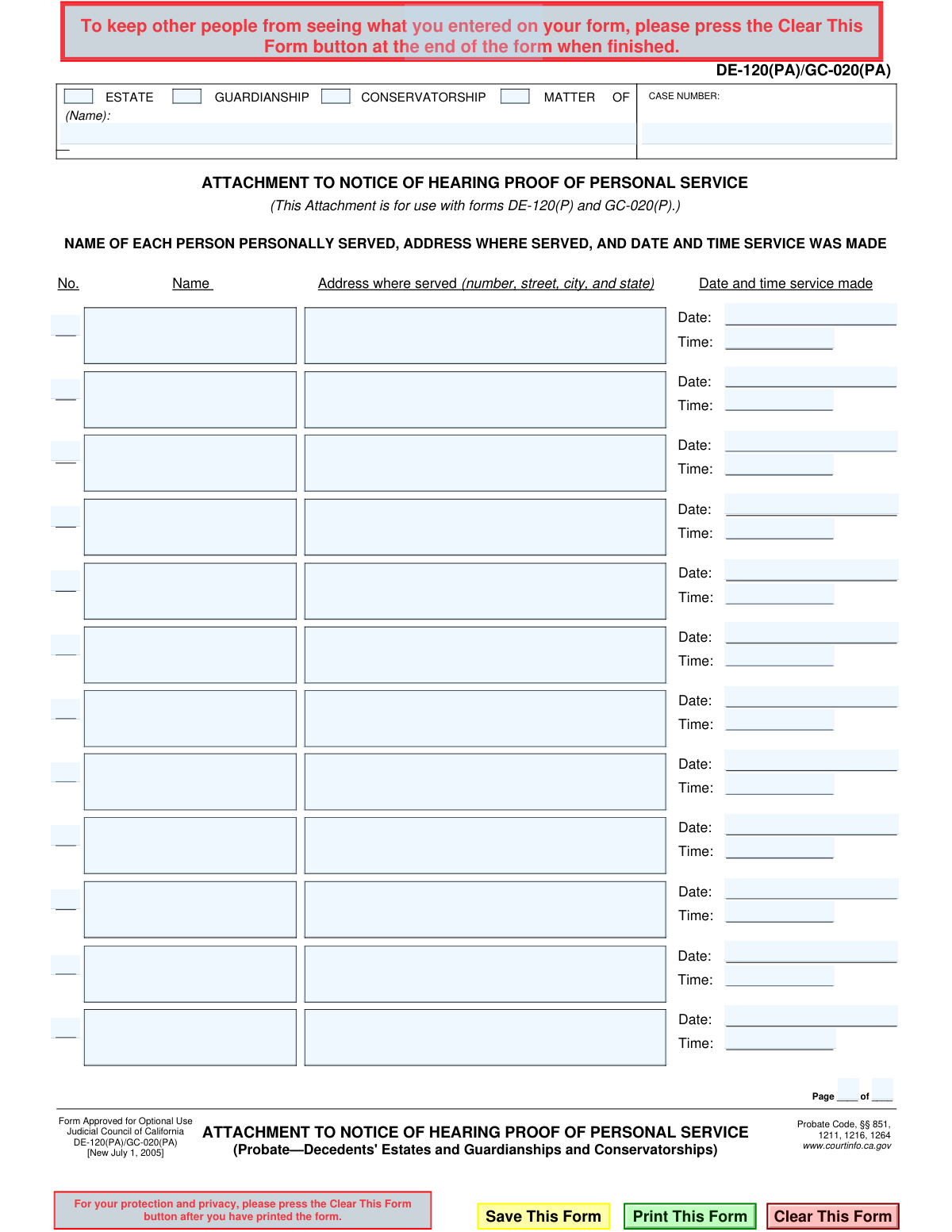
- Enter the case number and the name of the estate, guardianship, or conservatorship matter at the top of the form.
- For each person served, input their full name in the designated column.
- Enter the complete address (number, street, city, state) where each person was personally served.
- Provide the specific date and time that the service was completed for each individual listed.
- Indicate the page number and total number of pages if multiple attachment sheets are used.
- Review all entered details for accuracy before saving, printing, and attaching the form to your primary Proof of Service document (DE-120(P) or GC-020(P)).
Common Mistakes in Completing DE-120(PA)/GC-020(PA)
The ones the AI is built to catch.
Incorrect or Missing Case Number
Using the Form as a Standalone Document
Inconsistent Case Name
Forgetting to Fill Out Pagination
Providing an Incomplete Service Address
Using Ambiguous Date and Time Formats
Illegible Handwriting on a Printed Form
Mismatching Service Details in Rows
Incomplete or Misspelled Name of Person Served
Using the Attachment for a Single Service
Frequently Asked Questions About DE-120(PA)/GC-020(PA)
Is it really free for 7 days?
Can I fill other forms too?
How do I cancel?
How does the AI fill out DE-120(PA)/GC-020(PA)?
What happens to my information?
How complex is DE-120(PA)/GC-020(PA) to fill out?
What is the purpose of form DE-120(PA)/GC-020(PA)?
When do I need to use this specific attachment form?
Who is supposed to fill out this form?
Can I file this form by itself?
What information goes in the 'ESTATE/MATTER OF' field?
For the 'Address where served' field, what address should I write?
Why do I need to include the exact time of service?
What if I served more people than there are spaces on this one page?
Where do I file this form once it's completed?
Can I use an AI tool to help me fill out this form?
How do I use Instafill.ai to complete this form online?
The PDF form I downloaded is not fillable. What can I do?
Get your DE-120(PA)/GC-020(PA) filled out by AI
$0 today. Cancel before Nov 1 and you pay nothing.
Other forms like this one
California state forms: Judicial Council of California Form DE-111, Petition for Probate (Probate—Decedents Estates), DS 1891, Applicant/Vendor Disclosure Statement (State of California Department of Developmental Services), Judicial Council of California Form DE-120, Notice of Hearing—Decedent's Estate or Trust, Judicial Council of California Form DE-120, Notice of Hearing—Decedent's Estate or Trust, Murrieta Police Department Citizen Complaint Form (California Penal Code § 148.6 Advisory Statement), California Department of Social Services, Sworn Statement, State of California Department of Transportation California Civil Rights Laws Certification, State of California Department of Transportation Darfur Contracting Act Certification, Form DOT ADM-0077, State of California Department of Transportation, Contract Requirements, State of California Department of Transportation Subcontractor List, State of California Department of Transportation, Certified DVBE Summary, Bidder Declaration GSPD-05-105, State of California Level of Care Rate Determination Protocol Matrix, State of California Accessible Form, State of California Form SOC 321, Request for Order and Consent - Paramedical Services, State of California Darfur Contracting Act Certification, State of California Department of Veterans Affairs COMMERCIALLY USEFUL FUNCTION (CUF) CERTIFICATION FORM, Form ADR-100, Statement of Agreement or Nonagreement, Civil Appeal Case Information Statement, Form APP-014, Appellant's Proposed Statement on Appeal (Unlimited Civil Case)
California court forms: Judicial Council of California Form SC-105, Request for Court Order and Answer (Small Claims), Judicial Council of California Form SC-120, Defendant’s Claim and ORDER to Go to Small Claims Court (Small Claims), Judicial Council of California Form SER-001, Request for Sheriff to Serve Court Papers, Judicial Council of California Form SER-001, Request for Sheriff to Serve Court Papers, Affidavit for Collection of Personal Property California Probate Code Section 13100, Form POS-040, Proof of Service—Civil, Declaration of Facts of Death (California Superior Court), declaration-of-marriage-for-court-proceeding-california-family-law, ADOPT-200, Adoption Request, ADOPT-200, Stepparent Adoption Request, ADOPT-210, Adoption Agreement, ADOPT-310, Contact After Adoption Agreement, Judicial Council of California Form ADOPT-200, Adoption Request, Form ADR-107, Mediation Attendance Sheet, Form ADR-110, Order Appointing Referee, Form ADR-109, Stipulation or Motion for Order Appointing Referee, Form ADR-102, Request for Trial De Novo After Judicial Arbitration, Form ADR-108, Referee's Report (Code Civ. Proc., §§ 638, 639), Form ADR-106, Petition to Confirm, Correct, or Vacate Contractual Arbitration Award, Form ADR-104, Rejection of Award and Request for Trial After Attorney-Client Fee Arbitration
California probate forms: Judicial Council of California Form DE-111, Petition for Probate (Probate—Decedents Estates), Affidavit for Collection of Personal Property California Probate Code Section 13100, Form DE-142/DE-111(A-3e), Waiver of Bond by Heir or Beneficiary (Probate—Decedents Estates), Form DE-140, Order for Probate, Form DE-150, Letters (Probate), Form DE-154/GC-035, Request for Special Notice (Probate), Form DE-157, Notice of Administration to Creditors, Form DE-120(P), Proof of Personal Service of Notice of Hearing—Decedent's Estate or Trust, Form DE-131, Proof of Subscribing Witness (Probate), Form DE-172, Creditor's Claim (Probate), Form DE-174, Allowance or Rejection of Creditor's Claim, Form DE-221, Spousal or Domestic Partner Property Petition (Probate—Decedents Estates), Form DE-270 / GC-070, Ex Parte Petition for Authority to Sell Securities and Order, Form DE-315, Order Determining Succession to Primary Residence, Form DE-351/GC-101, Order Appointing Guardian Ad Litem—Probate, Form DE-115/GC-015, Notice of Hearing on Petition to Determine Claim to Property, Attachment to Notice of Hearing Proof of Service by Mail (Probate—Decedents' Estates and Guardianships and Conservatorships), Form DE-125, Summons (Probate), Form DE-147, Duties and Liabilities of Personal Representative, Form DE-147S, Confidential Supplement to Duties and Liabilities of Personal Representative (Probate)
proof of service forms: Form POS-040, Proof of Service—Civil, Judicial Council of California Form SC-104, Proof of Service (Small Claims), Judicial Council of California Form SC-104, Proof of Service (Small Claims), Form DV-200, Proof of Personal Service (CLETS) (Domestic Violence Prevention), Illinois Circuit Court Eviction Summons and Proof of Service of Eviction Summons & Eviction Complaint (Form E-S 3507.3), proof-of-electronic-service-appellate, Form APP-009, Proof of Service (Appellate Division), Form APP-109, Proof of Service (Appellate Division), Form GC-020(P), PROOF OF PERSONAL SERVICE OF NOTICE OF HEARING— GUARDIANSHIP OR CONSERVATORSHIP, Form APP-109E, Proof of Electronic Service (Appellate Division), Proof of Personal Service of Notice of Initial Appearance—CARE Act Proceedings, Form CARE-116, Proof of Personal Service of Notice of Hearing—CARE Act Proceedings, Form CR-106, Proof of Service — Criminal Record Clearing, CARE-107, Proof of Personal Service of Notice of Order for CARE Act Report, Form CIV-120, Notice of Entry of Dismissal and Proof of Service, Form DAL-012, Proof of Service—Disability Access Litigation, Form DE-120(P), Proof of Personal Service of Notice of Hearing—Decedent's Estate or Trust, Form EA-200, Proof of Personal Service (Elder or Dependent Adult Abuse Prevention), Form EA-260, Proof of Service of Order After Hearing by Mail (Elder or Dependent Adult Abuse Prevention), Form FL-115, Proof of Service of Summons (Family Law—Uniform Parentage—Custody and Support)
Let AI fill out your DE-120(PA)/GC-020(PA)
Your trial starts once a card is added. You pay nothing before Nov 1.
Our AI already knows this form, all 74 fields of it. Skip the typing: tell it about yourself, or upload what you have, and it fills the whole form in seconds.
- AI fills every field on the form, checkboxes included
- No typing into boxes: answer a few questions, or upload a document you already have, an old copy of this form, a photo of a document
- The AI checks the answers; you review and change anything before you download
- Download the finished PDF, print it, or sign it online
- Encrypted, and never used to train AI
Cancel before Nov 1 and you pay nothing.
A card is needed to start the trial. Cancel in two clicks from your account.
Terms · Privacy