
Yes! You can use AI to fill out Form DE-174, Allowance or Rejection of Creditor's Claim
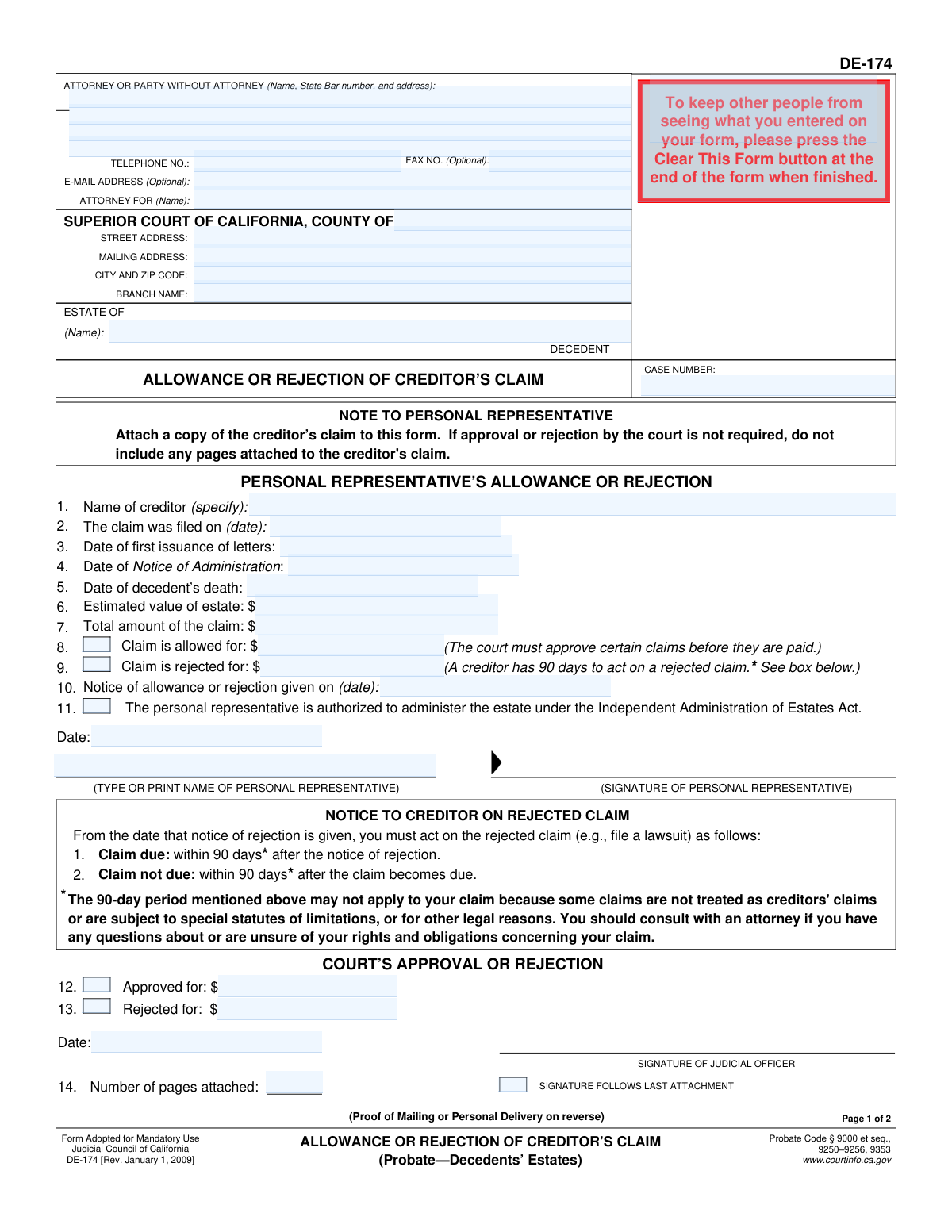
Don't type 62 fields by hand. Tell our AI about yourself, or upload a document you already have, and it fills every field in seconds. You check it, then download, print or sign.
The AI does the filling. You just check it.
No typing into boxes, nothing to install.
What this form asks for
The AI fills all of it, from your answers or your documents.
The AI checks your answers before you download
14 checks built for this form, so a wrong date or a missing answer is caught before anyone else sees it.
Verifies that the 'ESTATE OF (DECEDENT)' and 'CASE NUMBER' fields are not empty. These fields are critical for identifying the specific legal case to which this form pertains. Failure to provide this information makes the form unusable and will result in its rejection by the court clerk.
This validation confirms that the sum of the 'Claim is allowed for' amount and the 'Claim is rejected for' amount equals the 'Total amount of the claim'. This is crucial for accurate accounting and to ensure the disposition of the claim is fully addressed. A mismatch would indicate a calculation error and require correction before the form can be processed.
This check ensures that the dates on the form are logically sequential: 'Date of decedent’s death' must be on or before 'Date of first issuance of letters', which must be on or before 'The claim was filed on' date. This validation prevents data entry errors and maintains the legal timeline's integrity. An illogical sequence would call the entire document's validity into question.
Checks that the 'Notice of allowance or rejection given on' date is on or after 'The claim was filed on' date. A personal representative cannot act on a claim before it has been formally filed. This check prevents impossible timelines and ensures procedural correctness.
Validates that all fields representing money ('Estimated value of estate', 'Total amount of the claim', 'Claim is allowed for', 'Claim is rejected for') are entered as valid, non-negative numerical currency values. This prevents data corruption and calculation errors. Non-numeric or negative values would halt processing and require user correction.
This check ensures that if an amount is entered in the 'Claim is allowed for' or 'Claim is rejected for' fields, the 'SIGNATURE OF PERSONAL REPRESENTATIVE' and 'TYPE OR PRINT NAME OF PERSONAL REPRESENTATIVE' fields are completed. The representative's attestation is legally required to authorize the allowance or rejection. The form is invalid without this authorization.
And 8 more checks
- Requires Selection of a Service Method
- Validates Completeness of Mailing Information
- Validates Completeness of Personal Delivery Information
- Ensures Declarant Details are Provided for Proof of Service
- Validates Standard Date Formatting
- Requires Creditor Name Specification
- Confirms Attachment of Creditor's Claim
- Verifies Declarant Age and Party Status
Let AI fill out your DE-174
No typing. Every field filled in seconds, checked, ready to sign.
How to Fill Out DE-174 Online for Free in 2026
What the AI walks you through.
- Navigate to Instafill.ai and upload your Form DE-174, or select it from their library of official documents.
- Provide the court and case information, including the county, estate name, and case number in the header.
- Enter the details of the creditor's claim, such as the creditor's name, the date the claim was filed, and the total amount claimed.
- Complete the "Personal Representative’s Allowance or Rejection" section, indicating the amount allowed and the amount rejected, and provide your signature.
- Fill out the "Notice to Creditor on Rejected Claim" section if applicable, informing them of the deadline to act.
- Complete the "Proof of Mailing or Personal Delivery" on the second page to certify that the creditor has been officially notified of the decision.
- Review all entered information for accuracy with the AI assistant, then download, print, or e-file the completed Form DE-174 as required by the court.
Common Mistakes in Completing DE-174
The ones the AI is built to catch.
Failure to Attach the Creditor's Claim
Mismatching Financial Amounts
Improperly Completed Proof of Service
Missing Required Signatures
Confusing Key Probate Dates
Using an Invalid Declarant for Proof of Service
Incomplete Court and Estate Identification
Illegible Handwriting on Scanned Forms
Incorrect Creditor Name or Address
Failing to Specify Partial Rejection Amount
Frequently Asked Questions About DE-174
Is it really free for 7 days?
Can I fill other forms too?
How do I cancel?
How does the AI fill out DE-174?
What happens to my information?
How complex is DE-174 to fill out?
What is the purpose of Form DE-174, Allowance or Rejection of Creditor's Claim?
Who needs to fill out this form?
What documents must be attached to Form DE-174?
How do I fill out the form if I am only approving a portion of the claim?
What is the 'Proof of Mailing or Personal Delivery' on page 2?
What happens after I reject a creditor's claim using this form?
When is the 'Court's Approval or Rejection' section used?
Where do I find the information like 'Date of first issuance of letters'?
Can AI tools help me complete Form DE-174?
How can I fill out Form DE-174 online?
My copy of the DE-174 form is a non-fillable PDF. What should I do?
What does it mean to administer the estate under the 'Independent Administration of Estates Act'?
Where do I file the completed form?
Get your DE-174 filled out by AI
$0 today. Cancel before Nov 1 and you pay nothing.
Other forms like this one
California state forms: Judicial Council of California Form DE-111, Petition for Probate (Probate—Decedents Estates), DS 1891, Applicant/Vendor Disclosure Statement (State of California Department of Developmental Services), Judicial Council of California Form DE-120, Notice of Hearing—Decedent's Estate or Trust, Judicial Council of California Form DE-120, Notice of Hearing—Decedent's Estate or Trust, Murrieta Police Department Citizen Complaint Form (California Penal Code § 148.6 Advisory Statement), California Department of Social Services, Sworn Statement, State of California Department of Transportation California Civil Rights Laws Certification, State of California Department of Transportation Darfur Contracting Act Certification, Form DOT ADM-0077, State of California Department of Transportation, Contract Requirements, State of California Department of Transportation Subcontractor List, State of California Department of Transportation, Certified DVBE Summary, Bidder Declaration GSPD-05-105, State of California Level of Care Rate Determination Protocol Matrix, State of California Accessible Form, State of California Form SOC 321, Request for Order and Consent - Paramedical Services, State of California Darfur Contracting Act Certification, State of California Department of Veterans Affairs COMMERCIALLY USEFUL FUNCTION (CUF) CERTIFICATION FORM, Form ADR-100, Statement of Agreement or Nonagreement, Civil Appeal Case Information Statement, Form APP-014, Appellant's Proposed Statement on Appeal (Unlimited Civil Case)
California court forms: Judicial Council of California Form SC-105, Request for Court Order and Answer (Small Claims), Judicial Council of California Form SC-120, Defendant’s Claim and ORDER to Go to Small Claims Court (Small Claims), Judicial Council of California Form SER-001, Request for Sheriff to Serve Court Papers, Judicial Council of California Form SER-001, Request for Sheriff to Serve Court Papers, Affidavit for Collection of Personal Property California Probate Code Section 13100, Form POS-040, Proof of Service—Civil, Declaration of Facts of Death (California Superior Court), declaration-of-marriage-for-court-proceeding-california-family-law, ADOPT-200, Adoption Request, ADOPT-200, Stepparent Adoption Request, ADOPT-210, Adoption Agreement, ADOPT-310, Contact After Adoption Agreement, Judicial Council of California Form ADOPT-200, Adoption Request, Form ADR-107, Mediation Attendance Sheet, Form ADR-110, Order Appointing Referee, Form ADR-109, Stipulation or Motion for Order Appointing Referee, Form ADR-102, Request for Trial De Novo After Judicial Arbitration, Form ADR-108, Referee's Report (Code Civ. Proc., §§ 638, 639), Form ADR-106, Petition to Confirm, Correct, or Vacate Contractual Arbitration Award, Form ADR-104, Rejection of Award and Request for Trial After Attorney-Client Fee Arbitration
California probate forms: Judicial Council of California Form DE-111, Petition for Probate (Probate—Decedents Estates), Affidavit for Collection of Personal Property California Probate Code Section 13100, Form DE-142/DE-111(A-3e), Waiver of Bond by Heir or Beneficiary (Probate—Decedents Estates), Form DE-140, Order for Probate, Form DE-150, Letters (Probate), Form DE-154/GC-035, Request for Special Notice (Probate), Form DE-157, Notice of Administration to Creditors, Form DE-120(P), Proof of Personal Service of Notice of Hearing—Decedent's Estate or Trust, Form DE-131, Proof of Subscribing Witness (Probate), Form DE-172, Creditor's Claim (Probate), Form DE-221, Spousal or Domestic Partner Property Petition (Probate—Decedents Estates), Form DE-270 / GC-070, Ex Parte Petition for Authority to Sell Securities and Order, Form DE-315, Order Determining Succession to Primary Residence, Form DE-351/GC-101, Order Appointing Guardian Ad Litem—Probate, Form DE-115/GC-015, Notice of Hearing on Petition to Determine Claim to Property, Attachment to Notice of Hearing Proof of Service by Mail (Probate—Decedents' Estates and Guardianships and Conservatorships), Attachment to Notice of Hearing Proof of Personal Service (Probate—Decedents' Estates and Guardianships and Conservatorships), Form DE-125, Summons (Probate), Form DE-147, Duties and Liabilities of Personal Representative, Form DE-147S, Confidential Supplement to Duties and Liabilities of Personal Representative (Probate)
court claim forms: Form SC-100, Plaintiff's Claim and ORDER to Go to Small Claims Court, Judicial Council of California Form SC-105, Request for Court Order and Answer (Small Claims), SC-120, Defendant’s Claim and ORDER to Go to Small Claims Court (Small Claims), SC-105, Request for Court Order and Answer (Small Claims), Judicial Council of California Form SC-120, Defendant’s Claim and ORDER to Go to Small Claims Court (Small Claims), Form SC-100, Plaintiff’s Claim and ORDER to Go to Small Claims Court, Certificate of Service (Civil Court Claim), Form N161, Appellant’s notice (All appeals except small claims track appeals and appeals to the Family Division of the High Court), Plaintiff's Claim and ORDER to Go to Small Claims Court (SC-100), Form N161, Appellant's Notice (All appeals except small claims track appeals and appeals to the Family Division of the High Court), Form SC-100A, Other Plaintiffs or Defendants (Attachment to Plaintiff's Claim and ORDER to Go to Small Claims Court), Form N461: Claim for judicial review, Statement of Small Claim and Notice, Trial Court of Massachusetts, State of Michigan, Form MC 25, Notice of Intent to Escheat Unclaimed Personal Property, Form MC 35, Complaint, Claim and Delivery, Form MC 36, Motion for Possession Pending Judgment, Claim and Delivery, Order of Possession Pending Judgment, Claim and Delivery, Form MC 38, Bond, Claim and Delivery, Form MC 39, Judgment, Claim and Delivery, Form MC 55, Claim of Appeal
Let AI fill out your DE-174
Your trial starts once a card is added. You pay nothing before Nov 1.
Our AI already knows this form, all 62 fields of it. Skip the typing: tell it about yourself, or upload what you have, and it fills the whole form in seconds.
- AI fills every field on both pages, checkboxes included
- No typing into boxes: answer a few questions, or upload a document you already have, an old copy of this form, a photo of a document
- The AI checks the answers; you review and change anything before you download
- Download the finished PDF, print it, or sign it online
- Encrypted, and never used to train AI
Cancel before Nov 1 and you pay nothing.
A card is needed to start the trial. Cancel in two clicks from your account.
Terms · Privacy