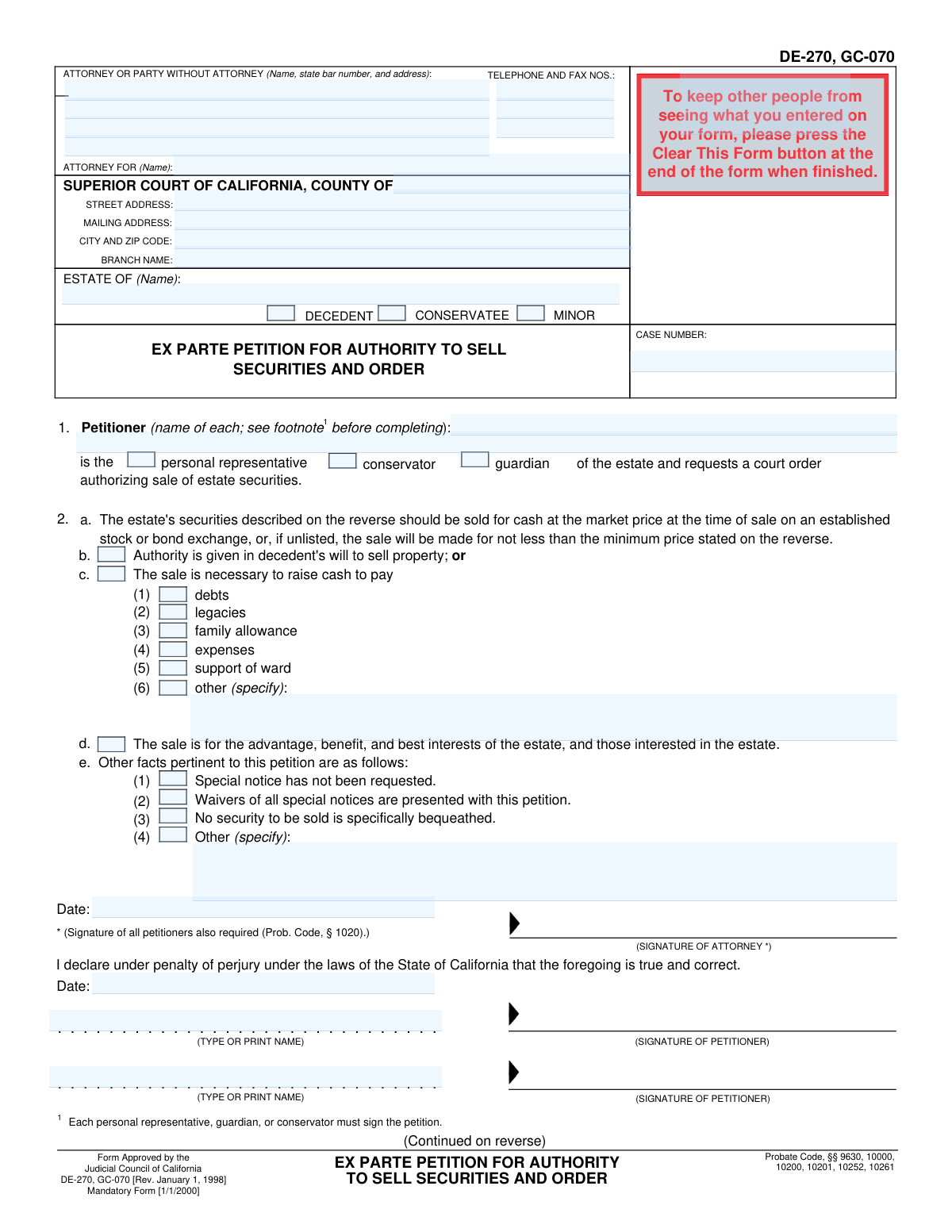
Yes! You can use AI to fill out Form DE-270 / GC-070, Ex Parte Petition for Authority to Sell Securities and Order

Form DE-270 / GC-070 is a legal document used in California courts by a personal representative, guardian, or conservator to request permission to sell securities belonging to an estate, minor, or conservatee without a formal hearing. This petition is necessary to liquidate assets to cover debts, expenses, or for the overall benefit of the estate and its beneficiaries. Today, this form can be filled out quickly and accurately using AI-powered services like Instafill.ai, which can also convert non-fillable PDF versions into interactive fillable forms.
DE-270 / GC-070 is part of the California court forms, California probate forms and California state forms categories on Instafill.
Our AI automatically handles information lookup, data retrieval, formatting, and form filling.
It takes less than a minute to fill out DE-270 / GC-070 using our AI form filling.
Securely upload your data. Information is encrypted in transit and deleted immediately after the form is filled out.

Form specifications

Form name: Form DE-270 / GC-070, Ex Parte Petition for Authority to Sell Securities and Order
Number of fields: 220
Number of pages: 1
Language: English
main-image

Instafill Demo: How to fill out PDF forms in seconds with AI

How to Fill Out DE-270 / GC-070 Online for Free in 2026

Are you looking to fill out a DE-270 / GC-070 form online quickly and accurately? Instafill.ai offers the #1 AI-powered PDF filling software of 2026, allowing you to complete your DE-270 / GC-070 form in just 37 seconds or less.
Follow these steps to fill out your DE-270 / GC-070 form online using Instafill.ai:
  1. 1 Navigate to Instafill.ai and upload or select Form DE-270 / GC-070.
  2. 2 Enter the attorney and court information, including the county, court address, case number, and the name of the estate.
  3. 3 Identify the petitioner by name and specify their role (e.g., personal representative, guardian, conservator).
  4. 4 Indicate the reason for the sale by checking the appropriate boxes, such as paying debts, family allowance, or for the benefit of the estate.
  5. 5 On the second page, provide a detailed list of the securities to be sold, including the name of the security, number of shares, and the exchange where they will be sold.
  6. 6 Review all the information populated by the AI for accuracy, then sign and date the petition under penalty of perjury.
  7. 7 Download the completed petition, ready for filing with the appropriate California Superior Court.

Our AI-powered system ensures each field is filled out correctly, reducing errors and saving you time.

Why Choose Instafill.ai for Your Fillable DE-270 / GC-070 Form?

Speed

Complete your DE-270 / GC-070 in as little as 37 seconds.

Up-to-Date

Always use the latest 2026 DE-270 / GC-070 form version.

Cost-effective

No need to hire expensive lawyers.

Accuracy

Our AI performs 10 compliance checks to ensure your form is error-free.

Security

Your personal information is protected with bank-level encryption.

Frequently Asked Questions About Form DE-270 / GC-070

This form is a petition used to ask a California court for an 'ex parte' order, which is a quick order without a formal hearing, authorizing the sale of securities (like stocks and bonds) belonging to a decedent's estate, a conservatorship, or a minor's guardianship.

The petitioner, who can be the personal representative of a decedent's estate, the conservator of an estate, or the guardian of an estate, must fill out this form to get legal authority to sell securities.

An 'ex parte' petition is a request made to a judge without the need for a formal, scheduled hearing with all parties present. It is typically used for urgent or uncontested matters, and this form requests that the judge dispense with the notice of hearing.

The court needs to know that the sale is necessary and in the best interest of the estate. You must check a box in section 2 to specify if the sale is to pay debts, cover expenses, or for the general benefit of the estate.

On the second page, you must list the name of each security, the number of shares or face value of bonds, the name of the exchange they are traded on, and any minimum selling price if required by local rules.

All petitioners (personal representatives, guardians, or conservators) must sign and date the form under penalty of perjury. If an attorney is representing the petitioner, the attorney must also sign.

A judge will review your petition. If they approve the request, they will sign the 'Order Authorizing Sale of Securities' on the second page, which gives you the legal authority to proceed with the sale.

This means that no heir, beneficiary, or other interested party has filed a formal request with the court to be notified of all proceedings in the case. If they have, you must either provide notice or have them sign a waiver.

Generally, no. The form includes a checkbox (2.e.(3)) to state that 'No security to be sold is specifically bequeathed.' Selling a specifically bequeathed asset is more complicated and may not be allowed through this ex parte process.

Because this is an 'ex parte' petition, it is designed to be a faster process than a standard noticed hearing. Processing times can vary by court, but it is typically much quicker, often within a few days.

Yes, AI-powered services like Instafill.ai can help you complete this form. These tools use AI to accurately auto-fill your information into the correct fields, which can save time and reduce errors.

Simply upload the Ex Parte Petition for Authority to Sell Securities and Order (DE-270, GC-070) to the Instafill.ai platform. The service will make the document interactive, and its AI assistant can help you fill in the required information quickly and easily.

If you have a non-fillable or 'flat' PDF, you can use a service like Instafill.ai. It can convert any non-fillable PDF into an interactive, fillable form that you can complete and sign online.

Compliance DE-270 / GC-070
Validation Checks by Instafill.ai

1
Petitioner Role and Estate Type Consistency
This check ensures the petitioner's role aligns with the type of estate. If 'personal representative' is checked in section 1, the estate type must be 'DECEDENT'. If 'conservator' or 'guardian' is checked, the estate type must be 'CONSERVATEE' or 'MINOR'. This prevents logical contradictions in the legal filing, as a personal representative only administers a decedent's estate. A mismatch would lead to rejection by the court clerk.
2
Case Identifier Completeness
Validates that the 'ESTATE OF (Name)' and 'CASE NUMBER' fields on the first page are not empty. These fields are the primary identifiers for the legal case and are essential for the court to file the document correctly. If these fields are missing, the petition cannot be associated with the correct case and will be rejected.
3
Case Identifier Consistency Across Pages
This validation verifies that the 'ESTATE OF (Name)' and 'CASE NUMBER' on page two match the corresponding values entered on page one. This is crucial for ensuring the integrity of the multi-page document and preventing the second page from being misfiled with another case. A mismatch could lead to an incorrect or invalid court order.
4
Mandatory Petitioner Identification
Ensures that at least one petitioner's name is provided in Section 1. The petition is being made by a specific individual or set of individuals, and their identity is a fundamental requirement. A petition without a named petitioner is legally invalid and provides no basis for the court to act.
5
Completeness of Justification for Sale
Verifies that at least one of the primary reasons for the sale (checkboxes 2b, 2c, or 2d) is selected. The court requires a legal justification to authorize the sale of estate assets. Failure to provide a reason means the petition lacks a legal basis and will be denied.
6
Conditional Requirement for 'Other' Reason for Sale
If the checkbox for 'other' under section 2c(6) is marked, this check ensures the adjacent text field specifying the reason is filled out. An empty 'other' field provides no information to the court, making the justification incomplete. The petition would be returned for clarification.
7
Conditional Requirement for 'Other' Special Notice Facts
If the checkbox for 'Other' under section 2e(4) is marked, this validation confirms the corresponding text field is not empty. This section is for disclosing pertinent facts, and selecting 'Other' without an explanation leaves a critical ambiguity. The court requires this information to be complete before making a decision.
8
Logical Check for Will-Based Authority
This check ensures that if checkbox 2b ('Authority is given in decedent's will to sell property') is selected, the estate type is marked as 'DECEDENT'. Only a decedent has a will that can grant such authority; this logic does not apply to a conservatee or minor. An incorrect combination would indicate a fundamental misunderstanding of the legal basis for the petition.
9
Securities List Non-Empty
Validates that the 'LIST OF SECURITIES' table on page two contains at least one complete row of data. A petition to sell securities is meaningless if no securities are listed for sale. The form would be rejected as incomplete and nonsensical.
10
Numeric Format for Number of Shares/Bonds
This check ensures that the 'Number of shares or face value of bonds' column in the securities list contains only valid numerical data (integers or decimals). This is critical for accurately identifying the assets to be sold. Non-numeric characters could lead to ambiguity and an unenforceable order.
11
Currency Format for Minimum Selling Price
Verifies that the 'Minimum selling price' column in the securities list contains a valid currency or numerical value. This price sets a floor for the transaction to protect the estate's interests. The absence of a valid price or the presence of text would make the authorization terms unclear and invalid.
12
Declaration Date Presence and Format
Ensures the 'Date' field next to the petitioner's signature is filled with a valid date. The declaration is made 'under penalty of perjury' as of a specific date, which is a core legal requirement for an affidavit or declaration. An undated or improperly formatted date invalidates the declaration.
13
Petitioner Signature and Name Consistency
Validates that for every petitioner signature, there is a corresponding typed or printed name. It also checks that the number of signatories matches the number of petitioners listed in Section 1, as required by the form's instructions. This ensures all fiduciaries are party to the petition, which is a legal necessity. Missing signatures or names will cause the petition to be rejected.
14
Attorney or Pro Se Filer Information Completeness
This check confirms that the header block for 'ATTORNEY OR PARTY WITHOUT ATTORNEY' is fully completed, including name, address, and telephone number. This contact information is mandatory for the court to communicate with the filer. Incomplete information will halt the processing of the petition until it is corrected.
15
Court Jurisdiction Identification
Validates that the 'COUNTY OF' field is filled out in the court header section. This specifies the legal jurisdiction where the petition is being filed. Filing in the wrong county court would render the petition invalid, so this information is essential for proper routing and processing.

Common Mistakes in Completing DE-270 / GC-070

Incorrect or Incomplete Case Identification

Filers often enter the wrong case number, misspell the name of the estate, or list the incorrect court branch. These details must exactly match all other case documents. An error here can lead to the petition being rejected at the clerk's office or misfiled, causing significant delays and requiring refiling. To avoid this, meticulously double-check the case number and estate name against existing court records before submission.

Missing Co-Petitioner Information and Signatures

The form requires that every petitioner be listed in Section 1 and that every petitioner signs the document. When there are multiple co-personal representatives or co-conservators, it is common for one person to fill out the form and forget to include the others or gather all required signatures. A petition with missing signatures is invalid and will be rejected by the court. Always ensure all fiduciaries are listed and have signed before filing.

Ambiguous Justification for Sale

In Section 2, the petitioner must provide a clear legal reason for selling the securities by checking the appropriate boxes (e.g., to pay debts, for the benefit of the estate). A common mistake is failing to check any of these boxes, leaving the court without a basis to grant the order. This forces the court to deny the petition or request more information, delaying the process. Carefully review and select the justification that accurately reflects the estate's situation.

Inaccurate or Incomplete Securities List

The table on page two requires a precise description of the securities to be sold, including the exact name and number of shares or face value of bonds. People often make typos, use informal names for stocks, or list an incorrect number of shares. An inaccurate description can result in the court order not authorizing the sale of the intended asset, requiring a new petition. Use official statements from the brokerage to ensure every detail is correct.

Ignoring Local Rule Requirements

Several fields in the 'List of Securities' table, such as 'Name of exchange' and 'Minimum selling price', are noted as being required by local rule. Filers frequently overlook this and fail to check their specific county's probate rules, leading them to omit necessary information. This omission can cause the petition to be deemed incomplete and denied. Always consult the local court rules for the specific county where you are filing to ensure all requirements are met.

Failure to Properly Address Special Notice

In Section 2.e, the petitioner must state whether special notice has been requested by any party and, if so, whether waivers are attached. Incorrectly stating that notice has not been requested when it has, or failing to provide waivers, is a serious procedural error. This can lead to the petition being denied and may open the petitioner up to liability. It is critical to verify the case file for any 'Request for Special Notice' forms before completing this section.

Mishandling Specifically Bequeathed Securities

Section 2.e(3) asks the petitioner to confirm that no security being sold is specifically bequeathed in the will. Mistakenly checking this box when a security *is* willed to a specific person is a major error with serious consequences, as it can violate the beneficiary's rights. Selling a specifically bequeathed asset requires a higher level of justification and notice. Always review the will carefully to confirm the status of each asset before petitioning for its sale.

Using Vague Language in 'Other (specify)' Fields

When checking 'other (specify)' in sections 2.c or 2.e, filers often provide vague or insufficient explanations like 'for estate purposes' or 'to pay bills.' The court requires a clear, specific, and legally sufficient reason for the action. A vague explanation will likely result in the court denying the petition or setting it for a hearing to demand clarification, defeating the purpose of an 'ex parte' (without hearing) petition.

Selecting the Incorrect Fiduciary Role

The form requires the petitioner to identify their role by checking 'personal representative,' 'guardian,' or 'conservator.' Selecting the wrong role misrepresents the petitioner's legal authority and the nature of the case (e.g., a decedent's estate vs. a conservatorship). This fundamental error will cause confusion and likely lead to the petition's rejection. Ensure you check the box that corresponds to the official appointment order from the court.

Filling in Sections Reserved for Court Use

The top right of the first page and the entire 'Order' section at the bottom of the second page are clearly marked 'FOR COURT USE ONLY.' Inexperienced filers sometimes write in these areas, attempting to fill in the case number or pre-fill the judge's order. Any unauthorized markings in these sections can cause the clerk to reject the form immediately. AI-powered form-filling tools like Instafill.ai help prevent this by locking court-only fields, and can also convert non-fillable court PDFs into user-friendly, fillable versions.
Saved over 80 hours a year

“I was never sure if my IRS forms like W-9 were filled correctly. Now, I can complete the forms accurately without any external help.”

Kevin Martin Green

Your data stays secure with advanced protection from Instafill and our subprocessors

Robust compliance program

Transparent business model

You’re not the product. You always know where your data is and what it is processed for.

ISO 27001, HIPAA, and GDPR

Our subprocesses adhere to multiple compliance standards, including but not limited to ISO 27001, HIPAA, and GDPR.

Security & privacy by design

We consider security and privacy from the initial design phase of any new service or functionality. It’s not an afterthought, it’s built-in, including support for two-factor authentication (2FA) to further protect your account.

Fill out DE-270 / GC-070 with Instafill.ai

Worried about filling PDFs wrong? Instafill securely fills form-de-270-gc-070-ex-parte-petition-for-authority-to-sell-securities-and-order forms, ensuring each field is accurate.

Related forms by category

California court forms Judicial Council of California Form SC-105, Request for Court Order and Answer (Small Claims), Judicial Council of California Form SC-120, Defendant’s Claim and ORDER to Go to Small Claims Court (Small Claims), Judicial Council of California Form SER-001, Request for Sheriff to Serve Court Papers, Judicial Council of California Form SER-001, Request for Sheriff to Serve Court Papers, Affidavit for Collection of Personal Property California Probate Code Section 13100, Form POS-040, Proof of Service—Civil, Declaration of Facts of Death (California Superior Court), declaration-of-marriage-for-court-proceeding-california-family-law, ADOPT-200, Adoption Request, ADOPT-200, Stepparent Adoption Request, ADOPT-210, Adoption Agreement, ADOPT-310, Contact After Adoption Agreement, Judicial Council of California Form ADOPT-200, Adoption Request, Form ADR-107, Mediation Attendance Sheet, Form ADR-110, Order Appointing Referee, Form ADR-109, Stipulation or Motion for Order Appointing Referee, Form ADR-102, Request for Trial De Novo After Judicial Arbitration, Form ADR-108, Referee's Report (Code Civ. Proc., §§ 638, 639), Form ADR-106, Petition to Confirm, Correct, or Vacate Contractual Arbitration Award, Form ADR-104, Rejection of Award and Request for Trial After Attorney-Client Fee Arbitration · + 216 more →
California probate forms Judicial Council of California Form DE-111, Petition for Probate (Probate—Decedents Estates), Judicial Council of California Form DE-111, Petition for Probate (Probate—Decedents Estates), Affidavit for Collection of Personal Property California Probate Code Section 13100, Form DE-142/DE-111(A-3e), Waiver of Bond by Heir or Beneficiary (Probate—Decedents Estates), Form DE-140, Order for Probate, Form DE-150, Letters (Probate), Form DE-154/GC-035, Request for Special Notice (Probate), Form DE-157, Notice of Administration to Creditors, Form DE-120(P), Proof of Personal Service of Notice of Hearing—Decedent's Estate or Trust, Form DE-131, Proof of Subscribing Witness (Probate), Form DE-172, Creditor's Claim (Probate), Form DE-174, Allowance or Rejection of Creditor's Claim, Form DE-221, Spousal or Domestic Partner Property Petition (Probate—Decedents Estates), Form DE-315, Order Determining Succession to Primary Residence, Form DE-351/GC-101, Order Appointing Guardian Ad Litem—Probate, form-de-115gc-015-notice-of-hearing-on-petition-to-determine-claim-to-property, attachment-to-notice-of-hearing-proof-of-service-by-mail-probatedecedents-estates-and-guardianships-and-conservatorships, attachment-to-notice-of-hearing-proof-of-personal-service-probatedecedents-estates-and-guardianships-and, form-de-125-summons-probate, form-de-147-duties-and-liabilities-of-personal-representative · + 3 more →
California state forms Judicial Council of California Form DE-111, Petition for Probate (Probate—Decedents Estates), Judicial Council of California Form DE-111, Petition for Probate (Probate—Decedents Estates), DS 1891, Applicant/Vendor Disclosure Statement (State of California Department of Developmental Services), DL 142, Request for Cancellation or Surrender of a Driver License or Identification Card (State of California Department of Motor Vehicles), Judicial Council of California Form DE-120, Notice of Hearing—Decedent's Estate or Trust, Judicial Council of California Form DE-120, Notice of Hearing—Decedent's Estate or Trust, Murrieta Police Department Citizen Complaint Form (California Penal Code § 148.6 Advisory Statement), California Department of Social Services, Sworn Statement, State of California Department of Transportation California Civil Rights Laws Certification, State of California Department of Transportation Darfur Contracting Act Certification, Form DOT ADM-0077, State of California Department of Transportation, Contract Requirements, State of California Department of Transportation Subcontractor List, State of California Department of Transportation, Certified DVBE Summary, Bidder Declaration GSPD-05-105, State of California Level of Care Rate Determination Protocol Matrix, State of California Accessible Form, State of California Form SOC 321, Request for Order and Consent - Paramedical Services, State of California Darfur Contracting Act Certification, State of California Department of Veterans Affairs COMMERCIALLY USEFUL FUNCTION (CUF) CERTIFICATION FORM, Form ADR-100, Statement of Agreement or Nonagreement · + 33 more →