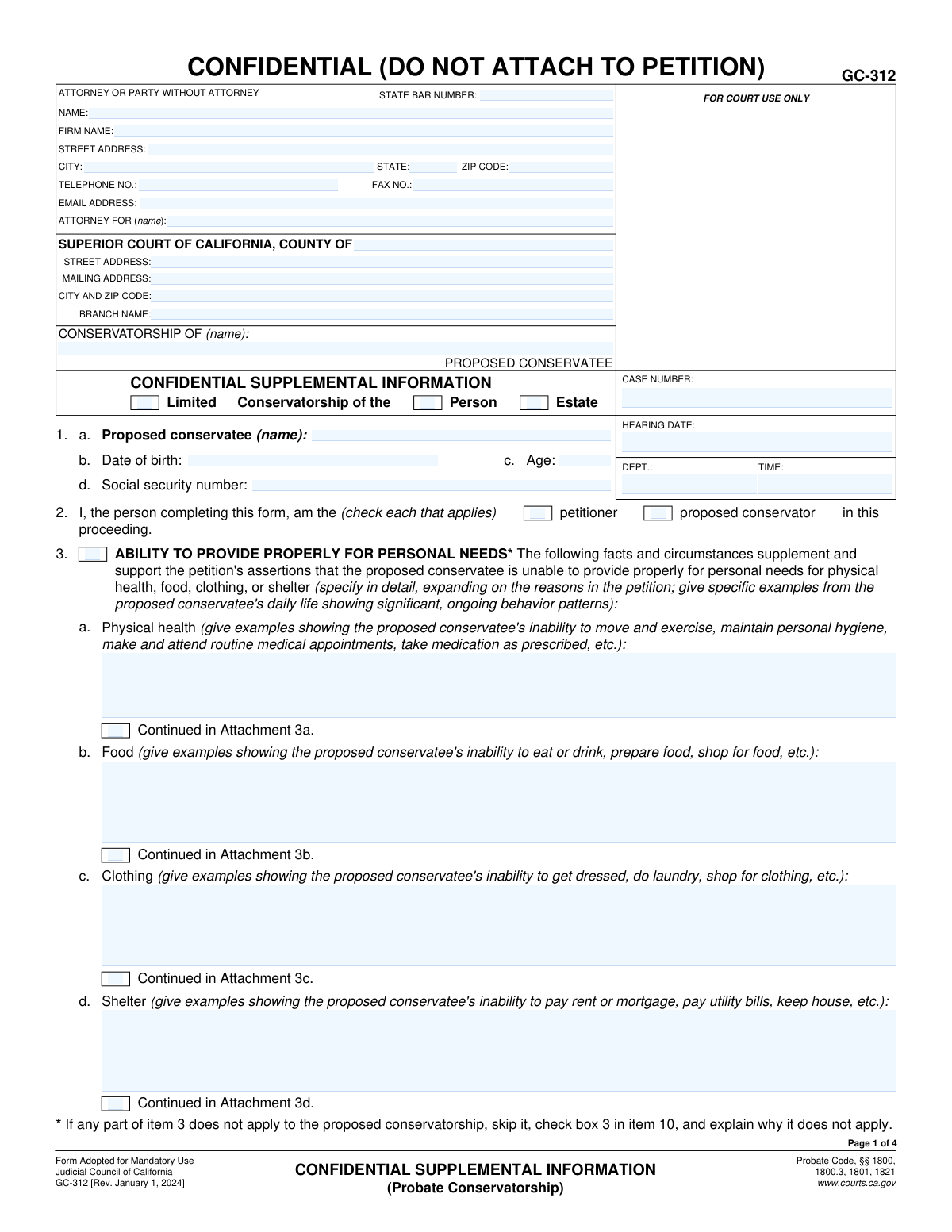
Yes! You can use AI to fill out Form GC-312, Confidential Supplemental Information (Probate Conservatorship)
Form GC-312, Confidential Supplemental Information, is a crucial document in California probate conservatorship cases, submitted to the court to provide detailed, sensitive information supporting the petition for conservatorship. It outlines the proposed conservatee's inability to manage personal needs (like health, food, and shelter) and financial resources, and it documents alternatives to conservatorship that have been considered. This confidential form ensures that private details are not part of the public record, allowing the judge to make a well-informed decision. Today, this form can be filled out quickly and accurately using AI-powered services like Instafill.ai, which can also convert non-fillable PDF versions into interactive fillable forms.
Our AI automatically handles information lookup, data retrieval, formatting, and form filling.
It takes less than a minute to fill out GC-312 using our AI form filling.
Securely upload your data. Information is encrypted in transit and deleted immediately after the form is filled out.
Form specifications
| Form name: | Form GC-312, Confidential Supplemental Information (Probate Conservatorship) |
| Number of fields: | 118 |
| Number of pages: | 1 |
| Language: | English |
Instafill Demo: How to fill out PDF forms in seconds with AI
How to Fill Out GC-312 Online for Free in 2026
Are you looking to fill out a GC-312 form online quickly and accurately? Instafill.ai offers the #1 AI-powered PDF filling software of 2026, allowing you to complete your GC-312 form in just 37 seconds or less.
Follow these steps to fill out your GC-312 form online using Instafill.ai:
- 1 Navigate to Instafill.ai and upload or select Form GC-312.
- 2 Use the AI assistant to fill in the attorney, court, and case information at the top of the form.
- 3 Provide the proposed conservatee's personal information and detailed examples of their inability to manage personal needs and financial resources in sections 3 and 4.
- 4 Describe the proposed conservatee's residence, their ability to live there, and explain what alternatives to conservatorship have been considered or attempted.
- 5 Complete the sections regarding health services received, the proposed conservatee's knowledge of the proceedings, and the source of your information.
- 6 Carefully review all the information populated by the AI for accuracy and completeness, making any necessary edits.
- 7 Sign the declaration, date the form, and download the completed confidential document for filing with the court.
Our AI-powered system ensures each field is filled out correctly, reducing errors and saving you time.
Why Choose Instafill.ai for Your Fillable GC-312 Form?
Speed
Complete your GC-312 in as little as 37 seconds.
Up-to-Date
Always use the latest 2026 GC-312 form version.
Cost-effective
No need to hire expensive lawyers.
Accuracy
Our AI performs 10 compliance checks to ensure your form is error-free.
Security
Your personal information is protected with bank-level encryption.
Frequently Asked Questions About Form GC-312
Form GC-312, the Confidential Supplemental Information, is a mandatory form used in California to provide the court with detailed, private information that supports a petition for a probate conservatorship. It explains why the proposed conservatee is unable to manage their personal needs or financial resources.
This form contains highly sensitive personal, medical, and financial information, so it is kept confidential to protect the proposed conservatee's privacy. It is not part of the public court file and is only accessible to the judge, court staff, and other authorized parties involved in the case.
No, you must not attach this form to the main petition. The form must be filed separately with the court clerk to ensure it remains confidential as instructed on the first page.
The person petitioning for the conservatorship (the petitioner) or the person who is proposed to be the conservator must complete and sign this form. You must indicate your role in item 2 of the form.
You must provide specific, concrete examples from the person's daily life that demonstrate their inability to provide for their needs or manage finances. For instance, describe specific events of them not eating, failing to pay bills, or being unable to maintain personal hygiene.
A conservatorship is a significant legal action, so the court requires you to show that less restrictive options are not workable. You must explain what alternatives, like a power of attorney or a trust, were considered or attempted and why they are insufficient.
If some sections do not apply to your case, you can indicate this in item 10. For a conservatorship of the estate only, you would check the box for item 3 in item 10 and explain that the petition does not concern the conservatee's personal needs.
You will need the proposed conservatee's full name, date of birth, and Social Security number. You should also gather specific examples of their behavior, details about their residence, and information on health or social services they have received.
The form provides an 'I don't know' option in item 8 for this situation. It is important to answer honestly and check the box that best reflects your knowledge of the proposed conservatee's awareness and feelings.
Yes, services like Instafill.ai use AI to auto-fill form fields accurately and save time. This can help reduce errors and make filling out complex legal documents faster.
You can use a service like Instafill.ai to upload the GC-312 PDF and fill it out on your computer. The platform allows you to easily type your information into the fields, save your progress, and print the completed form for submission.
If you have a flat, non-fillable PDF, you can use a tool like Instafill.ai. It can convert the non-fillable PDF into an interactive, fillable form that you can complete digitally.
If your explanation for a section is too long to fit in the provided space, check the 'Continued in Attachment' box. Then, provide the additional information on a separate sheet of paper, clearly labeled with the corresponding item number, and file it with the form.
Compliance GC-312
Validation Checks by Instafill.ai
1
Validate Date of Birth and Age Consistency
This check ensures the 'Age' entered in item 1c is consistent with the 'Date of birth' in item 1b. The system should calculate the age based on the date of birth and flag any discrepancy with the entered age. This is crucial for verifying the proposed conservatee's identity and eligibility, and an inconsistency could indicate a data entry error or a misunderstanding of the individual's details. If validation fails, the user should be prompted to review and correct either the date of birth or the age.
2
Validate Social Security Number Format
This check verifies that the 'Social security number' in item 1d is entered in the correct XXX-XX-XXXX format. As this is confidential and critical identifying information, ensuring a valid format helps prevent data entry errors and ensures the data is usable for official record-keeping. An invalid format would prevent the form from being processed correctly and could lead to rejection. The system should reject any entry that does not match the 9-digit format with hyphens.
3
Ensure Filer Role is Selected
This validation confirms that at least one checkbox is selected in item 2, identifying the filer as either the 'petitioner' or the 'proposed conservator'. This information is fundamental to understanding the filer's legal standing in the proceeding. Failure to select a role would make the submission incomplete and legally ambiguous, requiring the court to seek clarification. The form should not be submittable until at least one box is checked.
4
Conditional Requirement for Item 3 Explanation
This is a logical check linking item 3 to item 10. If the narrative sections in item 3 (3a, 3b, 3c, 3d) are left blank, the system must verify that checkbox '3' in item 10 is checked and that an explanation is provided in the corresponding text field. This ensures the filer explicitly states why the section on personal needs is not applicable, as required by the form's instructions. A failure would mean the form is incomplete, as the court would not know if the section was intentionally skipped or simply missed.
5
Conditional Requirement for Item 4 Explanation
This check mirrors the logic for item 3, but applies to item 4 and its link to item 10. If the narrative sections in item 4 (4a, 4b) are left blank, the system must confirm that checkbox '4' in item 10 is checked and an explanation is provided. This validates that the filer has addressed why the section on financial management is not relevant to the case. Without this check, a blank item 4 is ambiguous and could lead to the petition being deemed insufficient.
6
Cross-Page Header Consistency
This validation ensures that the 'CONSERVATORSHIP OF (name)' and 'CASE NUMBER' fields are identical across all pages of the form (Page 1, 2, 3, and 4). This is a critical data integrity check to ensure all pages belong to the same case file, especially when printed or handled manually. Mismatched information could lead to pages being misfiled or a case file becoming corrupted with incorrect information. The system should auto-populate or validate these fields on subsequent pages after the first entry.
7
Conditional Requirement for 'Other' Residence Address
This check focuses on item 5c. If the 'other' radio button is selected to indicate the proposed conservatee's current location, the corresponding text field for the 'other (street address, city, state)' must be filled in. This ensures that when a non-primary residence is indicated, its location is properly documented. Failure to provide the address would leave the court without essential information about the conservatee's whereabouts, making the form incomplete.
8
Validate Residence Status and Future Date
This is a complex logical check for item 5e(2)(a). If the filer indicates the proposed conservatee is 'not living in the residence' and 'will be able to return home by (date)', the system must validate two things: that a date is entered, and that the date is in the future. This ensures the plan for the conservatee's return is specific and plausible. An invalid or past date would render the information meaningless and require clarification.
9
Validate Attachment Count Logic
This check correlates the 'Number of pages attached' in item 11 with all the 'Continued in Attachment' checkboxes throughout the form (e.g., 3a, 3b, 4a, etc.). If one or more 'Continued in Attachment' boxes are checked, the 'Number of pages attached' must be a positive integer (greater than 0). Conversely, if the number of pages is greater than 0, at least one attachment checkbox should ideally be checked. This prevents discrepancies between the declared attachments and the form content.
10
Ensure Declaration Date is Valid
This validation checks the 'Date' field in the final declaration section. The system must ensure that the field contains a valid date in a recognized format (e.g., MM/DD/YYYY) and that the date is not in the future. The signature date legally attests to when the declaration was made, so it must be accurate and plausible. A future date would invalidate the declaration, and a missing date would render it incomplete.
11
Validate Attorney/Party Email Format
This check ensures that the value entered in the 'EMAIL ADDRESS' field for the attorney or party is in a valid email format (e.g., contains an '@' symbol and a domain). This is crucial for ensuring the court and other parties can reliably send electronic communications and notices. An invalid email address would lead to communication failures and potential delays in the legal process. If validation fails, the user should be prompted to correct the format.
12
Completeness of Alternatives to Conservatorship
This validation ensures that all text fields within item 6 (a through f) contain an entry. The form requires the filer to explain why each listed alternative to conservatorship was or was not attempted. Leaving any of these blank would constitute an incomplete response, as it fails to demonstrate the due diligence required by the court. The system should flag any empty fields in this section before submission.
13
Exclusive Selection in Residence Status
This check validates the logic in item 5e. The system must ensure that the user selects either the checkbox for 'living in the residence' (5e1) or 'not living in the residence' (5e2), but not both. These two options are mutually exclusive. This check prevents contradictory information about the proposed conservatee's living situation, which is fundamental to the case. If both or neither are checked, the user should be prompted to make a single selection.
14
Completeness of Knowledge and Preferences
This validation ensures that for both item 8a and item 8b, exactly one radio button option is selected. These questions about the proposed conservatee's knowledge and agreement are critical for the court to understand the individual's perspective. An incomplete or ambiguous answer (no selection or multiple selections) would require follow-up. The system should enforce that one choice is made for each question before allowing submission.
Common Mistakes in Completing GC-312
In Items 3 and 4, filers often use conclusory statements like 'cannot manage finances' instead of providing the required 'specific examples from the proposed conservatee's daily life.' This happens because they summarize the situation rather than detailing the evidence. A petition lacking specific, factual examples of behavior patterns may be rejected by the court for failing to meet the legal standard of proof, causing significant delays.
Item 6 requires an explanation for why less restrictive alternatives (like a power of attorney or trust) were attempted and failed, or why they are unsuitable. A common mistake is leaving this section blank or simply writing 'None' without the required detailed explanation. The court must consider if the conservatorship is the least restrictive option, and failure to provide this analysis can be grounds for denying the petition.
Filers often meticulously complete the proposed conservatee's name and case number on the first page but forget to carry it over to the headers of pages 2, 3, and 4. This oversight can lead to document management issues at the courthouse, potentially causing pages to be lost or the filing to be rejected as incomplete. Using a tool like Instafill.ai can prevent this by automatically populating recurring information across all pages of the form.
Forgetting to sign and date the declaration on page 4 is a frequent and critical error. An unsigned form is not a valid legal document, as the signature confirms the information is true under penalty of perjury. The court clerk will immediately reject an unsigned form, halting the entire process until a properly signed version is submitted.
After providing detailed information in Items 3 through 8, many people forget to complete Item 9, which requires them to declare if the information is based on personal knowledge or an attached affidavit. This omission weakens the petition by leaving the evidentiary basis of the claims unclear. To avoid this, filers should double-check that for every section they've completed, a corresponding source is checked in Item 9.
If a conservatorship of the estate is not requested, Item 4 ('Ability to Manage Financial Resources') may not apply. Instead of simply leaving it blank, the filer must check the corresponding box in Item 10 and briefly explain why it does not apply. Leaving a required section blank without this explanation makes the form appear incomplete and may trigger a court inquiry, delaying the hearing.
When providing details on a separate page, filers often forget to check the 'Continued in Attachment' box within the relevant section or fail to accurately state the total number of attached pages in Item 11. This creates confusion about whether the filing is complete and can lead to the court overlooking crucial evidence. Properly labeling each attachment (e.g., 'Attachment 3a') and ensuring the form references it is essential for a clear and complete submission.
Item 5 has multiple checkboxes regarding the proposed conservatee's living situation, and it's easy to make conflicting selections. For example, a filer might check box 5e(1)(a) indicating the person 'is able to continue living there' while also providing reasons in 5f that they need to be moved. Such contradictions confuse the court and the investigator, requiring clarification and delaying the case.
This form is often available as a non-fillable PDF, leading people to print and complete it by hand. Poor handwriting can make critical information like names, dates, and detailed explanations impossible for the court to read, leading to rejection or requests for clarification. AI-powered tools like Instafill.ai can convert flat PDFs into digitally fillable forms, ensuring every entry is clear, legible, and professional.
In the main caption 'CONSERVATORSHIP OF (name)', the person filling out the form sometimes mistakenly enters their own name or the proposed conservator's name. This field must contain the name of the individual for whom the conservatorship is being sought. This fundamental error creates significant confusion from the outset and will require the filing of corrected documents, delaying the entire proceeding.
Saved over 80 hours a year
“I was never sure if my IRS forms like W-9 were filled correctly. Now, I can complete the forms accurately without any external help.”
Kevin Martin Green
Your data stays secure with advanced protection from Instafill and our subprocessors

Robust compliance program
Transparent business model
You’re not the product. You always know where your data is and what it is processed for.
ISO 27001, HIPAA, and GDPR
Our subprocesses adhere to multiple compliance standards, including but not limited to ISO 27001, HIPAA, and GDPR.
Security & privacy by design
We consider security and privacy from the initial design phase of any new service or functionality. It’s not an afterthought, it’s built-in, including support for two-factor authentication (2FA) to further protect your account.
Fill out GC-312 with Instafill.ai
Worried about filling PDFs wrong? Instafill securely fills form-gc-312-confidential-supplemental-information-probate-conservatorship forms, ensuring each field is accurate.