
Yes! You can use AI to fill out Formulario I-9, Verificación de Elegibilidad de Empleo
Don't type 130 fields by hand. Tell our AI about yourself, or upload a document you already have, and it fills every field in seconds. You check it, then download, print or sign.
The AI does the filling. You just check it.
No typing into boxes, nothing to install.
What this form asks for
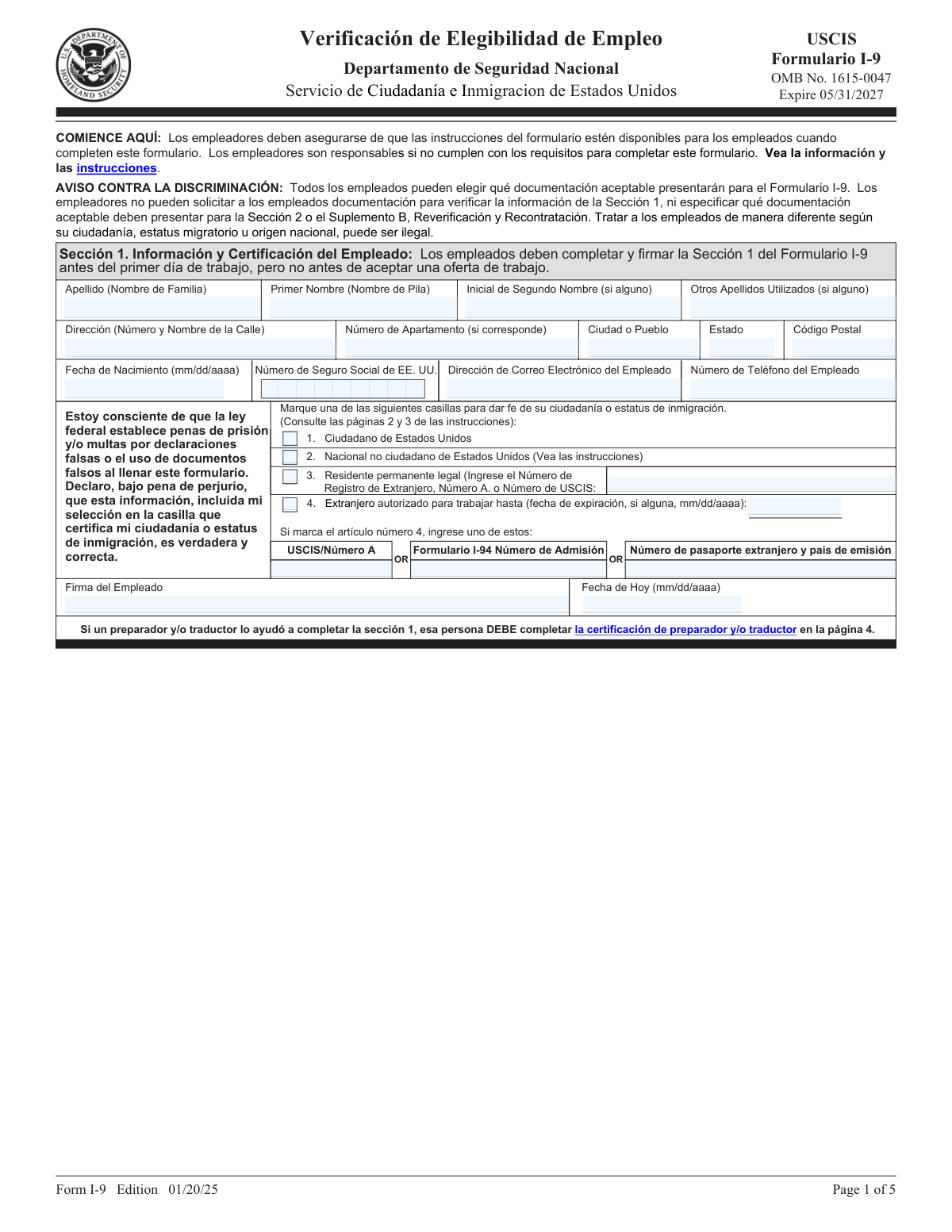
The AI fills all of it, from your answers or your documents.
The AI checks your answers before you download
12 checks built for this form, so a wrong date or a missing answer is caught before anyone else sees it.
This check ensures that the employee has selected exactly one of the four available citizenship or immigration status options in Section 1. Selecting none or more than one option makes the attestation invalid. Failure to select a single, valid status will prevent form submission and require the employee to correct the section before proceeding.
This validation verifies that if an employee checks the box for 'Residente permanente legal' (Lawful Permanent Resident), they must also provide an Alien Registration Number (A-Number) or USCIS Number. This number is required to confirm the employee's status. If the status is selected but the number is missing, the form will be considered incomplete and an error will be flagged.
This check ensures that if an employee selects 'Extranjero autorizado para trabajar' (Alien authorized to work), they must provide a work authorization expiration date and one of the required document numbers (USCIS/A-Number, Form I-94 Admission Number, or Foreign Passport Number). This information is critical for verifying temporary work authorization. A failure will result in an error message indicating that required information for the selected status is missing.
This check verifies that the 'Número de Seguro Social de EE. UU.' field contains a 9-digit number. While the SSN is not mandatory for all employees on their first day, if a number is entered, it must conform to the standard format. This prevents data entry errors and ensures data integrity for payroll and tax purposes. An invalid format will trigger an error.
This validation ensures that all date fields on the form, such as 'Fecha de Nacimiento', 'Fecha de Hoy', and document expiration dates, are entered in the correct mm/dd/yyyy format. Consistent date formatting is crucial for legal compliance and record-keeping. Any date entered in an incorrect format will be rejected, and the user will be prompted to correct it.
This check verifies that the employee's signature date in Section 1 is on or before the 'Primer día de trabajo del empleado' (Employee's First Day of Employment) listed in Section 2. The law requires employees to complete Section 1 by their first day of work. A signature date after the first day of employment is a compliance violation and will be flagged as an error.
And 6 more checks
- Section 2 Document Combination Logic
- Section 2 Document Expiration Date Validity
- Section 2 Employer Completion Deadline
- Supplement A Preparer/Translator Certification Completeness
- Supplement B Reverification Document Logic
- Name Consistency Across Form Sections
Let AI fill out your Formulario I-9
No typing. Every field filled in seconds, checked, ready to sign.
How to Fill Out Formulario I-9 Online for Free in 2026
What the AI walks you through.
- Navigate to Instafill.ai and upload or select the Formulario I-9.
- As the employee, provide your personal information in Section 1, including your full name, address, date of birth, and Social Security Number.
- Attest to your citizenship or immigration status by checking the appropriate box in Section 1 and providing any required document numbers.
- Sign and date Section 1. If a preparer or translator assisted you, they must complete and sign Supplement A.
- As the employer, physically examine the original documents presented by the employee to verify their identity and employment authorization.
- Complete Section 2 by recording the document titles, issuing authorities, numbers, and expiration dates, then sign and date the employer certification.
- Review all sections for completeness and accuracy before securely storing the form as required by law.
Common Mistakes in Completing Formulario I-9
The ones the AI is built to catch.
Incorrect or Inconsistent Date Formatting
Leaving Required Fields Blank Instead of Using 'N/A'
Incorrect Timing of Section 1 Completion and Signature
Misclassifying Citizenship or Immigration Status
Forgetting to Provide Required Document Numbers for Non-Citizens
Improperly Recording Documents in Section 2
Over-documenting by Requesting or Recording Too Many Documents
Missing Preparer and/or Translator Certification
Using an Outdated Version of the Form I-9
Confusing List A and List C Documents
Frequently Asked Questions About Formulario I-9
Is it really free for 7 days?
Can I fill other forms too?
How do I cancel?
How does the AI fill out Formulario I-9?
What happens to my information?
How complex is Formulario I-9 to fill out?
What is the purpose of Form I-9, Verificación de Elegibilidad de Empleo?
Who is responsible for completing Form I-9?
As an employee, when do I need to complete Section 1?
What documents do I need to provide for Form I-9?
What is the difference between List A, List B, and List C documents?
When does my employer need to complete Section 2?
What if a family member or translator helped me fill out the form?
Is providing my Social Security Number mandatory in Section 1?
What is Supplement B, Reverificación y Recontrataciones, used for?
Can my employer demand to see a specific document, like a Green Card?
Can AI tools help me fill out Form I-9?
How can I fill out this form online?
The Form I-9 I have is a non-fillable PDF. What can I do?
Get your Formulario I-9 filled out by AI
$0 today. Cancel before Nov 10 and you pay nothing.
Other forms like this one
employment forms: Form I-765, Application for Employment Authorization, Form CMS L564, Request for Employment Info, Form OF-306, Declaration for Federal Employment, Form NYS DHR, Employment Complaint Form, Form AO 78, Application for Employment, Illinois State Board of Education (ISBE) Application for Employment (ISBE 61-08), Prudential Group Disability Insurance – Education and Employment History Form (GL.2009.009, Ed. 06/2017), HR-Pol-Rec&Res-04 Employment Application Form (Recruitment of Permanent Employees), City of Carlinville Application for Employment (An Equal Opportunity Employer), U.S. Equal Employment Opportunity Commission (EEOC) Form 453, Recommendation for Recognition, The Prudential Insurance Company of America Group Disability Insurance – Education and Employment History Form (GL.2009.009, Ed. 06/2017), St. Paul’s Hospital Application for Employment (職位申請表) – SPHF-HRD-035, U.S. Equal Employment Opportunity Commission (EEOC) Form 453, Recommendation for Recognition, Prudential Group Disability Insurance – Education and Employment History Form (GL.2009.009, Ed. 06/2017), Claim for Special Employment Advance (SU514), New York State Employment Application: Part 1 – Pre-Interview (Form #S1000), New York State Employment Application Form, Sidney Sussex College Cambridge, Application for Employment, Z83, Application for Employment in the Republic of South Africa Government Department, ENVIRONMENTAL MONITORING LABORATORY, LLC Employment Application
verification forms: Address Verification Letter of Authorization, Form G-845, Verification Request, Form I-9, Employment Eligibility Verification, Uniform Mitigation Verification Inspection Form, Independent Diagnostic Testing Facility (IDTF) Site Verification Report, Medical Assistant Training Verification, Centrelink Form SY041 - Verification of your family circumstances: Unreasonable to live at home, Centrelink Form SY015 - Verification of 'Unreasonable to Live at Home', Day Care Service Application Worker Verification Checklist, Form I-9, Employment Eligibility Verification (08/01/23), Form I-9, Employment Eligibility Verification (08/01/23) - Duplicate, AIA International Limited Medical Claim Form
employment eligibility forms: The E-Verify Memorandum of Understanding for Employers, Form I-9, Employment Eligibility Verification, Form I-9, Employment Eligibility Verification (08/01/23), Form I-9, Employment Eligibility Verification (08/01/23) - Duplicate, AIA International Limited Medical Claim Form
Let AI fill out your Formulario I-9
Your trial starts once a card is added. You pay nothing before Nov 10.
Our AI already knows this form, all 130 fields of it. Skip the typing: tell it about yourself, or upload what you have, and it fills the whole form in seconds.
- AI fills every field on all 5 pages, tables and checkboxes included
- No typing into boxes: answer a few questions, or upload a document you already have, an old copy of this form, a photo of a document
- The AI checks the answers; you review and change anything before you download
- Download the finished PDF, print it, or sign it online
- Encrypted, and never used to train AI
Cancel before Nov 10 and you pay nothing.
A card is needed to start the trial. Cancel in two clicks from your account.
Terms · Privacy